Aiseesoft FoneEraser for Mac: Wipe an iPhone From Your Mac Before You Sell It
Aiseesoft FoneEraser for Mac is a macOS app that erases everything on a USB-connected iPhone, iPad or iPod touch by overwriting its storage once, twice or three times, and can also clear junk files and large media to free up space. Our Buy Now button sells a lifetime license for one Mac and up to 6 devices at $37.45.
Selling or trading in an iPhone means handing a stranger a device that held your photos, messages, banking apps and passwords. Apple's own Erase All Content and Settings is the standard answer and costs nothing. FoneEraser adds a visible overwrite step, a choice of how many passes to run, and the ability to wipe several devices from one Mac in a single session.
Quick facts
- Version: 1.0.26 (installer dated May 25, 2026)
- Developer: Aiseesoft Studio
- Runs on: Mac OS X 10.7 or later, up to macOS Tahoe. It's an Intel app, so Apple silicon Macs run it through Rosetta 2. A separate Windows edition exists.
- Devices: iPhone (iPhone 4 to the iPhone 18 Pro on Aiseesoft's list), all iPad models and iPod touch
- Modes: Erase All Data (low, medium or high level) and Free up Space
- Price: $37.45 one-time on the order page for a lifetime license, 1 Mac and 6 devices
- Refunds: 30-day money-back guarantee for lifetime licenses when there's a quality problem
- What we checked: the 28 MB installer, which contains app version 1.0.26.162056 built for Intel Macs only, and the order page, which showed a lifetime license at $37.45, on November 4, 2026. We didn't erase a device with it.
Before you buy
- Erasing can't be undone. Back up the iPhone to iCloud or your Mac first, and move your eSIM, two-factor authenticator codes and WhatsApp chats to the new phone.
- Apple's built-in erase is already strong. iPhones encrypt their storage, and Erase All Content and Settings (Settings, General, Transfer or Reset iPhone) destroys the encryption key, which makes the old data unreadable. FoneEraser is for people who also want the space overwritten, or who wipe several devices at once.
- Sign out of Find My and Apple ID first. Otherwise Activation Lock stays on and the buyer can't set the phone up, whatever tool erased it.
- The device must be unlocked and recognised. Aiseesoft's FAQ says a locked or non-starting device can't be erased by the app.
- Intel-only app. On an M-series Mac it needs Rosetta 2, which macOS offers to install the first time.
Download Free TrialBuy Now
Overview
The app has a blue sidebar with two sections, Erase All Data and Free up Space, and asks you to connect a device. Plug in the iPhone with a USB cable, unlock it and tap Trust, and the sidebar shows the device. Erase All Data asks for an erasing level and a confirmation, then overwrites the device; Free up Space scans for junk and large items and lets you choose what to remove without wiping the phone.
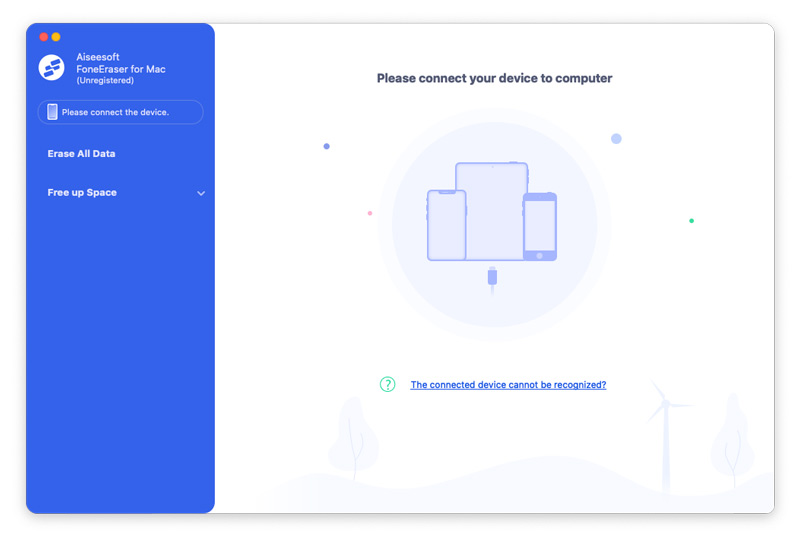
The unregistered Mac app before a device is connected: Erase All Data and Free up Space in the sidebar, and a "The connected device cannot be recognized?" help link.
Features
Three erasing levels
Aiseesoft FoneEraser for Mac overwrites the device's data once with zeros (Low), twice with zeros and junk data (Medium), or three times (High). Low is quick and enough for a phone you're giving to family; High takes longest and suits a work phone that held confidential data. All three remove contacts, messages and iMessages, call history, photos, videos, notes, Safari history, app data and chats from WhatsApp, Viber, Line, Kik and Messenger, plus settings.
Free up Space without erasing
Aiseesoft FoneEraser for Mac's Free up Space section clears junk and temporary files, uninstalls apps you no longer use, deletes large files and compresses photos, for a phone you're keeping that has run out of storage.
Several devices from one Mac
Aiseesoft FoneEraser for Mac can work on more than one connected device, and the license covers up to 6 devices. That's useful for a family clearing out a drawer of old iPhones and iPads, or a small office retiring a batch of work phones.
Real-World Uses
- Selling on eBay or to a trade-in shop: overwrite the phone after signing out of iCloud, then hand it over.
- Retiring company devices: wipe several iPads used by staff at the High level before recycling.
- Passing a phone to a child: a quick Low-level wipe so none of your accounts or photos remain.
- Full storage: use Free up Space to remove junk and big videos from a phone you're keeping.
Who It's For, and Who Should Skip It
It suits people who want an explicit, multi-pass overwrite they can see happening, families or offices wiping several Apple devices, and anyone who wants storage cleanup in the same tool.
Skip it if you're erasing one modern iPhone to sell: Apple's free Erase All Content and Settings, done after signing out of Find My, is what Apple and most security writers recommend, because the hardware encryption key is destroyed. Also skip it if you need to erase a phone that's locked or won't start; this app needs an unlocked, working device.
Usage Guide
- Prepare the phone: back it up, then sign out of your Apple ID and turn off Find My.
- Install: open the DMG and drag the app to Applications; on an M-series Mac, accept the Rosetta 2 install if asked.
- Connect: plug in the device with a USB cable, unlock it and tap Trust. Aiseesoft recommends having iTunes (Finder on current macOS) able to see the device.
- Erase: choose Erase All Data, pick Low, Medium or High, confirm, and keep the cable connected until it finishes.
- Or clean up: choose Free up Space, scan, and pick what to delete.
Where it falls short
- Not native on Apple silicon. The Mac app is still an Intel build, while Aiseesoft's video apps have Apple silicon versions. It works through Rosetta 2, but it's a sign the Mac edition gets less attention.
- Detection problems. The first question in Aiseesoft's FAQ is "Device connected, but cannot be detected?"; the fix it gives is to make sure iTunes (or Finder) is set up and can see the device.
- No locked or broken devices. A phone stuck at the passcode or in a boot loop can't be erased by it.
- Almost no independent testing. We found no independent hands-on review of the Mac edition, and the review sites that write about it mostly sell competing erasers.
What Users Say
Reviews on Aiseesoft's page
Aiseesoft's FoneEraser page shows 88 reviews, all positive and chosen by the vendor, covering the Windows and Mac editions together:
"I needed a tool to securely erase all data from my old iPhone, and Aiseesoft FoneEraser did exactly that. It's reliable, user-friendly, and provides different levels of data erasure for various needs." Sarah
"I used it before selling my old iPhone, and it completely wiped everything, leaving no trace behind." David
Trustpilot (Aiseesoft as a company)
Aiseesoft Studio scores 3.8 out of 5 from about 610 Trustpilot reviews across all products, about 60% five-star and 34% one-star. The praise is mostly for quick email support; the one-star reviews are mostly about refunds refused when the product wasn't judged faulty, for example "They refused to issue the refund. and have not fixed the haptics" (B Hackett, October 2026, about Aiseesoft's iPhone transfer app).
The pattern: there's very little independent feedback on FoneEraser at all. Treat the trial as your test, and keep in mind that the refund policy only covers quality problems.
Comparisons
FoneEraser for Mac vs Apple's Erase All Content and Settings
Apple's erase is free, runs on the phone itself, and works by destroying the encryption key, which modern iPhones make effectively unrecoverable. FoneEraser adds overwrite passes you choose, works on several devices from a Mac, and includes storage cleanup. For one phone, Apple's method is enough; FoneEraser is the extra-caution or many-devices option.
Editions and Pricing
| License | Price | Term | Covers |
|---|
| Lifetime (our Buy Now button) | $37.45 | One-time payment | 1 Mac, 6 iOS devices |
Aiseesoft's own purchase page shows the same lifetime license at $29.96 with a coupon applied there. The Windows FoneEraser is a separate product.
FAQs
Can erased data be recovered after Aiseesoft FoneEraser for Mac?
Aiseesoft FoneEraser for Mac overwrites the storage with zeros and junk data so recovery tools have nothing to read, according to Aiseesoft. On a modern iPhone, Apple's encryption already makes data unreadable after any full erase, so the overwrite is an extra layer.
Does it remove Activation Lock or the Apple ID?
No. Aiseesoft FoneEraser for Mac erases data but doesn't bypass Activation Lock. Sign out of your Apple ID and turn off Find My before erasing, or the next owner can't activate the phone.
Does it work on a jailbroken iPhone?
Yes. Aiseesoft's FAQ says FoneEraser erases jailbroken devices too, and the device stays jailbroken afterwards.
How long does a High-level erase take?
Aiseesoft FoneEraser for Mac's High level overwrites three times, so it takes roughly three times as long as Low; on a large, full iPhone that can mean hours. Keep the Mac awake and the cable connected.
Can I erase only some data, like just my photos?
Not with Erase All Data, which wipes the whole device. Aiseesoft FoneEraser for Mac's Free up Space section can delete large files and junk selectively, but for picking individual items to delete, a phone manager or the Photos app is the right tool.
Does one license cover Windows too?
No. Aiseesoft FoneEraser for Mac's license is for one Mac; the Windows FoneEraser is sold separately.
System Requirements
- Mac OS X 10.7 or later, up to macOS Tahoe
- Intel Mac, or Apple silicon Mac with Rosetta 2
- A USB cable for the iPhone, iPad or iPod touch
- About 100 MB of disk space
Conclusion
Worth it for people wiping several Apple devices, or who want a visible multi-pass overwrite; not needed for one iPhone. Aiseesoft FoneEraser for Mac is a one-time $37.45 purchase that covers six devices, with three erasing levels and a storage cleanup mode. Against it: Apple's free erase already protects a modern iPhone, the Mac app is still Intel-only, and independent reviews are almost nonexistent. If you do buy, sign out of Find My first and try the trial on a spare device.
Download Free TrialBuy Now