Aiseesoft iPhone Cleaner: Free Up iPhone Storage and Wipe Private Data From a Windows PC
Aiseesoft iPhone Cleaner is a Windows program that connects to an iPhone, iPad or iPod touch by USB, shows what is filling its storage, and clears it: junk and cache files, unused apps, large videos and photo libraries. It also wipes a whole device or erases chosen private data such as messages and photos. Our Buy Now button sells a lifetime license for one PC and up to 6 devices at $37.45.
"iPhone Storage Full" is one of the most common iPhone complaints, and the phone's own Settings, General, iPhone Storage screen only goes so far: it can offload apps and point at big items, but it won't clear cache files apps leave behind or compress a photo library. A desktop cleaner works on the phone from your PC, with a bigger screen for choosing what goes.
Quick facts
- Version: 1.0.52 (full installer dated September 10, 2025)
- Developer: Aiseesoft Studio
- Runs on: Windows 11, 10, 8.1, 8 and 7, with iTunes 10.7 or later recommended so Windows can see the device. A Mac edition is sold separately.
- Devices: iPhone, iPad and iPod touch on iOS 5 up to iOS 27 and iPadOS 13 to 27
- Modes: Free up Space (junk files, apps, large files, photos), Erase All Data (low, middle or high level) and Erase Private Data (custom or one-click)
- Price: $37.45 one-time on the order page for a lifetime license, 1 PC and 6 devices
- Refunds: 30-day money-back guarantee for lifetime licenses when there's a quality problem
- What we checked: the 2.1 MB online installer (file version 1.0.50) and the 40 MB program installer it downloads (file version 1.0.52), and the order page, which showed a lifetime license at $37.45, on November 4, 2026. We didn't connect an iPhone to it.
Before you buy
- Back up first. Deleting large files, photos and apps from the phone is permanent. Use Export & Delete for photos, or back up with iCloud or iTunes, before you clean.
- Turn off Find My before erasing. The erase features need Find My switched off, and a phone you're selling must also be signed out of your Apple ID or the buyer will hit Activation Lock.
- Don't expect a faster iPhone. Freeing storage helps when the phone is nearly full; it won't speed up a phone that has plenty of space, whatever cleaner ads suggest.
- It overlaps with FoneEraser. iPhone Cleaner already includes the full-device erase that Aiseesoft also sells as FoneEraser, so there's no need to buy both.
Download Free TrialBuy Now
Overview
Connect the iPhone, tap Trust and enter the passcode, and the home screen shows a storage ring with used, available and total capacity, plus a More Info link with the device details. One Quick Scan then sorts the reclaimable space into four groups (junk files, applications, large files and photos), each with an Erase button. The left sidebar holds the same tools plus the two erase modes, so you can go straight to the one you need.
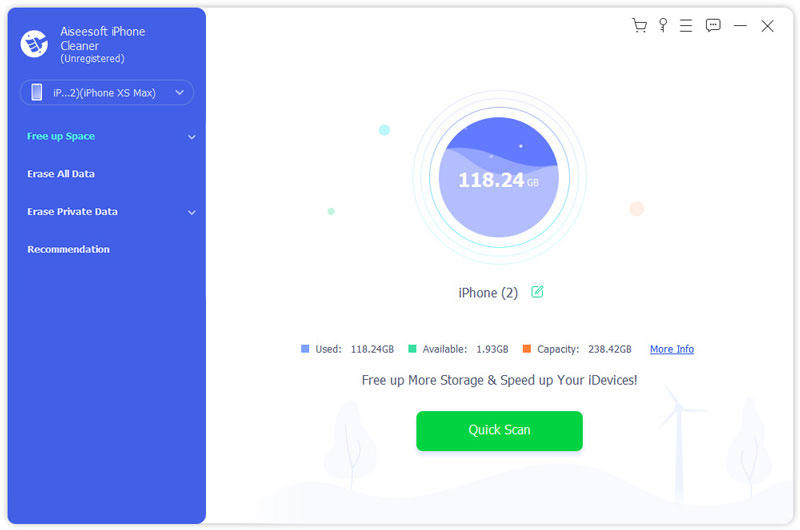
The home screen with an iPhone XS Max connected: 118.24 GB used, 1.93 GB available of 238.42 GB, and the Quick Scan button; Free up Space, Erase All Data and Erase Private Data in the sidebar.
Features
Junk file cleanup
Aiseesoft iPhone Cleaner finds photo cache, iTunes cache, invalid files, crash logs and other junk on the device, lists them by type with their sizes, and erases the ones you tick. How much you get back varies a lot; on a lightly used phone it may be only a few megabytes, as the vendor's own screenshot shows.
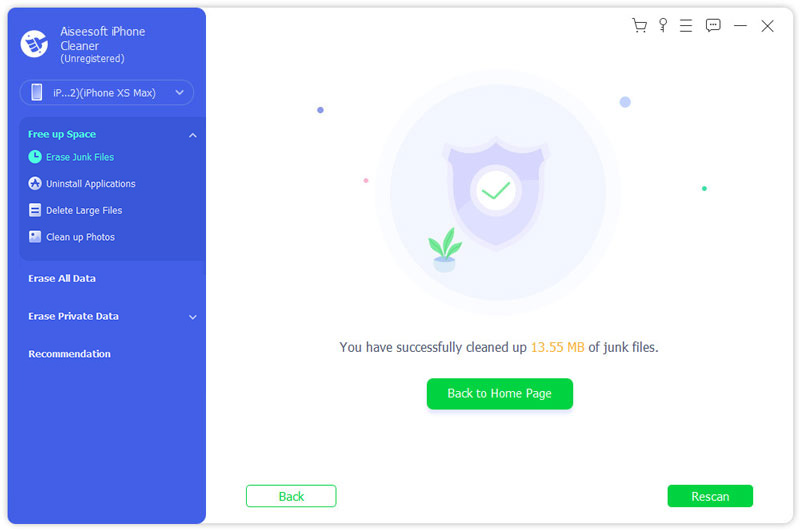
After an Erase Junk Files run: "You have successfully cleaned up 13.55 MB of junk files", with the Free up Space submenu (Erase Junk Files, Uninstall Applications, Delete Large Files, Clean up Photos) open on the left.
App uninstaller and large-file finder
Aiseesoft iPhone Cleaner lists every installed app with the space it takes and uninstalls the ones you pick, and it gathers large files by type (MP4, MOV, MP3, JPG, PNG, HEIC and more) so you can spot the forgotten 4 GB video that's eating your storage.
Photo compression or export-and-delete
Aiseesoft iPhone Cleaner's Clean up Photos tool has two choices. Backup & Compress shrinks the photos on the phone (Aiseesoft calls it lossless) and keeps a backup; Export & Delete copies photos to the PC, browsable by date, and then removes them from the phone. The second is the safer way to make real room.
Erase Private Data, item by item
Aiseesoft iPhone Cleaner's Custom Erase scans messages and attachments, contacts, photos, notes, calendar, voice memos, Safari bookmarks and history and WhatsApp chats, shows them with previews, and erases only what you tick. One-click Erase does the scan and removal automatically. It's handy before lending a phone or sending it in for repair.

Custom Erase on an iPhone 11 Pro: private data types (Messages, Contacts, Photo, Notes, Calendar, Voice Memos, Safari Bookmark) and WhatsApp on the left, one photo ticked with its preview, and the Erase button.
Erase All Data with three security levels
Aiseesoft iPhone Cleaner wipes the entire device at a Low, Middle or High level (more overwrite passes take longer). You type 0000 to confirm, and Aiseesoft advises closing running apps and pausing updates first. Use it when the phone is leaving your hands for good.
Real-World Uses
- A full 64 GB iPhone: export two years of photos to the PC and delete them from the phone, then remove a few big games.
- Before a repair: erase messages, photos and WhatsApp chats selectively, without wiping the phone.
- Selling an old iPad: sign out of iCloud and run Erase All Data at the High level.
- A parent's iPhone: clear cache and unused apps from a PC when their storage warning keeps appearing.
Who It's For, and Who Should Skip It
It suits Windows users with full iPhones who want one tool for cleanup, photo offloading and both kinds of erasing, and who'd rather work from a PC than the phone's small storage screen.
Skip it if iCloud Photos with "Optimize iPhone Storage" or the phone's own Offload Unused Apps already solves your storage problem; both are free. If you only want to wipe a phone before selling it, Apple's Erase All Content and Settings does that for free too. Mac owners need the separate Mac edition.
Usage Guide
- Install: run the downloaded installer, which fetches the program. Install iTunes if Windows doesn't recognise the iPhone.
- Connect: plug in the device, tap Trust and enter the passcode.
- Scan: click Quick Scan to see junk, apps, large files and photos.
- Clean: open each group, tick what to remove and click Erase. For photos, choose Export & Delete or Backup & Compress.
- Erase (optional): turn off Find My on the phone, then use Erase Private Data or Erase All Data.
Where it falls short
- Junk cleanup is modest. iOS limits what outside software can see, so expect megabytes from cache cleaning; the big gains come from photos, videos and apps you could also remove yourself.
- Some features are promised, not shipped. The product page lists backup, restore and transfer as "Coming Soon".
- No recent independent reviews. The coverage we found is either Aiseesoft's own blog or giveaway posts.
- Erase is permanent. There's no undo for anything it deletes.
What Users Say
Reviews on Aiseesoft's page
Aiseesoft's iPhone Cleaner page shows 234 reviews, all positive and chosen by the vendor:
"I used this cleaning app to clear up all the caches and other junk files on my iPhone XR. And it only took me 5 minutes." Ron
"There is a lot of personal data stored on my iPhone. Now I have just bought a new iPhone 12 Pro. So I want to wipe off all private and personal data on my old iPhone. This software works." Charlotte
"This program helped me free up my iPhone 11 with simple clicks." Alfred
Trustpilot and other sites
Aiseesoft Studio as a company scores 3.8 out of 5 from about 610 Trustpilot reviews, mostly praising quick email support, with one-star reviews mostly about refunds refused for products that weren't faulty. AlternativeTo lists the program with no user reviews, and a hands-on post on a Taiwanese tech blog (written for a free-license giveaway) found the quick scan and photo compression useful on a phone short of storage.
The pattern: users like that it's quick and simple; there's no independent long-term testing, and the company's strict refund policy is the main complaint about Aiseesoft generally.
Editions and Pricing
| License | Price | Term | Covers |
|---|
| Lifetime (our Buy Now button) | $37.45 | One-time payment | 1 PC, 6 devices |
| 1 Month | $19.95 (list) | Renews monthly | 1 PC, 6 devices |
| 3 PCs | $73.75 (list) | One-time payment | 3 PCs |
Aiseesoft's own site discounts these with coupons from time to time (the lifetime license showed $29.96 there on November 4, 2026).
FAQs
Does Aiseesoft iPhone Cleaner need iTunes?
Aiseesoft iPhone Cleaner lists iTunes 10.7 or later as a requirement on Windows, because iTunes installs the Apple drivers that let Windows talk to an iPhone. Install it from Apple or the Microsoft Store if the phone isn't detected.
Will it delete my photos without asking?
No. Aiseesoft iPhone Cleaner only removes what you select and click Erase on, and Clean up Photos offers Export & Delete so the pictures are copied to your PC first.
Is there a Mac version?
Yes. Aiseesoft sells iPhone Cleaner for Mac separately, with its own download and purchase page; this license covers the Windows program.
Can it clean an iPad too?
Yes. Aiseesoft iPhone Cleaner supports iPad and iPod touch as well, and one license covers up to six devices.
Does it work with the newest iOS?
Aiseesoft iPhone Cleaner's tech specs list iOS 5 through iOS 27 and iPadOS up to 27. The program installer we checked dates from September 2025, so test the trial with your device after a major iOS update.
Can it erase a locked or disabled iPhone?
No. Aiseesoft iPhone Cleaner needs the device unlocked and trusted by the PC; a locked or disabled iPhone has to be restored through Apple's recovery mode instead.
System Requirements
- Windows 11, 10, 8.1, 8 or 7
- 1 GHz Intel or AMD processor, 1 GB RAM
- iTunes 10.7 or later
- iPhone, iPad or iPod touch on iOS 5 to iOS 27, and a USB cable
Conclusion
Worth it if your iPhone is constantly full and you want one Windows tool for cleanup, photo offloading and secure erasing. Aiseesoft iPhone Cleaner puts storage analysis, app removal, large-file hunting, photo export and two kinds of erase in one simple program, for a one-time $37.45 that covers six devices. The main reason not to buy: the junk cleaning itself frees little space, and iCloud's storage optimisation, Offload Unused Apps and Apple's built-in erase are free. Try it on your own phone first, and back up before you delete anything.
Download Free TrialBuy Now