Aiseesoft MXF Converter: Turn Broadcast-Camera MXF Clips into Files Anyone Can Play
Aiseesoft MXF Converter is a $49.95 Windows program (lifetime license, one PC) that converts MXF files from professional cameras, such as Panasonic P2, Sony XDCAM and Canon XF models, into MP4, MOV, AVI, WMV and other everyday formats. It's aimed at people who receive MXF footage and need to watch, share or hand it on, more than at editors cutting it.
MXF (Material Exchange Format) is the wrapper broadcast and cinema cameras write to their cards. Professional editors read it fine, but double-click an MXF clip on an ordinary PC, phone or smart TV and you usually get an error, or picture with no sound, because pro cameras often store each audio channel as a separate track. A client who needs a quick preview, a teacher with footage from a school's camcorder, or a videographer sending a rough cut to a phone all hit the same wall. This program's job is to get them past it.
Quick facts
- Version: 9.2.56 (installer dated January 9, 2024)
- Developer: Aiseesoft Studio
- Runs on: Windows 11, 10, 8.1, 8, 7, Vista and XP (SP2 or later). A Mac edition is sold separately.
- Input: MXF (including P2 MXF), plus TS, MTS, M2TS, TP and TRP
- Output: H.264 MP4, MOV, AVI, WMV, MKV, MPEG-2, DV, VOB, FLV, WebM, 4K HEVC and H.264, and 3D MP4/MKV/TS/AVI/FLV, or MP3, AAC, AC3, FLAC, WAV and other audio
- Price: $49.95 one-time on the order page for a lifetime license on one PC
- Trial: converts the first 5 minutes of each clip (half of a clip shorter than that)
- What we checked: the 48.4 MB installer, whose file version is 9.2.56, and the order page, which sells the Lifetime license for $49.95, on November 4, 2026. We didn't convert MXF footage with it.
Before you buy: delivery formats, not editing codecs
The output list is made of delivery and consumer formats (H.264, HEVC, MPEG-2, DV, WMV). There's no ProRes or DNxHD on the Windows edition. If you edit in Premiere Pro, DaVinci Resolve, Vegas or Avid, those programs import MXF natively, so you may not need a converter at all.
Aiseesoft also offers a Free MXF Converter that converts MXF to MOV, WMV and AVI and extracts MP3, without the editing tools. Try it first if a straight conversion is all you need.
Download Free TrialBuy Now
Overview
MXF Converter opens to a Getting Started panel: import, edit, choose a profile, convert. The toolbar has Add File, Trim (Clip once files are loaded), 3D and Edit, and the NVIDIA, Intel and AMD acceleration buttons sit at the top right. Below the panel are the Profile and Destination fields, Merge into one file and the Convert button. Aiseesoft lists no timecode or metadata options: this is a consumer-style converter that happens to read MXF.
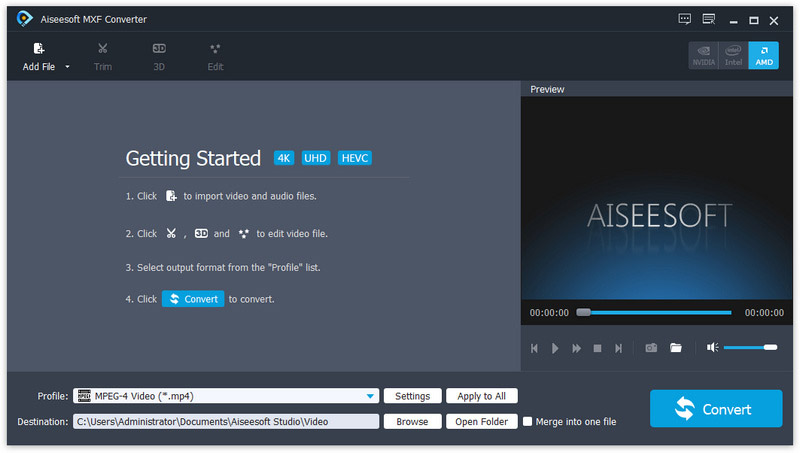
The empty MXF Converter window: the four Getting Started steps, AMD acceleration switched on at top right, and the MPEG-4 profile and destination folder at the bottom.
Features
Reads MXF from pro camcorders
Aiseesoft MXF Converter opens MXF files, including Panasonic P2 MXF, and Aiseesoft names Sony XDCAM among supported sources. Users on Aiseesoft's review page report converting clips from a Canon XF305 and a Canon C100 Mark II. It also takes broadcast-style TS, TP and TRP recordings and camcorder MTS/M2TS, so one tool covers most of what a small production company's cards produce.
Small, shareable MP4 and HEVC copies
Aiseesoft MXF Converter turns heavy, high-bitrate MXF clips into H.264 or H.265/HEVC MP4 files, from phone-sized up to 4K. That's the practical win: a few minutes of broadcast-codec footage can shrink to something you can email, upload to a review link or play on a laptop. The 4K Video group also offers HEVC MKV, WebM VP8/VP9, TS, AVI and a YouTube 4K profile.
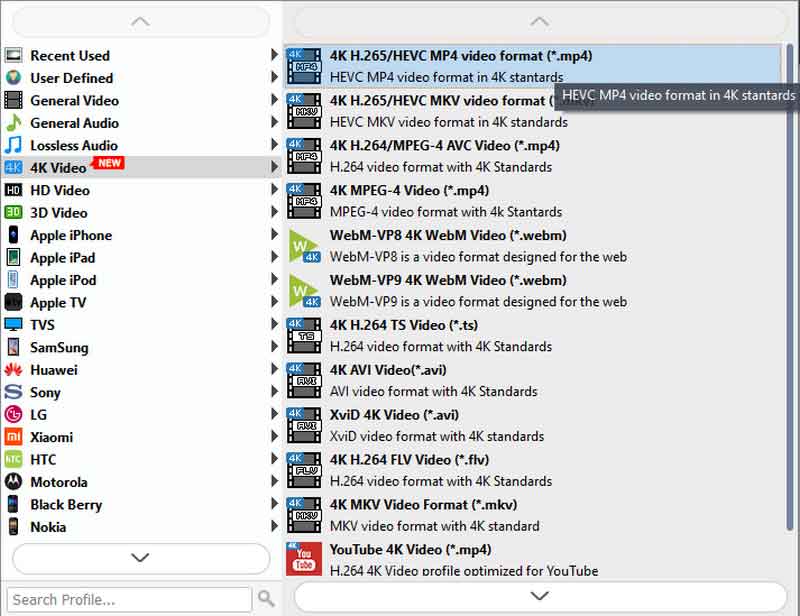
The 4K Video profile group: H.265/HEVC MP4 and MKV, H.264 MP4, WebM VP8 and VP9, TS, AVI, XviD, FLV, MKV and YouTube 4K, with device and HD categories on the left.
Profiles for older or simpler editors
Aiseesoft MXF Converter has profiles for Adobe Premiere/Sony Vegas and Avid Media Composer, plus MPEG-2 and DV outputs. These help when the editing software is old or a consumer app, or when a colleague's machine can't open MXF. Settings exposes encoder, resolution, frame rate, aspect ratio and audio channels.
Pick the audio, trim, crop and stamp a watermark
Aiseesoft MXF Converter shows an audio track menu for each clip, so you can choose which recorded track goes into the copy. The editor trims, crops away blank edges, rotates, adjusts brightness, contrast, saturation, hue and volume, merges several clips into one, and adds a text or image watermark with your own color, which is handy for stamping "PREVIEW" on footage you send to a client.

Aiseesoft's own screenshot of the queue, here with an M2TS and a TS clip rather than MXF, each showing its audio track and subtitle menus, converting to the Apple TV 3 Dolby Digital Pass-through M4V profile.
Benefits
The main benefit is turning footage that only an editing workstation can open into something everyone else can use. Producers can preview rushes on a laptop, clients can watch a cut on their phone, and a school or church volunteer can get recordings off a borrowed pro camera without learning an NLE. GPU acceleration helps, since MXF clips are large and long conversions add up.
Real-World Uses
- Rushes for a client: convert the day's P2 or XF clips to small, watermarked MP4s for review.
- A conference recorded on an XDCAM camera: make MP4 copies for the organizers' website and a WMV for an old office PC.
- Footage you can't open at all: a USB stick of MXF files from a TV station or production house; convert to H.264 MP4 and play it anywhere.
- Older editing software: convert to MPEG-2 or DV for a consumer editor that refuses MXF.
- Audio for transcription or radio: extract an interview's audio track to WAV or MP3.
Who It's For, and Who Should Skip It
It suits people at the edges of professional video: assistants, clients, educators, small studios and hobbyists who receive MXF and need playable copies with a simple interface.
Skip it if you edit professionally: Premiere Pro, Resolve, Vegas and Avid open MXF directly, and you'd want ProRes or DNxHD intermediates anyway, which this doesn't make. Also skip it if Aiseesoft's Free MXF Converter or the free HandBrake already handles your files, or if you're on a Mac (buy the Mac edition).
Usage Guide
- Copy the clips from the camera card to a local folder. On P2 and XDCAM cards the MXF files sit inside the card's folder structure (for P2, in CONTENTS\VIDEO).
- Install and launch Aiseesoft MXF Converter, then click Add File or drag the MXF files in.
- Check each clip's audio track menu; pro cameras often record several.
- Use Clip to trim and Edit to crop, adjust or add a watermark.
- Choose a profile: H.264 MP4 for sharing, an HEVC profile for small 4K files, or an editor profile. Click Apply to All.
- Enable GPU acceleration if available, pick a destination and click Convert.
Where it falls short
- Narrow input list. The tech specs list MXF, TS, MTS, M2TS, TP and TRP only. For MP4, MOV or AVI sources you need a general converter.
- No professional intermediates such as ProRes or DNxHD, and no timecode or metadata options.
- Muddled camera list. Aiseesoft's product page names consumer camcorders like the Panasonic HC-V720 alongside XDCAM; those consumer models record AVCHD, not MXF, so don't buy it on the strength of that list.
- Vendor reviews look padded. The newest reviews on Aiseesoft's page (2022 to 2025) are short, generic praise; the older, specific ones are more useful.
- Old installer. It was last rebuilt in January 2024.
What Users Say
Specific reviews on Aiseesoft's page
- "Works well and easy to use! I can convert Canon XF305 recorded videos to any formats now." (Holley, 2021-02-27)
- "I transcode my Canon C100 Mark II video to h.264 MOV last night. I can play the converted files on my Sony HDTV." (Andrew, 2020-11-09)
- "I have a MXF video, and it can't be played on my iPhone 6 somehow... After I converted MXF to MP4, I can now play the video on my iPhone." (Sebastian, 2019-11-24)
- "I had an HDD from a u/s HDD recorder and have converted the TRP files on it to MP4 - very easy to use and quite fast conversion." (Steve B, 2016-6-6)
- "NVIDIA graphics accelerated conversion makes it incredibly fast." (Sue, 2014-12-24)
Download sites
On Free Download Manager, Aiseesoft MXF Converter averages 4.1 out of 5 from 95 user votes, higher than Aiseesoft's MKV, MTS and M2TS converters score there, and on a reasonable number of votes.
Trustpilot: Aiseesoft as a company
Aiseesoft's TrustScore is 3.8 from 610 reviews. Recent praise is mostly for quick license resets (for example "Great software, Great customer service!" from a Blu-ray Player customer in September 2026), while one-star reviews such as "Refund Endless Cycle - Don't Trust" describe refund requests going in circles.
The pattern: the people who found it useful had a specific MXF file they couldn't play and needed an MP4 or MOV. Nobody describes it as part of a professional editing workflow, which matches what the software is.
Comparisons
MXF Converter vs. Aiseesoft Free MXF Converter
The free version converts MXF to MOV, WMV and AVI and extracts MP3, with output settings, but leaves out the editing functions. The paid MXF Converter adds MP4/HEVC/4K profiles, device and editor profiles, trimming, cropping, merging, watermarks, 3D and GPU acceleration. Start free and upgrade only if you miss those.
MXF Converter vs. HandBrake and your NLE
HandBrake is free and opens many MXF files for MP4 or MKV output, though multi-track pro audio can need care. Professional editors read MXF natively and export whatever you want. MXF Converter's niche is simplicity for people who have neither the patience for HandBrake nor an NLE.
Editions and Pricing
| Edition |
Price |
What you get |
| MXF Converter, lifetime (Buy Now button) | $49.95 | 1 PC, all features, free upgrades |
| MXF Converter, lifetime (Aiseesoft store coupon) | $39.96 | Same license |
| Free MXF Converter | Free | MXF to MOV, WMV, AVI and MP3, no editing |
FAQs
Why does my MXF file play with no sound?
Professional cameras usually record each audio channel as its own track, which many players ignore. Aiseesoft MXF Converter lets you pick the audio track per clip and writes a normal stereo or multichannel track into the MP4 or MOV.
Can Aiseesoft MXF Converter make ProRes for Final Cut Pro?
Not the Windows edition; its outputs are delivery formats such as H.264, HEVC, MPEG-2 and DV. Aiseesoft's ProRes guides are for MXF Converter for Mac.
Will it open a whole P2 or XDCAM card?
Aiseesoft MXF Converter works on the MXF files, so add the clips from the card's folders rather than the card itself. Test a clip with the trial, since P2 cards can store video and audio in separate MXF files.
What does the MXF Converter trial limit?
The trial of Aiseesoft MXF Converter converts the first 5 minutes of each clip, or half of a clip shorter than 5 minutes.
Can I convert MP4 or MOV files with it?
Aiseesoft MXF Converter's listed inputs are MXF and transport-stream formats (TS, MTS, M2TS, TP, TRP). For other sources, Aiseesoft's Video Converter Ultimate is the general tool.
Is a refund possible if it can't read my camera's files?
Aiseesoft's 30-day guarantee covers quality problems with the software, which a file it can't convert may qualify as; a change of mind isn't covered. Test your own clips in the trial first.
System Requirements
- Windows 11, 10, 8.1, 8, 7, Vista or XP (SP2 or later)
- 1 GHz Intel or AMD processor
- 1 GB RAM or more (more helps with 4K MXF)
- About 49 MB for the installer, plus space for output
Conclusion
Aiseesoft MXF Converter is a reasonable buy for one job: making MXF footage from pro cameras watchable and shareable on ordinary computers, phones and TVs, with trimming and watermarks for client previews. It is not a professional transcoding tool, and editors already have better options built in.
Buy it if you regularly receive MXF files and the free version's MOV/WMV/AVI output isn't enough. Skip it if you edit in a professional NLE, or if Aiseesoft's Free MXF Converter already does what you need.
Download Free TrialBuy Now