Aiseesoft iPhone Ringtone Maker for Mac: Trim a Song or Movie Clip into an M4R Ringtone
Aiseesoft iPhone Ringtone Maker for Mac is a $14.95 Mac utility (lifetime license, one Mac) that cuts a section out of a song or a video and saves it as an M4R ringtone, the format the iPhone uses for ringtones and alert tones. It can also send the finished tone straight to a connected iPhone, iPad or iPod touch.
The use case is simple: you want the chorus of a song you own, a line from a film or a voice recording as your ringtone, and you don't want to fiddle with GarageBand, file renaming or the Finder's sync settings to get it there. You load the file, drag two markers to pick the part you want, and click Generate.
Quick facts
- Version: 7.1.10 (build 7.1.10.92267, installer dated December 16, 2019)
- Developer: Aiseesoft Studio
- Runs on: Mac OS X 10.7 or later. The app is an Intel build, so an Apple silicon (M-series) Mac runs it through Rosetta 2. A separate Windows edition is sold on its own.
- Input: MP3, AAC, AC3, WAV, WMA, M4A, OGG, AIFF, FLAC, APE and other audio, plus the soundtrack of MP4, MOV, M4V, MKV, AVI, WMV, FLV, VOB, MTS/M2TS, WebM and other video files
- Output: M4R only
- Price: $14.95 one-time on the order page, lifetime license for one Mac
- Refunds: 30-day money-back guarantee, limited to specific cases (see below)
- What we checked: we downloaded the 35.9 MB installer, opened the disk image and read the app's own version (7.1.10.92267, minimum system Mac OS X 10.7, Intel x86_64 code only, no Apple silicon code), and the order page sold the lifetime license for $14.95 on November 4, 2026. We didn't run the program or connect an iPhone to it.
Before you buy
The installer Aiseesoft serves today was built in December 2019. It still installs the same 7.1.10 release, and it contains only Intel code. On an M1 to M5 Mac it depends on Apple's Rosetta 2 translation layer, which Apple announced in 2025 it will keep as a general tool only through macOS 27. From macOS 28, Apple plans to keep Rosetta only for certain older games, so unless Aiseesoft ships an Apple silicon build, this app is expected to stop running on Macs that upgrade past macOS 27. Try the free download on your own machine first.
The refund guarantee isn't a "change your mind" guarantee: Aiseesoft refunds wrong or duplicate purchases, missing registration codes and technical problems it can't fix within 30 days, and says it deducts 20% if a customer insists on a refund outside those cases. The trial is the place to find out whether it works with your Mac and iPhone.
Download Free TrialBuy Now
Overview
iPhone Ringtone Maker for Mac is a single-window app with one job. The top half is a file list showing each file's original length, its trimmed length and the output name. Under it sits a timeline with two markers, start and end time boxes and a small player. The bottom strip holds the finishing options: fade in, fade out, a volume slider, and where the ringtone goes (a folder on the Mac, iTunes, or a connected iPhone).

The main window with three MP3 files in the list, each set to become an M4R file, and the trim, fade, volume and output controls below. The title bar shows the unregistered trial.
There's no waveform, no multi-track editing and no effects beyond the two fades and the volume. That's the point of the program, and also its limit: it's a cutter and converter, not an audio editor.
Features
Turns almost any song or video into an M4R file
iPhone Ringtone Maker for Mac reads the common audio formats, including lossless FLAC, APE and WAV, and pulls the soundtrack out of video files such as MP4, MOV, MKV, AVI, WMV and VOB. That means a line of dialogue from a movie file or the intro of a music video works as well as an MP3. Whatever goes in, what comes out is always an M4R file.
Pick the exact seconds you want
iPhone Ringtone Maker for Mac gives you two ways to set the clip: drag the start and end markers on the timeline, or type the times into the Start Time and End Time boxes. The Trimmed Length counter updates as you go, and the player lets you listen to the selection before you convert it.

A 9:59 MP3 trimmed to a 2:55 clip (1:32 to 4:27) with the start and end markers on the timeline and Fade in ticked.
Fades and a volume boost
iPhone Ringtone Maker for Mac can fade the clip in and out over a number of seconds you choose, so a tone cut from the middle of a song doesn't start or stop abruptly. The volume slider runs from 0% to 200%, which helps when a quiet acoustic track or a voice memo would be too soft to hear in a pocket.
Several ringtones in one go
iPhone Ringtone Maker for Mac converts a whole list in one batch. Add several files, set the start and end time for each one, tick them all and click Generate once. It's handy if you want separate tones for family members or a set of alert sounds.
Sends the tone to your iPhone, and manages the ones already there
iPhone Ringtone Maker for Mac can save the M4R file to a folder on the Mac, add it to iTunes, or copy it straight to a connected iPhone, iPad or iPod touch picked from the "Add to iPhone" list. The Manage Ringtone button opens the custom ringtones on the device so you can rename or remove them, and copy them back to the Mac.
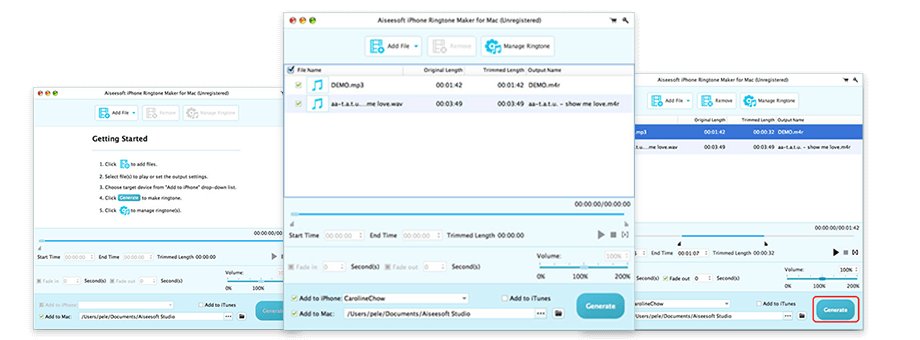
Three steps from Aiseesoft's guide: the empty start screen, two files loaded with a connected iPhone chosen under "Add to iPhone", and the Generate button.
Benefits
- No workarounds. Apple's own free route on a Mac means trimming in Music or GarageBand, exporting AAC, renaming the file to .m4r and dragging it onto the iPhone in Finder. This app does those steps in one click.
- Video sources count. The free routes start from audio files. Here a movie scene or a video you shot works directly.
- A small, one-time price. $14.95 buys a lifetime license, with no subscription to cancel later.
Real-World Uses
- Your favorite chorus as a ringtone: load an MP3 or FLAC album track, mark the 30 seconds you love, add a one-second fade-out and send it to the iPhone.
- A movie quote for a contact: load the MP4 or MKV, find the line, and save just those few seconds as a custom tone for one person.
- Your kid's voice: turn a voice recording into a ringtone, raising the volume so it's audible.
- A set of distinct alerts: batch-convert five short clips into separate tones for texts, mail and reminders.
Who It's For, and Who Should Skip It
It's for Mac owners who make custom ringtones now and then, want a point-and-click tool for it, and like being able to start from a video file.
Skip it if:
- You're happy with free tools. GarageBand on the iPhone itself can export a ringtone, and the Music app plus Finder can do it on the Mac with a few extra steps.
- You want real audio editing (cutting out a middle section, mixing two clips, a visible waveform). An audio editor fits better.
- You already own or want Aiseesoft's Mac FoneTrans. That transfer suite includes its own Ringtone Maker tool alongside photo, music and contact transfer, so you'd be paying twice.
- You need software that's actively updated. This one hasn't had a new build since 2019.
Usage Guide
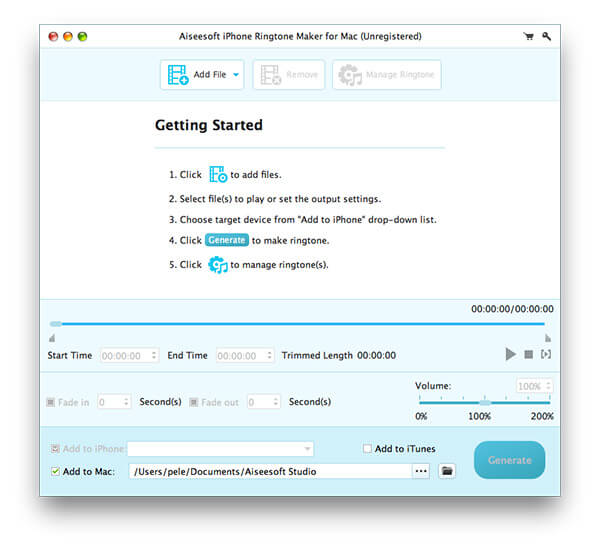
The Getting Started screen the app shows before any file is loaded.
- Install and launch. Download the DMG, drag the app to Applications and open it. On an Apple silicon Mac, macOS asks to install Rosetta 2 the first time if it isn't already there.
- Add files. Click Add File, choose one or more songs or videos and click Open.
- Set the clip. Select a file, then drag the start and end markers or type the times. Press play to listen.
- Finish it. Tick Fade in or Fade out and enter the seconds, and adjust the volume if needed.
- Choose where it goes. Leave "Add to Mac" ticked to save to a folder, tick "Add to iTunes", or connect your iPhone and pick it under "Add to iPhone".
- Click Generate. Use Manage Ringtone later to rename or delete custom tones on the device.
Tips
- Keep ringtones short. iOS has long expected ringtones of about 40 seconds or less, and a tone longer than that may not sync. Alert tones work best at a few seconds.
- Start the clip a beat before the part you want and add a short fade-in, so the first note isn't clipped.
- Saving to a folder as well as the iPhone gives you a copy to re-add after a phone reset.
- Only use music and video you own or have the right to use.
Where it falls short
- An old build. Aiseesoft's product page lists support for macOS Sequoia and newer iPhones, but the program itself is the December 2019 release, built on the Qt 5.6 framework. Direct transfer to an iPhone depends on how the device connects to the Mac, and that's the part most likely to break on new iOS versions.
- Intel only. No native Apple silicon code, so it runs through Rosetta 2 on M-series Macs, with the long-term question that brings.
- One output format. It only makes M4R. If you also want MP3 or OGG ringtones for an Android phone, you'll need another tool.
- Bare-bones editing. One continuous clip per file, two fades and volume. No waveform display, no splicing.
- Trial limits aren't stated. Aiseesoft doesn't say on its pages what the unregistered version holds back, so you find out by trying it.
What Users Say
We couldn't find independent reviews of the Mac edition on review sites, app stores or tech magazines. Mac software sites mostly list other companies' ringtone makers, and the forum posts that mention it are reposted tutorials. The only user comments we found are the ones Aiseesoft shows on its own product page (it counts 8 reviews), so read them as the vendor's selection, which leans entirely positive.
On Aiseesoft's product page
"With Aiseesoft iPhone Ringtone Maker for Mac, I can make a custom ringtone with over 40s on my Mac. However, iTunes only allows us to add less than 40s ringtone to iPhone. It really works well on Mac." Stephen
"With the help of Aiseesoft iPhone Ringtone Maker for Mac, I made my own ringtones for iPhone 6s with my recorded audio file. It really did a great job!" Alisa
"Nice tool! Up to now, it can meet all my need. Thanks to this iPhone Ringtone Maker, I can make ringtones from my CDs and transfer them to my iPhone directly. Highly recommended!" Dan
"Very nice. Before I always make ringtone files for my mobile phone with various tools on my Mac computer. And I find Aiseesoft Ringtone Maker for Mac should be best choice. It is very easy to make iPhone ringtone from videos or songs." Zoe
The themes are ease of use and making tones from your own recordings and CDs. Stephen's comment is also a useful warning: the app will happily make a clip longer than 40 seconds, but iTunes won't add it to the iPhone. The iPhone 6s mention shows how old most of these comments are; none of them speaks to recent macOS or iOS versions.
Comparisons
iPhone Ringtone Maker for Mac vs. Apple's free tools
GarageBand on the iPhone and the Music app plus Finder on the Mac can both produce a ringtone for nothing. They need more steps (export, rename to .m4r, sync), and they start from audio, not video. Aiseesoft's app is quicker, handles video sources and batches, and adds fades and a volume boost. If you make one ringtone a year, the free route is enough. If you make them often or from movie clips, $14.95 buys convenience.
iPhone Ringtone Maker for Mac vs. Aiseesoft Mac FoneTrans
Mac FoneTrans is Aiseesoft's full iPhone transfer suite (photos, music, contacts, messages and more), and its toolbox includes a Ringtone Maker that creates tones from MP3, FLAC, AAC and other audio. It's much more expensive, but if you need to move other data between iPhone and Mac anyway, it covers ringtones too. Buy the standalone ringtone maker only if ringtones are all you need, or if you want to start from video files.
Editions and Pricing
| Edition | Platform | License | Price |
|---|
| iPhone Ringtone Maker for Mac | Mac OS X 10.7 or later | Lifetime, 1 Mac | $14.95 on the order page |
| iPhone Ringtone Maker (Windows) | Windows | Lifetime, 1 PC | $14.95, sold separately |
The Mac license doesn't cover the Windows edition, or the other way round. Aiseesoft's own store sometimes shows a coupon price lower than $14.95.
FAQs
Does Aiseesoft iPhone Ringtone Maker for Mac run on an M1, M2 or M3 Mac?
Aiseesoft iPhone Ringtone Maker for Mac runs on Apple silicon Macs through Rosetta 2, since the app contains only Intel code. Aiseesoft lists M-series chips as supported. Apple has said Rosetta 2 stays available for apps like this through macOS 27, and from macOS 28 only for certain older games, so check the trial on your Mac before buying.
Is the $14.95 a subscription?
No. Aiseesoft iPhone Ringtone Maker for Mac is sold as a one-time lifetime license for one Mac at $14.95, and Aiseesoft promises free lifetime updates.
Can I get a refund if I don't like it?
Probably not in full. Aiseesoft's 30-day guarantee covers wrong or duplicate purchases, a registration code that never arrives, and technical problems support can't fix within 30 days. For other refund requests it says it keeps 20% of the price.
Do I need iTunes or the Music app to get the ringtone onto my iPhone?
Aiseesoft iPhone Ringtone Maker for Mac can copy the ringtone straight to a connected iPhone through its "Add to iPhone" option, without syncing in iTunes. If that doesn't work with your iOS version, save the M4R to a folder and drag it onto the iPhone in Finder.
Can it make ringtones for Android phones?
No. Aiseesoft iPhone Ringtone Maker for Mac only outputs M4R, the iPhone ringtone format. Android phones use MP3 or OGG tones, so you'd need a general audio converter.
Will it convert songs bought from Apple Music?
Aiseesoft doesn't say it removes any copy protection, and Apple Music streaming downloads are protected. Plan on using DRM-free files: MP3s, CDs you ripped, iTunes Store purchases, your own recordings and video files.
How long can the ringtone be?
Aiseesoft iPhone Ringtone Maker for Mac lets you set any length, but keep it to about 40 seconds or less. One user on Aiseesoft's page found that longer tones can be made but iTunes won't add them to the iPhone.
System Requirements
- Mac OS X 10.7 or later (Aiseesoft lists support up to current macOS releases)
- Intel processor, or Apple M-series chip with Rosetta 2
- 512 MB RAM, 800 x 600 display, 16-bit graphics card or better
- About 36 MB download
- A USB cable for sending ringtones directly to an iPhone, iPad or iPod touch
Conclusion
Aiseesoft iPhone Ringtone Maker for Mac does one small job well enough for the price: pick a clip from a song or a video, fade it, and get an M4R file onto your iPhone without the rename-and-sync routine. The reason to buy it is convenience, especially if you want tones from movie clips or several at once. The reason to hesitate is age: the program hasn't been rebuilt since 2019, runs on Apple silicon only through Rosetta, and has no independent reviews to back up the vendor's own testimonials.
Our verdict: worth $14.95 if the free trial works on your Mac and iPhone and you make ringtones regularly. If you make one tone a year, Apple's free tools will do, and if you also need iPhone file transfer, Mac FoneTrans covers ringtones as part of a bigger package.
Download Free TrialBuy Now