Aiseesoft MTS Converter for Mac: Camcorder Clips Ready for Final Cut Pro, iMovie and QuickTime
Aiseesoft MTS Converter for Mac is a $49.95 Mac app (lifetime license, one Mac) that turns AVCHD camcorder MTS and M2TS clips into MOV, MP4, ProRes and Apple Intermediate Codec files that QuickTime, Photos, iMovie and Final Cut Pro open without complaint. It runs on Intel and Apple silicon Macs.
Macs have always been awkward with AVCHD. QuickTime Player won't play a loose .MTS file, iMovie wants the whole camcorder card structure rather than files copied out of it, and older Final Cut versions choke on long-GOP H.264. If you have a drive full of MTS files that someone dragged out of a camcorder's STREAM folder years ago, the simplest fix is to convert them once into a Mac-native format, and that's what this app does.
Quick facts
- Version: 9.2.30.97409 (disk image dated January 31, 2024)
- Developer: Aiseesoft Studio
- Runs on: Mac OS X 10.7 or later through macOS Sequoia, Tahoe and macOS 27, on Intel and M-series Macs
- Editor-ready output: ProRes for Final Cut Pro, Apple Intermediate Codec MOV for iMovie and Final Cut Express, plus Premiere/Vegas and Avid profiles
- Other output: MOV, MP4, M4V, AVI, WMV, FLV, MKV and HD/4K profiles, or MP3, AAC, AIFF, FLAC, WAV audio
- Price: $49.95 one-time on the order page for a lifetime license on one Mac
- Trial: converts only the first 5 minutes of each clip (half of a clip shorter than that)
- What we checked: the 49.9 MB disk image, whose app reports version 9.2.30.97409, and the order page, which sells the Lifetime license for $49.95, on November 4, 2026. We didn't run conversions on a Mac.
Before you buy
Current versions of iMovie and Final Cut Pro can import AVCHD directly when you give them the complete card or camcorder folder (with its BDMV and CLIPINF structure). If you still have the original card or a full backup of it, try importing that first: you may not need a converter at all.
The converter earns its price when you only have loose .MTS files, when you want one consistent MOV or MP4 library, or when you're on an older Mac or editor. Aiseesoft's refund guarantee covers quality problems only, so test with the trial.
Download Free TrialBuy Now
Overview
The Mac edition opens on a Getting Started panel with four numbered steps and a preview pane on the right. Its toolbar has Enhance, Trim, 3D and Edit next to Add File, and the bottom bar holds the Profile menu, the destination folder (in your Documents by default), Merge into one file and an orange Convert button. Once clips are loaded, each row shows the source resolution and length, the audio track, a subtitle menu and a Forced Subtitles checkbox.
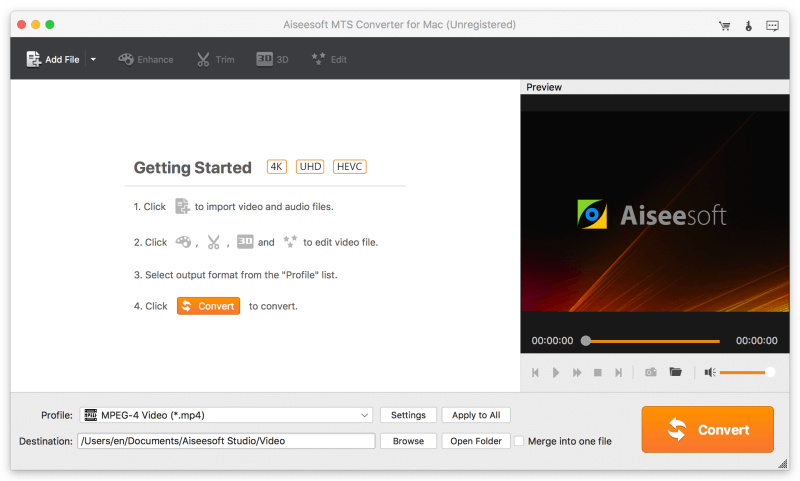
The Mac app's Getting Started screen: Add File, Enhance, Trim, 3D and Edit in the toolbar, 4K, UHD and HEVC badges, the MPEG-4 profile and the orange Convert button.
Features
ProRes for Final Cut Pro
Aiseesoft MTS Converter for Mac converts AVCHD clips to Apple ProRes 422 through its Final Cut Pro profile group. ProRes files are big, but they scrub and play back smoothly in Final Cut's timeline because every frame is stored whole, unlike the compressed H.264 inside an MTS file. Reviewers on Aiseesoft's page mention using it for exactly this.
AIC and MOV for iMovie
Aiseesoft MTS Converter for Mac has an "iMovie and Final Cut Express" profile group whose output is Apple Intermediate Codec (AIC) MOV, the editing format those apps were built around, plus ordinary MOV and MP4 profiles for newer iMovie versions. A QuickTime Movie Format group covers playback in QuickTime Player and Photos.
Batch queue with per-clip audio and subtitles
Aiseesoft MTS Converter for Mac converts several clips in one run. Each row lets you pick the audio track (camcorders often record AC3 5.1), choose or add a subtitle, and tick Forced Subtitles. Ticking Merge into one file joins the clips in order, which reassembles a long recording that the camcorder split into several files.

Three clips queued, two of them 3840x2160 and one 1920x1080 with AC3 5.1 audio, each with a subtitle menu and Forced Subtitles box, set to the iPad 4 MPEG4 profile.
Clean up the picture before it reaches your editor
Aiseesoft MTS Converter for Mac's Edit window has Rotate, 3D, Crop, Effect and Watermark tabs with original and output previews. Effect adjusts volume, brightness, contrast, saturation and hue and has a Deinterlacing option for 1080i camcorder footage. Trim cuts clips by start and end time or by dragging the slider. Rendering these fixes into the converted file means less work in iMovie later.

The Mac Edit window on the Effect tab: brightness, contrast, saturation and hue raised, the Deinterlacing checkbox, and a cropped output preview below the original.
Apple device and sharing profiles
Aiseesoft MTS Converter for Mac also has profiles for iPhone, iPad, iPod and Apple TV, Android phones, streaming video sites and game consoles, and a 4K Video group. For a Vimeo or YouTube upload, an MP4 profile with a lower bitrate shrinks a large AVCHD clip considerably.
Benefits
On a Mac, the payoff is a camcorder archive that behaves like every other video in your library: thumbnails in Finder, Quick Look previews, playback in QuickTime, drag-and-drop into iMovie, and smooth editing in Final Cut. You convert once and stop fighting the AVCHD folder structure.
Real-World Uses
- A Final Cut Pro project from Canon or Sony AVCHD footage: convert the clips to ProRes so the timeline doesn't stutter.
- Loose .MTS files on an old backup drive: the card structure is long gone, so iMovie won't import them; convert to MOV and they drop straight in.
- A school project on a MacBook: trim the clips, merge them and export an MP4 that plays in Keynote or on a classroom TV.
- Sharing to Vimeo: compress big 1080i clips to a deinterlaced MP4 at a sensible size.
- Watching on Apple TV or iPad: use the Apple TV or iPad profile and add the files to the TV app.
Who It's For, and Who Should Skip It
It suits Mac users with loose AVCHD files, Final Cut users who want ProRes intermediates without opening Compressor, and anyone on an older macOS or iMovie version that struggles with MTS.
Skip it if you still have the full camcorder card (import it directly into iMovie or Final Cut), if you're comfortable with free HandBrake, or if you need to convert many kinds of video, where Aiseesoft's Mac Video Converter Ultimate covers far more. Windows users need the separate Windows edition.
Usage Guide
- Download the 49.9 MB disk image, open it and drag the app to Applications, then launch it.
- Click Add File and choose your MTS clips, or drag them from Finder.
- Check each clip's audio track and subtitle settings, and tick Merge into one file for split recordings.
- Use Trim, Enhance or Edit if needed; tick Deinterlacing in the Effect tab for 1080i footage.
- Open Profile and choose Final Cut Pro (ProRes), iMovie and Final Cut Express (AIC), or an MP4/MOV profile. The search box at the bottom finds profiles by name.
- Choose a destination folder with enough free space and click Convert.
Where it falls short
- ProRes files are huge. Plan for several times the size of the original MTS clips on disk.
- Mixed system requirements. Aiseesoft's product page download box says macOS 10.12 or higher, while its tech specs list much older versions. On a very old Mac, test the trial before buying.
- Little recent development. The disk image dates from January 2024, though Aiseesoft lists the current macOS releases and M-series chips as supported.
- Overlapping products. Aiseesoft's M2TS Converter for Mac and Mac Video Converter Ultimate do the same core job; make sure you're buying the one you need.
What Users Say
Aiseesoft's review page for the Mac edition
- "It helps me to convert MTS to FCP ProRes 422 on my MacBook Pro easily and fast." (Chess, 2015-4-2)
- "It successfully converts my Canon AVCHD MTS/M2TS footage to video file compatible with Mac FCP." (Connor, 2014-12-25)
- "I used this app to convert my video then load them into iMovie to do some following edits. In order to upload on Vimeo, I need to compress them into a smaller size, and it never let me down." (Jade, 2018-1-10)
- "I haven't encountered any instances of stuttering or skipping, even on files that I had "pause" and "restart" during the conversion process." (Linda, 2018-5-19)
The lukewarm ones
Not every review on the vendor's own page is a rave, which makes these more believable:
- "A fairly stable and potentially useful program that is in a super saturated market right now." (Phillis, 2014-11-03)
- "I'm sure this is a fine app, but I think Aiseesoft Video converter for Mac was an even better find." (Joe, 2014-11-04)
- "I tried again, this time it was successful. I don't know what happened last time." (Jack, 2014-11-11, on getting it installed and registered)
Trustpilot: Aiseesoft as a company
Aiseesoft holds a TrustScore of 3.8 from 610 reviews. Mac customers there mostly praise support; one December 2025 reviewer, Hayden, a long-time Video Converter Ultimate user, says the macOS version initially lacked some support. On the negative side, recent one-star reviews describe refunds refused after a trial and slow email replies.
The pattern: the people who bought it for Final Cut or iMovie got what they needed. All the user reviews are years old, so treat them as evidence that it worked then, and use the trial to confirm it works on your Mac now.
Comparisons
MTS Converter for Mac vs. importing AVCHD directly
Direct import into iMovie or Final Cut costs nothing and keeps the original quality, but needs the camcorder's full folder structure. The converter works on loose files and adds trimming, merging and deinterlacing, at the cost of time and disk space.
MTS Converter for Mac vs. HandBrake
HandBrake is free and runs natively on Apple silicon, but it outputs MP4, MKV and WebM only: no ProRes or AIC for editing. If you edit in Final Cut, that alone may justify Aiseesoft's app; if you only want MP4s to watch, HandBrake is enough.
Editions and Pricing
| License |
Where |
Price |
Covers |
| Lifetime | Buy Now button on this page | $49.95 | 1 Mac, free upgrades |
| Lifetime | Aiseesoft store, with its coupon | $39.96 | 1 Mac |
FAQs
Does Aiseesoft MTS Converter for Mac run natively on M1, M2 or later Macs?
Aiseesoft lists Apple M-series chips, including M5, in MTS Converter for Mac's tech specs alongside Intel processors.
Which profile should I pick for Final Cut Pro?
In Aiseesoft MTS Converter for Mac, use the Final Cut Pro group for ProRes output. For iMovie, the "iMovie and Final Cut Express" group's AIC MOV or a plain MOV profile works.
What does the MTS Converter for Mac trial limit?
The trial of Aiseesoft MTS Converter for Mac converts the first 5 minutes of each clip, or half of a clip shorter than 5 minutes.
Can I use the Mac license on my Windows PC?
No. The Windows MTS Converter is a separate product with its own license.
Can it convert M2TS files too?
Yes. Aiseesoft MTS Converter for Mac reads HD M2TS, TS, TRP and TP files as well as MTS, plus MOD and TOD from older camcorders.
What if I reinstall macOS?
Aiseesoft support resets registrations after a reformat or a new Mac; it's the most common thing customers thank them for on Trustpilot.
System Requirements
- Mac OS X 10.7 or later, up to macOS Sequoia, Tahoe and macOS 27
- Intel processor (1 GHz or faster) or Apple M-series chip
- 1 GB RAM or more
- About 50 MB for the app, plus generous space for ProRes output
Conclusion
Aiseesoft MTS Converter for Mac is worth it for one kind of buyer: a Mac user with loose AVCHD files who wants them in ProRes, AIC or MOV for Final Cut and iMovie, with trimming, merging and deinterlacing along the way. That's the one thing free HandBrake can't do.
Buy it if you edit camcorder footage on a Mac and the trial converts your clips cleanly. Skip it if you still have the original card to import directly, or if you only need MP4 copies to watch.
Download Free TrialBuy Now