Aiseesoft DVD Creator for Mac: Burn Home Videos to a DVD That Plays on a TV
Aiseesoft DVD Creator for Mac is a macOS app that turns MP4, MOV, MKV, AVI and other video files into a real video DVD with a menu, or into a DVD folder or ISO image, for Intel and Apple silicon Macs. Our Buy Now button sells a lifetime license for one Mac at $39.96 (a one-time payment), and there's a free trial.
Apple stopped selling iDVD more than a decade ago, and Finder's Burn command only writes data discs, which a living-room DVD player can't play. If you want to hand grandparents a disc of the family videos, send a wedding film to someone without a computer, or archive camcorder footage in a format any player understands, you need authoring software that builds a proper DVD-Video structure. This is one of the few paid options that is still updated for current macOS.
Quick facts
- Version: 6.0.26 for Apple silicon (June 26, 2026); the Intel build is 6.0.18 (January 9, 2026)
- Developer: Aiseesoft Studio
- Runs on: macOS 10.12 Sierra or later, including Sonoma, Sequoia and Tahoe, on Intel and Apple M-series Macs. A separate Windows edition exists.
- Output: DVD disc (DVD-5 4.7 GB or DVD-9 8.5 GB; DVD±R, DVD±RW, DVD+R DL and DVD-RAM), DVD folder (VIDEO_TS) or ISO image
- Input: MP4, M4V, MOV, MKV, AVI, WMV, FLV, MTS/M2TS, TS, MPG, MOD/TOD, 3GP, DV and more
- You also need: a DVD burner (current Macs have none built in, so a USB drive such as Apple's old SuperDrive) and blank discs, unless you only make ISO files or folders
- Price: $39.96 for a lifetime license for one Mac on the order page (list price $49.95)
- Refunds: 30-day money-back guarantee for lifetime licenses when there's a quality problem
- What we checked: the 4.4 MB online installer and the Apple silicon package it downloads (version 6.0.26.164044, 80 MB) and the order page, which showed a lifetime license for one Mac at $39.96 after a $9.99 discount, on November 4, 2026. We didn't burn a disc with it.
Before you buy
- DVD means standard definition. A DVD holds 720x480 (NTSC) or 720x576 (PAL) video, so 4K or 1080p iPhone footage is scaled down. That's the format's limit, not the app's; for HD on a disc you need Blu-ray.
- Pick NTSC or PAL to match the player. North America and Japan use NTSC; most of Europe, Australia and much of Asia use PAL. Aiseesoft's FAQ says a wrong setting is the usual reason a burned disc plays on a computer but not on a DVD player.
- Check your drive in the trial. One Mac Pro user on Aiseesoft's review page wrote that the app "did not recognize my DVD drive" at first. Make sure yours appears under Burn to disc before paying.
- Free disk space matters. The app wants about twice the output size free in its temporary folder (up to roughly 17 GB for a dual-layer disc), which can be tight on a 256 GB MacBook.
Download Free TrialBuy Now
Overview
The app works in three screens. First you add videos and set the disc type (DVD-5 or DVD-9), aspect ratio (16:9 or 4:3) and video quality, while a capacity bar along the bottom shows how full the disc will be. Next comes the menu: choose a template or none, change the background, add music or an opening clip, and preview it as it will look on a TV. Last, you choose the destination (a disc in your burner, a DVD folder, an ISO file, or several at once), the TV standard, the number of copies and whether the disc starts from the menu or loops all titles, then click Start.
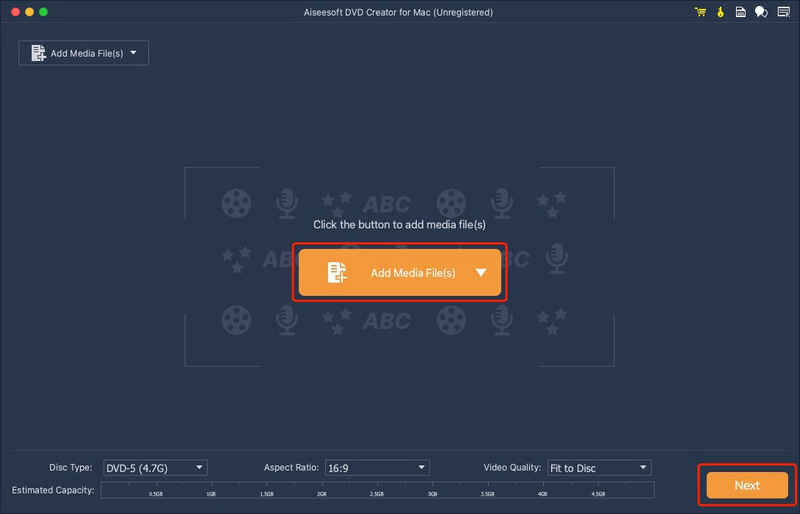
The first screen of the unregistered app: Add Media File(s), with Disc Type DVD-5 (4.7G), Aspect Ratio 16:9, Video Quality Fit to Disc, the Estimated Capacity bar and the Next button.
Features
Disc, folder or ISO from almost any video
Aiseesoft DVD Creator for Mac accepts the files Macs usually end up with (iPhone MOV and HEVC, iMovie exports, MP4 downloads, camcorder MTS and MOD/TOD) as well as MKV, AVI, WMV and FLV, and combines several of them onto one disc as separate titles. Besides burning, it can save a DVD folder or an ISO image, which you can burn later on another computer or keep as a backup.
Menu templates you can customize
Aiseesoft DVD Creator for Mac has menu templates grouped by theme (Holiday, Family, Wedding, Travel and others) plus your own saved Custom Templates. You can edit the title and button text, change fonts and colors, set background music (looped if you like), swap the background picture and add an opening film that plays before the menu. "No Menu" makes a disc that simply plays.
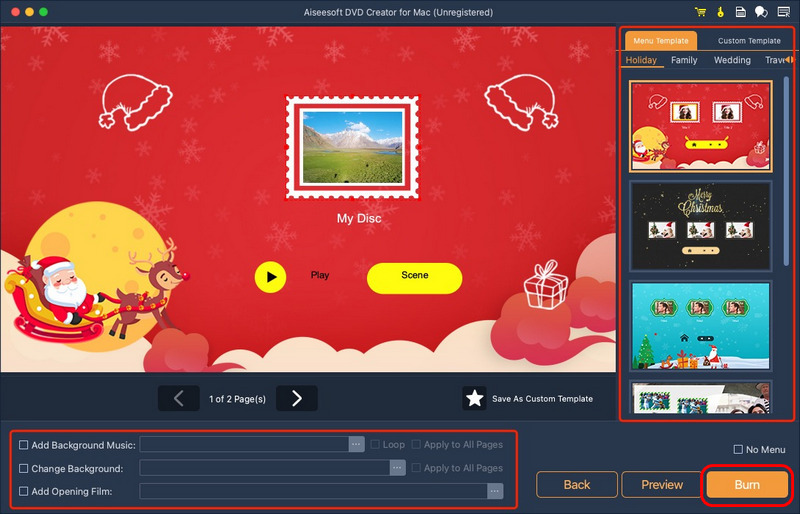
The menu screen with a Christmas template from the Holiday group, Play and Scene buttons, Save As Custom Template, and the Add Background Music, Change Background and Add Opening Film options below.
Audio tracks and subtitles
Aiseesoft DVD Creator for Mac lets you add extra audio tracks (a second language or a commentary) and subtitle files to each title, with language tags and the subtitle's position, font, size and color. A DVD player then offers them in its audio and subtitle menus, just like a shop-bought disc.
Basic editing before burning
Aiseesoft DVD Creator for Mac can trim the start and end of each clip, crop black bars, adjust brightness, contrast, saturation, hue and volume, and add a text or image watermark. It's meant for tidying clips so you don't need to re-export them from iMovie first.
Burn settings for TVs and players
Aiseesoft DVD Creator for Mac's last screen sets the TV standard (NTSC or PAL), the volume label, the number of copies to burn one after another, and the playback mode: start from the menu or loop all titles, which is useful for a disc that plays on repeat at an event or a shop display.
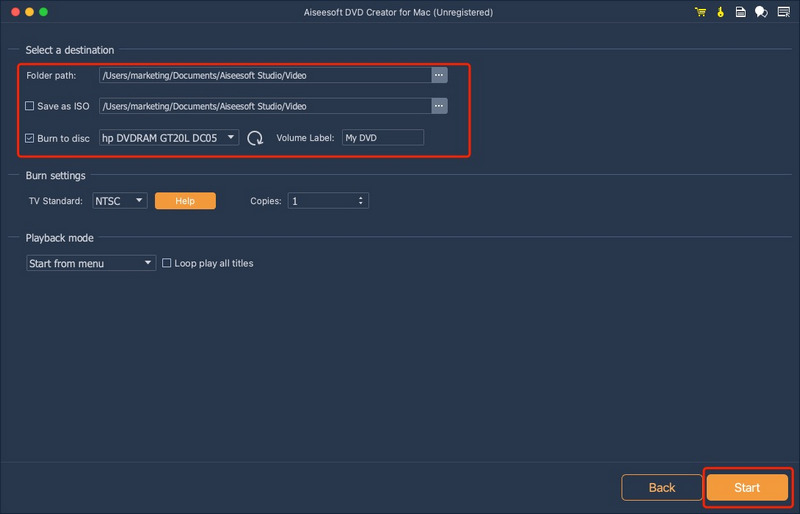
The destination screen: a folder path, Save as ISO, Burn to disc with an HP DVD writer selected, TV Standard NTSC, Copies, and the "Start from menu" playback mode.
Benefits
- The iDVD gap filled. Mac owners get menus and TV-playable discs again without running Windows software.
- One-time price. The order page sells a lifetime license, so there's no subscription for a tool you may use a few times a year.
- Native on Apple silicon with a separate M-series build, so encoding doesn't run through Rosetta.
- Disc-free option. ISO output lets you prepare discs now and burn them later on a machine that has a drive.
Real-World Uses
- Family gifts: collect a year of iPhone clips into one disc with a holiday menu for relatives who watch on a TV DVD player.
- Weddings and events: burn several copies of the same film for guests, one after another.
- Old camcorder footage: put MOD/TOD or MTS files from a tape or hard-disk camcorder onto a disc that will still play in any player.
- Schools and churches: hand out a recorded performance or service on DVD to people without streaming.
- Looping displays: a "loop all titles" disc for a trade-show stand or a shop TV.
Who It's For, and Who Should Skip It
It suits Mac owners who need to give video to people who watch on a DVD player, and want menus that look finished without learning authoring software.
Skip it if the person on the other end can use a USB stick, a shared album or a streaming link: those keep HD quality and cost nothing. Skip it too if you want HD on a disc (you need a Blu-ray authoring tool and a Blu-ray burner), or if you only burn the odd disc and don't mind the free DVDStyler, which does the basics with a more technical interface.
Usage Guide
- Install: open the DMG and run the installer, which downloads the build for your Mac. Plug in your USB DVD burner and insert a blank disc.
- Add videos: click Add Media File(s), then choose the disc type, aspect ratio and video quality. Watch the capacity bar.
- Edit (optional): select a title to trim, crop, adjust colors, or add audio tracks and subtitles.
- Design the menu: click Next, pick a template or No Menu, add background music, a picture or an opening film, and click Preview.
- Burn: click Burn, tick Burn to disc and/or Save as ISO, set NTSC or PAL and the number of copies, then click Start.
- Test: play the finished disc in the actual DVD player you're giving it for, before burning more copies.
Where it falls short
- "Not enough space" surprises. Aiseesoft's FAQ explains that 3 GB of compressed video can need more than a 4.7 GB disc once it's converted to uncompressed DVD video. The capacity bar shows this, but expect to choose DVD-9 or lower quality for long videos.
- No Blu-ray. It only makes DVDs; Aiseesoft sells Blu-ray creation separately.
- Drive problems are on you. For a "no driver found" error the FAQ's advice is to reinstall the app or update the drive's driver from its maker, which is little help with an unsupported drive.
- Few independent reviews. Download sites describe it, but no Mac magazine has tested it recently, so the trial is your best test.
What Users Say
Reviews on Aiseesoft's own page
Aiseesoft's review page for the Mac edition shows 105 reviews. They're chosen by the vendor, so read them as testimonials; the older ones are the most specific:
"I don't see any image or sound quality loss during the DVD burning. By the way, I mainly use it to burn MP4 videos to DVD discs." Mandy, "Powerful software", July 10, 2018
"It takes me half hour to convert 5 movies into 8GB disc." Grizzle, "Converting speed is Ok", January 10, 2018
"At the beginning, it did not recognize my DVD drive on my Mac Pro, after minutes trying, it is done." Shane, December 8, 2017
"I use your trial version, and only allowed to convert the video to DVD for three times. There is watermark on the DVD folder. But the quality is good." Cornish, "The quality is good", January 8, 2018 (an older version; current trial terms may differ)
Trustpilot (Aiseesoft as a company)
Aiseesoft Studio has a TrustScore of 3.8 out of 5 from about 610 reviews across all its products, with about 60% five-star and 34% one-star. Praise centers on support ("The customer service is swift, pleasant and competent.", Jane, August 2026); the one-star reviews mostly concern refunds being refused for products that weren't faulty, and other products such as Data Recovery.
Download sites
FileHippo's editor described an older version as easy to use with basic but good editing features. Softpedia's listing still calls it Intel-only, which is out of date: the current installer has a native Apple silicon build.
The pattern: users like that it burns MP4 and MOV files to a DVD with little fuss and keeps the quality; the complaints are about drive detection at first run and Aiseesoft's strict refunds.
Comparisons
Aiseesoft DVD Creator for Mac vs Finder's Burn
Finder copies files to a disc as data. A computer can read it, but a TV DVD player can't play it. Aiseesoft's app re-encodes the video into DVD-Video with menus, which is what players need.
Aiseesoft DVD Creator for Mac vs DVDStyler
DVDStyler is free and open source with menu editing, but it's harder to learn. Aiseesoft's app has prettier templates, an Apple silicon build and a guided three-step flow, for a one-time fee.
Editions and Pricing
| License | Price | Term | Macs |
|---|
| Lifetime (our Buy Now button) | $39.96 (list $49.95) | One-time payment | 1 |
| 1 Month | $12.45 (list $24.90) | Renews monthly | 1 |
| Multi-user lifetime | $69.96 (list $149.85) | One-time payment | 3 |
The monthly and multi-user prices are the ones Aiseesoft's product page listed on November 4, 2026. A Windows edition, Aiseesoft DVD Creator, is sold separately.
FAQs
Does Aiseesoft DVD Creator for Mac work with Apple's USB SuperDrive?
Aiseesoft DVD Creator for Mac burns to the DVD writer macOS sees, internal or USB, and Apple's SuperDrive is a DVD writer. Insert a blank disc and check that the drive appears under Burn to disc in the trial before buying.
Can it burn iMovie projects to DVD?
Yes, after you export them. Aiseesoft DVD Creator for Mac takes the MP4 or MOV file iMovie exports (File, Share, File), not the iMovie project itself.
How many minutes of video fit on one DVD?
Aiseesoft DVD Creator for Mac fits the video to the disc you choose, and the capacity bar shows the estimate. At good quality a DVD-5 holds roughly 1 to 2 hours and a DVD-9 about twice that; more video means lower quality per minute.
Can I make a DVD without a DVD drive?
Yes. Aiseesoft DVD Creator for Mac can save a DVD folder or ISO image instead of burning, so you can burn it later on a computer that has a drive, or play the ISO in a media player.
Can it copy or rip an existing DVD?
No. Aiseesoft DVD Creator for Mac only makes DVDs from video files. Copying or ripping discs needs a different tool.
Does the license cover the Windows version too?
No. Aiseesoft DVD Creator for Mac's lifetime license covers one Mac; the Windows DVD Creator has its own license.
Do I get updates with the lifetime license?
Aiseesoft DVD Creator for Mac's purchase page lists free upgrades and free technical support with the license, so new versions for new macOS releases are included.
System Requirements
- macOS 10.12 Sierra or later, up to macOS Tahoe
- 1 GHz Intel processor or Apple M-series chip (M1 to M5)
- 1 GB RAM or more
- A DVD writer (internal or USB) for disc output
- Free disk space of about twice the DVD size for temporary files
Conclusion
Worth it if you need to give video to people who watch on a DVD player. Aiseesoft DVD Creator for Mac does the job iDVD used to do, with decent templates, audio tracks and subtitles, ISO output and a native Apple silicon build, for a one-time $39.96. The main reason not to buy: if the recipient can take a USB stick or a link, skip discs altogether and keep the HD quality. Use the trial to confirm your burner is detected and a test disc plays in the target player, since Aiseesoft only refunds for quality problems.
Download Free TrialBuy Now