Aiseesoft HD Video Converter: Change HD and 4K Formats on a Windows PC
Aiseesoft HD Video Converter is a Windows program that converts HD and 4K video between formats such as AVCHD (MTS/M2TS), H.264, H.265/HEVC, MP4, MOV, AVI and MKV. It suits camcorder owners and anyone whose TV, phone or editor refuses a file. The order page charges $45.00 a year, renewing automatically.
The usual trigger is simple: a Sony or Panasonic camcorder hands you .MTS files, and your iPad or smart TV won't play them. This program turns those files into something the device accepts, one at a time or in a batch.
Quick facts
- Version: 9.2.36, installer dated January 9, 2024
- Developer: Aiseesoft Studio
- Platform: Windows 11, 10, 8 and 7. The Mac edition (Mac OS X 10.7 or higher) is a separate product.
- Converts: AVCHD, MTS/M2TS, MOD/TOD, MXF, H.264, H.265/HEVC, DivX, MP4, MOV, AVI, MKV, WMV and more
- Resolutions: 720p, 1080p and 4K (3840 x 2160), up or down
- Price: $45.00 on the order page, on a yearly auto-renewal
- Trial: free download. Aiseesoft's FAQ says the trial converts 5 minutes of longer files, half of shorter ones, and adds a watermark.
- Refunds: 30 days, for "a quality problem", in Aiseesoft's words
- What we checked: the 43.7 MB installer from Aiseesoft, with file version 9.2.36, and the order page, which charged $45.00 with a next billing date a year later, on November 6, 2026. We didn't run a conversion test.
Before you buy
This is a subscription at this price. The order page renews at $45 every 12 months unless you turn automatic billing off. Aiseesoft's own store lists different plans, including a lifetime license (see Editions and Pricing), so compare before you pay.
The Windows build dates from January 2024. Format conversion doesn't depend on new phones the way a transfer tool does, but newer codecs such as AV1 aren't on Aiseesoft's format list.
Download Free TrialBuy Now
Overview
The main window is built around a file list, a preview pane, a Profile menu and a large Convert button. You load files, pick a target format or a device profile, and start. GPU buttons at the top right switch on NVIDIA, Intel or AMD acceleration. Editing tools sit in a separate window, so they stay out of the way if all you want is a format change.
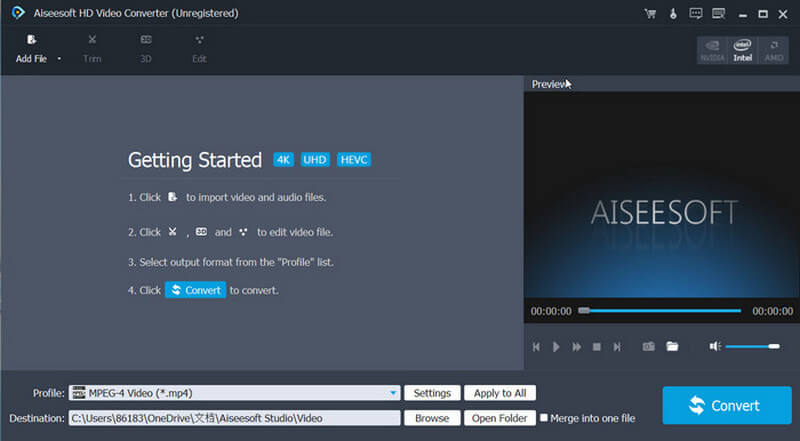
The main window before any files are added, with the Profile menu set to MPEG-4 Video and the Intel GPU option at the top right.
Features
Convert camcorder and HD formats to something that plays
Aiseesoft HD Video Converter reads AVCHD (.mts, .m2ts, .ts), MOD/TOD, MXF and P2 MXF camcorder files as well as H.264, H.265 and DivX video, and writes them to MP4, MOV, AVI, MKV, WMV and others. That's the core job, and it's why the program exists alongside Aiseesoft's bigger suite.
Scale between 720p, 1080p and 4K
Aiseesoft HD Video Converter can shrink a 4K clip to 1080p or 720p for a smaller file or an older screen, or scale 1080p up to 3840 x 2160. Upscaling can't add detail that was never recorded, so treat it as a compatibility step, whatever a marketing line suggests.
Profiles for devices and editing programs
Aiseesoft HD Video Converter includes output profiles for iPhone and iPad models, Samsung Galaxy phones, HTC, Motorola and Sony devices, plus editors such as Sony Vegas, Adobe Premiere Pro and Windows Movie Maker. You pick the target and the program fills in the codec and resolution.
Basic editing before you convert
Aiseesoft HD Video Converter lets you rotate, crop, trim and merge clips, add a watermark or a 3D effect, and adjust brightness, contrast, saturation, hue and volume. Original and output previews sit one above the other, so you can see a crop before you commit to it.
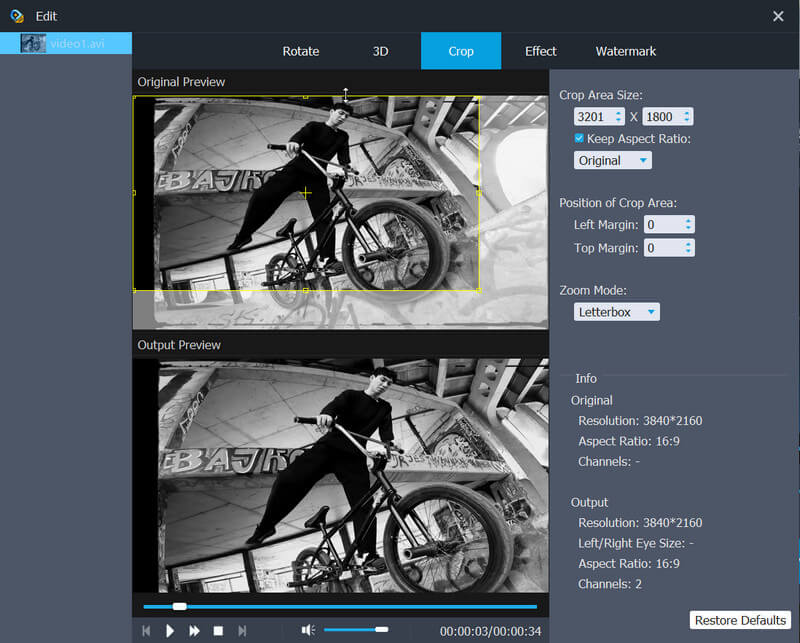
The Edit window on the Crop tab, with Rotate, 3D, Effect and Watermark tabs beside it. The source here is a 3840 x 2160 clip.
Batch conversion with GPU help
Aiseesoft HD Video Converter queues several files at once and shows per-file and total progress. Aiseesoft claims speeds up to 10X with GPU acceleration, a figure that depends on your graphics card and on the codecs involved.
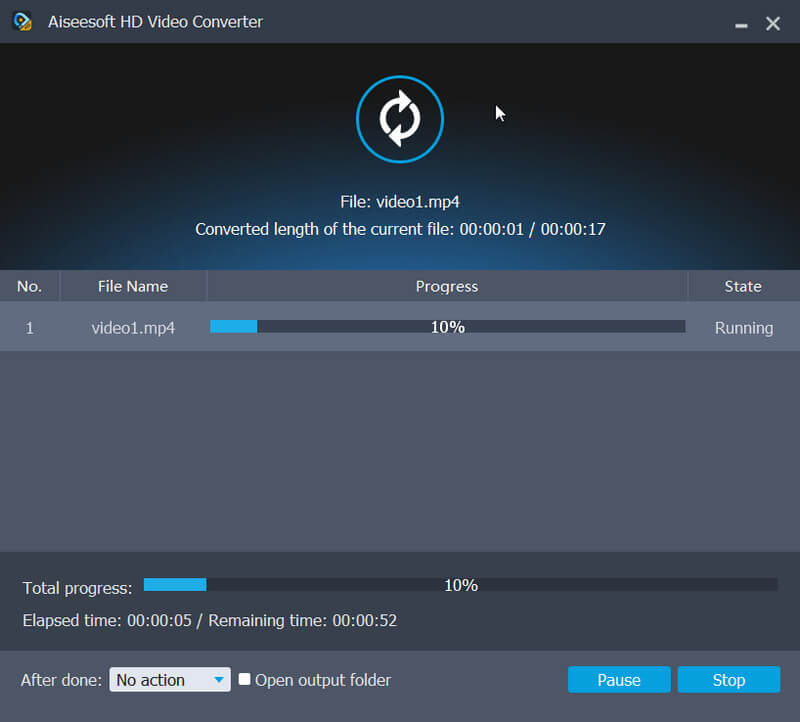
The progress window, showing elapsed and remaining time and an option for what to do after the job finishes.
Benefits
- Older screens stay useful. An old HDTV or a tablet can play camcorder footage once it's in the right format.
- Files stay on your PC. Nothing is uploaded, which matters for family or client footage and for files too large for an online converter.
- Less trial and error. A profile saves you from looking up which codec a device wants.
Real-World Uses
- Holiday footage on a TV. Turn AVCHD files from a Sony camcorder into MP4 for a TV that rejects .MTS.
- Editing older clips. Convert MOD or MXF footage into a format Premiere Pro or Vegas handles without complaint.
- Saving space. Bring 4K phone clips down to 1080p for an archive or to share by cloud link.
- A tablet for a trip. Batch-convert a folder of videos with an iPad profile before you leave.
Who It's For, and Who Should Skip It
Aiseesoft HD Video Converter fits people with a specific format problem and no wish to learn encoding settings. Someone with a drawer of camcorder files is the ideal buyer.
Skip it if you convert only now and then, because a yearly renewal is hard to justify and free tools such as HandBrake handle common formats well. Skip it too if you want a DVD ripper, downloader or screen recorder in one package; those belong to bigger suites such as Aiseesoft's own Video Converter Ultimate.
Usage Guide
- Download and install the program, then open it.
- Click Add File, or drag your videos into the window.
- Click Edit or Trim if you need to crop, rotate or cut anything.
- Open the Profile menu and choose a format or a device.
- Choose a destination folder, tick Merge into one file if you want the clips joined, and click Convert.
Where it falls short
- Aiseesoft's "without quality loss" wording is marketing. Re-encoding lossy video always costs a little, so keep your originals.
- Refunds are a common complaint about Aiseesoft as a company on Trustpilot, and the promise covers "a quality problem", not a change of mind. Test your own files in the trial first.
- Registration keys are tied to a computer, and several Trustpilot reviewers needed support to reset a key after moving to a new PC.
What Users Say
Independent reviews of this specific program are scarce, so we've kept product reviews and company reviews apart.
Reviews on Aiseesoft's product page (246 reviews, 4.5 average)
These are published by the vendor, so read them as the happy end of the range.
Leah: "Wow, so fantastic. I have many HD video files from my Sony Camcorder, and I cannot play on my iPad. With this software, now I can convert the M2TS files to MP4 and play on my iPad Pro easily."
Jones: "I know a lot of video converters called themselves as HD video converter but they are really not what they boasted. I have tested this HD video converter and the results really satisfy me."
Alex: "My grandpa wants to watch the videos of our Christmas family party. He has a HDTV, but it cannot play the AVCHD MTS files. This HD converter converts the files to MP4 format easily and keeps the HD video quality."
Jolin: "Just tried to convert a short video – 5mins- shot with my Canon Camcorder. I select the high definition H.264 and it converts the video with less than 2 minutes."
Wilfred: "It has a number of excellent options; you can define the output as relative size or actual size and to be sure the quality of the output is up to your requirements."
Trustpilot: Aiseesoft Studio as a company (3.8 out of 5, 610 reviews)
These cover all of Aiseesoft's products, not this one.
Jane (August 22, 2026): "Aiseesoft Studio software just works! The customer service is swift, pleasant and competent."
Lowell (October 12, 2026): "Company reset my registration to reregister my software on a new computer."
Henry (January 4, 2026): "The software has done wonders in converting various formats to MP4 which I can easily play on my various devices."
B Hackett (October 22, 2026): "They refused to issue the refund. and have not fixed the haptics"
Owend (September 14, 2026): "First warning sign was they try to push you into a subscription rather than the one-time purchase."
John A (July 11, 2025): "I was refused even a partial refund of $117.70"
What the reviews add up to
People with camcorder files are pleased, and conversion quality is rarely the problem. The complaints are about the business side: refunds, subscriptions and license resets. That points to the same advice as the rest of this page: run your own file through the trial, and read the term on the order page.
Comparisons
HD Video Converter vs Aiseesoft Video Converter Ultimate
Aiseesoft HD Video Converter does format conversion with light editing. Video Converter Ultimate, the company's larger program, adds enhancement and other tools on top. If you only need files to play somewhere, the smaller program is enough. If you want one program for many media jobs, look at the bigger one.
HD Video Converter vs HandBrake
HandBrake is free and open source and turns most video into MP4, MKV or WebM. Aiseesoft HD Video Converter is the easier choice if you want a long list of device profiles, more output formats, and crop and watermark tools in one window. If all you need is an MP4, the free tool makes more sense.
Editions and Pricing
| Plan | Where | Price | Term | PCs |
|---|
| Order page behind our Buy Now button | 2Checkout | $45.00 | 1 year, auto-renews at $45 | 1 |
| 1 Year License | Aiseesoft store | $25.60 (list $32.00) | 1 year | 1 |
| Lifetime License | Aiseesoft store | $36.00 (list $45.00) | Lifetime | 1 |
| Multiple-User Personal License | Aiseesoft store | $183.20 (list $229.00) | Lifetime | 8 |
Aiseesoft store prices were read from its product page on November 6, 2026 and move with its promotions.
FAQs
Does Aiseesoft HD Video Converter renew automatically?
Yes. At $45.00 on the order page, Aiseesoft HD Video Converter is billed again 12 months later. The order page says automatic billing can be disabled at any time.
Can Aiseesoft HD Video Converter convert H.265/HEVC video?
Yes, Aiseesoft HD Video Converter lists H.265/HEVC among the formats it converts, along with H.264/AVC, AVCHD and DivX.
Does Aiseesoft HD Video Converter work on Windows 11?
Yes. Aiseesoft lists Windows 11, 10, 8 and 7 as supported.
Does the Windows license also cover a Mac?
No. Aiseesoft sells HD Converter for Mac as a separate product, with its own download and its own purchase page.
Does the trial of Aiseesoft HD Video Converter add a watermark?
Yes, according to Aiseesoft's FAQ on trial and registered versions, converted video from the trial carries a watermark and length is capped at 5 minutes per file. A registration code removes both limits.
Can Aiseesoft HD Video Converter rip DVDs or download videos?
Neither appears among its features. Aiseesoft HD Video Converter works on video files already on your computer.
System Requirements
- Windows 11, 10, 8 or 7
- About 44 MB for the installer
- An NVIDIA, Intel or AMD graphics chip for GPU acceleration (optional)
Conclusion
Worth it for a clear, repeating format problem, with one big condition: read the term. The program does a focused job in a simple window, and owners of camcorder footage are its happiest users. The one reason to buy is getting AVCHD and other HD formats to play without learning encoders. The main reason not to is value: at $45 a year it's a costly way to convert a few files, and a free tool may be enough.
Download Free TrialBuy Now