Aiseesoft PPT to Video Converter: Batch-Convert PowerPoint Decks to Video, or Burn Them to DVD
Aiseesoft PPT to Video Converter is a $49.95 Windows program (lifetime license, one PC) that turns PowerPoint presentations into MP4, WMV, AVI, MOV and other video files, or burns them to a DVD disc or ISO image with a menu. It needs Microsoft PowerPoint installed on the same PC, and it's most useful for people with many decks to convert or presentations that must play on a TV's DVD player.
The usual reasons to turn a deck into a video are practical: a kiosk or lobby screen that loops a presentation, a training course uploaded to a video platform, a sales deck sent to a client's phone, or a social site that won't accept a .pptx. PowerPoint can export one deck at a time to MP4 itself; this program adds batch conversion, more output formats, narration recording and, its most distinctive feature, DVD authoring.
Quick facts
- Version: 1.0.18 (installer dated December 27, 2023)
- Developer: Aiseesoft Studio
- Runs on: Windows 11, 10, 8.1, 8 and 7. No Mac version.
- Requires: Microsoft PowerPoint installed on the PC (2010 or later for Auto Mode)
- Input: PPT, PPTX, PPTM, PPSX, PPS, PPSM, POTX, POT, POTM and ODP
- Video output: MP4, WMV, AVI, MOV, M4V, MKV, FLV, MPG, VOB, TS, ASF, F4V, up to 1080p, plus device profiles
- DVD output: DVD disc, DVD folder or ISO, NTSC or PAL, with menu templates and background music
- Price: $49.95 one-time on the order page for a lifetime license on one PC
- What we checked: the 84.6 MB installer, whose file version is 1.0.18, and the order page, which sells the license for $49.95, on November 4, 2026. We didn't convert a presentation with it, and Aiseesoft doesn't publish this product's trial limits.
Before you buy: you may not need it
PowerPoint 2010 and later can already save a presentation as a video (File, Export, Create a Video), with your timings and narration, at no extra cost. If you convert the odd deck to MP4, use that.
Aiseesoft's product page says you can watch presentations "when you do not install the Microsoft PowerPoint", but its own tech specs and guide say PowerPoint must be installed on the PC that does the converting. The finished videos play anywhere; the conversion doesn't. Also close the presentations in PowerPoint before converting, as the guide warns.
Download Free TrialBuy Now
Overview
The program opens with a choice between Convert into Videos and Burn into DVD, then walks you through a step-by-step wizard down the left side: Add File(s), Settings and Convert for video; Add File(s), Settings, Menu and Burn for DVD. It's a different design from Aiseesoft's video converters, plainer and more like an installer wizard, which suits the one-job nature of the tool.
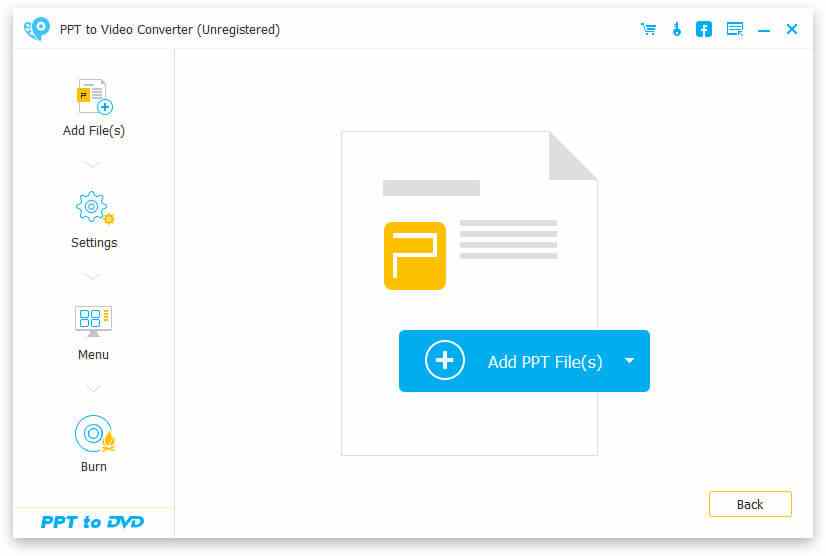
The PPT to DVD wizard: Add File(s), Settings, Menu and Burn steps down the left, and the Add PPT File(s) button, whose drop-down also adds a folder.
Features
Auto Mode: hands-off conversion
Aiseesoft PPT to Video Converter's Auto Mode advances the slides by itself at an interval you set (6 seconds by default) and records the result as video. It requires PowerPoint 2010 or later. This is the mode for batches: add a folder of decks, set the timing once and let it run.
Advanced Mode: narration and your own pacing
Aiseesoft PPT to Video Converter's Advanced Mode works with any PowerPoint version. You click through the slides yourself while it records, and you choose whether to keep the presentation's existing narration, ignore it, or record new narration through your microphone as you go. That makes it a quick way to produce a narrated walkthrough of a deck.
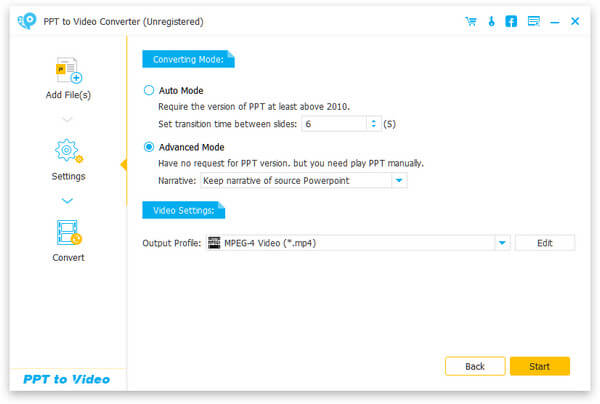
The video Settings step: Auto Mode with a 6-second slide transition time, Advanced Mode set to keep the source narration, and MPEG-4 Video chosen as the output profile.
Many output formats and device profiles
Aiseesoft PPT to Video Converter saves to MP4, WMV, AVI, MOV, M4V, MKV, FLV, MPG and more, at resolutions such as 360p, 720p and 1080p. You can choose by format or by device (iPhone, iPad, Samsung, Xbox and others) and mark favorites. Videos embedded in the slides are carried into the output, according to Aiseesoft.
Burn presentations to DVD with a menu
Aiseesoft PPT to Video Converter's DVD side sets the TV standard (NTSC or PAL) and aspect ratio, lets you set DVD chapters in Advanced Mode, then adds a menu from templates with a background image and music, and burns to a disc, a DVD folder or an ISO file with your choice of burning engine and volume label. It even suggests the slide size to use for the best result.
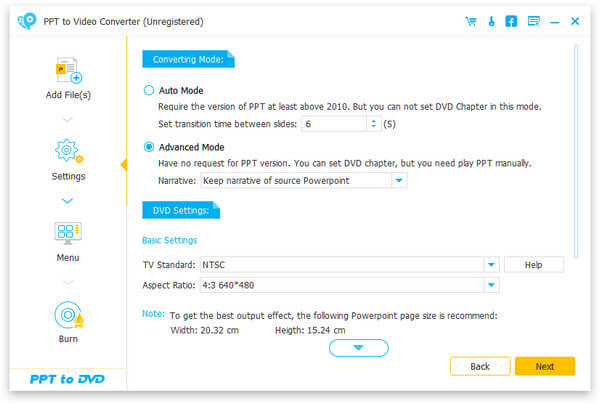
DVD settings: Auto Mode can't set chapters, Advanced Mode can; NTSC TV standard, 4:3 640x480 aspect ratio, and a recommended PowerPoint page size of 20.32 x 15.24 cm.
Benefits
The value is in volume and in the DVD route. A trainer with forty course decks can queue them all instead of exporting each from PowerPoint by hand. A church, school or trade-show stand that still plays content from a DVD player gets a menu-driven disc without separate authoring software. And a narrated video of a deck is easier to send than a .pptx with audio files that may not play on the recipient's machine.
Real-World Uses
- Training libraries: batch-convert a folder of course presentations to MP4 for a learning platform.
- Lobby or trade-show loops: make a timed MP4 or a DVD that plays on a TV without a PC attached.
- Narrated sales walkthroughs: click through the deck in Advanced Mode, talk over it, and send the video.
- Memorial or event slideshows built in PowerPoint: burn them to a DVD with a menu and background music for relatives.
- Social posts: turn a deck into a video that Facebook or LinkedIn accept.
Who It's For, and Who Should Skip It
It suits Windows users with PowerPoint who convert many presentations, need WMV, AVI or other formats PowerPoint doesn't export, or want DVDs with menus.
Skip it if you convert a deck now and then (PowerPoint's own export is free), if you don't have PowerPoint installed, if you're on a Mac (no Mac version; Keynote and PowerPoint for Mac both export video), or if you want a full slideshow maker from photos, which Aiseesoft sells separately as Slideshow Creator.
Usage Guide
- Make sure Microsoft PowerPoint is installed, and close any presentations you want to convert.
- Install the 84.6 MB download and launch PPT to Video Converter.
- Choose Convert into Videos or Burn into DVD.
- Click Add PPT File(s), or use its drop-down to add a whole folder.
- In Settings, pick Auto Mode and a slide time, or Advanced Mode and a narration option. Choose the output profile (or, for DVD, the TV standard and aspect ratio).
- For a DVD, click Next, choose a menu template, background and music, then choose disc, folder or ISO and the burner.
- Click Start. In Advanced Mode, click through the slides yourself while it records.
Where it falls short
- Depends on PowerPoint. No PowerPoint, no conversion, and PowerPoint itself can already make MP4 videos.
- Advanced Mode is real-time. You click through every slide while it records, so a 30-minute talk takes 30 minutes.
- Dated DVD defaults. The DVD settings start at 4:3 640x480; check the aspect ratio for widescreen slides.
- Thin, careless product page. The "reviews" on Aiseesoft's page for this product are actually about its iPhone eraser, FoneEraser, and a heading calls it "Total Video Converter". It doesn't inspire confidence, though it says nothing about the software itself.
- No published trial limits. Check what the trial does to your output before relying on it.
What Users Say
Reviews of this product
We couldn't find any independent reviews or user ratings of Aiseesoft PPT to Video Converter: download sites list it with almost no downloads or votes, and the quotes on Aiseesoft's own product page belong to a different product. That's a sign of a niche tool with few users, so lean on the trial rather than other people's opinions.
Trustpilot: Aiseesoft as a company
Aiseesoft has a TrustScore of 3.8 from 610 reviews. Reviewers often praise support, for example "Support was Fantastic!" (DavidP, August 2026) about moving a license to a new email address. The one-star reviews concern refunds, including "Refusal to comply with consumer rights" from a buyer charged after a trial, and slow email replies.
Comparisons
Aiseesoft PPT to Video Converter vs. PowerPoint's own Export to Video
PowerPoint exports one presentation at a time to MP4 (or WMV in older versions), keeps your recorded timings, narration and animations, and costs nothing extra. Aiseesoft's tool adds batch conversion, more formats and device profiles, simple narration recording during conversion, and DVD burning with menus. If you don't need those four things, PowerPoint wins.
PPT to Video Converter vs. Aiseesoft DVD Creator
If you already have your presentation as an MP4 (from PowerPoint's export), Aiseesoft DVD Creator or any DVD authoring tool can burn it with menus, along with other videos. PPT to Video Converter is simpler only because it goes straight from the .pptx to the disc.
Editions and Pricing
| License |
Where |
Price |
Covers |
| Lifetime | Buy Now button on this page | $49.95 | 1 PC, free upgrades |
| Lifetime | Aiseesoft store, with its coupon | $39.96 | 1 PC |
FAQs
Does Aiseesoft PPT to Video Converter keep animations and transitions?
Aiseesoft PPT to Video Converter works through your installed copy of PowerPoint, but Aiseesoft doesn't spell out how animations are handled. Run a deck with your heaviest animations through the trial before buying. In Auto Mode, the slide timing you set controls how long each slide stays up.
Can it convert Google Slides or Keynote files?
Not directly. Aiseesoft PPT to Video Converter takes PowerPoint formats and ODP, so download a Google Slides deck as .pptx first, or export a Keynote file to PowerPoint.
Which PowerPoint version do I need?
Aiseesoft PPT to Video Converter's Auto Mode needs PowerPoint 2010 or later; Advanced Mode works with any version, but you advance the slides yourself.
Will a converted DVD play on a normal DVD player?
Aiseesoft PPT to Video Converter writes standard DVD video in NTSC or PAL. Pick the standard used in your country, and burn to a disc type your player supports.
Is there a Mac version?
No. Aiseesoft PPT to Video Converter is Windows-only.
Can I get a refund?
Aiseesoft's 30-day money-back guarantee applies when there's a quality problem with the software, not a change of mind, so test the trial with your own presentations.
System Requirements
- Windows 11, 10, 8.1, 8 or 7
- Microsoft PowerPoint installed (2010 or later for Auto Mode)
- 1 GHz Intel or AMD processor
- 1 GB RAM or more
- About 85 MB for the installer; a DVD burner for disc output
Conclusion
Aiseesoft PPT to Video Converter is a narrow tool that only makes sense alongside PowerPoint. Its real reasons to exist are batch conversion of many decks, formats PowerPoint doesn't export, narration recording on the fly, and DVD discs with menus.
Buy it if you regularly convert lots of presentations or need DVDs for TVs and players. Skip it if you only convert the occasional deck: PowerPoint's built-in Export to Video does that for free.
Download Free TrialBuy Now