Able Fax Tif View: A Kodak Imaging Replacement for Viewing, Editing and Converting Multipage TIFF and Fax Files
Able Fax Tif View is a $56 Windows program from GraphicRegion for viewing, editing, annotating and converting multipage TIFF, fax and PDF files. It's aimed at offices and home users who scan or receive faxes as TIFFs and want the page tools the old Kodak Imaging viewer had, plus scan cleanup, OCR and batch conversion.
The everyday problem is simple: Windows' photo viewers show a multipage fax as a single picture, can't drop a blank page or turn page 7 the right way up, and ignore the notes someone made in an older imaging system. Able Fax Tif View treats every page as something you can move, fix, annotate or pull out.
Quick facts
- Version: 3.26.10.9, October 2026
- Developer: GraphicRegion (Graphic-Region Development)
- Platform: Windows only (the developer names Windows 8, 10 and 11, and older systems back to XP)
- Opens: TIFF, fax, PDF, DCX, EPS, PS, AI, DICOM, JBIG and GIF, plus JPEG, PNG, BMP, HEIC, WebP and other common formats
- Price: $56 personal (home use), $89 business, one-time payment
- Updates: free for one year; the license never expires
- Trial: 30 days
- What we checked: installer faxtifview.exe, file version 3.26.10.9 (43.6 MB), downloaded from graphicregion.com with a valid digital signature on November 8, 2026, and all four license prices on the order page on November 8, 2026. We didn't run it on a set of our own faxes.
Before you buy
- It's the same feature set as Advanced TIFF Editor. GraphicRegion also sells Advanced TIFF Editor at the same prices and with the same version number and change log. You don't need both.
- Very large files need Advanced TIFF Editor Plus. Able Fax Tif View loads the whole file into memory. For scans of hundreds of pages, the developer points you to Plus ($65), which loads one page at a time.
- The personal license is for home use only. Office, business or government use needs the $89 business license.
Download Free TrialBuy Now
Overview
Able Fax Tif View has been on the market for many years, and it looks it: a Pages panel of thumbnails on the left, the page in the middle and a long toolbar on top. It's still updated every few months. The October 2026 release added automatic border-color detection and Crop Threshold and Inner Crop options to AutoCrop; earlier 2026 releases added WebP loading and saving, EXIF auto-rotation and a fix for page order during multipage scanning.
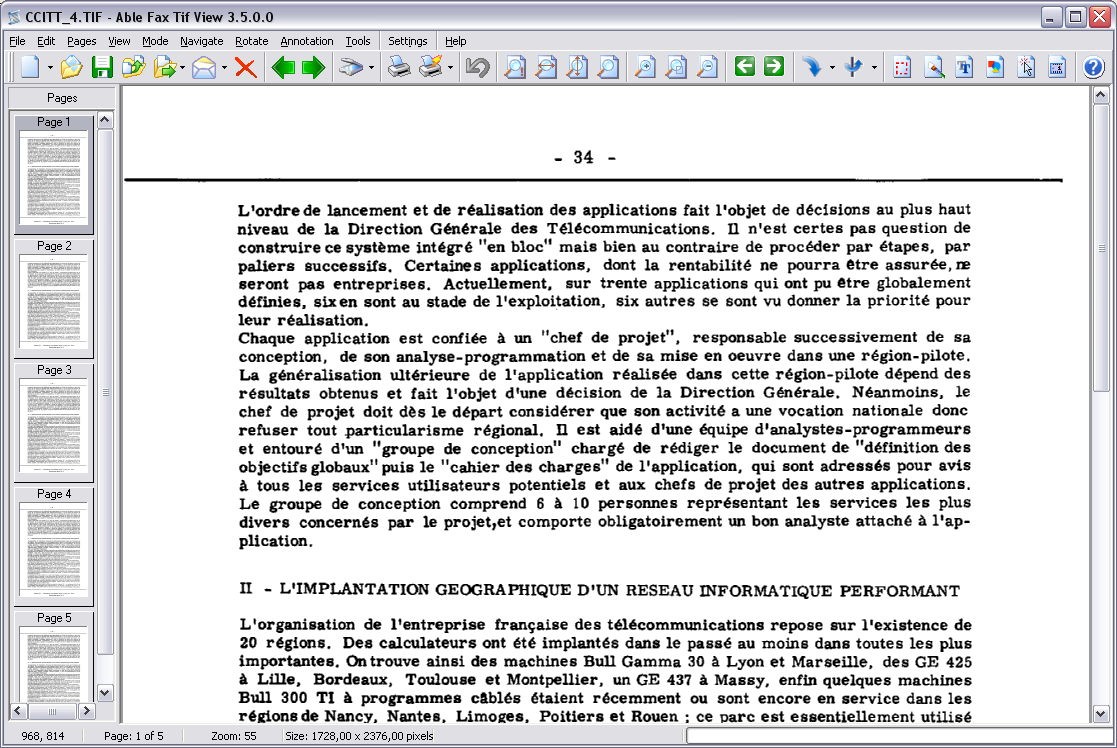
The main window (shown in an older version, 3.5.0.0) with a 5-page CCITT G4 fax open, page thumbnails on the left and the full menu bar.
All processing happens on your own PC, so faxed medical records, contracts and tax papers never pass through an online converter.
Features
Page management: reorder, split, merge, delete
Able Fax Tif View lets you drag pages to reorder them in the Pages panel, insert pages from a scanner or another file, delete pages, split a multipage TIFF into separate files and merge several files into one. That's exactly the workflow of people who scan statements with a document feeder and then fix skipped, upside-down and blank pages afterwards.
Scan and fax cleanup
Able Fax Tif View deskews tilted scans, removes noise and isolated pixels (despeckle), crops borders automatically with AutoCrop, and removes punch holes. It also corrects faxes with different horizontal and vertical resolutions, and it can re-save TIFFs that look faded in other viewers with a different compression so they display properly.
Kodak/Wang-compatible annotations
Able Fax Tif View reads and writes Wang and Kodak Imaging annotations: highlights, lines, boxes, text and memos, date and time stamps, rubber stamps and images such as a signature. That's why it's sold as a replacement for the Kodak Imaging viewer that came with older Windows versions: notes made years ago still show up.
Conversion, OCR and batch processing
Able Fax Tif View saves to TIFF (with G4 compression for small fax files, or a different compression per page), PDF, JPEG, PNG and other formats, recognizes text in 40+ languages for search, and runs a list of actions over whole folders in batch mode.
Printing multipage documents properly
Able Fax Tif View prints a whole multipage file as one job, fits pages to paper or prints them at actual size, positions them on the sheet, and saves print presets for repeated jobs.
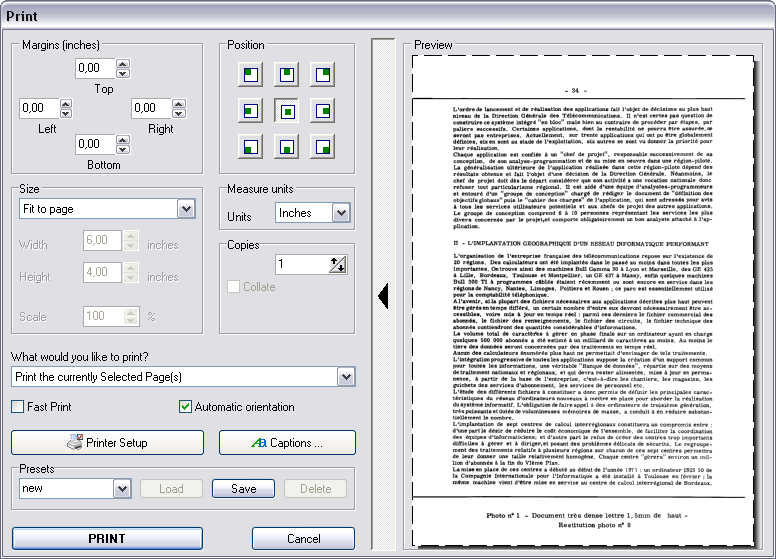
The Print dialog: margins, page position, fit-to-page sizing, copies, presets and a live preview of the scanned page.
Benefits
- Fix scans instead of rescanning. Rotating, reordering and inserting skipped pages saves running a batch through the feeder again.
- Old annotations survive. Documents from Kodak Imaging or other Wang-compatible systems keep their notes.
- Smaller archives. Cleanup and G4 compression keep a year of scanned statements in a manageable file.
Real-World Uses
- At year end, you scan twelve monthly bank statements into one 48-page TIFF, then rotate pages fed upside down, drop blank backs and insert a page the feeder skipped.
- A clinic saves scanned lab and radiology results as compact TIFFs instead of PDFs and lets physicians annotate findings for the nurses.
- A land-surveying office scanning 30 years of property plats cleans and crops each sheet before archiving.
- An engineer adds text and lines to old scanned electrical schematics.
Who It's For, and Who Should Skip It
Able Fax Tif View suits people who handle scanned and faxed documents regularly: small offices, clinics, archives, engineers and home users digitizing paperwork, especially anyone moving off the old Kodak Imaging viewer.
Skip it if you already own Advanced TIFF Editor (same features), if your files run to hundreds of pages (get Advanced TIFF Editor Plus), if you only need to read and print TIFFs (the $19.99 Multipage TIFF Viewer is cheaper), or if you need a Mac app.
Usage Guide
- Install and launch. Download the 42 MB installer from GraphicRegion and run it. The trial runs for 30 days.
- Open or scan. Click Open to load a TIFF, PDF or DCX file, or acquire pages straight from a TWAIN or WIA scanner.
- Organize pages. Drag thumbnails in the Pages panel to reorder them, and use the Pages menu to split or merge files.
- Clean up. Use Deskew for tilted scans and Remove Noise for fax artifacts; add notes with the Annotation tools.
- Save. Use File, Save As and choose TIFF (G4 for the smallest black-and-white files), PDF or JPEG.
Where it falls short
- PDFs become images. Like GraphicRegion's other editors, it converts a PDF to graphics when it opens it, so the saved file loses selectable text; OCR search still works.
- Annotations need the right format to travel. Choose the Wang/Kodak-compatible format or merge annotations into the page before sending files to someone using a different viewer.
- A crowded, dated interface. One user who has used it for years says he's still not familiar with many of its features.
What Users Say
Most published feedback on Able Fax Tif View is on GraphicRegion's own testimonials page, so it leans positive. We found no in-depth independent review. The 3d2f.com editors, quoted by the developer, called it "a perfect aide for anyone working with various tiff (fax) documents on a regular basis."
Long-time users
Bill Mcgoughran: "we use it for cleaning up certs and other documents after looking for years for a good tiff editor I found yours years ago and have been using ever since, using on 3 workstations and can't live without it."
Jörg R. chose it "in 2012 as substitution for "KODAK-Imaging" (accessory of "Windows 98 SE")" for processing paper documents for electronic storage, and names the multi-page ability and adding annotations as its most interesting features.
Rhys Ludlow: "I got Able Fax Tif View simply to scan multipage documents easily. ... After many years of dreading and avoiding scanning this software finally makes it almost as easy as printing."
Martin (Houston, TX): "AbleFaxTifView is a relatively small and very cost effective and efficient program for viewing and editing fax and TIFF files." He adds: "I had one or two small problems with the program and the developers were very quick to respond and fix them - customer support is excellent."
Specific workflows
Roy Wegen scans a year of financial statements into single TIFFs and uses it for the final edit: rotating pages, moving skipped pages into order and deleting blank pages. "It really saves considerable time when you don't have to constantly process the same batch of document to get a complete scan without skipped pages or jams."
Lisa Michelle's clinics use it with McKesson Practice Partner EMR because their IT department "does not want us to save these documents as PDF due to limited space on the server."
Gerrit Wielenga uses it "for editing old scanned electric schematics," and Teresa Braun for cropping and cleaning figures in her engineering book.
Guillermo Maduro checks outgoing faxes with it, but admits: "The program contains many interesting features which frankly, I'm still not too familiar with."
The pattern: long-term users praise the page handling, cleanup tools, Kodak replacement role and quick support. The criticism, mostly implied, is the learning curve of a program with a very long feature list.
Comparisons
Able Fax Tif View vs Advanced TIFF Editor Plus
Advanced TIFF Editor Plus has every feature of Able Fax Tif View, loads only the current page so it copes with very large files, and adds Booklet, Stacked pages & Crop and webcam capture. It costs $65 personal and $99 business, $9 to $10 more.
Able Fax Tif View vs Multipage TIFF Viewer
GraphicRegion's Multipage TIFF Viewer ($19.99) views, prints, scans and runs OCR, but isn't meant for editing and saving your documents. If you only read and print faxes, it's the cheaper choice.
Editions and Pricing
| License |
Price |
Who it covers |
| Personal | $56 | Non-commercial use at home |
| Business | $89 | Corporate, government or business use |
| Site | $1,350 | Unlimited use within one organization's site |
| World-wide | $4,500 | Unlimited use at all locations of one organization |
All licenses are one-time purchases with a year of free updates. Personal and business licenses get volume discounts from three copies ($49 personal or $79 business each for 3-4 copies), and site and world-wide buyers can get an MSI package.
Buy Personal ($56)Buy Business ($89)Buy Site ($1,350)Buy World-wide ($4,500)
FAQs
Does Able Fax Tif View run on Windows 11?
Yes. GraphicRegion lists Windows 8, 10 and 11 for Able Fax Tif View, and the current release is from October 2026. Its PAD file also lists Windows XP through Windows 10 and Windows Server 2003-2012.
What's the difference between Able Fax Tif View and Advanced TIFF Editor?
Able Fax Tif View and Advanced TIFF Editor carry the same version number, prices and feature updates on GraphicRegion's two websites, so for most buyers there's no practical difference. Buy one, not both.
Why does only the first page of my fax show in Windows' viewer?
Windows' built-in picture viewers don't handle every multipage TIFF properly. Able Fax Tif View shows all pages, and re-saving the file in Able Fax Tif View with a different compression can make it display correctly in other viewers too.
What happens to Able Fax Tif View after the first year?
Able Fax Tif View keeps working: the license doesn't expire, and only the free updates end after a year.
Can I use the Able Fax Tif View personal license at work?
No. The Able Fax Tif View personal license is for non-commercial use at home. Business, government and office use needs the business license or higher.
System Requirements
- Windows 11, 10, 8, 7, Vista or XP, or Windows Server 2003-2012
- 42 MB download
- TWAIN or WIA scanner (optional, for scanning)
Conclusion
Able Fax Tif View is worth $56 (or $89 for business use) if you work with scanned and faxed TIFF documents often and want a capable, local replacement for the Kodak Imaging viewer. The one reason to buy it is the combination of page surgery, scan cleanup and Kodak-compatible annotations in one program that's still being updated. The main reason not to: if your files are huge, Advanced TIFF Editor Plus is the better buy for $9 more, and if you only read faxes, a $19.99 viewer will do. Try it for 30 days on your own files first.
Download Free TrialBuy Now