Aiseesoft HEIC Converter for Mac: Batch-Convert iPhone Photos to JPG or PNG
Aiseesoft HEIC Converter for Mac is a small, single-purpose macOS app that converts iPhone and iPad HEIC photos to JPG or PNG in batches, with a quality setting and the option to keep or strip the EXIF data. The free trial converts 10 photos, and our Buy Now button sells a lifetime license at $31.20, paid once with no renewal.
Since iOS 11, iPhones save photos as HEIC to halve their size. Your Mac opens them without trouble, but a client's Windows laptop, an older photo printer kiosk, a website upload form or a Word document often won't. The question for a Mac owner is whether you need a separate app for this at all, and the honest answer depends on how many photos you convert and how often.
Quick facts
- Version: 1.0.52 for Apple silicon and 1.0.50 for Intel, both packaged October 30, 2026
- Developer: Aiseesoft Studio
- Runs on: macOS 11 Big Sur or later on Apple silicon Macs; Mac OS X 10.7 or later on Intel Macs. A separate Windows edition exists.
- Converts: HEIC/HEIF to JPG/JPEG or PNG, in batches, with JPG quality and Keep Exif Data options
- Free trial: converts 10 HEIC files
- Price: $31.20 one-time on the order page for a lifetime license; a 3-Mac license is also sold (see Editions and Pricing)
- Refunds: 30-day money-back guarantee for lifetime licenses when there's a quality problem
- What we checked: the 3.9 MB online installer and the packages it downloads (Apple silicon 1.0.52.167125, 30 MB, needing macOS 11; Intel 1.0.50.150178, 18 MB, needing Mac OS X 10.7), and the order page, rechecked on November 4, 2026, which sells "Aiseesoft HEIC Converter for Mac" at $31.20 as a lifetime license with no renewal. We didn't convert photos with it.
Before you buy: your Mac can already do this
- Finder converts HEIC for free. On macOS Monterey and later, select photos in Finder, right-click, choose Quick Actions, then Convert Image, and pick JPEG or PNG and a size. Preview's File, Export does the same for one file, and Photos exports selected pictures as JPEG.
- Stop the problem at the source. On the iPhone, Settings, Camera, Formats, Most Compatible makes the camera save JPEG from now on.
- So who needs it? People who regularly convert big folders and want one window with a quality setting, EXIF control and an output folder, or who run an older Mac without Quick Actions. The 10-photo trial shows whether it's faster for you than Finder.
- The Buy Now button sells a lifetime license at $31.20, a one-time payment with nothing to cancel. Aiseesoft's own site shows it at $24.96 with its coupon.
Download Free TrialBuy Now
Overview
The whole app is one window. The left side lists the photos you've added with their size and folder, each with a checkbox; the right side holds the conversion settings: format (JPG/JPEG or PNG), quality as a percentage, a Keep Exif Data box and the output path. The Convert button shows how many photos are ticked, and a summary at the end reports how many succeeded and failed, with a button to open the output folder in Finder.
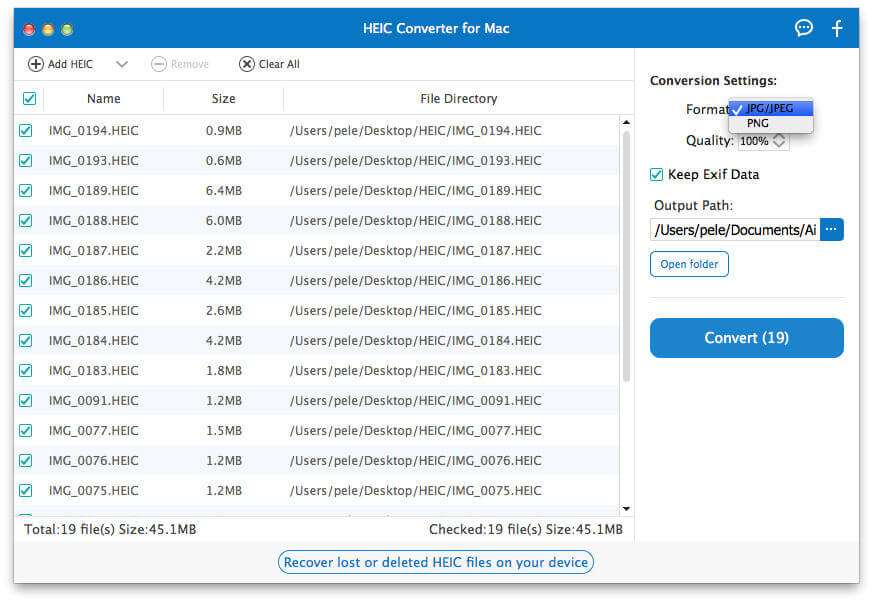
The main window with 19 iPhone HEIC photos (45.1 MB) listed, the Format menu open on JPG/JPEG and PNG, Quality at 100%, Keep Exif Data ticked and the Convert (19) button.
Features
Batch conversion from files or folders
Aiseesoft HEIC Converter for Mac takes single photos or a whole multi-selection, dragged in from Finder or added with Add HEIC, and converts them in one run. Checkboxes let you leave some out without removing them from the list.
JPG or PNG with a quality setting
Aiseesoft HEIC Converter for Mac writes JPG/JPEG (smaller, universal) or PNG (lossless, larger), and the Quality control sets the JPG compression, so you can make smaller files for email or web uploads, or keep 100% for printing.
Keep or strip EXIF data
Aiseesoft HEIC Converter for Mac's Keep Exif Data box carries the photo's metadata (date taken, camera and, if recorded, GPS location) into the converted file. Untick it before sharing photos publicly and the location won't travel with them, a privacy step Finder's Convert Image doesn't offer as a single switch.
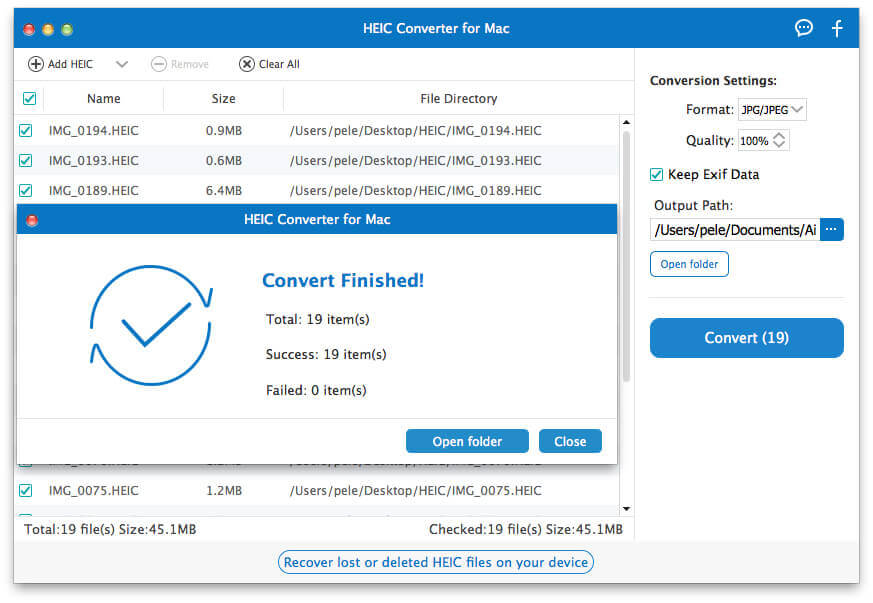
The Convert Finished summary: 19 items, 19 succeeded, 0 failed, with Open folder and Close buttons.
Real-World Uses
- Sending photos to Windows users: convert an album of trip photos to JPG before sharing a folder with family on PCs.
- Uploads that reject HEIC: job portals, government forms and older web shops that only accept JPG or PNG.
- Selling online: convert product shots at 80% quality without location data before uploading them to a marketplace.
- Print shops: deliver high-quality JPGs to a kiosk or lab that can't read HEIC.
Who It's For, and Who Should Skip It
It suits people who convert large batches often, want a dedicated window with clear options, or are on an older Intel Mac (it supports Mac OS X 10.7) without Finder's Quick Actions.
Skip it if you convert a few photos now and then: Finder's Convert Image, Preview and Photos already do it at no cost. Skip it too if you also need resizing, renaming or HEIC video, which this app doesn't do; a general batch image tool fits better.
Usage Guide
- Install: open the DMG and run the installer; it downloads the Apple silicon or Intel build.
- Add photos: click Add HEIC or drag photos from Finder into the list. (AirDrop or Image Capture gets them off the iPhone first.)
- Set options: choose JPG/JPEG or PNG, the quality, Keep Exif Data on or off, and the output path.
- Convert: click Convert, then Open folder to see the results in Finder.
Where it falls short
- No preview. One reviewer on Aiseesoft's page noted that "it cannot let me preview these images before coversion"; you choose by file name.
- Two formats only. JPG and PNG; no TIFF, WebP or PDF output, and no resizing.
- Dated screenshots and pages. The vendor's screenshots show an older look and the purchase page still says Mac OS X 10.6, while the Apple silicon build needs macOS 11.
- Price versus free tools. $31.20 for something macOS does built in is hard to justify unless the batch features save you real time.
What Users Say
Reviews on Aiseesoft's own page
Aiseesoft's HEIC Converter page shows 253 reviews, all chosen by the vendor and covering both the Windows and Mac editions. The more specific ones:
"Aiseesoft HEIC converter works very well and it allows me to convert 10 photos in .heic format for free." Richard, "Perfect", December 2, 2017
"I know there are some online free HEIC converters, but I cannot make sure whether they will keep my photos." Joseph, "So great", December 4, 2017, on why he chose a desktop app
"This converter for HEIC files works well, converting images from HEIC to JPEG. But it cannot let me preview these images before coversion." Matt, "Nice product", November 24, 2017
Mac App Store and Trustpilot
A Mac App Store version, "HEIC Converter - Aiseesoft" (version 1.0.21, $9.99, sold by RayShare Co., Ltd), had no ratings when we looked. Aiseesoft Studio as a company scores 3.8 out of 5 from about 610 Trustpilot reviews; praise is mostly for quick email support, and the one-star reviews mostly concern refusals of refunds and other products.
The pattern: users like that it's simple and fast and keeps photos off online converters; the main gripe is the missing preview. There are no independent reviews of the Mac edition.
Editions and Pricing
| License | Price | Term | Macs |
|---|
| Lifetime (our Buy Now button) | $31.20 (Aiseesoft's site shows $24.96 with its coupon) | One-time payment | 1 |
| Multi-user lifetime | $39.96 | One-time payment | 3 |
FAQs
Does Aiseesoft HEIC Converter for Mac run on M1, M2 and newer Macs?
Yes. Aiseesoft HEIC Converter for Mac has a native Apple silicon build, which needs macOS 11 Big Sur or later.
Will it run on an old Intel Mac?
Yes. Aiseesoft HEIC Converter for Mac's Intel build lists Mac OS X 10.7 Lion as its minimum, so it runs on Macs far older than Finder's Convert Image Quick Action supports.
Does converting HEIC to JPG lose quality?
Aiseesoft HEIC Converter for Mac's JPG output is lossy, like any JPG, but at 100% quality the difference is hard to see; the files get larger than the HEIC originals. Choose PNG when you need lossless output.
Can it convert Live Photos or HEIC videos?
No. Aiseesoft HEIC Converter for Mac converts the still HEIC image; the short video part of a Live Photo and HEVC videos need a video converter.
Is the App Store version the same app?
The Mac App Store's "HEIC Converter - Aiseesoft" ($9.99, a one-time purchase) is sold under RayShare Co., Ltd and was at version 1.0.21 from October 2024, behind the 1.0.52 build Aiseesoft's installer downloads.
Does the license cover Windows too?
No. Aiseesoft HEIC Converter for Mac's license covers the Mac app; the Windows HEIC Converter is sold separately.
System Requirements
- Apple silicon Macs: macOS 11 Big Sur or later
- Intel Macs: Mac OS X 10.7 Lion or later, 1 GHz processor
- 1 GB RAM, 200 MB free disk space
- An internet connection during installation
Conclusion
A tidy tool most Mac owners don't need. Aiseesoft HEIC Converter for Mac does one job cleanly: batches, a quality setting and an EXIF switch in a single window, with native Apple silicon and old-Intel builds. But Finder's Convert Image, Preview and Photos already turn HEIC into JPG for free, so it only earns its $31.20 one-time price if you convert big folders regularly, want EXIF stripped in one click, or run an older Mac. Try the 10 free conversions first; if Finder does the job as well for you, keep your money.
Download Free TrialBuy Now