Aiseesoft Blu-ray Player for Windows: Blu-ray, DVD and 4K Files in One Player
Aiseesoft Blu-ray Player is Windows software that plays commercial Blu-ray discs, Blu-ray folders and ISO images, plus DVDs, on a PC with an optical drive, and also works as an everyday player for 4K MP4, MKV and HEVC files. Our Buy Now button sells the lifetime license for up to 3 PCs at $79.96, a one-time payment with no renewal.
Windows 10 and 11 can't play a Blu-ray movie on their own, and they dropped built-in DVD playback too. Plug in a Blu-ray drive, insert a film, and Windows shows you folders of encrypted files. VLC opens many DVDs but struggles with protected Blu-rays. A paid player like this one exists to close that gap: insert the disc, get the menu, press play.
Quick facts
- Version: 6.7.92 (installer dated August 11, 2026)
- Developer: Aiseesoft Studio
- Runs on: Windows 11, 10, 8.1, 8 and 7; 1 GHz CPU and 1 GB RAM minimum. A separate Mac edition exists, without DVD support.
- Plays: Blu-ray discs, Blu-ray folders and ISO files; DVD discs, folders and ISO files; 4K and HD video (MP4, MKV, H.265/HEVC, MTS/M2TS, MXF, WMV, AVI, WebM); audio including FLAC, APE, MP3 and AAC
- You also need: an internal or USB Blu-ray drive for discs, and an internet connection while a disc loads
- Price: $79.96 one-time on the order page for a lifetime license on up to 3 PCs (see Editions and Pricing).
- Refunds: 30 days for lifetime licenses when there's a quality problem with the software
- What we checked: the 3.4 MB online installer (file version 6.7.92) downloaded from Aiseesoft on November 4, 2026, and the order page, rechecked on November 4, 2026, which sells "Aiseesoft Blu-ray Player Up to 3 PCs License" at $79.96 as a lifetime license with no renewal. We didn't play a Blu-ray disc with it.
Before you buy: two things to know
It goes online to open discs. When you load a Blu-ray or DVD, the player contacts Aiseesoft's servers to handle the disc's copy protection. Once the disc is loaded, playback works offline. No connection while loading, no disc.
The button sells a one-time license for up to 3 PCs. $79.96 covers the player for life on up to three computers, with nothing to cancel. Aiseesoft's store also has a cheaper 1-PC plan it labels "Lifetime" at $49.96, but at checkout on November 4, 2026 it was a plan renewing every 12 months at $62.45, so read the order page before you pay. Either way, try the free download with your own discs first, since newly released titles are where any Blu-ray player is most likely to fail.
Download Free TrialBuy Now
Overview
The start screen has two big buttons, Open File and Open Disc, and a menu bar (File, Controls, Audio, Video, Tools) for everything else. Open Disc reads whatever is in the drive; Open File takes a Blu-ray or DVD folder, an ISO image or an ordinary video file.
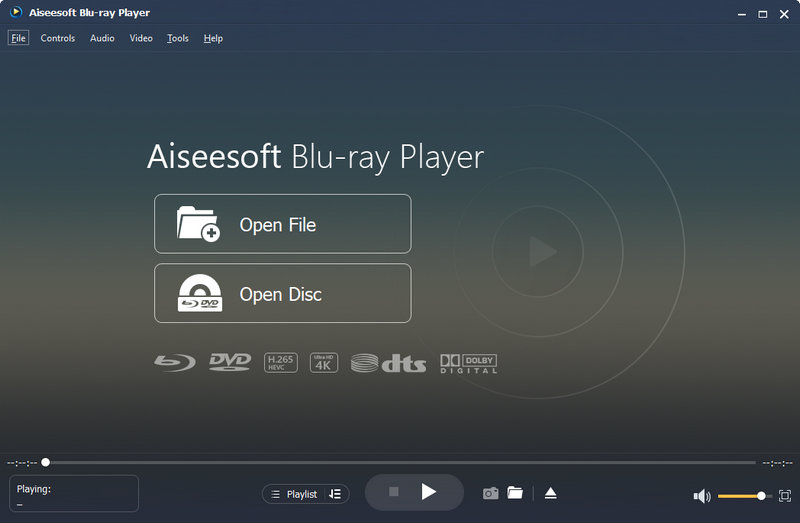
The start screen: Open File, Open Disc, the supported-format badges (Blu-ray, DVD, H.265, 4K, DTS, Dolby Digital) and the playback bar with Playlist, snapshot, open and eject buttons.
It's a player and nothing more. It doesn't rip, copy or convert discs; Aiseesoft sells other tools for that.
Features
Commercial Blu-ray discs, folders and ISO images
Aiseesoft Blu-ray Player plays retail Blu-ray movies at full 1080p, including new releases, and Aiseesoft says discs from any region. It also opens BDMV folders and Blu-ray ISO images you've backed up to a hard drive or NAS, so you can watch your collection without the disc in the drive. The product pages describe Blu-ray playback at 1080p; 4K Ultra HD Blu-ray discs aren't among the advertised disc types, while 4K video files are.
DVD playback, which the Mac edition lacks
The Windows edition of Aiseesoft Blu-ray Player also plays DVD discs, DVD folders and DVD ISO files, following the disc's main menu and letting you pick audio track, channel, video track and subtitles. The Mac edition doesn't play DVDs at all, so this is a real difference between the two. It also means one program covers a mixed shelf of DVDs and Blu-rays.
A menu to jump straight to the film
When a disc loads, Aiseesoft Blu-ray Player shows its own navigation menu: Play Movie, Chapter, Audio, Subtitle and Other Titles. You choose the soundtrack language and subtitles before the film starts, skip the trailers, or open a bonus title.
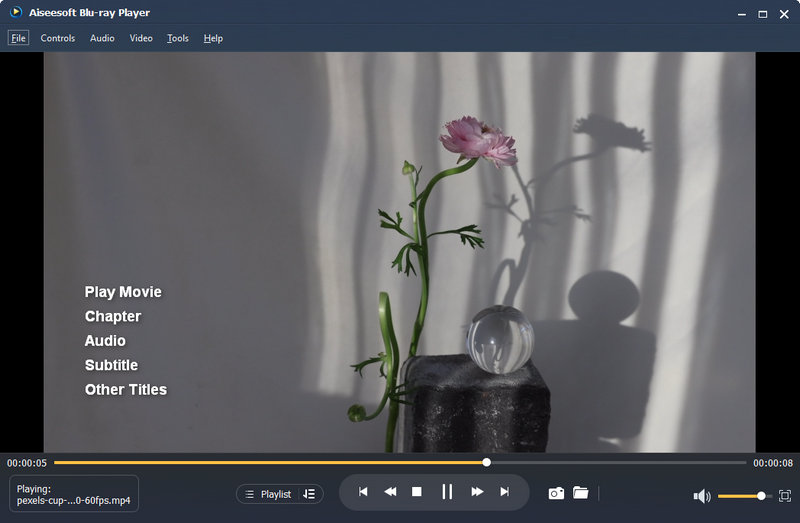
The navigation menu over a loaded title: Play Movie, Chapter, Audio, Subtitle and Other Titles, with the playback controls below.
Lossless Blu-ray soundtracks
Aiseesoft Blu-ray Player handles the high-resolution soundtracks found on Blu-ray, DTS-HD Master Audio and Dolby TrueHD, and lets you pick the audio track and channel layout from the Audio menu. Whether you hear full surround depends on your sound card, receiver and how they're connected.
An everyday 4K video and music player
Aiseesoft Blu-ray Player also plays ordinary files: 4K MP4, MKV, MOV, WebM and H.265/HEVC, camcorder MTS/M2TS, MXF, WMV, AVI, FLV and more, and audio such as FLAC, APE, WAV, MP3 and AAC. You can build playlists that mix files, DVDs and Blu-ray folders, take snapshots of a frame, and adjust the picture through the Video menu.
Benefits
- Your discs work on a PC again. Blu-rays and DVDs play with menus, subtitles and the right soundtrack.
- One player for the whole collection. Discs, backed-up ISO files and downloaded videos all open in the same window.
- A small home theater. A PC with a Blu-ray drive, connected to a TV or projector, becomes a Blu-ray player with surround sound.
- Simple enough for anyone in the house. Two buttons on the start screen.
Real-World Uses
- A media PC under the TV: plug a USB Blu-ray drive into a mini PC and watch your disc collection from the couch.
- A laptop on a trip: copy Blu-ray movies to ISO files before you leave and watch them without the drive.
- Old family DVDs: play home-made DVDs on a Windows 11 PC that no longer has a DVD player app.
- Language practice: switch a film's soundtrack and subtitles from the menu before it starts.
Who It's For, and Who Should Skip It
It's for Windows users who own Blu-ray discs or Blu-ray backups and want a player that just opens them, especially if they also have DVDs.
Skip it if you only play DVDs and video files: VLC is free and handles both. Skip it if your collection is mostly 4K Ultra HD Blu-ray discs, since those aren't advertised. Skip it if the PC is often offline, because discs load only with an internet connection. And if you'd rather pay nothing and tinker, VLC with extra decryption files can open some Blu-rays, with mixed results.
Usage Guide
- Install: run the 3.4 MB installer from Aiseesoft; it downloads and installs the full player. Register with the code from your order email.
- Connect the drive: plug in an external Blu-ray drive if your PC doesn't have one, and insert the disc.
- Stay online: make sure the PC is connected to the internet while the disc loads.
- Open it: click Open Disc, or Open File for a Blu-ray/DVD folder, an ISO image or a video file.
- Choose and play: in the menu, pick the audio track and subtitles, then click Play Movie (or Main Movie on some discs).
- Extras: use the snapshot button for a still, Playlist to queue files, and the Video and Audio menus for picture and sound settings.
Where it falls short
- "File loading failed" and crashes happen. Aiseesoft's own FAQ has entries for both, blaming software or hardware conflicts on crashes; new disc protections can also stop a disc until the player is updated.
- Licenses are tied to one PC. A new PC or new hardware can trigger a registration error until support resets the code.
- Not much to adjust. Compared with full media players, the playback settings are basic.
- Purchase extras. Aiseesoft's own purchase page pre-selects a 7-day Aiseesoft Screen Recorder add-on that then renews at $25 a month; untick it there if you buy from the vendor.
What Users Say
Amazon (download edition)
The download version of Aiseesoft Blu-ray Player on Amazon has 3.2 out of 5 from 39 ratings. That's a middling score for software whose one job is to play discs, and many of those ratings are years old. Treat it as a reason to test your own discs, not as a verdict on the current version.
Trustpilot (Aiseesoft Studio, all products)
Aiseesoft as a company scores 3.8 from 610 reviews on Trustpilot, roughly 60% five-star and 34% one-star. Recent five-star reviews of the Blu-ray player are mostly about support moving a license to new hardware:
- Ro, "Customer Support as it should be." (September 2026): "Bought a new computer but the licence for my BluRay player wouldn't authorise." Support reauthorized it within 24 hours.
- Máx Rockátánsky, "Great software, Great customer service!" (September 2026), describes reliable playback and a quick license reset after replacing PC parts.
Reviews on Aiseesoft's own site
The product page shows 118 reviews, curated by the vendor. Two that say something specific:
- Odelia: "This player is very easy to use. The interface will not confuse me like some other complicated design video player."
- Pyron: "Firstly, I download the wrong Mac version, because I need the Windows version. With the help of the support team, now I can enjoy my player easily."
The pattern: the player is easy to use and support is responsive, especially for license resets, which come up a lot because each license is locked to one PC. The weak spot is the one every Blu-ray player shares: a disc that won't load, which Aiseesoft's FAQ covers and updates aim to fix. That's the main thing to check with the free download.
Comparisons
Aiseesoft Blu-ray Player vs VLC
VLC is free and plays DVDs and nearly every video file. It doesn't play protected commercial Blu-rays out of the box, and Blu-ray menus are hit or miss. Aiseesoft is the paid route to commercial Blu-rays with menus; for DVDs and files alone, VLC is enough.
Windows edition vs Mac edition
Both play Blu-ray discs, folders and ISO files and common video formats. Only the Windows edition plays DVDs. They're separate products with separate licenses, so buy the one for the computer you'll watch on.
Editions and Pricing
| Plan | Price | Term | PCs |
|---|
| "Lifetime License" 1 PC (Aiseesoft store) | $49.96 (list $62.45) | Renewed every 12 months at $62.45 at checkout | 1 |
| Up to 3 PCs License (our Buy Now button) | $79.96 (Aiseesoft's store lists it at $187.35) | Lifetime | 3 |
Our order page adds nothing else to the cart and charges $79.96 for the 3-PC license.
FAQs
Do I need a Blu-ray drive to use Aiseesoft Blu-ray Player?
Only for discs. Aiseesoft Blu-ray Player needs an internal or USB Blu-ray drive to read a Blu-ray disc (a DVD drive can't read one), but Blu-ray folders, ISO files and video files play without any drive.
Can Aiseesoft Blu-ray Player play 3D Blu-ray discs?
Aiseesoft says its Blu-ray Player can play 3D Blu-ray movies on a computer, but doesn't spell out which 3D display methods it supports. If 3D is the reason you're buying, test a 3D disc with the free download on your own screen first.
What does error code 4001 mean?
Error 4001 in Aiseesoft Blu-ray Player is a registration problem: the registration code didn't come back after a successful lookup. Aiseesoft's fix is to contact support, which resets the code.
Can I install Aiseesoft Blu-ray Player on two computers?
The standard Aiseesoft Blu-ray Player license covers one PC. The Up to 3 PCs License on our Buy Now button covers three, and support can move a single license to a new computer.
Can it rip or copy my Blu-rays?
No. Aiseesoft Blu-ray Player only plays discs. Copying or converting them needs separate software.
I bought the Mac version by mistake. Can I switch?
Yes. Aiseesoft support can swap a license bought for the wrong platform; one of the vendor's own customer reviews describes exactly that.
System Requirements
- Windows 11, 10, 8.1, 8 or 7
- 1 GHz Intel or AMD processor or faster
- 1 GB RAM or more
- An internal or USB Blu-ray drive for Blu-ray discs (DVDs play in a DVD or Blu-ray drive)
- An internet connection while a disc loads
Conclusion
Aiseesoft Blu-ray Player is worth it for Windows users with a Blu-ray collection who want the simplest way to watch it on a PC, with DVDs thrown in. The reason to buy is that it handles commercial Blu-rays with menus, which free players don't do reliably. The reasons to hesitate are the online check when a disc loads, a mixed long-term record on Amazon, and the $79.96 price, which is steep if you only need it on one computer; it does cover up to three PCs for life with no renewal. Test your own discs with the free download before you pay.
Download Free TrialBuy Now