Aiseesoft MTS Converter: Get Camcorder AVCHD Footage Off the Card and Into MP4
Aiseesoft MTS Converter is a $49.95 Windows program (lifetime license, one PC) that converts the MTS and M2TS files recorded by AVCHD camcorders from Sony, Panasonic, Canon and JVC into MP4, MOV, AVI, WMV and other formats. It's for anyone with years of family videos, weddings or school events sitting in a camcorder's AVCHD folder that won't open in the apps they use now.
If you've ever plugged in an old Handycam and found a maze of folders (PRIVATE, AVCHD, BDMV, STREAM) full of files named 00000.MTS, 00001.MTS, you know the problem. Those clips are often interlaced 1080i, carry Dolby AC3 5.1 sound, and a long recording can be split across several numbered files. Phones, social sites and many editors want a single progressive MP4 with stereo AAC audio. That conversion is this program's whole job.
Quick facts
- Version: 9.2.50 (installer dated January 9, 2024)
- Developer: Aiseesoft Studio
- Runs on: Windows 11, 10, 8.1, 8, 7, Vista and XP (SP2 or later). MTS Converter for Mac is a separate purchase.
- Camcorder input: HD MTS, M2TS, TS, TRP and TP, plus MOD and TOD from older JVC and Panasonic models, MP4, MOV, AVI, MKV and WMV
- Output: MP4, MOV, AVI, WMV, MKV, FLV, MPG, VOB, WebM and HD TS, or MP3, AAC, AC3, FLAC, WAV and other audio
- Price: $49.95 one-time on the order page for a lifetime license on one PC
- Trial: converts only the first 5 minutes of each clip (half of a clip shorter than that)
- Refunds: 30-day money-back guarantee for quality problems with the software
- What we checked: the 48.6 MB installer, whose file version is 9.2.50, and the order page, which sells the Lifetime license for $49.95, on November 4, 2026. We didn't convert camcorder footage with it.
Before you buy
Aiseesoft also sells an M2TS Converter that reads the same AVCHD files and costs $45.00 on our order page, and its Video Converter Ultimate handles MTS along with everything else for a similar price on Aiseesoft's store. The three share the same conversion engine, so pick by price and by how much else you need.
Copy the clips from the camcorder or card to your PC before converting. Aiseesoft's own troubleshooting advice for files that won't load is to save them to a local disk with a simple file name.
Download Free TrialBuy Now
Overview
The window is built around a queue of clips. Each row shows a thumbnail, the clip's resolution and length, the output file it will become, and two menus: the audio track (a camcorder clip typically shows "ac3 5.1") and the subtitle. The preview player on the right lets you scrub through a clip before committing. Profile, destination folder, Merge into one file and the big Convert button sit along the bottom, and NVIDIA, Intel and AMD acceleration buttons sit at the top right.
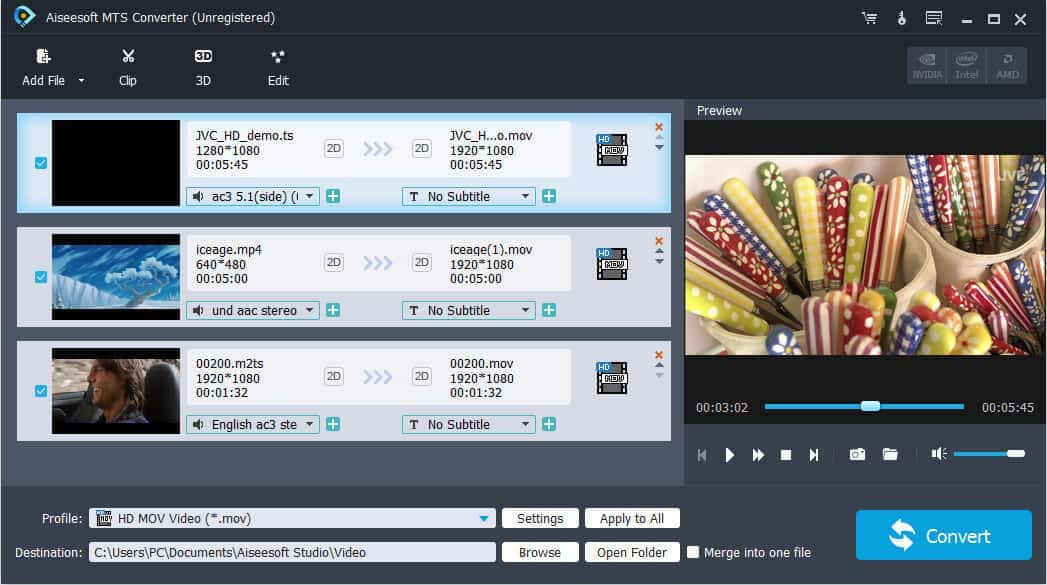
Three clips queued: a JVC 1080 TS file with AC3 5.1 audio, a 640x480 MP4 and a 1920x1080 M2TS, all set to the HD MOV Video profile.
Features
Reads AVCHD from the major camcorder brands
Aiseesoft MTS Converter opens MTS and M2TS files from Sony, Panasonic, Canon, JVC, Hitachi and Leica AVCHD camcorders, plus the TS, TRP and TP variants and older MOD and TOD files. You can drag clips straight from Explorer into the queue and convert a whole day's shooting in one batch.
Deinterlace 1080i footage
Aiseesoft MTS Converter has a Deinterlacing checkbox in its Effect tab. Many AVCHD camcorders record 1080i, which shows comb-like lines on fast motion when played on a computer or phone. Deinterlacing during conversion gives you clean frames in the MP4. The same tab adjusts brightness, contrast, saturation, hue and volume, with original and output previews side by side.
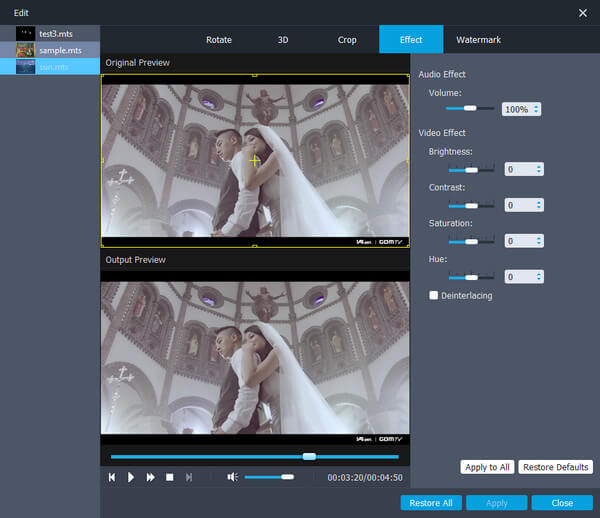
The Edit window's Effect tab with three MTS clips loaded: volume, brightness, contrast, saturation and hue sliders and the Deinterlacing checkbox, above original and output previews.
Join split recordings and cut the dull parts
Aiseesoft MTS Converter's Merge into one file option joins consecutive clips, which is how you put back together a long recording the camcorder split into 00003.MTS, 00004.MTS and so on. The Clip tool cuts a video into segments and lets you reorder them, and the Crop, Rotate and Watermark tabs handle black edges, sideways shots and a name or logo.
Profiles for editors, phones and consoles
Aiseesoft MTS Converter groups its output profiles into General Video, HD Video, 4K Video, 3D Video and Lossless Audio, then by device: iPhone, iPad, Apple TV, Samsung, Huawei, Sony, LG and others, and editing apps such as Adobe Premiere, Sony Vegas and Avid Media Composer. Settings opens the encoder, frame rate, resolution, aspect ratio and bitrates when you need control.

The profile list on General Video: MPEG-4 and H.264 MP4, MOV, M4V, AVI, DivX, XviD, MPEG-1/2, VOB and MKV, with HD, 4K, 3D and device categories on the left.
Swap the soundtrack, add subtitles, or make 3D
Aiseesoft MTS Converter can replace or remove a clip's audio, add your own music track, and add SRT, ASS or SSA subtitles. For fun, its 3D settings turn ordinary 2D camcorder footage into anaglyph (red/cyan glasses), side-by-side or top-and-bottom 3D for a 3D TV.
Benefits
The benefit is getting a decade of home video into a format you'll still be able to play, share and edit. AVCHD was the standard for consumer HD camcorders, but almost nothing outside a desktop media player handles it well now. One batch run turns a card's worth of 1080i MTS clips into deinterlaced MP4 files that go straight to a phone, a family cloud album or YouTube, with the split pieces of each event joined back together.
Real-World Uses
- Digitizing a box of camcorder memory cards: copy each card's STREAM folder to the PC, queue everything, choose an MP4 profile and let it run overnight.
- A wedding filmed on a Sony Handycam: merge the split clips, trim the waiting-around, deinterlace, and export one MP4 for the couple.
- Editing in Premiere or Vegas without stutter: convert the AVCHD clips to an editor profile first, as one reviewer on Aiseesoft's page does.
- Sharing a school play on social media: downscale 1080i footage to a phone-friendly MP4 with stereo AAC instead of AC3 5.1.
- Keeping just the audio: pull a recital or speech out as MP3 or FLAC.
Who It's For, and Who Should Skip It
It suits Windows users with an AVCHD camcorder (or a pile of its old footage) who want a simple batch tool with deinterlacing, merging and editor profiles.
Skip it if you have a Mac (buy MTS Converter for Mac), if you're happy with free HandBrake, which also converts and deinterlaces MTS, or if your camcorder footage is only a small part of what you convert, in which case Aiseesoft Video Converter Ultimate gives you far more for a similar price. Professional MXF footage from XDCAM or P2 cameras needs Aiseesoft's MXF Converter instead.
Usage Guide
- Copy the clips from your camcorder or card (usually in PRIVATE\AVCHD\BDMV\STREAM) to a folder on your PC.
- Install and launch Aiseesoft MTS Converter, then click Add File or drag the MTS files in.
- For each clip, check the audio track menu and add subtitles if you want them.
- Open Edit, go to Effect and tick Deinterlacing for 1080i footage. Crop, rotate or watermark if needed. Use Clip to cut segments.
- Pick a profile (for example H.264/MPEG-4 AVC MP4, or your editor's profile), click Apply to All, and tick Merge into one file if the clips belong together.
- Turn on GPU acceleration if available and click Convert.
Where it falls short
- Higher quality takes longer. Aiseesoft's FAQ says H.264, H.265 and 4K output and higher bitrates make conversion slower than general formats.
- Deinterlacing is manual. You have to tick it in the Effect tab; it isn't switched on automatically for 1080i clips.
- Old device list. Profiles name phones like the Galaxy S4 and Note 3. Current phones are fine with the generic MP4 profiles.
- No recent development. The installer dates from January 2024.
- Vendor reviews read like marketing. Many of the most recent reviews on Aiseesoft's page are short, near-identical praise.
What Users Say
Aiseesoft's review page (101 reviews)
The older, more specific reviews are the useful ones:
- "I have no complaints with the software, it's working great. I purchased the software because the Panasonic camcorder I have is an HD and all of the video format is MTS." (Kenny, 2018-04-15)
- "This MTS converter helps me convert MTS to MP4 with original quality. So that, I can import these MTS files to Sony Vegas, Adobe Premiere, etc. for further editing." (Joe, 2018-07-02)
- "The big plus for me is that it converts mts to m4v format which is typically used by iTunes and Apple TV... I converted a 75 minute video in about 7 or 8 minutes." (Sue, 2014-10-31)
- "I use it to convert MTS video so as to play it on my iPhone 5s, and share on social media. No Audio/Video sync issues." (Bobby, 2014-3-11)
- "It yielded the best quality to size ratio that I was satisfied with for avc mp4." (Philip, 2014-11-11)
Download sites
On Free Download Manager, Aiseesoft MTS Converter has only 5 user votes, averaging 3.2 out of 5: too few to mean much, but not the glowing picture of the vendor's page.
Trustpilot: Aiseesoft as a company
Aiseesoft scores 3.8 from 610 reviews. One October 2026 five-star review from a camcorder owner, Pete Macay, is titled "Aiseesoft is the best at removing the 'jaggies' in the image from my Sony Video Camcorder videos"; he also thanks support for restoring his license after a reformat. License resets are the most common praise. The one-star reviews mostly concern refunds refused after a trial or for data recovery products, and slow email exchanges.
The pattern: camcorder owners who bought it for exactly this job say it works and keeps audio and video in sync. The vendor's recent reviews are too uniform to trust much, and refund complaints mean you should test the trial on your own clips.
Comparisons
Aiseesoft MTS Converter vs. Aiseesoft M2TS Converter
Both read MTS and M2TS AVCHD files and convert them to the same formats. On our order page the M2TS Converter is $45.00 and the MTS Converter $49.95. MTS Converter's product page puts more weight on camcorder work (deinterlacing, audio replacement, subtitles), so it's the one to try first if your footage comes from a camcorder.
Aiseesoft MTS Converter vs. HandBrake
HandBrake is free, converts MTS to MP4 and has automatic deinterlace filters. It doesn't merge clips into one file, and its settings are more technical. MTS Converter adds merging, simple editing and a friendlier queue, which is what you're paying for.
Editions and Pricing
| License |
Where |
Price |
Term |
| Lifetime, 1 PC | Buy Now button on this page | $49.95 | One-time, free upgrades |
| Lifetime, 1 PC | Aiseesoft store, with its coupon | $39.96 | One-time |
| MTS Converter for Mac, lifetime | Separate product | $49.95 list | One-time, 1 Mac |
FAQs
Can Aiseesoft MTS Converter open files straight from my camcorder?
Aiseesoft MTS Converter works on the MTS files themselves, so copy them off the camcorder or card first. Aiseesoft's support advice for clips that fail to load is to check they play on the PC and save them to a local disk with a short file name.
Does Aiseesoft MTS Converter handle 4K camcorder footage?
Aiseesoft MTS Converter has 4K Video output profiles and accepts 4K MTS and MP4 input. Expect 4K and H.265 conversions to take noticeably longer than 1080p.
Will the 5.1 surround sound from my camcorder survive?
Aiseesoft MTS Converter lets you set the audio encoder and channels in Settings, so you can keep AC3 5.1 in a format that supports it or mix down to stereo AAC for phones and social sites.
What does the Aiseesoft MTS Converter trial limit?
The trial converts the first 5 minutes of each clip, or half of a clip shorter than 5 minutes. Use it to check the quality and the deinterlacing on a real clip.
Does the license cover Mac too?
No. The Windows license covers one PC; MTS Converter for Mac is sold separately.
Can I get my money back if it doesn't suit me?
Aiseesoft's 30-day guarantee covers quality problems with the software, not a change of mind, so try the trial on your own footage first.
System Requirements
- Windows 11, 10, 8.1, 8, 7, Vista or XP (SP2 or later)
- 1 GHz Intel or AMD processor
- 1 GB RAM or more
- About 49 MB for the installer, plus plenty of free space: converted HD video is large
Conclusion
Aiseesoft MTS Converter is a sensible, single-purpose tool for rescuing AVCHD camcorder footage: it batches clips, deinterlaces 1080i, joins split recordings and outputs MP4 or editor-ready files. It hasn't changed much in years, but neither has AVCHD footage.
Buy it if you have a lot of camcorder MTS footage on Windows and want a simple way through it. Skip it if HandBrake's free conversion is enough, or if Aiseesoft's cheaper M2TS Converter or broader Video Converter Ultimate fits your needs better.
Download Free TrialBuy Now