Aiseesoft Video Converter Ultimate: A Format Converter That Grew an AI Enhancer
Aiseesoft Video Converter Ultimate is a Windows toolkit that converts video and audio between more than 1,000 formats (up to 8K HEVC), compresses and edits clips, and, since version 11, upscales and repairs footage with AI models. Our Buy Now button sells the monthly plan at $29 a month, renewing automatically; Aiseesoft's own store also sells a lifetime license for one PC at $49.96.
The problem it solves is familiar: a phone that won't play an MKV, a 4 GB 4K clip that won't fit in an email, a TV that chokes on HEVC, a pile of old camcorder footage that looks soft on a modern screen. Instead of a separate app for each job, you get one window with a converter, an enhancer and about twenty smaller tools.
Quick facts
- Version: 11.0.60 (installer dated July 30, 2026)
- Developer: Aiseesoft Studio
- Runs on: Windows 11, 10, 8.1, 8 and 7; 1 GHz CPU and 1 GB RAM minimum. A separate Mac edition exists.
- Formats: 1,000+ video, audio and image formats, including MP4, MKV, MOV, AVI, WebM, MXF, H.265/HEVC up to 8K, FLAC, ALAC and WAV
- Hardware acceleration: NVIDIA, Intel and AMD graphics
- Price: $29 per month on the order page, renewing monthly until you cancel. Lifetime licenses are on Aiseesoft's store (see Editions and Pricing).
- Free trial: converts the first 5 minutes of each file; the AI enhancer previews 3 seconds per task; most other tools stop after 5 files
- Refunds: 30 days for lifetime licenses when there's a quality problem with the software
- What we checked: the 2.3 MB online installer (file version 11.0.60) downloaded from Aiseesoft on November 4, 2026, and the order page on November 4, 2026, which sells "Aiseesoft Video Converter Ultimate - 1 Month" at $29.00 with monthly renewal. We didn't run conversions or AI enhancement with it.
Before you buy: the AI tools run on credits
The converter, compressor and editor are unlimited once you pay. The AI models in the Video Enhancer tab (upscaling, denoising, frame interpolation, colorizing and the rest) consume AI credits. The monthly plan includes 300 credits that reset to zero when the plan ends; the 1-PC lifetime plan includes 500 and the 3-PC lifetime plan 1,000, and lifetime credits carry over. When they run out, the AI models stop until you buy more or earn free credits through Aiseesoft's rewards activity. If restoring old footage is your main reason to buy, run the trial on your own clips first and decide whether a credit balance suits you.
Download Free TrialBuy Now
Overview
The program opens on four tabs: Home, Converter, Enhancer and More Tools. The Converter tab is the classic part. You drop in files, pick an output profile per row or one for all, and press Convert All. Each row has its own Edit, Cut, Enhance and HDR buttons, its own subtitle and audio track selectors, and a Settings gear for encoder, resolution, frame rate and bitrate.
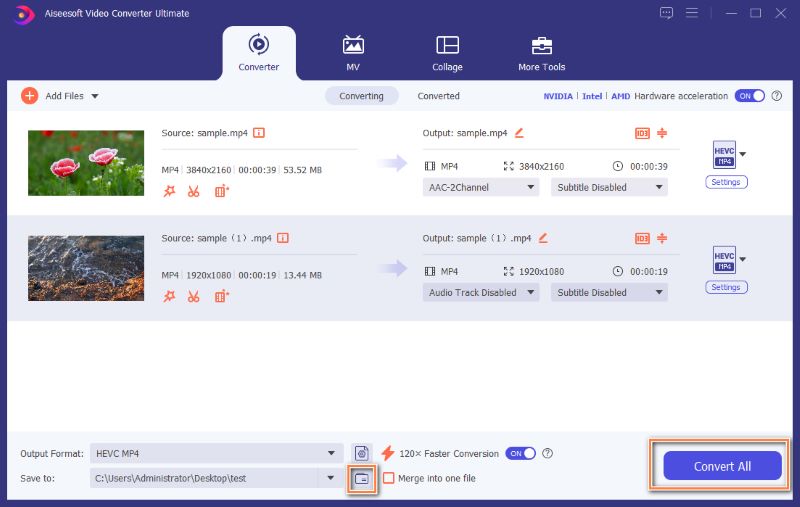
The Converter tab: three files queued with 4K MP4 output, the hardware acceleration switch (NVIDIA, Intel, AMD), the 120x Faster Conversion toggle and Convert All.
Version 11 shifted the product's center of gravity. The Enhancer tab is now a full AI workspace with about ten models, and the vendor markets the whole package as an "AI video converter". The older converter is still there and still the reason most people buy it.
Features
Conversion between 1,000+ formats, up to 8K
Aiseesoft Video Converter Ultimate reads and writes H.265/HEVC, H.264, VP8, VP9, XviD and the common containers (MP4, MKV, MOV, AVI, WMV, WebM, MXF, TS), with 5K and 8K output in MP4 and MKV. Audio goes to MP3, AAC, AC3, DTS or lossless FLAC, ALAC, AIFF and WAV. Device presets cover iPhones up to the iPhone 18, iPads, Apple TV, Samsung and other Android phones, smart TVs, PlayStation, Xbox, Roku and Chromecast. Batch conversion runs many files at once, and you can keep several audio tracks and subtitle tracks in the output.
"120x faster" conversion, with conditions
Aiseesoft's speed claim applies to a specific path: the 120x Faster Conversion switch works when the input is MP4, MKV, AVI, M2TS, MTS, MOV, MPG, TS, TRP, M4V or FLV and the output is MP4, MKV, AVI, MOV or M4V, and it leans on GPU encoding. Convert to anything outside that list and you get normal speed. The marketing number is a best case, not an average.
AI Video Enhancer with about ten models
The Enhancer tab in Aiseesoft Video Converter Ultimate offers separate models for anime, video quality repair, detail restoration, denoising, frame interpolation (2x or 4x frame rate, up to 240 fps), colorizing black-and-white footage, SDR to HDR, color enhancement and low-light enhancement. You pick a model per file, choose an output resolution (200% and up, to 4K or 8K), preview, then export.
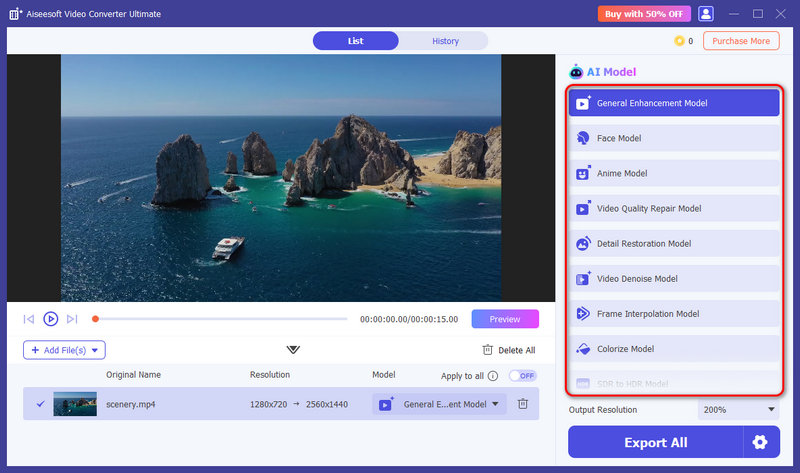
The Video Enhancer window with the model list (Anime, Video Quality Repair, Detail Restoration, Denoise, Frame Interpolation, Colorize, SDR to HDR and more) and the credit balance at the top right.
A compressor with a size target
The Video Compressor in Aiseesoft Video Converter Ultimate lets you drag a slider to the file size you want, and it adjusts bitrate and resolution to hit it, with a preview before you commit. That's the quickest way to get a clip under an email or chat app's limit. A separate Audio Compressor does the same for sound files.
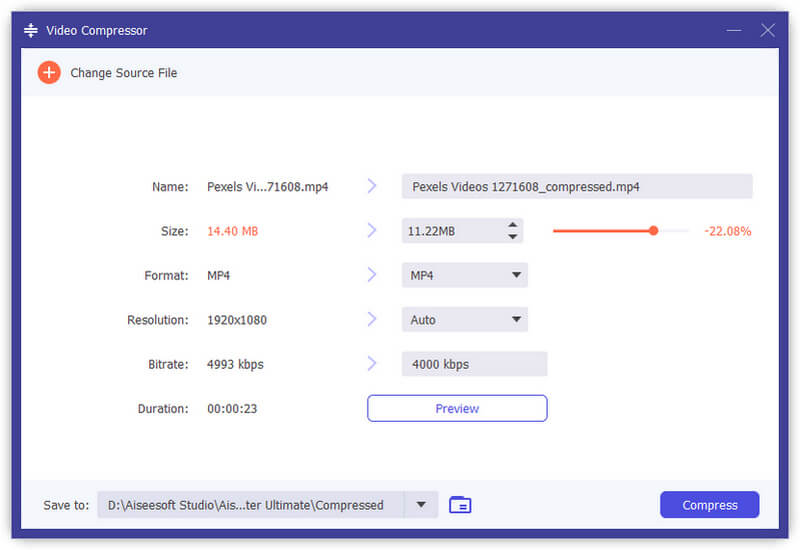
Video Compressor: a 14.40 MB 1080p MP4 set to 11.22 MB (-22%), with format, resolution and bitrate fields and a Preview button.
Editing that covers the everyday fixes
Each file's Edit window in Aiseesoft Video Converter Ultimate has tabs for Rotate & Crop, Effect & Filter (brightness, contrast, saturation, hue and preset filters), Watermark (text or image), Audio and Subtitle. Cut splits or trims a clip, and the merge option joins the queue into one file. It's enough to tidy footage before conversion, not a timeline editor.
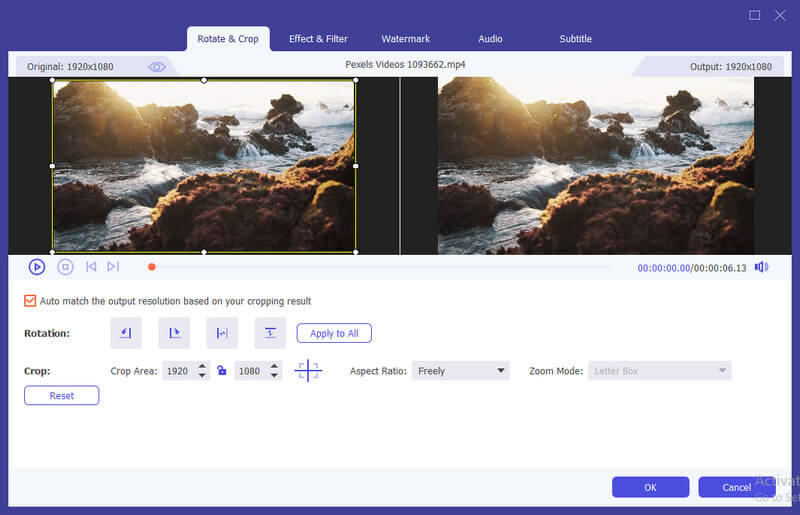
The Edit window's Rotate & Crop tab, with the original and output previews side by side and the other editing tabs along the top.
A toolbox of about twenty extras
The More Tools tab of Aiseesoft Video Converter Ultimate collects single-purpose utilities: GIF Maker, 3D Maker (anaglyph, side-by-side, top-and-bottom), Video Merger, Speed Controller (0.125x to 8x), Reverser, Collage (split-screen) Maker, MV Maker with themes, Watermark Remover, Volume Booster, Audio Sync, Media Metadata (ID3) Editor, Image Converter (including HEIC and camera RAW files), File Date Changer, and AI Vocal Remover and Vocal Isolator for separating voice from music.
Benefits
- One install instead of five. Converter, compressor, light editor, GIF maker and vocal remover share one queue and one output folder.
- Fast on modern hardware. GPU encoding on NVIDIA, Intel and AMD cuts long 4K jobs down considerably on the supported format pairs.
- Old footage gets a second chance. Denoising, detail restoration and colorizing are tools most converters don't have at all.
- Beginner-friendly. Device presets mean you can pick "iPhone" or "Samsung TV" without knowing what codec they want.
Real-World Uses
- Making a downloaded MKV play on a TV or phone: pick the device preset, keep the English audio track and the subtitles you want, and convert.
- Shrinking a 4K drone clip for sharing: drag the compressor's size slider to the chat app's limit and preview the result.
- Restoring a digitized VHS or camcorder tape: run the denoise and detail restoration models, then upscale to 1080p or 4K.
- Preparing karaoke or practice tracks: strip the vocals from a song with the AI Vocal Remover.
- Turning a short clip into a GIF for a forum post or presentation.
Who It's For, and Who Should Skip It
It suits home users and casual creators who convert and compress video regularly and want a simple interface with presets, plus people sitting on old family footage they'd like to clean up. It's also a reasonable choice if you'll use several of the toolbox utilities, since buying them separately costs more.
Skip it if you only convert a file now and then: free tools such as HandBrake handle MP4 and MKV conversion well, without a subscription. Skip it too if you need a real editor with a timeline, multiple tracks and transitions; the editing here is per-clip. And if heavy AI upscaling is the whole point, compare the credit cost with a dedicated enhancer before you commit.
Usage Guide
- Install: run the 2.3 MB installer from Aiseesoft; it downloads the full program. Launch it and sign in with the email you bought with to activate the paid plan.
- Add files: on the Converter tab, click Add Files or drag videos onto the window.
- Pick a format: click the format icon on a row, or use Output Format at the bottom for all files. Use the Settings gear to change encoder, resolution or bitrate.
- Edit if needed: use Edit and Cut on each row, choose audio and subtitle tracks, and tick Merge into one file to join clips.
- Turn on speed: leave Hardware acceleration and 120x Faster Conversion on, then click Convert All.
- Enhance: on the Enhancer tab, add a file, pick an AI model and output resolution, click Preview, then Export.
Where it falls short
- Disc ripping isn't part of the current version's spec sheet. Earlier versions advertised ripping home DVDs; the version 11 format list covers files only, so test with your discs before relying on it.
- The order page sells a monthly subscription. At $29 a month, it costs more than the $49.96 lifetime license within two months. If you only need it for a short project, cancel before the next renewal.
- Credits limit the headline feature. Heavy AI enhancement users will burn through the included credits.
- Refunds are conditional. The 30-day refund covers lifetime licenses only when there's a quality problem with the software. Several 1-star Trustpilot reviews of Aiseesoft are about refunds being refused.
- Interface changes. Version 11 reorganized the window around the Enhancer, which some long-time users found unfamiliar at first.
What Users Say
Trustpilot (Aiseesoft Studio, all products)
Aiseesoft Studio has a TrustScore of 3.8 from 610 reviews, and the split is stark: about 60% five-star and 34% one-star, with very little in between. The reviews cover all of Aiseesoft's products. Several five-star reviews name Video Converter Ultimate:
- Turhan (5 stars, October 2026): "I have been using Aiseesoft Video Converter Ultimate for a long time." He praises its precise cutting and merging and the support team.
- Henry (5 stars, January 2026): "I have been using Aiseesoft total video converter ultimate for several years." He uses it to convert files to MP4 for different devices.
- Hayden (5 stars, December 2025), a Mac user of the same product: "I've been buying Aiseesoft products for many years and always get quick support from them."
The one-star side is mostly about money rather than conversion quality: refunds refused after a trial converted into a charge, and refund requests for data recovery software that didn't recover the files. Many positive reviews credit support for resetting a license after a new PC.
AlternativeTo
Only two comments, years apart. John Doe (October 2022): "This one has proven its worth and is an underrated all-in-one tool. It does have some minor glitches that need ironing..."
larrypasley (July 2015), about a much older version: "Quality of conversions was not good. File size was triple the size of the original. They would not honor their 90 day..." The guarantee mentioned there has since become a 30-day one.
Reviews on Aiseesoft's own site
Aiseesoft shows 533 user reviews on the product's review page. These are published by the vendor, so read them as a sample of the happy customers, not a balanced survey. Two are useful because they're specific:
- Samantha (November 2025), "So far, so good.": "I'm only using the free version, and honestly, I don't have any real complaints. It does what it says it does, and it works pretty well as a quick fix or a simple video format converter."
- Michelle (December 2025), "Its New Feature "Enhance Video" Surprises Me": "though i didn't accustomed to this new interface change, i still have to confirm the AI tech's progress, which can make a blurry old video clear and vivid again."
The pattern: people who use it keep using it for years, mostly for straightforward conversion and trimming, and they rate the support well. Independent, detailed reviews of the current AI version are scarce. Complaints cluster around Aiseesoft's refund handling and billing, not around the converter itself.
Comparisons
Aiseesoft Video Converter Ultimate vs HandBrake
HandBrake is free and open source and converts to MP4, MKV and WebM with excellent encoder control. Aiseesoft Video Converter Ultimate outputs far more formats and device presets, has a size-target compressor, editing, GIF and 3D tools, and the AI enhancer. If you only need MP4 or MKV out, HandBrake is enough.
Editions and Pricing
| Plan | Price | Term | PCs | AI credits |
|---|
| Monthly (our Buy Now button) | $29.00 per month | Renews monthly | 1 | 300, reset when the plan ends |
| Perpetual VIP (Aiseesoft store) | $49.96 (list $62.45) | Lifetime | 1 | 500, carried over |
| Multi-user VIP (Aiseesoft store) | $80.56 (list $187.35) | Lifetime | 3 | 1,000, carried over |
Aiseesoft's store also discounts the first month of the monthly plan to $14.50 with its own coupon. Its purchase page pre-selects a 7-day Aiseesoft Screen Recorder add-on that renews at $25 a month afterwards, so untick it there if you don't want it.
FAQs
How do I cancel the monthly plan?
The Aiseesoft Video Converter Ultimate monthly plan renews automatically until you cancel it. You can cancel it any time before the renewal date, and Aiseesoft support can help if you can't find the subscription.
Can I move my Aiseesoft license to a new computer?
Yes. Aiseesoft support resets registrations for a new PC, and it can switch a license between Windows and Mac. Several Trustpilot reviewers describe getting a reset within a day.
Does Aiseesoft Video Converter Ultimate work on Windows 7?
Aiseesoft Video Converter Ultimate lists Windows 11, 10, 8.1, 8 and 7 as supported. GPU-accelerated conversion depends on your graphics card and driver, so older PCs may convert at normal speed only.
Can it upscale a 1080p video to 4K for free?
The Aiseesoft Video Converter Ultimate trial can preview an upscale for 3 seconds and goes up to 4K at most. Exporting a full upscaled video needs a paid plan and uses AI credits.
Is there a Mac version?
Yes. Aiseesoft Mac Video Converter Ultimate runs on macOS 10.12 or later on Intel and Apple silicon. It's a separate product with its own license.
Is the Aiseesoft Video Converter Ultimate installer safe?
Aiseesoft's installer carries a valid digital signature from the vendor. Download it from Aiseesoft's site rather than a third-party download portal, where repackaged and cracked copies circulate.
System Requirements
- Windows 11, 10, 8.1, 8 or 7
- 1 GHz Intel or AMD processor or faster
- 1 GB RAM or more
- An NVIDIA, Intel or AMD graphics card with current drivers for hardware-accelerated conversion
- An internet connection to download the program, activate it and use AI credits
Conclusion
Aiseesoft Video Converter Ultimate is worth it if you convert and compress video often and like having presets, light editing and a GIF maker in the same window; it's one of the broadest converters you can buy, and long-time users stick with it. The reason to buy is breadth with simplicity. The reason to hesitate is the pricing model: the monthly plan on our button makes sense for a short project, while for long-term use the lifetime license is the better deal, and the AI enhancer runs on a credit balance either way. Try the free version on your own files first.
Download Free TrialBuy Now