Aiseesoft Mac Screen Recorder: Capture Your Mac Screen With System Sound, Webcam and Microphone
Aiseesoft Mac Screen Recorder is a macOS app that records the whole screen, a region or a single window together with the Mac's own sound and your microphone, and also works as a webcam recorder, an audio-only recorder and a screenshot tool. It runs natively on Intel and Apple silicon Macs, and our Buy Now button sells a lifetime license for 3 Macs at $79.96, paid once with no renewal. There's a free trial.
macOS already records the screen: press Shift-Command-5 or use QuickTime Player. What it won't do is record the sound coming out of the Mac. A Zoom call, a webinar or a YouTube tutorial recorded with the built-in tool comes out silent unless you set up a loopback audio driver yourself. Closing that gap, plus scheduling and a few editing extras, is what you pay for here.
Quick facts
- Version: 2.3.12 (packages dated June 15, 2026)
- Developer: Aiseesoft Studio
- Runs on: macOS 10.13 High Sierra or later, including Sonoma, Sequoia and Tahoe, with separate Intel and Apple silicon builds (M1 to M5). Older Macs get an older 2.2.60 build from the same installer.
- Modes: Video Recorder, Window Recorder, Audio Recorder, Webcam Recorder and Screen Capture
- Audio: system sound and microphone, separately or together, through an audio plug-in the app installs
- Price: $79.96 one-time on the order page for a lifetime license on 3 Macs; a 1-Mac lifetime license is also sold (see Editions and Pricing)
- Free trial: yes, with a cap on recording length; the title bar shows "Unregistered" until you enter a code
- Refunds: 30-day money-back guarantee for lifetime licenses when there's a quality problem
- What we checked: the 3.8 MB online installer and the Apple silicon (55 MB) and Intel (58 MB) packages it downloads, both version 2.3.12.6611, and the order page, rechecked on November 4, 2026, which sells "Aiseesoft Mac Screen Recorder - Lifetime/3 Macs" at $79.96 with no renewal. We didn't record with it.
Before you buy
- The Buy Now button sells a lifetime license for 3 Macs at $79.96, a one-time payment with nothing to cancel. If you only record on one Mac, the 1-Mac lifetime license in the table below costs less.
- The Mac edition has fewer modes than the Windows one. Aiseesoft's product page describes Game Recorder, Phone Recorder (mirroring an iPhone or Android) and an AI webcam background that needs an NVIDIA RTX graphics card. Those are Windows features; the Mac app's start window offers Video, Window, Audio and Webcam recording and Screen Capture.
- Give it permission. macOS asks you to allow Screen Recording, Microphone and Camera access for the app in System Settings, Privacy & Security, and system sound needs Aiseesoft's audio plug-in. Do this during the trial so you know system audio works on your Mac.
- Mind the Mac count. The license on our button covers 3 Macs. A 1-Mac license registered on a second computer gives error 4104, according to Aiseesoft's FAQ.
Download Free TrialBuy Now
Overview
The app opens as a slim dark window with five big buttons and a status strip along the bottom: Recording history, Set record length, Task Schedule and Record Watermark, each showing whether it's on. Pick a mode, choose the area and audio sources, and press the round REC button. A floating bar lets you pause, draw on the screen or take a snapshot while recording, and when you stop, a preview window opens where you trim the start and end before saving.
Everything you record is kept in Recording history, so you can go back to a clip, rename it, play it or delete it without hunting through Finder. By default recordings go to a folder in Documents and screenshots to the Desktop, both changeable in Preferences.
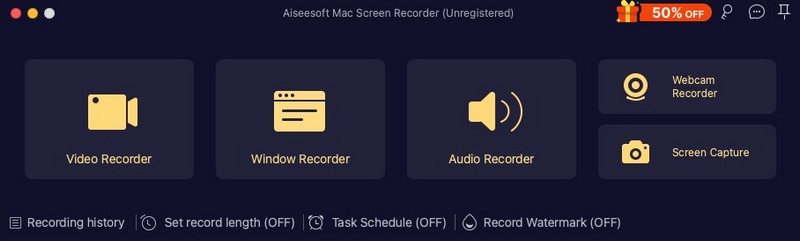
The start window of the unregistered Mac app: Video Recorder, Window Recorder, Audio Recorder, Webcam Recorder and Screen Capture, with Recording history, Set record length, Task Schedule and Record Watermark below.
Features
Screen and window recording with the Mac's own sound
Aiseesoft Mac Screen Recorder's Video Recorder captures the full screen, a fixed size such as 1920x1080, or a region you draw, and Window Recorder follows one app window. You switch the webcam, system sound and microphone on or off for each recording, so a tutorial can carry your voice over the app's sounds, or a webinar can be saved with only the presenter's audio. System sound goes through Aiseesoft's audio plug-in, which is the part macOS's own tools lack.
Audio-only and webcam recording
Aiseesoft Mac Screen Recorder's Audio Recorder saves system sound, the microphone or both to MP3, WAV, AAC and other audio formats, for podcasts, voice notes or audio from a streaming site. Webcam Recorder records just the camera with the microphone, and can take a still snapshot, which is handy for a quick video message without opening Photo Booth.
Scheduled recordings and a set record length
Aiseesoft Mac Screen Recorder can start and stop a recording on its own. In Task Schedule you name a task, choose Video, Audio or Webcam Recorder, set the start time (once or on chosen weekdays) and either a stop time or a length, plus what to do afterwards. The Mac must stay awake and unlocked for it to run, which the window itself warns about. Set record length does the simpler job of stopping any recording after a fixed time.
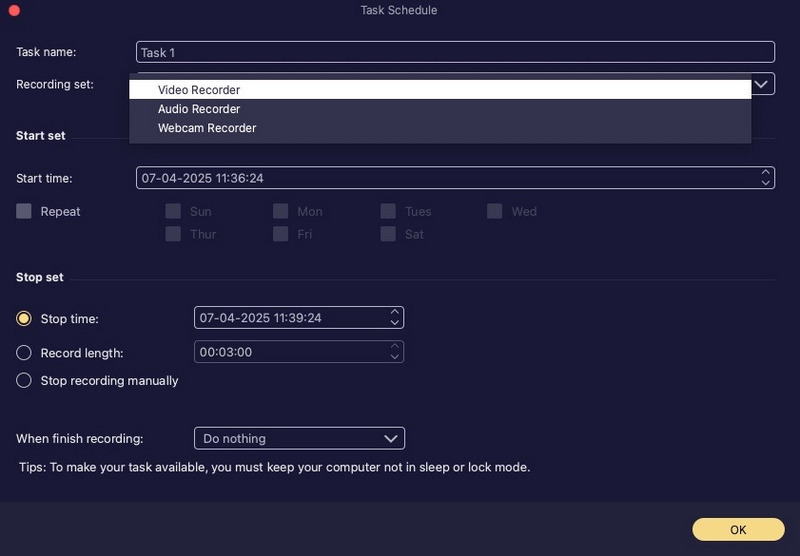
The Task Schedule window: task name, the recording set (Video, Audio or Webcam Recorder), start time with weekday repeats, a stop time or record length, and the note that the computer must not sleep or lock.
Drawing on screen, cursor effects and hotkeys
Aiseesoft Mac Screen Recorder lets you add text, lines, arrows and shapes while you record, show or hide the cursor and highlight clicks, and hide the floating bar or the Dock so they don't appear in the video. Hotkeys start and stop, pause and resume, take a screenshot, toggle the webcam and show or hide the panel, so you can control a full-screen recording without clicking into the app.
Output settings you control
Aiseesoft Mac Screen Recorder's Output preferences set the video format (MOV by default, with MP4 and others), codec, quality and frame rate, the audio format and quality, the screenshot format, the save folders and an audio delay to fix lip sync. Recording in MOV with H.264 keeps files ready for iMovie and Final Cut Pro without conversion.
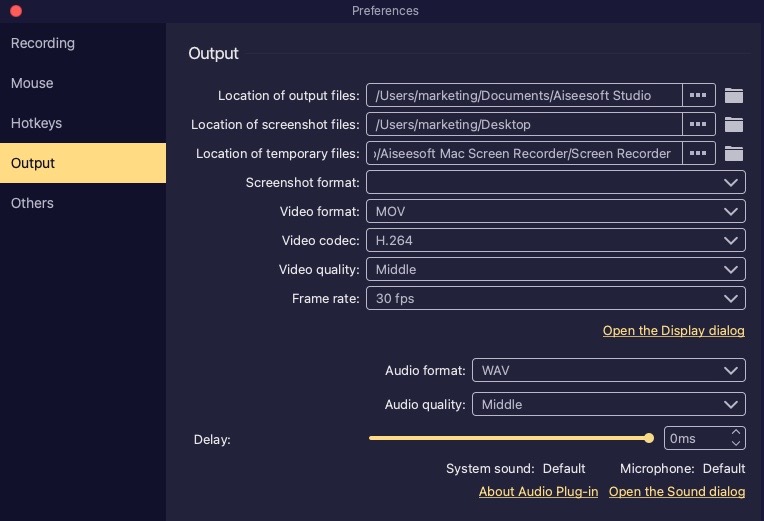
The Output tab of Preferences: output and screenshot folders, video format MOV, codec H.264, quality Middle, 30 fps, audio format WAV, a delay slider and the "About Audio Plug-in" link.
Benefits
- System audio without setup. You don't have to install and route a loopback driver yourself, which is where most Mac users get stuck with free tools.
- Unattended capture. A webinar that starts at 3 a.m. your time can be recorded by schedule while you sleep, as long as the Mac stays awake.
- Light on older Macs. The listed minimum is 512 MB of RAM and a 1 GHz Intel chip, and an older build is kept for Macs that can't run the current one.
- Everything in one history. Video, audio and screenshots sit in one list instead of scattered files.
Real-World Uses
- Online classes and webinars: record the slides and the presenter's voice from the browser, scheduled for the session's start time.
- Software tutorials: record one app window with your microphone, highlight clicks and draw arrows on the screen as you go.
- Video calls: save a FaceTime, Zoom or Teams call with both sides of the conversation (get everyone's consent first).
- Audio from the web: capture a live radio stream or a podcast that has no download button, as MP3.
- Bug reports: record the steps that cause a problem and send the trimmed clip to support.
Who It's For, and Who Should Skip It
It suits Mac users who record meetings, lectures or tutorials with sound and want scheduling and a simple trim step, without assembling free tools and audio drivers.
Skip it if you only need silent screen clips (Shift-Command-5 does that for free), if you stream or record games with scenes and overlays (OBS Studio is free and far more capable), or if you need a full editor with zooms and captions, where tools built for screencasts such as ScreenFlow or Camtasia fit better.
Usage Guide
- Install: open the DMG and run the installer, which downloads the right build for your Mac.
- Allow access: when macOS asks, allow Screen Recording, Microphone and Camera in System Settings, Privacy & Security, then reopen the app. Install the audio plug-in when prompted so system sound can be recorded.
- Register: after buying, enter your email and registration code from the order email.
- Record: click Video Recorder, choose Full or Custom, turn on System sound and Microphone as needed, and click REC.
- Finish: stop from the floating bar or your hotkey, trim the clip in the preview window, and save it.
- Schedule (optional): click Task Schedule, add a task, set the times and leave the Mac awake.
Where it falls short
- Protected video stays protected. Streaming services that use DRM (Netflix, Apple TV+ in Safari) usually record as a black window on any Mac recorder.
- Light editing only. You get trimming, not a timeline with zooms, captions or cursor smoothing.
- The scheduler needs an awake Mac. A task won't fire if the Mac is asleep or locked, so adjust Energy settings before an overnight recording.
- Audio plug-in after macOS updates. Any app that captures system sound through a plug-in can need it reinstalled or re-allowed after a major macOS update; test before an important recording.
What Users Say
Trustpilot
Aiseesoft Studio as a whole has a TrustScore of 3.8 out of 5 from about 610 reviews, roughly 60% five-star and 34% one-star. Screen Recorder buyers are among the happiest:
"Great software, easy to use, user friendly interface." Kirill Yanovsky, December 2025, five stars (Mac Screen Recorder)
"I was having a strange problem saving movies on my Mac." Bernhard, February 2026, five stars, a Mac Screen Recorder user praising the support that fixed it
"I've tried many different screen recorders and none have been as good as this one" Isledy P.J., September 2026, five stars
"I find the software well-designed and easy to use." Vinnie M., August 2026, five stars
Complaints about the company
The one-star reviews on Trustpilot are mostly about refunds and other products rather than the recorder. A trial user wrote: "I was refused a return based on the product not being faulty due to their so called returns policy." (caitlin hardwick, October 2026), and another reviewer complained that "if you email this company they will make circles with you on email with a response every 8hours" (Rb, September 2026).
A hands-on Mac review
Tweak Library's review of the Mac edition (last updated April 22, 2022, from a site that earns commissions on its links) called it "the finest screen recorder I've come across in a long time", listing the editing feature, audio format choice and "Customizable hotkeys" as pros. Its cons were the trial cap ("In the trial edition, you can record for up to 2 minutes.") and "No option for automatic recording." The scheduler has since been added.
The pattern: users like how easy it is and the support replies; complaints focus on Aiseesoft's strict refund policy. Aiseesoft's own review page shows 158 positive reviews, which are vendor-hosted testimonials.
Comparisons
Aiseesoft Mac Screen Recorder vs macOS Screenshot toolbar and QuickTime
Apple's tools are free and record the screen and microphone well, but not the Mac's own sound, and they have no scheduler, annotations or audio-only mode. If you never need system audio, stay with them.
Aiseesoft Mac Screen Recorder vs OBS Studio
OBS is free, open source and built for streaming, with scenes, multiple sources and plug-ins, and it records system audio on recent macOS versions. It takes time to learn. Aiseesoft's app is the press-a-button option with scheduling and a history list.
Editions and Pricing
| License | Price | Term | Macs |
|---|
| Lifetime | $49.96 (list $62.45) | One-time payment | 1 |
| Lifetime/3 Macs (our Buy Now button) | $79.96 | One-time payment | 3 |
Our order page adds nothing else to the cart. Aiseesoft's own purchase page bundles a 7-day free trial of its Mac Blu-ray Player with a purchase, which then renews monthly at $31.20 unless cancelled, so check for any extra item if you buy there.
FAQs
Can Aiseesoft Mac Screen Recorder record internal audio on a Mac?
Yes. Aiseesoft Mac Screen Recorder records system sound through its own audio plug-in, alone or mixed with the microphone, which macOS's built-in recorder can't do.
Does it run natively on Apple silicon Macs?
Yes. Aiseesoft Mac Screen Recorder has a separate Apple silicon build, and the tech specs list M-series chips up to the M5.
Can it record my iPhone screen on the Mac?
Aiseesoft Mac Screen Recorder's start window has no Phone Recorder; Aiseesoft's tutorial describes that mode for the Windows Screen Recorder. On a Mac, QuickTime Player can show and record a USB-connected iPhone's screen for free.
Is there a recording time limit?
Aiseesoft Mac Screen Recorder has no time limit once registered; recordings are limited by disk space. The trial caps how long each recording can be.
Can I use the license on my Windows PC too?
No. Aiseesoft Mac Screen Recorder's license covers the Mac app only (3 Macs with the license on our button); the Windows Screen Recorder is a separate purchase.
Will it work on an older Mac?
Aiseesoft Mac Screen Recorder needs macOS 10.13 High Sierra or later according to the purchase page, and the installer keeps an older 2.2.60 build for Macs that can't run the newest one.
System Requirements
- macOS 10.13 High Sierra or later, up to macOS Tahoe
- 1 GHz Intel processor or Apple M-series chip (M1 to M5)
- 512 MB RAM (1 GB recommended)
- About 60 MB for the app, plus space for recordings
- An internet connection during installation
Conclusion
Worth it if you need to record your Mac's screen with its sound and don't want to fiddle with audio drivers or OBS. Aiseesoft Mac Screen Recorder is simple, light on resources, runs natively on Apple silicon and adds scheduling, annotations and audio-only recording that Apple's tools lack. The main reason not to buy: if silent clips are enough, macOS does that free, and gamers and streamers are better served by OBS. The Buy Now button sells a $79.96 one-time license for 3 Macs, which is good value for a household or small team but more than one Mac needs. Test system-audio capture in the trial first, because Aiseesoft only refunds for quality problems.
Download Free TrialBuy Now