Aiseesoft Mac FoneLab - Android Data Recovery: Get Deleted Android Data Back on a Mac
Aiseesoft Mac FoneLab - Android Data Recovery is a $49.96 one-time Mac program that recovers deleted text messages, contacts, call logs, photos, videos, WhatsApp data and documents from Android phones, tablets and SD cards. It's for Mac owners who have deleted something from an Android phone, and the free scan shows what it can find before you pay.
Most Android recovery tools are Windows-first, so a Mac owner with a wiped message thread has fewer options. Mac FoneLab connects to the phone over USB, scans it, and lists what's recoverable by type, so you can pick out the conversation or photos you want and save them to the Mac.
Quick facts
- Version: 5.0.68
- Developer: Aiseesoft Studio
- Runs on: Mac OS X 10.7 or later, including macOS Sequoia, with packages for Intel and Apple silicon. A Windows version is sold separately
- Phones: Android phones and tablets over USB, with USB debugging on
- Price: $49.96 once for a lifetime license (list price $62.45), covering 6 devices on 1 Mac
- Trial: the free download scans and previews, and recovering needs a license
- Guarantee: 30-day money-back guarantee for quality problems
- What we checked: the Apple silicon package the installer downloads, which we opened without running (version 5.0.68, dated June 18, 2026), and the $49.96 price with a true lifetime term on the order page on November 5, 2026. We didn't connect a phone or run a recovery.
Before you buy: run the free scan
Stop using the phone as soon as you notice the loss, because new data can overwrite what you want back. Then run the free scan: if your files appear in the preview, they can be recovered, and if they don't, you've spent nothing.
Mac FoneLab needs USB debugging on and installs a small helper app, FoneGo, on the phone to read its data, so a phone with a dead screen or USB port may not work. Watch the order page too: Aiseesoft's purchase page mentions a 7-day trial of its Mac Screen Recorder that renews monthly afterward, so untick any add-on you don't want.
Download Free TrialBuy Now
Overview
The program has two parts: Android Data Recovery and Android Data Backup & Restore. Connect the phone, choose the kinds of data you're after, and scan. Results appear by category, with a preview, and you tick what you want to save. The DMG you download is a small installer that fetches the full program.
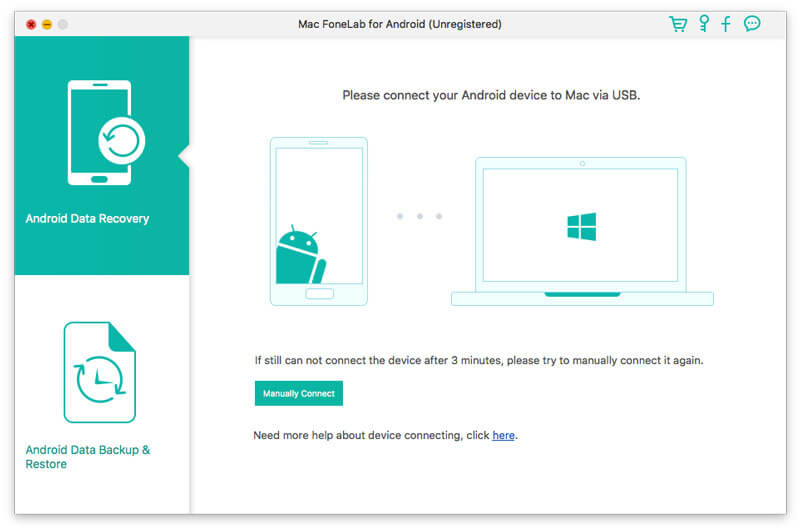
An older Mac FoneLab for Android window, asking you to connect a device over USB, with Android Data Recovery and Android Data Backup & Restore on the left.
Features
Messages, contacts and call logs
Mac FoneLab recovers deleted text messages, contacts with their full details, and call history. Contacts export as VCF, CSV or HTML, and messages as CSV or HTML with attached images.
Photos, videos, audio and documents
Mac FoneLab finds deleted camera photos, downloaded pictures, recorded videos, call recordings and music, along with Word, Excel, PowerPoint, PDF, HTML, Zip and RAR files stored on the phone or its SD card.
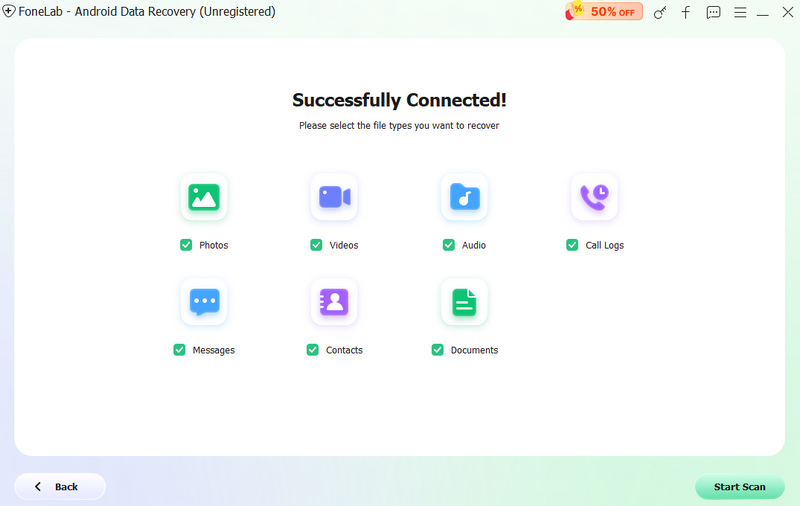
The file type screen, shown here in the Windows version: photos, videos, audio, call logs, messages, contacts and documents.
WhatsApp data
Mac FoneLab recovers WhatsApp chat history along with attached photos, videos and audio, including after the app has been uninstalled, according to Aiseesoft.
Google Drive backups
Mac FoneLab can read a Google Drive backup and pull out contacts, texts, call history, calendar entries and WiFi passwords, which helps when the phone itself is gone.
Backup and restore to the Mac
Mac FoneLab's Android Data Backup & Restore module copies text messages, contacts and media to your Mac, so you have a copy before the next accident.
Real-World Uses
- A deleted thread. You cleared a conversation with a client, and need the messages back for a dispute.
- Photos after a factory reset or update. Pictures vanish after a system update, and you scan the phone and its SD card.
- A phone that's gone. The phone was lost, so you pull contacts and texts from its Google Drive backup.
- Switching to iPhone. You keep a copy of old messages and photos on your Mac before you move on.
Who It's For, and Who Should Skip It
This fits Mac owners with a working Android phone who've lost messages, contacts or media and would rather pay once than subscribe.
Skip it if your phone won't power on or connect, since it needs USB debugging and the FoneGo app. Skip it too if you use a PC, because the Windows version is a separate listing, or if your data is on an iPhone, since this is the Android product. If you only need a basic copy of your photos, Android's own file transfer does that for free.
Usage Guide
- Download the DMG, install the program and open it.
- Connect the phone by USB, and follow the on-screen steps to turn on USB debugging if you haven't.
- Install FoneGo on the phone when asked, and give it access to the data.
- Choose the data types and click Start Scan.
- Preview the results, tick what you need and click Recover to save it to your Mac. This last step needs a license.
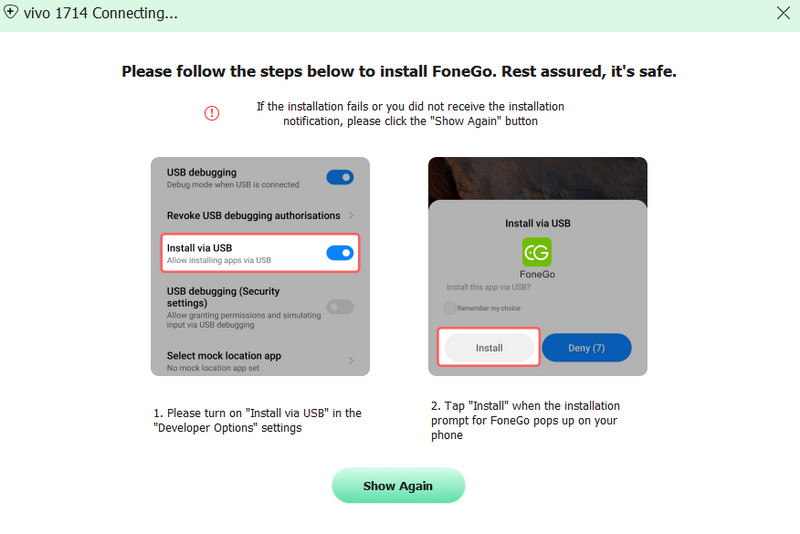
The FoneGo step, shown here in the Windows version: turn on Install via USB in the phone's developer options, then tap Install on the phone.
Where it falls short
- Nothing can recover overwritten data. Reviewers on Aiseesoft's own page say not everything came back.
- Scans take time. A long scan is normal, particularly on a full phone.
- The Mac version gets less attention. Most guides, screens and videos show the Windows version, so don't expect them to match exactly.
- Independent reviews are scarce. Almost all published user comments sit on Aiseesoft's own site.
What Users Say
Aiseesoft's product page shows 174 reviews of FoneLab for Android, covering both Windows and Mac. They're hosted by the vendor, so read them as such, though some are balanced.
Reviews on Aiseesoft's site
No File Corruption After Recovery: "The software is easy to use and lets you preview files before restoring them, which is helpful. The scan takes some time, and not everything was recoverable, but it still managed to recover most of the data I needed, most importantly, without file corruption" Charlee Anthony, December 2025
Works for SD Card Recovery: "I used FoneLab Android Data Recovery for recovering data from my Android SD card and it recovers most of my data." Amy Dennis, September 2025
Saved my photos: "I dropped my phone in water, and thought my photos were gone forever. FoneLab saved them in the end." Cunningham, August 2023
Excellent: "Helped recover my deleted or lost photos and messages successfully. But you should know that it is not 100% to recover any thing. I think it is the best to read some tutorials from this site before you choose to buy it." oLIVER, December 2017
Aiseesoft as a company
On Trustpilot, Aiseesoft Studio rated 3.9 out of 5 from about 600 reviews across all its products when we last looked. One 1-star reviewer, Owend, wrote about a different Aiseesoft recovery product: "First warning sign was they try to push you into a subscription rather than the one-time purchase." That's worth remembering on the order page, where monthly licenses sit next to the lifetime one.
The recurring themes: users like the preview and the range of data it finds, including from SD cards and water-damaged phones. The honest caveats are that scans take time and not everything comes back, which is why the free preview matters.
Editions and Pricing
| License |
Price |
Term |
Covers |
| Lifetime |
$49.96 |
One-time |
6 devices, 1 Mac |
| 1 Month |
$19.90 |
Monthly |
6 devices, 1 Mac |
| Multi-user |
$79.00 |
Lifetime |
6 devices, 3 Macs |
The monthly and multi-user prices are from Aiseesoft's purchase page on November 5, 2026. The lifetime license is the one to buy: a single month costs about 40% as much.
FAQs
Does Mac FoneLab - Android Data Recovery run on Apple silicon?
Mac FoneLab - Android Data Recovery has a separate Apple silicon package, and its installer fetches the right one for your Mac.
Is the Mac FoneLab lifetime license really one payment?
Mac FoneLab's lifetime license at $49.96 is a one-time purchase with no renewal. We confirmed that on the order page for this product.
Does Mac FoneLab work with a broken Android phone?
Mac FoneLab needs the phone to connect, allow USB debugging and accept the FoneGo app. A phone that can't do those won't scan, though its Google Drive backup or removable SD card may still be readable.
Can I use one Mac FoneLab license on two Macs?
Mac FoneLab's lifetime license covers 1 Mac and up to 6 devices. The multi-user license at $79.00 covers 3 Macs.
Can I get a refund from Aiseesoft?
Aiseesoft promises a refund for a quality problem within 30 days of purchase. The free scan is still the better first step, since it shows what can be found.
System Requirements
- Mac OS X 10.7 or later, including macOS Sequoia
- Intel or Apple silicon Mac
- About 53 MB for the program, downloaded by the installer
- An Android phone or tablet, a USB cable and USB debugging turned on
Conclusion
Mac FoneLab - Android Data Recovery is worth $49.96 if you're on a Mac, your Android phone still connects, and the free scan shows what you've lost. The one-time price and native Mac packages are the reasons to choose it over a Windows-only tool. The main reason not to is a phone that won't connect, and you should weigh the fact that nearly all its praise sits on Aiseesoft's own site. Run the scan first and buy only if your files are there.
Download Free TrialBuy Now