Aiseesoft Mac Data Recovery: Find Deleted Files on a Mac Before You Pay
Aiseesoft Mac Data Recovery is a $64.95 lifetime-license macOS app that scans your Mac's disks, the Trash and plugged-in drives (USB sticks, SD cards, camera cards, external hard drives) for deleted files and copies them back. It's for home users and small offices who emptied the Trash, formatted a card or lost a folder, and its free trial shows you what it can find before you buy.
You'll know the moment: the folder isn't in the Trash, there's no Time Machine backup, and the file was the only copy. A file recovery tool is worth trying before you give up, as long as you stop writing new files to that drive. This one makes the first step free: the scan and preview cost nothing, and only the recovery needs a license.
Quick facts
- Version: 1.8.68, the build Aiseesoft's installer downloaded in October 2026 (package dated August 2026)
- Developer: Aiseesoft Studio
- Runs on: macOS 10.7 or later, with separate native builds for Intel and Apple Silicon (M-series) Macs. The Windows version is sold separately.
- Recovers from: internal Mac drives, the Trash, USB flash drives, memory cards, digital cameras and external hard drives
- File types: images, audio, video, email, documents and others (Aiseesoft claims more than 2,000)
- Price: $64.95 at checkout, a one-time lifetime license
- Free trial: scans and previews, but recovering files needs a license
- Guarantee: 30-day money-back guarantee for a quality problem
- Download: a 4.2 MB installer that fetches the full app (about 36 MB) during setup
What we checked: the installer's full app package, which reports version 1.8.68.165739 and ships a native Apple Silicon build alongside the Intel one, and the price on the order page ($64.95, lifetime license, nothing else added to the cart), both on October 27, 2026. We didn't run a recovery on a Mac ourselves.
Before you buy
- Run the free scan first and buy only if your files show up. The trial lists and previews what it found, so you can check before paying. Several buyers on Trustpilot say the files were listed but came back unusable, so preview the actual files, not just the file names.
- You'll have to turn off System Integrity Protection. Aiseesoft's guide says Macs running El Capitan or later need SIP disabled before the program can scan. That means restarting into Recovery Mode and running a Terminal command, and turning it back on afterwards.
- Refunds are not automatic. The 30-day guarantee covers "a quality problem", and the critical reviews below are mostly about refund disputes.
- Stop using the drive. Every new file you save can overwrite what you're trying to get back. Install the app on a different drive if you can.
Download Free TrialBuy Now
Overview
Aiseesoft Mac Data Recovery works in one window. You tick the file types you're after (Image, Audio, Video, Email, Document, Others), pick the drive or the Trash, and click Scan. A Quick Scan comes first. When it ends, the results open in a browser with a Type List and a Path List, a name-or-path search box and a filter, and you tick what you want and click Recover. If the file you need isn't there, a Deep Scan goes over the drive again more thoroughly.
It's built for everyday losses rather than lab work: no disk imaging, no RAID rebuilding, no hex editor. The interface is the same simple white window throughout, which is the point. Someone who has never used a recovery tool can get through it.
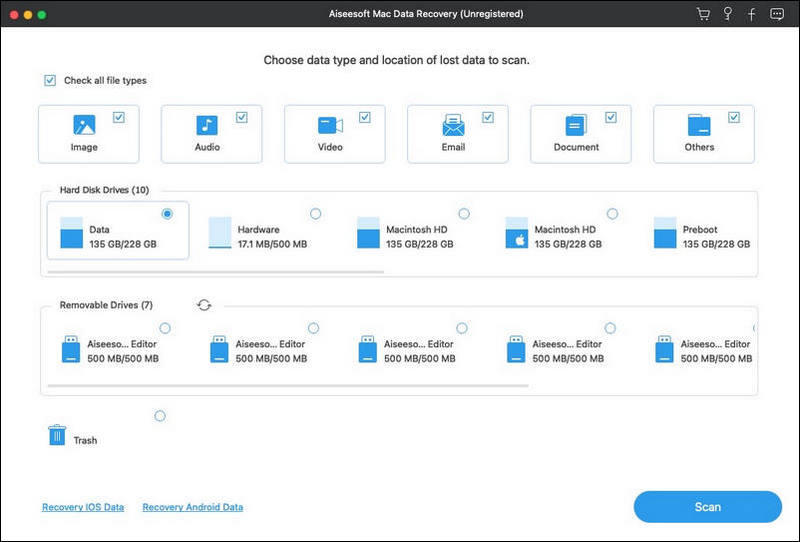
The start screen of the unregistered trial: file type checkboxes at the top, the Mac's volumes under Hard Disk Drives, plugged-in drives under Removable Drives, the Trash, and the Scan button.
Features
Recovery from the Mac, the Trash and removable drives
Aiseesoft Mac Data Recovery scans any volume the Mac can see: the internal APFS volumes (Data, Macintosh HD and the rest), the Trash on its own, and removable drives such as USB flash drives, SD and CompactFlash cards, camera cards and external hard drives or SSDs. That covers the common cases: an emptied Trash, a reformatted camera card, a USB stick that suddenly shows as empty.
Quick Scan first, Deep Scan when you need it
Aiseesoft Mac Data Recovery starts with a Quick Scan, which finishes fast and lists recently deleted files. When that doesn't find your file, the Deep Scan button runs a slower, more thorough pass over the same drive. Aiseesoft says it can also work on formatted and RAW drives and lost partitions, the cases where a deep scan matters.
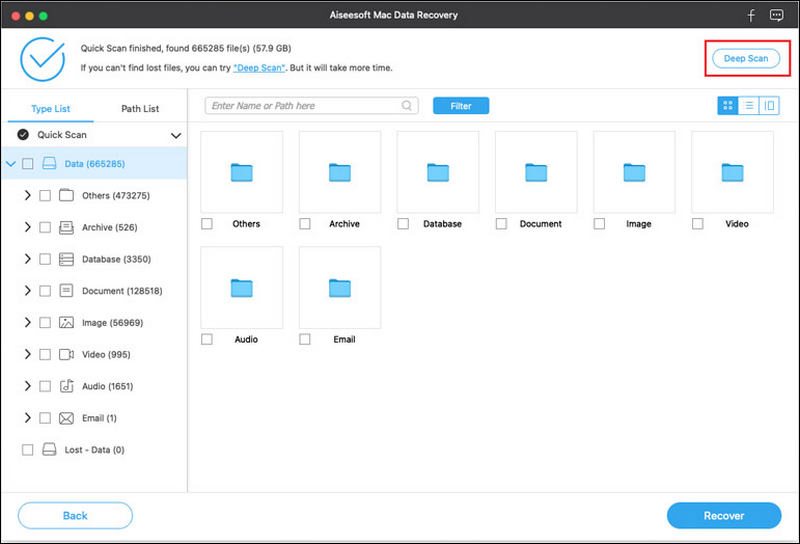
Quick Scan results: 665,285 files (57.9 GB) found on the Data volume, grouped into Others, Archive, Database, Document, Image, Video, Audio and Email, with the Deep Scan button highlighted at the top right.
Find the right file in a big result list
Aiseesoft Mac Data Recovery sorts results two ways: the Type List groups files by kind and extension, and the Path List rebuilds the folders they came from when it can. A search box takes a file name or path, the Filter narrows the list, and you can switch between thumbnail, list and detail views. That matters when a scan turns up hundreds of thousands of files, as in Aiseesoft's own example.
Preview before you recover
Aiseesoft Mac Data Recovery lets you preview found files before recovering them, and the preview works in the free trial. That's the most useful part of the trial: a photo that previews properly is very likely recoverable, while a file that only shows a name and a blank icon may come back damaged.
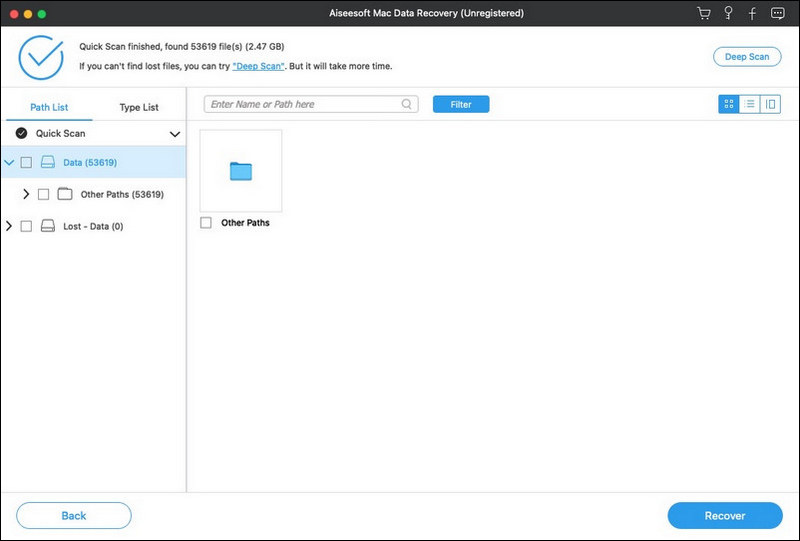
The Path List view after a Quick Scan (53,619 files, 2.47 GB), with the name and path search box, the Filter button, view switches and the Recover button. The title bar shows the unregistered trial.
Benefits
The real benefit is a free answer to "can I get it back?" Many recovery tools let you scan for free, and this one does too, so you don't spend $64.95 on a hope. If the preview shows your files intact, you pay once and recover as much as you need, now and the next time something goes missing.
The second is simplicity. There's nothing to configure beyond file types and a drive, which suits a stressed person at 11 pm far better than a professional tool with partition tables and hex views.
Real-World Uses
- An emptied Trash: scan only the Trash, filter by Document, and pull back last week's report.
- A camera card formatted by mistake: connect the SD card with a reader, tick Image and Video, and run a Deep Scan if the Quick Scan comes up short.
- A USB stick that shows as empty after it was pulled out mid-copy.
- A folder deleted with Command-Option-Delete, which skips the Trash, found again through the Path List.
Who It's For, and Who Should Skip It
Aiseesoft Mac Data Recovery fits home users and small offices who lost ordinary files (photos, documents, videos) on a Mac or a removable drive and want a simple tool with a one-time price. It's best as a first try on a fresh loss, while the data hasn't been overwritten.
Skip it if the drive is clicking, not detected or physically failing: stop using it and go to a recovery lab, because every scan stresses a dying disk. Skip it if you can't or won't disable System Integrity Protection on a work Mac you don't manage. And if your data is important enough to be worth hundreds of dollars, compare its free scan with the free scans of better-reviewed Mac recovery tools first: run each trial, and buy the one whose preview shows your files intact.
Usage Guide
- Download and install. Run the small DMG installer, ideally onto a drive other than the one you're recovering from. It downloads the full app during setup.
- Disable System Integrity Protection if your Mac runs El Capitan or later, following Aiseesoft's guide, then restart and open the program.
- Choose what to scan. Tick the file types and select the drive, an external drive or the Trash, then click Scan.
- Browse the results. Use the Type List or Path List, the search box and the Filter, and preview the files you need.
- Run a Deep Scan if the file isn't there.
- Register and recover. Buy a license, enter the email address and registration code from your order email in the registration window, tick the files and click Recover. Save them to a different drive.
- Turn SIP back on when you're done.
Where it falls short
- Found doesn't always mean usable. Trustpilot reviewers describe files that were listed by the scan but wouldn't open after recovery, including large videos that wouldn't play. A file whose space has been reused can't be repaired by any tool, so judge by the preview.
- Weak independent test results. DiskTuna's 2019 test of the Windows version found its deleted-file scan mostly limited to Recycle Bin paths and a long, partial result on a damaged drive. That's an older version on Windows, but there's no recent independent test of the Mac version to set against it.
- The SIP step is a hurdle for non-technical users and isn't allowed on many managed work Macs.
- Some confusion on the vendor's site: one page says Mac OS X 10.7 or higher and another 10.12 or higher, and the store sells monthly, yearly and lifetime plans, so check what you're buying at checkout.
What Users Say
Aiseesoft's own review page: 563 reviews
Aiseesoft's page collects reviews of Aiseesoft Data Recovery (Windows and Mac together), all positive. They're hosted by the vendor, so read them as testimonials rather than independent ratings.
D. Carlson, "Fast and safe." (November 2025): "I tried every free recovery tool out there and still couldn't get back a file I deleted months ago. I had basically given up. Then I found this software through a recommendation. I can't believe it did. I just got all my file back within 1 minute!"
Larry, "Recovering data easily" (January 2019): "It recovers data from memory cards for phones and cameras. Get a SD card reader, and scan the reader. Recovering data easily."
Steve, "Doing a great job" (June 2018): "It did the job for my few scan disk card. And I like settings, quick scan, and deep scan. Doing a great job."
Trustpilot: Aiseesoft rated 3.8 out of 5 from 608 reviews
Aiseesoft's Trustpilot score covers all its products, and most of the 5-star reviews are about its video and iPhone tools, often praising fast help with registration keys. The reviews that name the data recovery software are a different story: all five we found were 1-star, including the four below.
Leo Xu (1 star, September 2024), in a review titled "Aiseesoft Mac Data Recovery": "Basically you can't get anything back." The reviewer advises checking the refund terms before buying.
Jonas (1 star, January 2025), "Their money back guarantee does not work": "The recovered files are no longer possible to play in a video player." The refund was refused because the data had been overwritten.
Owend (1 star, September 2026), "Refund Endless Cycle - Don't Trust": "The free trial said it found my data, click here to purchase and recover." The reviewer says the results weren't useful and refund requests led to repeated demands for more information.
Yann Duval (1 star, October 2026), "Data recovery SW. Fraud. Do no buy it.": "After my HDD got corrupt I bought the data recovery software." The review describes very little recovered and a promised refund that didn't arrive.
These Trustpilot excerpts were read through a summarizer, so treat the wording as close but not guaranteed exact.
DiskTuna: an independent test of the Windows version
Joep of DiskTuna, a photo recovery service, tested Aiseesoft Data Recovery for Windows in November 2019 with a free giveaway license, comparing file detection against other tools on a large NTFS drive.
"Verdict: not worth your time. For undelete type recovery it's useless, there are free alternatives that are better, Recuva to name one."
On a lightly damaged drive, he wrote that it "needed well over an hour. Found about 50% of total files, only 285000 or so in original directory tree." The test is old and Windows-only, but it's the one hands-on independent test we could find.
The recurring themes: the vendor's testimonials praise speed and ease of use, especially for memory cards. Independent voices are much harsher: buyers who say the scan found files that came back unusable, refund requests that dragged on despite the 30-day guarantee, and a professional tester who found it weak. Almost none of the reviews are specific to the Mac version. Treat the free scan and preview as the deciding test, and don't buy on the strength of a file list alone.
Comparisons
Mac Data Recovery vs Aiseesoft Free Data Recovery
Aiseesoft also has a separate freeware program, Aiseesoft Free Data Recovery, which recovers up to 200 MB. The paid Mac Data Recovery has no recovery limit. If you only need a few documents back, the free program may be enough. For a camera card full of photos or videos, it won't be.
Mac vs Windows
The Windows version, Aiseesoft Data Recovery, adds a Crashed PC Recovery mode that boots a dead computer from a USB drive, and AI repair of broken images. The Mac version described here scans drives the running Mac can see. Each is a separate purchase.
Editions and Pricing
| License |
Price |
Term |
Macs |
| Lifetime license (this listing's Buy Now) |
$64.95 once |
Lifetime |
Not stated on the order page |
| Aiseesoft store: 1 Month |
$30.00 |
1 month |
1 |
| Aiseesoft store: 1 Year |
$60.00 |
1 year |
2 |
| Aiseesoft store: Lifetime |
$144.00 |
Lifetime |
3 |
FAQs
Can the Aiseesoft Mac Data Recovery trial recover files for free?
No. The Aiseesoft Mac Data Recovery trial scans your drives and previews what it finds, but recovering the files needs a license. Use the preview to decide whether buying is worth it.
Does Aiseesoft Mac Data Recovery run natively on M1, M2 and later Macs?
Yes. Aiseesoft Mac Data Recovery's installer downloads a separate Apple Silicon build, and that build's program files are native ARM code, so it doesn't need Rosetta on M-series Macs.
Why does Aiseesoft Mac Data Recovery ask me to disable System Integrity Protection?
Aiseesoft Mac Data Recovery needs to read the system disk directly to find deleted files, and System Integrity Protection, on by default since El Capitan, restricts that kind of access. You disable SIP from Recovery Mode with a Terminal command. Turn it back on after you've recovered your files, since it protects the Mac from malware.
Can Aiseesoft Mac Data Recovery get back files after I emptied the Trash?
Often, yes, if you act quickly. Aiseesoft Mac Data Recovery can scan the Trash on its own, and files deleted from the Trash stay on the disk until new data overwrites them. The longer you keep using the Mac, the lower the chance.
Will Aiseesoft Mac Data Recovery work on a drive that's making clicking noises?
Don't try it. A clicking or undetected drive usually has a hardware fault, and scanning it with any recovery software can make things worse. Turn it off and contact a professional recovery service.
Is the $64.95 license a subscription?
No. The Aiseesoft Mac Data Recovery license behind this page's Buy Now button is a one-time lifetime license, with nothing else added to the cart. Aiseesoft's own store also sells monthly and yearly plans that renew, so check the term if you buy elsewhere.
Can I get a refund if Aiseesoft Mac Data Recovery doesn't recover my files?
Aiseesoft offers a 30-day money-back guarantee, but only for "a quality problem", and buyers on Trustpilot describe refunds refused when the data had been overwritten. Count on the free preview, not the refund, to protect you.
Can Aiseesoft Mac Data Recovery recover iPhone data?
No. Aiseesoft Mac Data Recovery works on drives connected to the Mac. Its start screen has Recovery iOS Data and Recovery Android Data links for phone data, which Aiseesoft handles with separate programs.
System Requirements
- Operating system: Mac OS X 10.7 or later (Aiseesoft also lists the latest macOS releases), with System Integrity Protection disabled on El Capitan or later
- Processor: 1 GHz 64-bit Intel CPU or Apple M-series chip
- Memory: 512 MB RAM, 1 GB recommended
- Disk: 100 MB free, plus room on another drive for the recovered files
Conclusion
Aiseesoft Mac Data Recovery is worth $64.95 only after its free scan has shown you previews of the files you need: then you're paying a fair one-time price for a simple tool that has already proved it can find them. The reason to choose it is that easy, no-subscription route for an everyday loss on a Mac or a memory card. The reason for caution is its independent record: the reviews of the data recovery product on Trustpilot are 1-star refund complaints, and the one hands-on test we found was poor. Scan first, preview carefully, and don't buy if the preview doesn't show your files intact.
Download Free TrialBuy Now