Aiseesoft Mac Cleaner: Find Junk, Duplicates and Large Files and Free Up Space on Your Mac
Aiseesoft Mac Cleaner is a Mac utility that scans for system and app caches, logs, old iTunes backups, mail attachments, similar photos, duplicate files and large, old files, lets you review them and deletes the ones you pick, with an app uninstaller, privacy cleaner and system monitor alongside. A lifetime license for one Mac is $80 on the order page; a 1-year license is $45.
It's for Mac owners who keep running out of disk space, especially on a small SSD, and want one place to find what's using it.
Quick facts
- Price: $80 lifetime for 1 Mac, $45 for 1 year, $19.95 for 1 month, $99.95 for 5 Macs
- Developer: Aiseesoft Studio
- Platform: macOS Sierra and later, up to macOS 27; Intel and Apple silicon (M-series) Macs
- Cleaner: System Junk, iPhoto Junk, Email Junk, Similar Photo, iTunes Junk, Trash Bin, Large & Old Files, Duplicate Finder
- ToolKit: uninstaller, optimizer, privacy cleaner, file manager and shredder, file hider and encrypter
- Status: live CPU, memory and disk usage
- Refund: 30-day money-back guarantee when there's a quality problem
- What we checked: the vendor's disk image (19.6 MB, dated July 27, 2023; version 3.0.20 as listed by download sites) and the four licenses on the order page (lifetime 1 Mac $80, 1 year $45, 1 month $19.95, 5 Macs $99.95) on November 25, 2026. We didn't run a scan ourselves.
Before you buy
- Try macOS's own tools first. System Settings > General > Storage shows what's using your disk and offers to empty the Trash automatically, optimize storage and review large files, for free.
- Caches come back. Clearing caches frees space for a while, but apps rebuild them. The lasting gains come from removing large old files, duplicates, old iPhone backups and apps you don't use.
- Check before you delete. Review each scan's results; "large and old" or "duplicate" doesn't always mean unwanted.
- Lifetime vs yearly. The lifetime license costs less than two years of the yearly one.
Free DownloadBuy Lifetime (1 Mac)
Overview
Macs with a 256 GB SSD fill up quickly, and macOS's "Other" or "System Data" storage is hard to make sense of. Mac Cleaner puts the usual suspects in one window. Its Cleaner section has eight scanners, each showing how much space it found and a list of the files behind it, sorted and searchable, so you can tick what goes and click Clean.
The app has three sections. Status shows CPU, memory and disk use in real time. Cleaner holds the eight scanners. ToolKit has the extras: an uninstaller that removes apps with their leftover files, an optimizer for things like login items and Spotlight, a privacy cleaner for browser cookies, searches, downloads and history, a file manager that can shred files, and a tool to hide and encrypt private files.
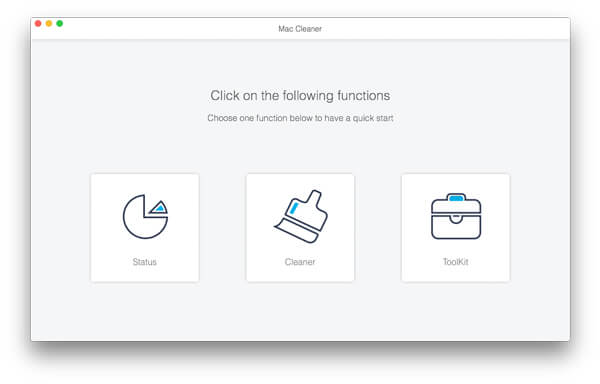
The home screen: Status, Cleaner and ToolKit.
Features
Eight junk scanners
Aiseesoft Mac Cleaner scans for system junk (system and app caches, system and user logs, unused localization files), iPhoto junk (photo caches), email junk (downloaded mail and attachments), iTunes junk (old iOS backups, installation packages, broken downloads), the Trash, large and old files, duplicate files and similar photos.
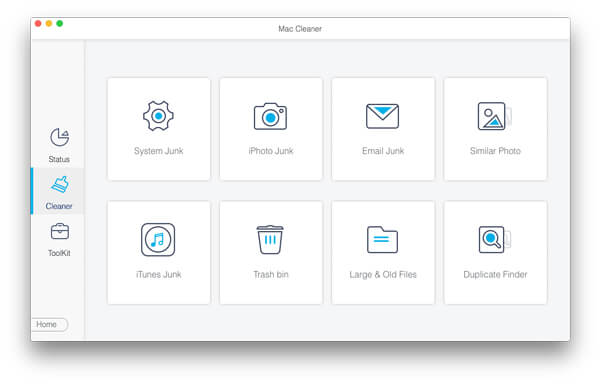
The Cleaner section: one tile for each of the eight scanners.
Review before you clean
Aiseesoft Mac Cleaner lists everything a scan finds by type, with each item's size, location and date, so you can deselect anything you want to keep before clicking Clean. Large & Old Files sorts results into over 100 MB, 5 to 100 MB, older than a year and older than 30 days.
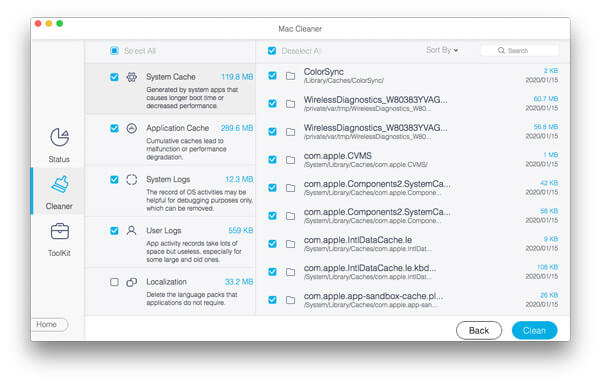
System Junk results: system cache, application cache, system and user logs and localization files, each with its size and the files behind it.
Uninstaller and privacy cleaner
Aiseesoft Mac Cleaner's ToolKit removes applications together with their related files, which dragging an app to the Trash leaves behind, and clears cookies, searches, downloads and visit history from your browsers.
File shredder and file hider
Aiseesoft Mac Cleaner's file manager shows file information and shreds files so they can't be recovered, and its encrypter hides and encrypts private files on the Mac.
Who it's for, and who should skip it
It suits Mac owners on small SSDs who regularly run short of space, people who keep old iPhone backups and big video projects around, and anyone who wants a duplicate finder, uninstaller and shredder in one app rather than three.
Skip it if your Mac has plenty of free space: cleaning won't make a healthy Mac noticeably faster, whatever cleaner marketing suggests. Skip it too if macOS's own Storage settings already show you what to delete, or if you only need one job done, such as finding duplicates, where a single-purpose tool is cheaper.
Usage Guide
- Download the disk image, drag Mac Cleaner to Applications and launch it.
- Click Status to see how your disk, memory and CPU are used.
- Click Cleaner and choose a scanner, such as Large & Old Files or System Junk, then click Scan.
- When the scan finishes, click View, review the results and untick anything you want to keep.
- Click Clean. Use ToolKit for uninstalling apps, clearing browser privacy data or shredding files.
Where it falls short
- Big claims. The product page promises up to 5x faster boot and 10x more free space. Results depend entirely on what's on your Mac; on a tidy Mac the gains are small.
- Updates are infrequent. The current download is version 3.0.20 from July 2023.
- Strict refunds. Aiseesoft's 30-day guarantee covers quality problems with the program, not a change of mind.
What Users Say
Aiseesoft's site shows an average of 5.0 out of 5 from 356 ratings for Mac Cleaner. We found no independent user reviews of the current version (MacUpdate lists it with no reviews yet), so here are the testimonials on the vendor's page and what buyers say about Aiseesoft on Trustpilot.
On Aiseesoft's product page
Ben: "Mac Cleaner is the best Mac cleaning tool. It can clean the malware and adware like Advanced Mac Cleaner, etc., from my MacBook easily. I love this tool."
Cassie: "This Mac Cleaner helps me to erase much cache and junk files and lets my iMac get faster than before."
Tom: "Aiseesoft Mac Cleaner seems to let my MacBook Air be a little faster since I use it to delete the similar files as well as some large files more than 150MB."
Cristina: "Compared with Avast, I like this Mac space cleaner more. All files that I want to get rid of my Mac are removed permanently. Thanks a lot."
Trustpilot (Aiseesoft as a company)
Aiseesoft Studio has a TrustScore of 3.9 from 614 reviews. Support gets the praise: Turhan (October 25, 2026): "It is very easy to use, and the help and support team is excellent." Ro (September 14, 2026): "This is customer support at its best. Thanks team."
Refunds get the complaints. B Hackett (October 22, 2026), about Mac FoneTrans: "They refused to issue the refund. and have not fixed the haptics". caitlin hardwick (October 6, 2026): "I was refused a return based on the product not being faulty due to their so called returns policy."
Users who wrote about Mac Cleaner mostly value the space it frees and the large-file and similar-photo scans; Tom's "a little faster" is a fair expectation for speed. All of the product reviews come from the vendor's own page, and Aiseesoft's refund policy is the recurring complaint about the company.
Editions and Pricing
Each button below orders that license.
Prices are from the order page on November 25, 2026. The 5-Mac license costs only $19.95 more than the single-Mac lifetime one, so it's the better buy for a household with two or more Macs.
FAQs
Does Aiseesoft Mac Cleaner work on Apple silicon Macs?
Yes. Aiseesoft lists Mac Cleaner as supporting Apple M-series chips as well as Intel Core i5 and later, on macOS Sierra up to macOS 27.
Will Aiseesoft Mac Cleaner make my Mac faster?
Aiseesoft Mac Cleaner can help when a nearly full disk is slowing things down or when login items pile up. On a Mac with plenty of free space, expect little change in speed; the main benefit is reclaimed storage.
Is it safe to delete what Aiseesoft Mac Cleaner finds?
Caches and logs are rebuilt by macOS and apps as needed, so deleting them is generally safe. Large, old and duplicate files are your own data, so review Aiseesoft Mac Cleaner's lists before cleaning; deleted files go for good if you use the shredder or empty the Trash.
Can Aiseesoft Mac Cleaner remove malware?
Aiseesoft Mac Cleaner's uninstaller removes unwanted apps, including adware you can see in Applications, with their leftover files. It isn't an antivirus program, so use a dedicated security tool for a suspected infection.
Can one license cover two Macs?
No. The lifetime and yearly Aiseesoft Mac Cleaner licenses cover one Mac each. The 5-Mac license covers up to five.
Is there a Windows version?
No. Aiseesoft Mac Cleaner is for macOS only.
System Requirements
- macOS Sierra through macOS 27
- Intel Core i5 (1.4 GHz dual-core) or faster, or an Apple M-series chip
- 1 GB RAM
- 2 GB of free disk space
Conclusion
Aiseesoft Mac Cleaner is worth buying if your Mac keeps running out of space and you want one app that finds caches, old backups, duplicates and large files, plus an uninstaller and shredder. The 5-Mac license at $99.95 is the best value if you have more than one Mac. The main reason not to buy it: macOS's free Storage settings already cover the basics, and cleaning won't speed up a Mac that has room to spare. Try the free download first to see what it finds on your Mac.
Free DownloadBuy Lifetime (1 Mac)Buy 5 Macs