Aiseesoft Mac Video Converter Ultimate: Convert, Trim, Compress and Upscale Video on Any Mac
Aiseesoft Mac Video Converter Ultimate is a macOS app that converts video and audio between formats (including 4K and 8K HEVC, MKV, AVI and WebM that QuickTime won't open), and adds a basic editor, a movie maker, a split-screen collage maker and a toolbox of 20-odd small utilities. Our Buy Now button sells a one-Mac license called "Lifetime" for $49.96 (20% off $62.45), but it renews automatically every 12 months at $62.45, so it's really a yearly plan; there's a free trial.
The Mac is good at playing the formats Apple likes and stubborn about everything else. An MKV from a friend, an AVI from an old camcorder or a WMV from a Windows colleague won't play in QuickTime or import into iMovie, and Apple's own "Encode Selected Video Files" in Finder only writes H.264 or HEVC from files macOS can already read. A converter like this one fills that gap: drop the file in, pick a preset, and get something your Mac, iPhone or editor accepts.
Quick facts
- Version: 10.5.56 (app packages dated August 25, 2026)
- Developer: Aiseesoft Studio
- Runs on: macOS 10.12 Sierra or later, up to macOS Tahoe, with separate native builds for Intel and Apple silicon (M1 to M5) Macs. The Windows edition, Aiseesoft Video Converter Ultimate, is a separate product with its own license.
- Converts: MP4, MOV, MKV, AVI, WMV, FLV, WebM, MTS/M2TS, MXF, VOB, 3GP and more, with H.265/HEVC, H.264, VP8/VP9 and Xvid; audio to MP3, AAC, FLAC, WAV, AIFF, M4A, OGG and others
- Also does: trimming, merging, cropping, filters, subtitles, extra audio tracks, watermarks, MV themes, split-screen collages, 2D to 3D, GIFs, compression and AI-based upscaling and denoising
- Price: $49.96 for the first year on the order page (list $62.45, 20% off), then $62.45 a year. The order page names it "Lifetime", but it auto-renews every 12 months unless you turn renewal off. A 3-Mac license is $79.96 on Aiseesoft's store.
- Free trial: yes, with limits on how much of each file it converts
- Refunds: 30-day money-back guarantee for lifetime licenses when there's a quality problem with the software
- What we checked: the 4.2 MB online installer and the Apple silicon (188 MB) and Intel (182 MB) app packages it downloads, both version 10.5.56.29949, and the order page, which charged $49.96 (20% off $62.45) for the "Lifetime" option with automatic renewal every 12 months and the next $62.45 charge set for a year later, rechecked on November 4, 2026. We didn't convert any files with it.
Before you buy
- "Lifetime" on the order page renews yearly. The option is labelled Lifetime, but the order page sets it to renew every 12 months: $49.96 now, then $62.45 a year until you cancel. Untick automatic renewal at checkout if you don't want the yearly charge.
- The money-back guarantee is narrow. Aiseesoft promises refunds within 30 days for lifetime licenses "when there is a quality problem", not for a change of mind. Run the trial on your own files first.
- The download is an installer, not the app. The 4.2 MB DMG fetches the real app (about 190 MB) during installation, so you need a working internet connection on the Mac you install it on.
- Mac and Windows licenses are separate. A Mac code won't activate the Windows edition.
Download Free TrialBuy Now
Overview
The app opens on four tabs across the top: Converter, MV, Collage and Toolbox. Converter is the one most people buy it for. You drag files onto the window (or use Add Files, which also takes a whole folder), choose a format from "Convert All to" at the top right, and click Convert All. The output lands in a folder under your Movies folder unless you pick another one, and a "Merge into one file" box joins the clips on the way out.
Each file in the queue gets its own Edit and Cut buttons, so you can tidy a clip before converting it instead of opening a separate editor. Preferences let you set what happens when a batch finishes (open the output folder, sleep or shut down the Mac), which helps with long overnight queues.
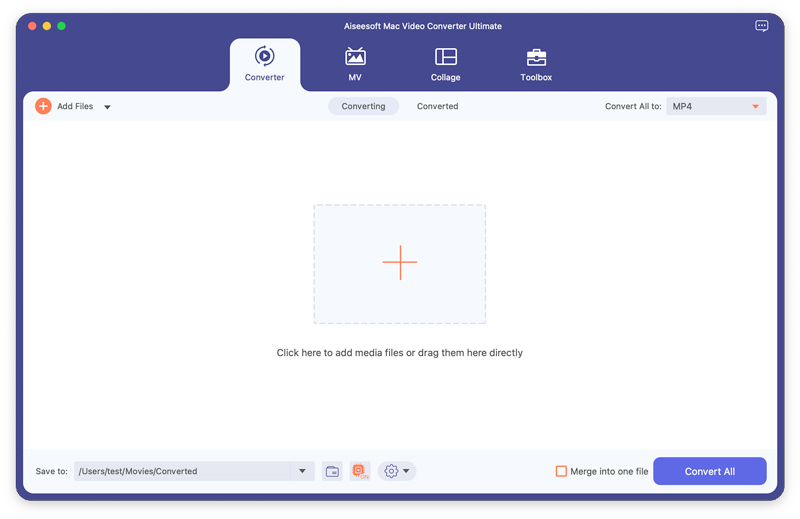
The Converter tab before any files are added: Add Files on the left, "Convert All to: MP4" on the right, a Save to path under /Users/.../Movies/Converted, the "Merge into one file" box and the Convert All button.
Features
Format conversion up to 8K, with device presets
Aiseesoft Mac Video Converter Ultimate reads the formats macOS ignores (MKV, AVI, WMV, FLV, RMVB, VOB, MXF, TOD, MOD) and writes MP4, MOV, MKV, AVI, WebM, TS and many older formats, with H.265/HEVC, H.264, VP9 and other codecs up to 4K, 5K and 8K. Presets cover iPhone, iPad, Apple TV, iMovie, Avid, Android phones and game consoles, and you can change the encoder, frame rate, bitrate, resolution and aspect ratio yourself. Audio converts to MP3, AAC, FLAC, WAV, AIFF, M4A and more, which also makes it a quick way to pull the soundtrack out of a video.
Editing before conversion
Aiseesoft Mac Video Converter Ultimate has a Cut window for trimming, splitting and reordering segments, and an Edit window with tabs for rotate and crop (16:9, 4:3, 1:1 and 9:16 presets), brightness, contrast, saturation and hue, a dozen filters, text or image watermarks, an extra audio track with a delay setting, and external SRT, SSA or ASS subtitles with font and color controls. It's enough to fix a sideways phone clip or burn subtitles into a film, not a replacement for Final Cut Pro or iMovie's timeline.
MV themes and split-screen collages
Aiseesoft Mac Video Converter Ultimate's MV tab turns a handful of clips and photos into a short movie with a ready-made theme, title text and background music, and the Collage tab places several videos or photos side by side in a chosen layout with filters and one audio track. Both are template tools for social posts and family clips, with a choice of aspect ratio such as 16:9.
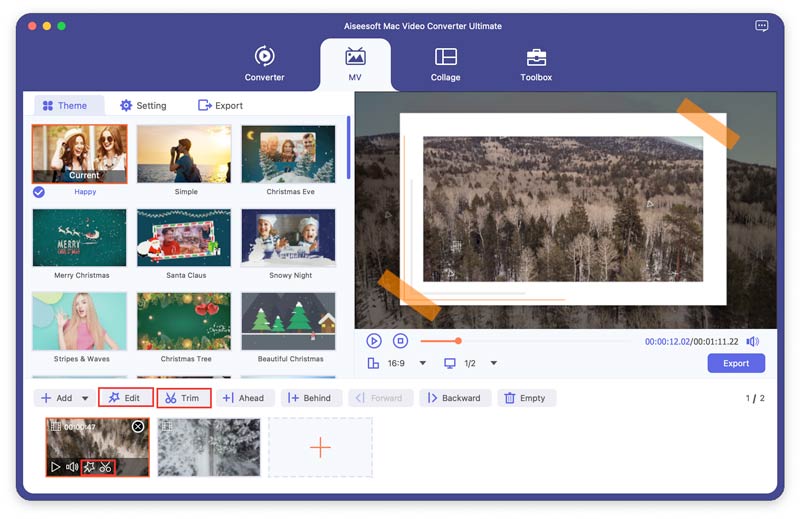
The MV tab: themes such as Happy, Simple and Christmas Eve on the left, a preview with a 16:9 aspect ratio and Export button on the right, and the clip strip with Edit and Trim buttons at the bottom.
A toolbox of single-purpose utilities
Aiseesoft Mac Video Converter Ultimate's Toolbox holds about 20 small tools, each with its own window: Video Compressor (set a target size, resolution and bitrate, with preview), GIF Maker (from a video or a set of photos), 3D Maker, Video Enhancer, Media Metadata Editor (title, artist, album, year and other tags), Video Trimmer, Speed Controller, Reverser, Merger, Rotator, Cropper, Volume Booster, Audio Sync, Audio Compressor, Watermark and Watermark Remover, Color Correction, Noise Remover, Image Converter, File Date Changer and a Video Player. The compressor is the one most Mac users will reach for, to get a phone video under an email or Messages attachment limit.
Video Enhancer: upscaling, denoise, brightness and stabilization
Aiseesoft Mac Video Converter Ultimate's Video Enhancer has four checkboxes: Upscale Resolution, Optimize Brightness and Contrast, Remove Video Noise and Reduce Video Shaking. You tick what you want, preview a section and click Enhance. It's aimed at old low-resolution clips and shaky handheld footage. Aiseesoft also sells a standalone Mac Video Enhancer with the same four options, so there's no need to buy both.
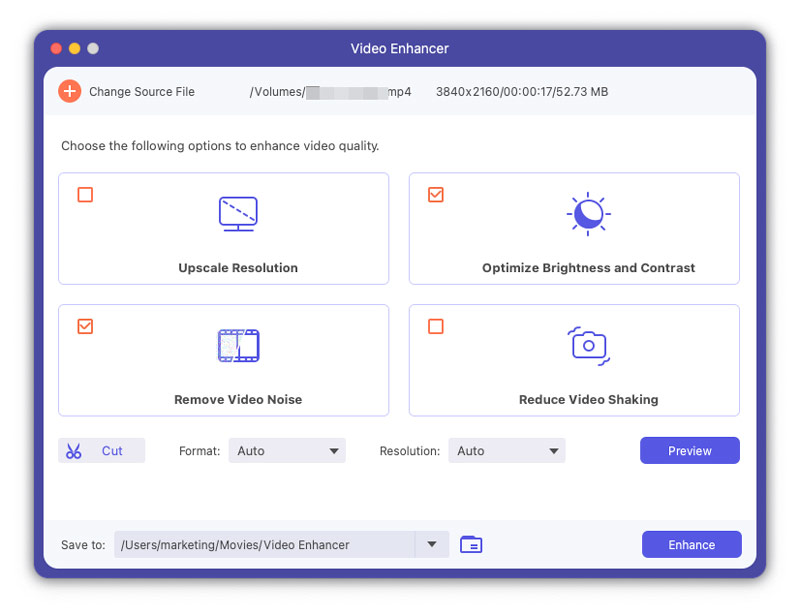
The Video Enhancer window with a 3840x2160 source loaded, Optimize Brightness and Contrast and Remove Video Noise ticked, and Preview and Enhance buttons.
2D to 3D conversion
Aiseesoft Mac Video Converter Ultimate's 3D Maker turns an ordinary video into anaglyph 3D (red/cyan and other color pairs, for paper glasses) or split-screen 3D (side by side or top and bottom, half or full) for 3D TVs and VR headsets, with a depth slider and a left/right swap. It's a niche feature, but few Mac converters still offer it.
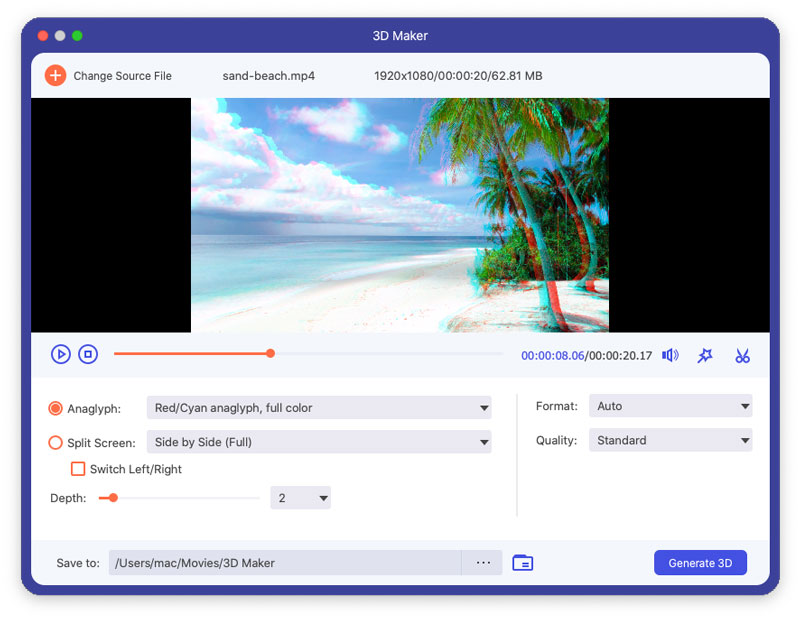
The 3D Maker previewing a 1080p beach clip as red/cyan anaglyph, with the Split Screen option, Depth setting and Generate 3D button below.
Benefits
- One app instead of several. A free converter such as HandBrake covers the conversion, but not the compressor, GIF maker, metadata editor, collage maker and enhancer. If you'd otherwise hunt for a separate app for each of those, the bundle saves time.
- Native on Apple silicon. Aiseesoft ships a separate Apple silicon package, so it doesn't run through Rosetta on an M-series Mac.
- Presets instead of codec settings. You pick "iPhone" or "iMovie" rather than working out profile levels and bitrates, which suits people who just want the file to play.
- Batch queues. A folder of old camcorder clips converts in one run, with the Mac set to sleep when it's done.
Real-World Uses
- Old home videos into Photos. Convert a box of AVI, MOD/TOD and MTS files from older camcorders to H.264 MP4, merge the short clips, and import them into Photos or iMovie.
- Downloaded MKV films on an iPad. Convert MKV files with SRT subtitles to MP4 with the subtitles burned in, using the iPad preset.
- Shrinking a screen recording. Run a 2 GB 4K recording through the Video Compressor at 1080p so it fits a Slack or email upload.
- Audio from video. Pull the audio of a lecture or concert video to MP3 or M4A, then fix the title and artist tags in the Metadata Editor before adding it to Music.
- A quick birthday clip. Drop phone clips and photos into the MV tab, pick a theme and music, and export a short movie without learning a timeline editor.
Who It's For, and Who Should Skip It
It suits Mac owners who regularly get video in formats Apple doesn't handle and want a point-and-click app with presets, plus the odd compression, GIF or trimming job, without learning HandBrake's settings or FFmpeg's command line.
Skip it if you only convert the occasional file: the free HandBrake converts most formats to MP4 and MKV well, and Finder's "Encode Selected Video Files" handles simple re-encodes of files macOS already plays. Video editors who live in Final Cut Pro or DaVinci Resolve won't use the editing side.
Usage Guide
- Install: open the downloaded DMG and run the installer. It downloads the Intel or Apple silicon app (about 190 MB) and puts it in Applications.
- Register: after buying, click the key or Register icon and enter the email address and registration code from the order email. Until then it runs as the trial.
- Add files: drag videos onto the Converter tab or click Add Files (the arrow beside it adds a whole folder).
- Edit if needed: click Cut to trim or split, or Edit to crop, rotate, filter, watermark, add subtitles or another audio track.
- Pick the output: open "Convert All to", search for a format or device preset, and change the resolution or bitrate with the gear icon if you want.
- Convert: choose the Save to folder, tick "Merge into one file" if you want a single output, and click Convert All.
Where it falls short
- Files only. Its input list is video and audio files, with no DVD or Blu-ray disc input; disc ripping needs a separate ripper.
- The editor is basic. One video track, no keyframes, no multi-track audio mixing; it's for trims and fixes, not projects.
- Resource-hungry. One of the two reviews on G2 (4.8 average) said the app uses a lot of RAM, which matters on an 8 GB MacBook running long 4K jobs.
- Dated device list. The tech specs still name the iPhone 11 and the original iPad Air as the newest Apple presets; newer devices play the generic HEVC or H.264 MP4 presets fine, but don't expect a preset named after your phone.
- Thin independent testing. Unlike HandBrake, it has almost no independent hands-on reviews of the Mac edition, so the trial is your best evidence.
What Users Say
Trustpilot (Aiseesoft as a company)
Aiseesoft Studio has a TrustScore of 3.8 out of 5 from about 610 reviews on Trustpilot, covering all its products: about 60% are five-star and about 34% one-star, a split you see with many software vendors. Reviews that name this Mac app are positive:
"I've been buying Aiseesoft products for many years and always get quick support from them." Hayden, Trustpilot, December 2025, five stars (Video Converter Ultimate on macOS)
Two other converter users praised specific jobs: "Other video converters couldn't handle the Sony proprietary format as well as Aiseesoft does." (Pete Macay, October 2026) and its "ability to perform video cutting and merging with a precision of 1/24th of a second" (Turhan, October 2026).
The one-star reviews are mostly about refunds and other products, not about this converter. One trial user wrote: "I was refused a return based on the product not being faulty due to their so called returns policy." (caitlin hardwick, October 2026), and a Data Recovery buyer complained: "First warning sign was they try to push you into a subscription" (Owend, September 2026).
G2
G2 lists only two reviews of the Mac edition, averaging 4.8 out of 5. One reviewer uses it to convert and compress videos and names heavy RAM use as the downside; the other found it worked on files a free tool couldn't handle and noted the price changes with promotions.
Reviews on Aiseesoft's own page
Aiseesoft's review page shows 151 reviews, all positive. They're hosted and chosen by the vendor, so treat them as testimonials. The most specific one is about the enhancer:
"I tried the "Video Enhancer" feature to improve the quality of my old low-resolution clips. It did make the videos look noticeably clearer though takes some time." Anastasia, "Enhance Video Amazingly", December 25, 2025
The pattern: people who use it like the format support, the speed and the all-in-one toolbox, and Aiseesoft's email support gets frequent praise. The complaints are about the company's strict refund policy, its push toward subscriptions and memory use. There's no independent lab-style test of the Mac edition's output quality.
Comparisons
Mac Video Converter Ultimate vs HandBrake
HandBrake is free and open source, converts almost any input to MP4, MKV or WebM with excellent quality control, and runs natively on Apple silicon. Aiseesoft's app writes many more output formats (MOV, AVI, WMV, GIF, audio-only), has device presets with friendlier names, and adds the MV maker, collage, compressor, enhancer and metadata tools. If you only need conversions, start with HandBrake; pay for Aiseesoft if you want the extras in one window.
Mac Video Converter Ultimate vs Aiseesoft's other Mac converters
Aiseesoft also sells Video Converter for Mac, 4K Converter for Mac, MP4 Converter for Mac and a standalone Mac Video Enhancer. They do parts of what Ultimate does for a similar or slightly lower price, so Ultimate is usually the better buy unless you need exactly one function.
Editions and Pricing
| License | Price | Term | Macs |
|---|
|
| "Lifetime" (our Buy Now button) | $49.96 first year (list $62.45) | Renews every 12 months at $62.45 unless you turn renewal off | 1 |
| Multi-user lifetime (Aiseesoft store) | $79.96 | Sold as Lifetime, check the renewal setting at checkout | 3 |
Aiseesoft also sells a 1-month plan on its own store. Larger business licenses (20 to 100+ computers) are quoted on request.
FAQs
Does Aiseesoft Mac Video Converter Ultimate run natively on M1, M2, M3 and newer Macs?
Yes. Aiseesoft Mac Video Converter Ultimate has a separate Apple silicon build, and the installer picks the right package for your Mac. The tech specs list M-series chips up to the M5.
Which macOS versions does it support?
Aiseesoft Mac Video Converter Ultimate supports macOS 10.12 Sierra and later, including macOS Tahoe, so it also runs on older Macs that can't update past High Sierra or Mojave.
Can I use one license on my Mac and my Windows PC?
No. Aiseesoft Mac Video Converter Ultimate's license only activates the Mac app. The Windows edition is sold separately, and Aiseesoft quotes combined Windows and macOS business licenses on request.
How do I stop the "Lifetime" license from renewing every year?
Aiseesoft Mac Video Converter Ultimate's "Lifetime" option is billed through 2Checkout, the store that runs the order page, and is set to renew every 12 months at $62.45. Untick automatic renewal at checkout, or cancel any time before the renewal date in the 2Checkout order email.
Can it convert iPhone HEVC videos so a Windows PC can play them?
Yes. Aiseesoft Mac Video Converter Ultimate reads H.265/HEVC MOV files from an iPhone and converts them to H.264 MP4, which almost every Windows player, TV and older device can open.
Can I move my license to a new Mac?
Aiseesoft Mac Video Converter Ultimate is registered with your email and code. Aiseesoft's support has reset registrations for buyers who changed computers, according to several Trustpilot reviews, so contact support@aiseesoft.com if the code won't activate on the new Mac.
Does it add a watermark in the trial?
Aiseesoft Mac Video Converter Ultimate's trial limits how much of each file it converts, and Aiseesoft's general trial FAQ also mentions watermarks on some products. Convert a short test clip in the trial to see exactly what the current version does before you buy.
System Requirements
- macOS 10.12 Sierra or later, including macOS Tahoe
- 1 GHz Intel processor or Apple M-series chip (M1 to M5)
- 1 GB RAM or more (more helps with 4K and the enhancer)
- About 200 MB of disk space for the app, plus room for converted files
- An internet connection during installation
Conclusion
Worth it if you convert video on your Mac regularly and want the extras in one place. Aiseesoft Mac Video Converter Ultimate handles the formats QuickTime and iMovie refuse, runs natively on Apple silicon, and its compressor, GIF maker, metadata editor and enhancer cover the small jobs that otherwise need separate apps. The main reason not to buy: if you only need plain conversions, the free HandBrake does that well. And mind the license: the Buy Now button's "Lifetime" option is $49.96 for the first year but renews at $62.45 every 12 months, so turn renewal off at checkout if you don't want the yearly charge. Try the trial on your own files first, since the refund policy only covers quality problems.
Download Free TrialBuy Now