Aiseesoft FoneTrans for Windows: Move iPhone Photos, Music and Contacts Without iTunes Sync
Aiseesoft FoneTrans is a Windows program that copies photos, music, videos, contacts, messages and other data between an iPhone, iPad or iPod touch, your PC and your iTunes library, over a USB cable and without iTunes' all-or-nothing sync. The lifetime license for one PC lists at $62.45 and was $49.96 on the order page when we checked, and there's a free trial to test it with your own phone first.
If you've ever plugged an iPhone into a new PC and watched iTunes offer to erase your music library, you know the problem FoneTrans solves: you see the phone's contents in a file-manager window, tick what you want, and click Export or Add.
Quick facts
- Version: 9.5.88 (installer dated August 5, 2026)
- Developer: Aiseesoft Studio
- Runs on: Windows 11, 10, 8.1, 8 and 7. Mac FoneTrans is a separate program with its own license.
- Works with: iPhone, iPad and iPod touch on iOS 6 or later, including iOS 26 and iOS 27, from the iPhone 3GS to the iPhone 18 Pro
- Needs: iTunes 10.7 or later installed on the PC (it supplies the Apple device drivers), and a USB cable
- Price: $62.45 list for a lifetime license on 1 PC, $49.96 at checkout with the current discount. Other licenses are listed under Editions and Pricing below.
- Refunds: 30-day money-back guarantee, which Aiseesoft words as covering "a quality problem"
- What we checked: the Free Download file (a 2.1 MB downloader that fetches the 109 MB program, version 9.5.88), downloaded from aiseesoft.com on October 24, 2026 and digitally signed by RayShare Co., Ltd, and the price on the order page ($62.45, $49.96 after the discount) on October 24, 2026. We didn't connect an iPhone and run transfers ourselves.
Before you buy
- The trial is capped. The unregistered version shows "FoneTrans (Unregistered)" in its title bar and limits how many items you can move. Reviewers describe the cap as roughly 10 items per data type, enough to confirm your phone is detected and transfers work, but not to move a whole library.
- Keep iTunes installed. FoneTrans doesn't replace the Apple drivers that come with iTunes. If the phone isn't detected, a missing or outdated iTunes is the first thing to check.
- Have your iPhone passcode ready. On iOS 13 and later the phone asks for its passcode when FoneTrans reads it, sometimes twice in one scan, and an encrypted iTunes backup also needs its backup password.
- Watch for add-ons on Aiseesoft's own store page. That page advertises 7 days of Aiseesoft Screen Recorder with a FoneTrans purchase, renewing at $25.00 a month unless you cancel. The order page behind our Buy Now button held only the FoneTrans lifetime license when we checked.
Download Free TrialBuy Now
Overview
FoneTrans opens with a home screen that names the connected device and shows its model, iOS version, capacity and free space. Down the left side are the data types: Photos, Music, Videos, Podcasts, Contacts, Messages, Books, iTunes U, Others and a Toolbox. Click one and the phone's items load into the main pane, grouped the way iOS groups them (Library, Screenshots, Recently Deleted and your albums for photos, for example).
Nothing is synced or replaced behind your back, which is the main difference from iTunes.
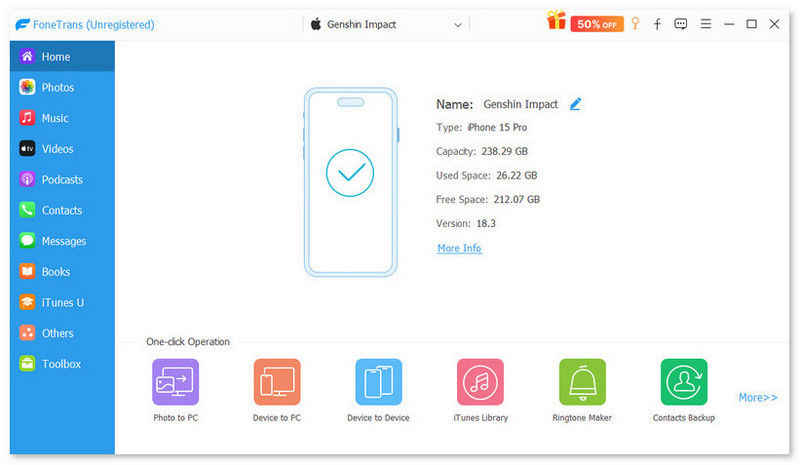
The unregistered FoneTrans home screen with an iPhone 15 Pro on iOS 18.3 connected: device details on the right, data types on the left and one-click tools (Photo to PC, Device to PC, Device to Device, iTunes Library, Ringtone Maker, Contacts Backup) along the bottom.
Features
Copy photos and videos off the phone, folder by folder
Aiseesoft FoneTrans lists everything in the Camera Roll and Photo Library, split into Library, Videos, Screenshots, Recently Deleted, Recents and your own albums, so you can export one album or 700 pictures to a PC folder. It also creates and deletes albums, moves pictures between them, shows each photo's date, size and format, and opens iPhone HEIC photos on a PC that has no HEIC viewer.
One iOS rule applies: photos you add from the PC go into the Photo Library, not the Camera Roll.
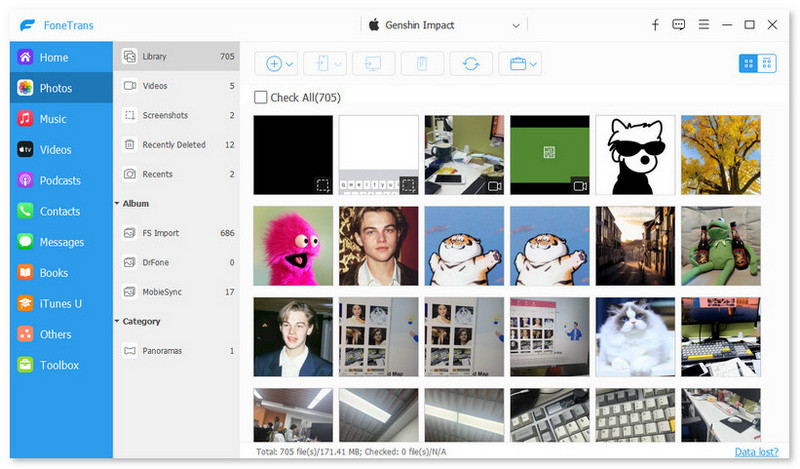
The Photos view: 705 pictures in the Library, with Videos, Screenshots, Recently Deleted and albums in the second column and export, delete and convert buttons on the toolbar.
Put music, movies and books on an iPhone without syncing
FoneTrans imports music, movies, TV shows, music videos, podcasts, iTunes U, ringtones, audiobooks, voice memos, playlists, ePub and PDF files from the PC to an iPhone, iPad or iPod, adding to what's there instead of replacing it. It converts music the phone can't play into a format it can, edits ID3 tags (cover art, artist, genre), builds playlists and deletes songs to free space.
Export messages, notes and the call log to the PC
Aiseesoft FoneTrans exports text messages and the chats of WhatsApp, Kik, Line, Viber, Messenger, WeChat and QQ, plus notes, calendars, Safari data, the call log and app attachments, to your computer. That makes it a way to keep a readable copy of a conversation or print it, which an encrypted iTunes backup doesn't give you. These are export-only: messages and notes go from the phone to the PC, not back.
Clean up, back up and restore contacts
FoneTrans shows the phone's contacts in a list you can edit on the PC: add a contact, change a number or address, attach a photo, build groups, delete old entries and merge duplicates with its De-duplicate tool. Contacts can be exported to the PC or to another iPhone, imported from a file, and saved with the Toolbox's Contacts Backup, then put back with Contacts Restore.
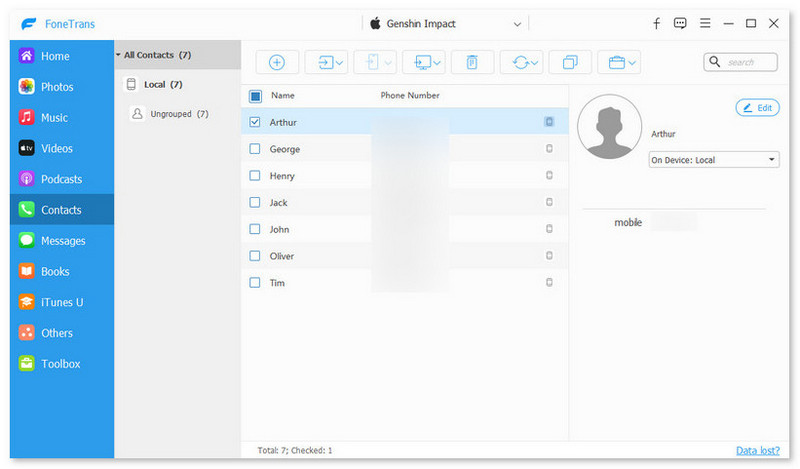
The Contacts view: seven contacts in the phone's local list, one selected with its details and an Edit button on the right.
One-click copies in the Toolbox
The FoneTrans Toolbox gathers the jobs you'd otherwise do item by item: Photo to PC, Device to PC (photos, music, videos, contacts, messages and books in one go), Device to Device for moving to a new iPhone, Contacts Backup and Restore, the iTunes Library browser and a HEIC Converter that turns HEIC photos into JPG or PNG at a quality you choose.
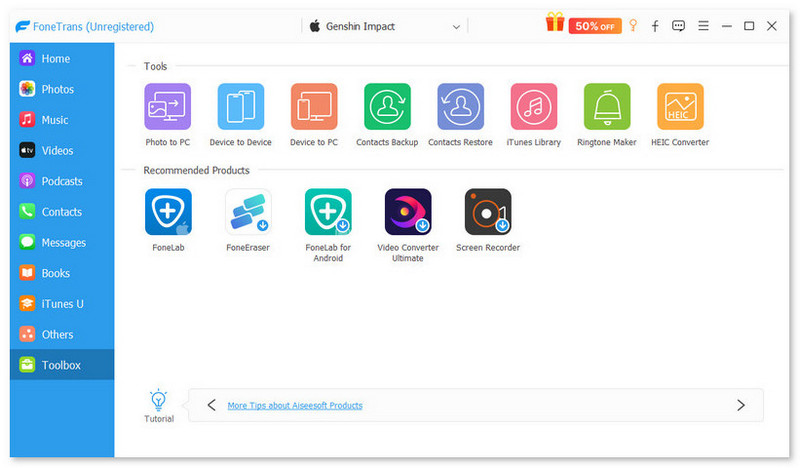
The Toolbox: eight tools across the top, and Aiseesoft's other products (FoneLab, FoneEraser, Video Converter Ultimate, Screen Recorder) underneath.
Make a ringtone from any song
FoneTrans' Ringtone Maker takes a song from the phone or the PC, lets you set the start and end points, the volume and a fade in or out, and saves the clip to the PC and straight onto the device. It's the free way around buying tones in the iTunes Store.
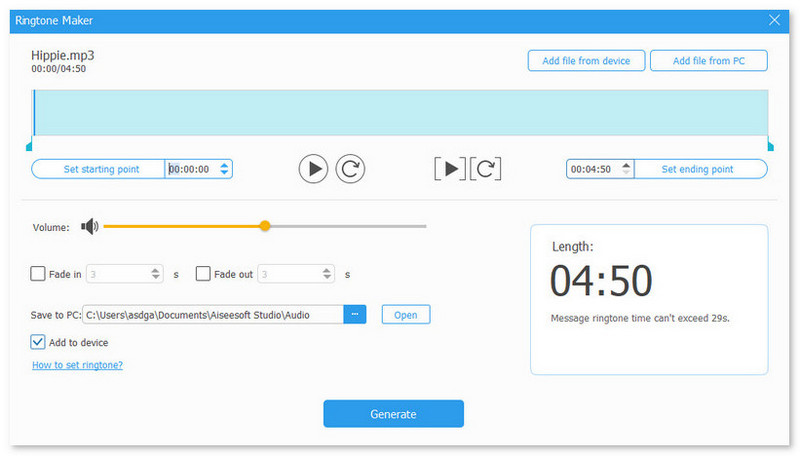
The Ringtone Maker with a 4:50 song loaded: start and end points, volume, fade in and out, a Save to PC folder and an Add to device box. A note says message tones can't exceed 29 seconds.
Benefits
- You choose what moves. One album, one playlist or one chat goes across without touching anything else on the phone, so there's no risk of a sync wiping songs that aren't on this PC.
- Your data ends up in normal files. Photos land as pictures in a folder and contacts as files on the PC, not locked inside a backup you can only restore whole.
- It all happens over USB. No iCloud storage plan, no upload of your photos to a server and no Wi-Fi speed limits on a large video.
Real-World Uses
- Retiring an old iPod. Copy the songs on an aging iPod touch back to the PC or into iTunes before it dies, including tracks that never made it into your current library.
- Setting up a new iPhone from an old one. Connect both phones and use Device to Device for photos, music, contacts and books, without restoring a full backup.
- Keeping a record of a conversation. Export a text or WhatsApp thread to the PC so you have a copy to file or print.
- Freeing space on a full phone. Copy a year of photos and videos to the PC, check they're there, then delete them from the phone in FoneTrans.
Who It's For, and Who Should Skip It
FoneTrans fits Windows users with an iPhone, iPad or iPod who want to pick individual files and data to move, especially people with a big music collection on a PC, an old iPod to empty, or contacts and messages to keep a copy of.
- Mac owners should buy Mac FoneTrans instead. This license is Windows-only.
- Android users get nothing from it: FoneTrans works only with Apple devices. Aiseesoft sells FoneEase for moving data between iPhone and Android.
- Anyone who only needs photos off the phone can do that free with the Windows Photos app or File Explorer.
- People who want a full, restorable backup of the phone are better served by iTunes or the Apple Devices app, which back up everything; FoneTrans backs up contacts and copies data, but doesn't make a full device backup.
Usage Guide
- Install and launch. Run the Free Download file. It's a small downloader that fetches and installs the full program (about 109 MB), so stay online. Make sure iTunes is installed too.
- Connect the device. Plug in the iPhone, iPad or iPod with its USB cable, tap Trust on the phone, and enter the passcode if asked. The home screen shows the device name and storage.
- Pick a data type. Click Photos, Music, Videos, Contacts, Messages or another type on the left and wait for the items to load.
- Export from the phone. Tick the items and choose Export to PC, Export to iTunes or another connected device from the toolbar. For contacts, use Import/Export.
- Import to the phone. Click Add (the plus button), choose files on the PC and click Open.
- Use the Toolbox for bulk jobs. Device to PC or Phone to Phone copies several data types at once: tick the types, choose a destination, and click Start.
- Register. Enter the license email and code from your order to remove the trial's limits.
Where it falls short
- Music metadata can go wrong. One buyer on Trustpilot found 20 tracks arriving on an iPhone as 20 separate albums, and after weeks of emails support hadn't fixed it. If you care about how albums appear, check a small batch first.
- Speed varies. Another Trustpilot reviewer found music transfers very slow at first, and support's adjustments didn't fully fix it.
- Some data only goes one way. Messages, notes, calendars, Safari data and the call log export to the PC but can't be written back to a phone.
What Users Say
Feedback on FoneTrans comes mostly from Trustpilot, where Aiseesoft Studio as a whole scores 3.8 out of 5 from 607 reviews (October 2026), and from a few download-site and comparison-site reviews. The pattern: the program does the basic job for most buyers, and support gets a lot of praise, partly because many reviewers needed it.
Trustpilot: buyers who are happy
Adrian (5 stars, February 2025): "I primarily use FoneTrans to transfer Apple Music(iTunes) from a computer to a iPhone, and it worked perfectly for me."
Tom Hansen (5 stars, "FoneTrans seems to do what is advertised", March 2026): "I purchased the perpetual license for FoneTrans and have zero problem with it."
Larry Gleason (5 stars, March 2026), who uses it to load an old iPod: "FondTrans always works and is easy to load and change songs."
Wayne Hall (5 stars, October 2026), after a license key stopped working following an update: "I contacted the Aiseesoft Customer service team by email and they very quickly reset the registration key for me."
Trustpilot: problems and support
TF (5 stars, "Excellent customer support", February 2024), who couldn't load Apple Lossless music onto an iPod: "The customer support responded quickly with the support of their Development to resolve my problem within 48 hours."
Michael Smiley Sr (5 stars, August 2025) found the program "very slow in transferring music, so I contacted the company," and still rated it highly for the help received: "I have never witnessed a company so committed to assisting their customers in rectify their problems or concerns."
John Derrett (1 star, "FoneTrans", February 2025) bought a lifetime license: "Then the problem started with FoneTrans transferring 20 tracks to the iPhone as 20 separate albums." The review goes on: "What followed was a most frustrating 52 days and 25 emails back and forth that in the end did not even solve the problem." The verdict: "I suggest you don't use their software and definitely don't hand over 1 cent !"
Trustpilot quotes were read through a page summarizer, since the site blocks direct downloads.
Review sites
FileHippo's editor review (version 9.0.12, August 2021) found that "The interface is easy to navigate with a single window, which shows you all your connected devices," called the program "relatively lightweight" with "a shallow learning curve," and concluded that for anyone with more than one iOS device and a PC it "is a useful tool to have."
SoftwareVS (Weldon Paul, updated September 2025) was cooler. It found FoneTrans "slightly deficient in terms of feature completeness and interface design compared to its competitors," noted that the free trial "restricts the functionality and number of transfers," and concluded that "FoneTrans might not be the most cost-effective or optimal choice for iPhone users," while pointing to the 30-day guarantee as a way to try it with limited risk.
Aiseesoft's own reviews page
Aiseesoft's FoneTrans page shows 138 reviews, all five stars, so treat it as a sample of happy customers rather than an average. The most specific one, from Amy Dennis (August 2025), says FoneTrans "can transfer large video file easily, indeed outstanding over iTunes."
The recurring themes: buyers like that it gets music onto iPhones and old iPods without iTunes sync, and that it's simple once the phone is detected. The complaints are about music landing with the wrong album info, slow transfers and license keys needing a reset, and most of those reviewers needed support to get it working. Independent hands-on reviews are scarce and mostly several versions old.
Comparisons
FoneTrans vs iTunes (or Apple Devices)
Apple's free software makes complete backups and syncs your library to the phone, but syncing is all or nothing: the phone ends up matching that one computer's library, and you can't drag individual songs or messages off the phone to a folder. FoneTrans is the opposite. It copies individual items in both directions and exports messages, notes and the call log to readable files, but it doesn't make a full restorable backup and still needs iTunes installed for its drivers. Many people use both.
FoneTrans vs Mac FoneTrans
The two do the same job on different systems and are licensed separately at the same prices. Buy the one for the computer you'll plug the phone into.
Editions and Pricing
All Windows licenses include the same features. Prices on Aiseesoft's purchase page, October 24, 2026:
| License | Computers | Term | List price | Discounted price |
|---|
| 1 Month | 1 PC | 1 month | $31.20 | $15.60 |
| Lifetime, single user (sold here) | 1 PC | Lifetime | $62.45 | $49.96 |
| Lifetime, multi-user | 3 PCs | Lifetime | $98.75 | $79.00 |
| Commercial | 30 PCs | Not stated | $499.95 | $199.00 |
The lifetime licenses come with free upgrades and technical support. If you only need to move one phone's data once, the 1-month license costs less than a third of the lifetime price.
FAQs
Does Aiseesoft FoneTrans work with iOS 26 and the newest iPhones?
Yes. Aiseesoft FoneTrans lists support for iOS 26 and iOS 27 and for iPhones up to the iPhone 18 Pro and 18 Pro Max, as well as current iPads (iPadOS 13 through 27) and iPod touch models back to the 4th generation.
Why does FoneTrans need iTunes installed if it replaces iTunes syncing?
FoneTrans relies on the Apple device drivers that iTunes installs to talk to the iPhone over USB. You don't have to open iTunes or sync with it, but version 10.7 or later has to be on the PC.
What can I do if FoneTrans doesn't detect my iPhone?
Unlock the phone and tap Trust when it asks about the computer, try another cable or USB port, and update or reinstall iTunes so the Apple drivers are current. Aiseesoft's FAQ has a page for devices that aren't recognized, and support (support@aiseesoft.com) answers by email.
Can FoneTrans transfer data to an Android phone?
No. Aiseesoft FoneTrans only connects to iPhone, iPad and iPod touch. You can export contacts and photos to the PC as files and copy those to Android yourself, but for direct iPhone-to-Android transfers Aiseesoft sells a different program, FoneEase.
Can FoneTrans restore text messages to a new iPhone?
No. FoneTrans exports messages and app chats from the phone to the PC so you can keep or print them, but it doesn't write messages back onto a device. To move messages to a new iPhone, use Apple's own transfer or a full backup and restore.
Is the FoneTrans lifetime license a one-time payment?
Yes. The FoneTrans lifetime license is paid once and the order page shows no renewal date, with free upgrades included. The 1-month license is the time-limited option.
Can I move my FoneTrans license to a new computer?
The single-user license covers one PC. Trustpilot reviewers who changed computers or hit a key problem after an update say Aiseesoft support reset the key for them by email, so keep your order details.
System Requirements
- Windows: Windows 11, 10, 8.1, 8 or 7
- Processor: 1 GHz Intel or AMD CPU or faster
- Memory: 1 GB RAM or more
- iTunes: version 10.7 or later installed
- Devices: iPhone, iPad or iPod touch on iOS 6 or later (iOS 26 and 27 included), iPadOS 13 to 27, with a USB cable
- Disk space: about 110 MB for the downloaded program, plus room for whatever you copy off the phone
Conclusion
Aiseesoft FoneTrans is worth $49.96 if you're a Windows user with real iPhone or iPod data to move: a music library that iTunes keeps fighting you over, an old iPod to empty, contacts to clean up or chats to keep. The one reason to buy it is control, since you move exactly the items you pick without a sync replacing anything. The main reason not to is that independent testing is thin and some buyers hit music-tag and speed problems that needed support, so run the trial on your own phone first and keep the 30-day guarantee in mind. If you only need photos off the phone or a full backup, Windows and Apple's free tools already do that.
Download Free TrialBuy Now