MobiKin Transfer for Mobile for Mac: Copy One Phone to Another Through Your Mac
MobiKin Transfer for Mobile for Mac is a $39.95 macOS program, with a lifetime license for 1 computer, that copies data between two phones plugged into your Mac. It's most useful for Mac owners moving to a new Android phone. It can't carry photos, messages or music from Android to an iPhone, so read the route table first.
Quick facts
- Version: 3.1.19, released July 8, 2026
- Developer: MobiKin
- Runs on: Mac OS X 10.10 or later. A Windows version is sold separately
- Phones: Android 6 to 17, and iOS 5 to 27
- Price: $39.95 once for 1 computer, lifetime license
- Trial: transfers only 10 contacts
- Guarantee: 30 days money back, under set conditions
- What we checked: the installer is a 10.8 MB disk image dated July 8, 2026, matching the version notes, and the order page showed a lifetime license at $39.95 with no renewal on November 6, 2026. We read the data types in MobiKin's FAQ and its Mac screenshots, but we didn't run a transfer between two phones.
What Transfers on Each Route
MobiKin's FAQ gives this list, and its Mac screenshots match it on the two cross-platform routes. Types the program can't move show a warning icon and can't be ticked.
| Route | Moves | Stays behind |
|---|
| Android to Android | Apps, contacts, SMS, call logs, music, photos, videos, books | Nothing major |
| iPhone to Android | Contacts, text messages, books, music, videos, photos | Calendars, Safari bookmarks |
| iPhone to iPhone | Contacts, calendars, books, bookmarks, notes (notes not on iOS 11 or later) | Text messages, photos, music, videos |
| Android to iPhone | Contacts and documents (PDF and EPUB books) | Call logs, messages, photos, music, videos, apps |
Before you buy
- Getting an iPhone? Android to iPhone stops at contacts and documents. Apple's free Move to iOS app carries far more while a new iPhone is being set up.
- Check your Mac. The tech specs name an Intel CPU and don't mention Apple silicon. Run the trial first.
- Have two cables ready. The Mac has to see both phones at once, so a Mac with few USB ports may need a hub or adapter.
- Use the trial as a preview. Ten contacts will show that both phones connect and which types can be ticked on your route.
Download Free TrialBuy Now
Overview
Transfer for Mobile puts Source on the left, Destination on the right and a list of content between them. Plug in both phones, make sure the old one is under Source (Flip swaps them), tick the content and click Start Copy. A progress window counts the items, then reports how many transferred and how many failed.
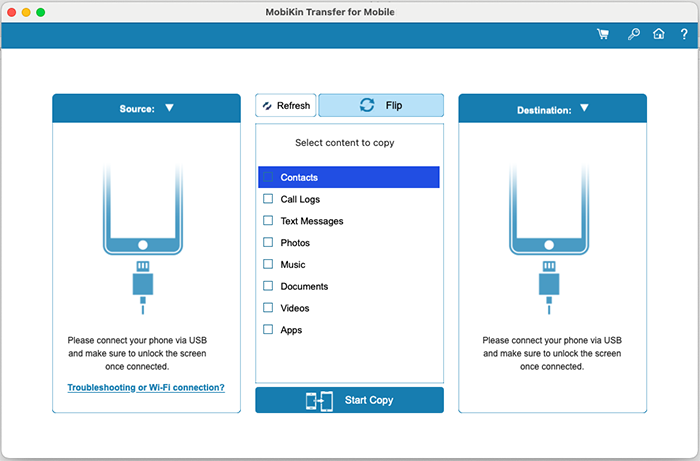
The Mac start screen, waiting for two phones. Refresh and Flip sit above the content list.
Features
Android to Android, where it moves the most
MobiKin Transfer for Mobile for Mac copies contacts, call logs, text messages, photos, music, videos, apps and documents between two Android phones. MobiKin says more than 3,000 models work on the Mac version, across Samsung, Xiaomi, OPPO, OnePlus, vivo, Honor, Motorola, Huawei and others.
iPhone to Android, the best reason to buy it
MobiKin Transfer for Mobile for Mac brings contacts, text messages, books, music, videos and photos from an iPhone to an Android phone. Calendars and Safari bookmarks can't move on this route. You'll need to unlock the iPhone when messages load.
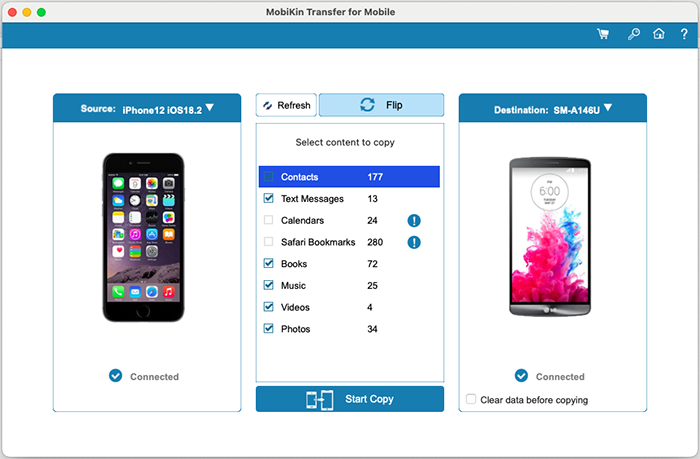
iPhone to Android on a Mac: six types are ticked, while Calendars and Safari Bookmarks show a warning icon.
Android to iPhone, a narrow route
MobiKin Transfer for Mobile for Mac moves contacts and documents to an iPhone, and nothing else. In MobiKin's own screenshot, Call Logs, Text Messages, Photos, Music, Videos and Apps all carry a warning icon and can't be selected. It does at least work on an iPhone that's already set up, which Apple's tool doesn't.
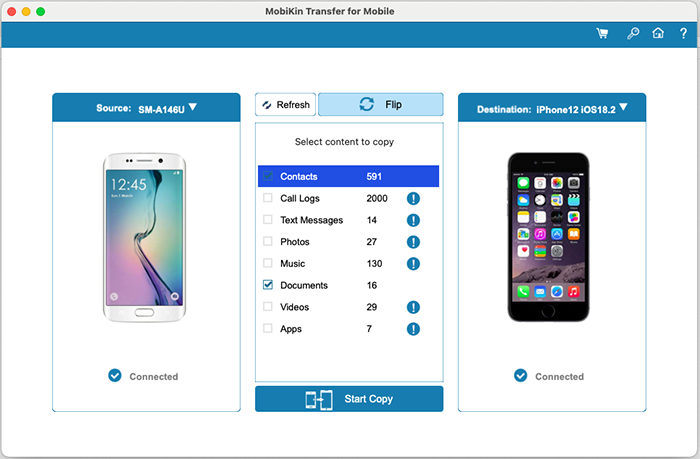
Android to iPhone on a Mac: only Contacts and Documents can be selected.
iPhone to iPhone, for a few types of data
MobiKin Transfer for Mobile for Mac copies contacts, calendars, Safari bookmarks and books from one iPhone to another. Notes are off the list from iOS 11 on, and text messages, photos, music and videos aren't included.
Progress and a clear result
MobiKin Transfer for Mobile for Mac shows a progress bar and an item count for each data type, then a summary of what transferred and what failed. Keep both phones connected until it finishes. On Android, you may need to approve the MobiKin phone app so it can change data on the phone.
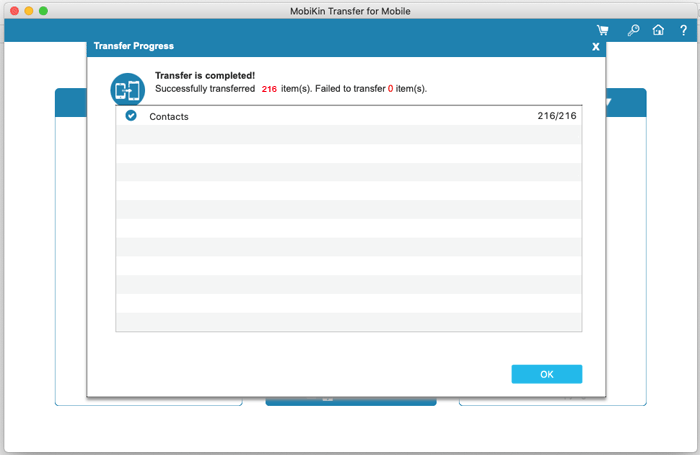
The finished dialog: 216 contacts moved and none failed.
Benefits
- Works after setup. Neither phone needs a factory reset, so you can run it weeks into using a new phone.
- No cloud account in the middle. Everything goes over cables through your own Mac.
- You choose the content. Tick only what you want and leave the old apps and music behind.
Real-World Uses
- Mac owner, iPhone to Galaxy. Bring your messages, photos and contacts to a new Android phone.
- Android upgrade. Copy everything from an old Xiaomi or OPPO to a new phone from a different maker.
- Clearing out an old phone. Move its contacts and photos to your current Android phone before you recycle it.
- A contact list for an iPhone in use. Add an Android address book without resetting the iPhone.
Who It's For, and Who Should Skip It
It fits Mac owners moving to an Android phone, from either an iPhone or another Android, who want it done on the desktop.
Skip it if your new phone is an iPhone, since Apple's free tools carry more. Skip it if you have a Windows PC available, because the Windows version is further along. And if you just want a copy of a phone on your Mac, not on another phone, Assistant for Android or Assistant for iOS is the right MobiKin product.
Usage Guide
- Download the disk image, install the app and open it.
- Connect both phones to the Mac by USB and unlock their screens.
- For Android, enable USB debugging, tap OK or Allow to authorize the Mac and confirm the app install. For iPhone, tap Trust.
- Check that the old phone is under Source, and click Flip if it isn't.
- Tick the content, leaving out anything with a warning icon, and click Start Copy.
- Keep both phones connected, and approve any prompt on the Android phone, until you see "Transfer is completed".
Where it falls short
- The route limits are easy to miss. The Mac product page says the program moves files "freely" between Android and iOS, and the limits only appear in the FAQ and in the program itself.
- The Mac version trails Windows. On our check date it was at 3.1.19 from July, while Windows reached 6.0.24 in November. The Mac version's only 2026 entry in the version notes is an installation fix.
- Connection comes first. FileHorse lists "Device Compatibility Issues", and both phones have to be recognized before anything can happen.
- Refunds aren't unconditional. A change of mind doesn't qualify, and you're expected to try support's fixes first.
What Users Say
Coverage of the Mac version is thin, and no independent reviewer we found ran a real transfer on it. Trustpilot rates the whole company, and Kevin's review doesn't name a product but describes phone-to-phone copying.
FileHorse (Mac listing)
FileHorse's page for version 3.1.13 lists "Cross-Platform Transfer", "One-Click Transfer" and "User-Friendly Interface" as pros, and "Limited Free Version", "Slow Transfer Speed", "Device Compatibility Issues" and "No Wireless Transfer" as cons. It also lists "No Selective Transfer", which doesn't match the Mac screenshots, where you tick each data type.
Trustpilot: 3.6 from 48 reviews (all MobiKin products)
The reports below are the ones that deal with moving data between phones:
"The program only allowed me to transfer the Contacts from my Samsung phone to my new IPhone." customer, December 2, 2021, 1 star
"I looked at their detailed breakdown of transferring info from phone to phone across platforms." and "it got through 5 or 6 before it got stuck for an hour and a half" Unsatisfied customer, April 12, 2023, 1 star
"Had I known from the start, I might have decided whether it was worth the cost" Kevin, May 21, 2026, 2 stars
On MobiKin's own site
These short comments can't be verified, so read them lightly. "Worked smoothly on my Mac and transferred almost everything in one go." Lara Benett, March 13, 2026. "Convenient once everything was ready." Winterbourne, October 27, 2026. "Took about 6 minutes for 2GB." Mue Thayuo, May 29, 2026.
The pattern: the process is simple when both phones connect. The serious complaints come from buyers who expected a full Android to iPhone move, and from transfers that stalled partway.
Comparisons
Mac version vs Windows version
Both have the same price and the same route limits, per MobiKin's shared FAQ, but they're separate purchases. The Windows version gets the newer features, such as the transfer timer added in version 6.0.24. If you have both computers, buy for Windows.
MobiKin Transfer for Mobile vs Apple's and Google's free tools
Apple's Move to iOS covers more for a new iPhone, and Google's and Samsung's setup tools handle new Android phones. They work best during setup. Transfer for Mobile is for later, when a phone is already in use and you don't want to reset it.
Editions and Pricing
| Plan | Price | Term | Computers |
|---|
| Lifetime | $39.95 | One payment | 1 |
| 1 Year | $29.95 | Renews automatically | 1 |
| Lifetime | $59.95 | One payment | 2 to 5 |
| 1 Year | $49.95 | Renews automatically | 2 to 5 |
| Lifetime | $99.95 | One payment | 6 to 10 |
| 1 Year | $89.95 | Renews automatically | 6 to 10 |
All plans have the same features. The difference is the term and the number of computers, and plans go up to 26-30 computers. The Buy Now button on this page opens the Lifetime license for 1 computer. Prices are from MobiKin's product catalog on November 6, 2026.
FAQs
Can MobiKin Transfer for Mobile for Mac move text messages to an iPhone?
MobiKin Transfer for Mobile for Mac can't move text messages to an iPhone, from Android or from another iPhone. Text messages only move when the destination is an Android phone.
Can I use MobiKin Transfer for Mobile for Mac over Wi-Fi?
MobiKin Transfer for Mobile for Mac is built around USB. Its connection screen also offers a Troubleshooting or Wi-Fi link for Android phones, but plan on cables for iPhones.
Will MobiKin Transfer for Mobile for Mac erase my new phone?
MobiKin Transfer for Mobile for Mac doesn't erase a phone unless you tick "Clear data before copying", which appears when the destination is an Android phone.
Is a transfer with MobiKin Transfer for Mobile for Mac a move or a copy?
MobiKin Transfer for Mobile for Mac copies your data, as its Start Copy button says. Delete from the old phone yourself once you've checked the new one.
Are updates to MobiKin Transfer for Mobile for Mac free?
MobiKin Transfer for Mobile for Mac updates are free, and you check for them under the program's About item. Your registration stays valid for later versions.
Can I get a refund on MobiKin Transfer for Mobile for Mac?
MobiKin Transfer for Mobile for Mac has a 30-day money-back guarantee, but only under the accepted circumstances in MobiKin's policy. A change of mind doesn't qualify, and a refunded license is disabled.
System Requirements
- Mac OS X 10.10 or later
- Intel Core 1 GHz processor or above
- 1 GB or more of free disk space
- Android 6 to 17 or iOS 5 to 27 on both phones, with their USB cables
Conclusion
MobiKin Transfer for Mobile for Mac is worth $39.95 if you own a Mac, your next phone is an Android, and you want your messages and photos moved after setup without any cloud service. The reason to buy it is that a Mac has very little built in for that job. The main reason not to is the route: if your next phone is an iPhone, you'd pay for contacts and documents only, and Apple's free tool does more. Check your route in the table, then let the trial show you what can be ticked.
Download Free TrialBuy Now