Stellar Converter for Outlook for Mac: Open a Windows Outlook PST in Apple Mail
Stellar Converter for Outlook for Mac converts a Windows Outlook PST file into Apple Mail mailboxes, and moves the contacts, calendars, notes and tasks into Contacts, Calendar, Notes and Reminders. It runs on Apple silicon and Intel Macs up to macOS Tahoe 26, and doesn't need Outlook. At checkout it costs $39 for a one-year license. It's for anyone who switched from a Windows PC to a Mac and is left holding a PST file.
A PST is Outlook's own format, and nothing built into macOS opens it. Outlook for Mac can import some PST files, but that means buying and keeping Outlook. This app turns the file into the formats Apple's own apps already use.
Quick facts
- Version: 4.0.0.0, released September 2026
- Developer: Stellar, an email and data recovery tools company founded in 1993. Older versions were called Stellar PST to MBOX Converter for Mac
- Platform: Apple silicon (M1 to M5) and Intel Macs, macOS High Sierra 10.13 to macOS Tahoe 26
- Reads: PST files from Outlook 2016, 2019, 2021 and 2024, password-protected ones included
- Writes: emails to Apple Mail MBOX, contacts to VCF, calendars to ICS, notes to TXT, tasks straight into Reminders
- Price: $39 a year at checkout
- Free demo: scans the PST and previews everything; saving needs a license
- What we checked: the installer (StellarPSTtoMBOXConverter.dmg.zip, 126 MB, dated October 9, 2026) on Stellar's download server, the spec sheet, and a checkout price of $39.00 for 12 months on November 18, 2026. We didn't convert a PST ourselves.
Before you buy
Run the free demo on your PST first: it scans the file and shows every folder, so you can see that your mail is readable before you pay. The source PST is opened read-only and isn't changed.
Stellar lists PST files from Outlook 2016 to 2024. If your PST came from a much older Outlook, test it in the demo. The license at checkout is yearly, even though most people convert once. Stellar's refund policy covers 30 days from a first purchase, and only if you tried the demo first.
Download Free TrialBuy Now
Overview
The app opens with a Choose PST File box: browse to the file, or click Find PST to search the Mac, a network share or an external drive. Click Scan, and a log tells you how many mails, people, calendar items, notes and tasks it found. The PST's folders then appear in a tree on the left, with Mail, Calendar, People, Tasks and Notes views along the toolbar and a preview on the right. Tick what you want and click Save; emails become MBOX mailboxes for Apple Mail's File > Import Mailboxes, and tasks go straight into Reminders.
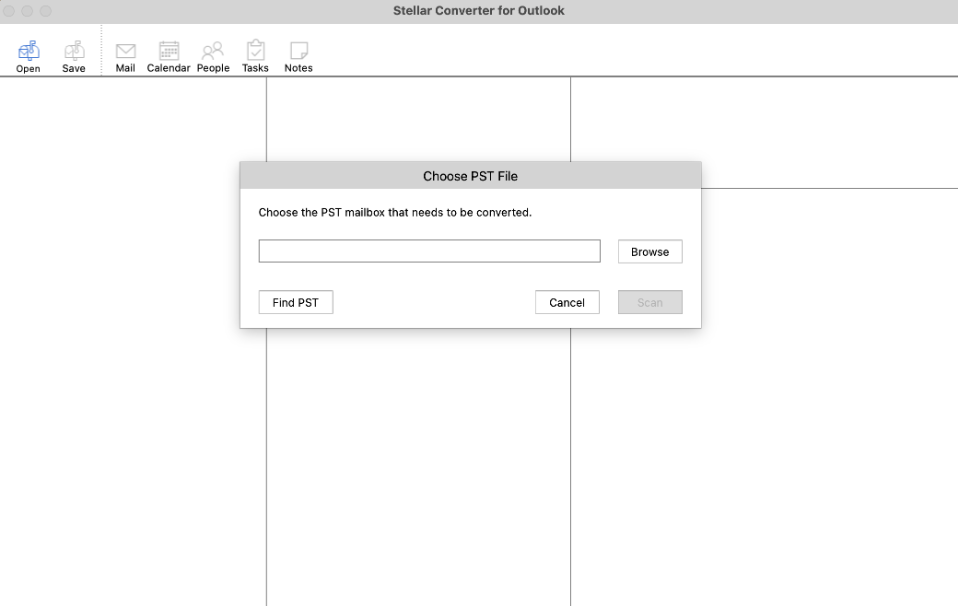
The first step: choose a PST file, or let Find PST search for one.
Features
Everything goes to Apple's own apps
Stellar Converter for Outlook for Mac saves emails as MBOX for Apple Mail, contacts as VCF for Contacts, calendar items as ICS for Calendar and notes as TXT, and exports tasks directly into Reminders, so the whole Outlook data file finds a home on the Mac.
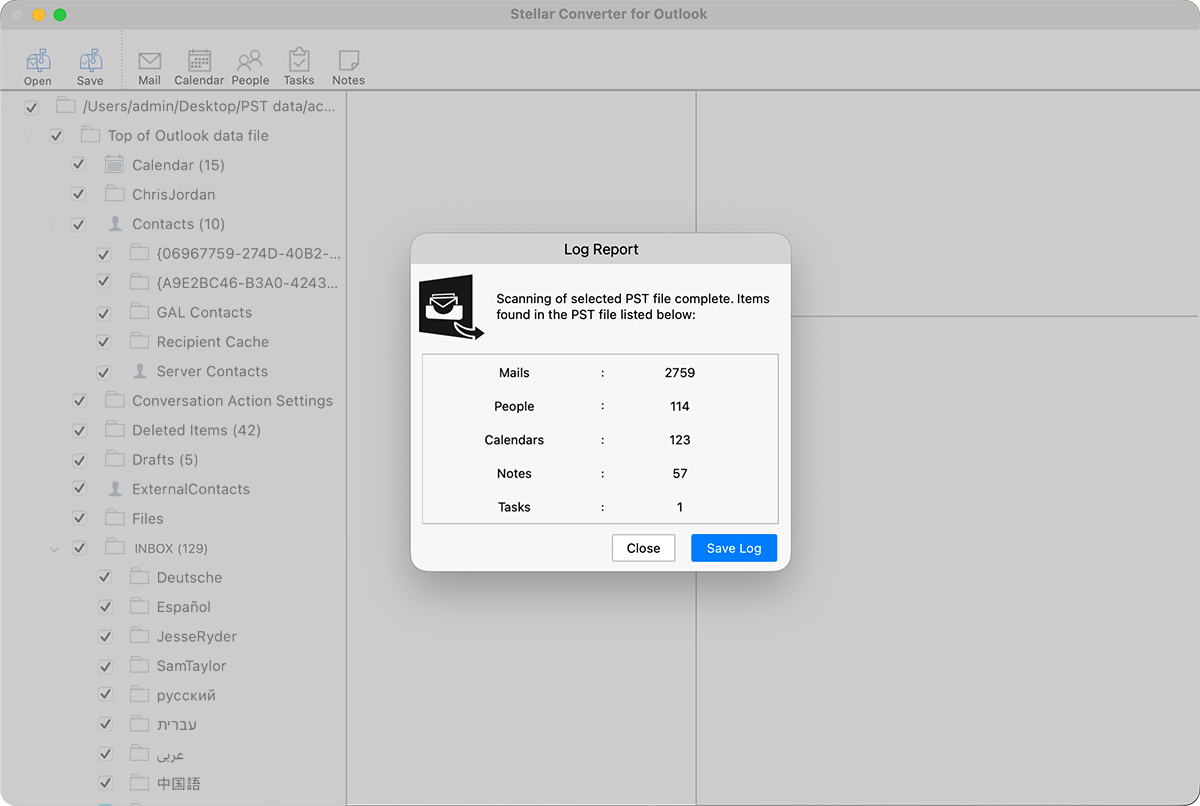
After a scan: 2,759 mails, 114 people, 123 calendar items, 57 notes and 1 task found, over the PST's folder tree.
Whole file, folders or single emails
Stellar Converter for Outlook for Mac converts the complete PST with no size limit, or only the folders or individual emails you tick, and keeps the PST's file name on the output so it's easy to match up later.
Password-protected PST files
Stellar Converter for Outlook for Mac opens password-protected PST files as part of the conversion.
Preview with attachments and languages intact
Stellar Converter for Outlook for Mac shows each email with its formatting and attachment list in the preview pane. Stellar's sample mailbox includes folders in German, Spanish, Russian, Hebrew, Arabic and Chinese, which display correctly.
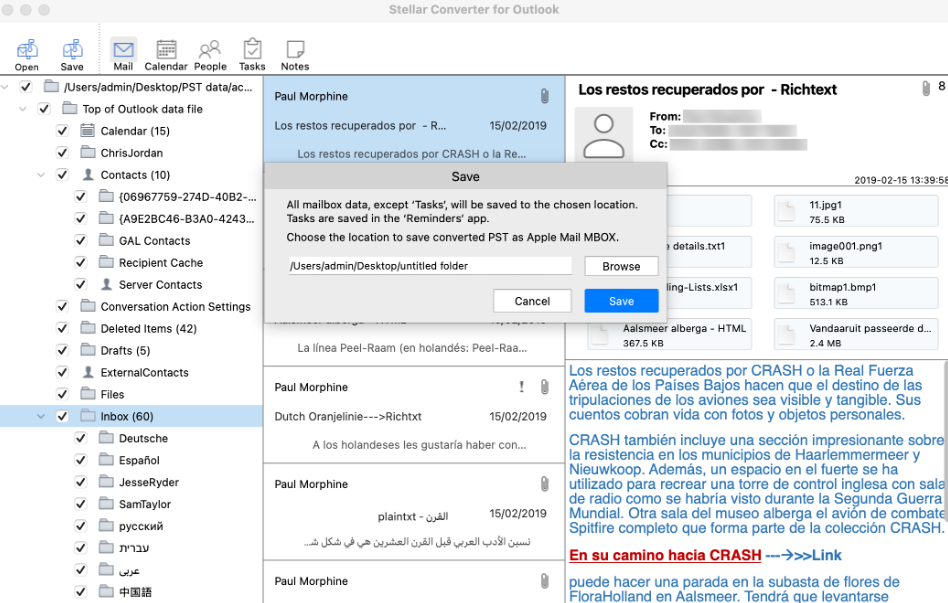
The Save dialog: everything except tasks goes to the chosen folder as Apple Mail MBOX and companion files; tasks go to Reminders.
Benefits
- No Outlook needed. Keep using Apple Mail and avoid a Microsoft 365 subscription just to read old mail.
- Current Macs. Native support listed for M1 to M5 and macOS Tahoe 26.
- More than mail. Contacts, calendars, notes and tasks come across too.
- Safe source. The PST is read-only during conversion.
Real-World Uses
- Switching from Windows to Mac. Bring the Outlook archive, address book and calendar over in one pass.
- A PST from a former employer or colleague. Read it on your Mac without installing Outlook.
- A shared family archive. Turn an old Windows PST into Apple Mail mailboxes everyone in the house can browse.
- An IT handover. Convert a departing Windows user's PST for a new Mac user.
Who It's For, and Who Should Skip It
It suits Mac users who use Apple Mail and have a Windows Outlook PST to bring over, particularly with contacts and calendars they want too.
Skip it if you already pay for Microsoft 365 with Outlook for Mac (Outlook for Mac can import a PST itself), if your mail lives in an Exchange or Microsoft 365 account rather than a PST file (just add the account to Apple Mail), or if you're on Windows: Stellar's Windows Converter for Outlook is a different, older product for Thunderbird.
Usage Guide
- Download the .dmg.zip, unzip it, open the disk image and drag the app to Applications.
- Launch it. In Choose PST File, click Browse, or Find PST to search a drive.
- Click Scan. Read the log of items found and close it.
- Check folders and items in the preview using the Mail, Calendar, People, Tasks and Notes buttons.
- Activate the license, tick what you want, click Save and choose a folder.
- In Apple Mail, choose File > Import Mailboxes and pick the saved MBOX files. Open the VCF in Contacts and the ICS in Calendar.
Where it falls short
- Yearly price for a one-time move. $39 a year at checkout.
- Manual import steps. Mail, contacts and calendars each need an import in their own app.
- Older PSTs aren't listed. Outlook 2016 to 2024 is the stated range.
- Little independent testing. Coverage is mostly download sites and Stellar's own pages.
What Users Say
Mac Informer (earlier version)
Mac Informer users rated an earlier version of Stellar's PST to MBOX converter for Mac 3.8 out of 5 from 40 votes. We found no hands-on review of the current version 4.
Trustpilot (Stellar as a company)
Stellar scores 4.8 out of 5 from 5,609 reviews across all its products (November 18, 2026), 89% five-star and 4% one-star. LaurentK wrote that a Stellar tool "allowed me to recover most of my lost emails from damaged PST", and John Backer called a Stellar tool "a game changer for me as I could lose many years of memories and data."
On the other side, Nick wrote "Do not purchase. Software is terrible and customer service worse." None of these name the Mac converter.
Recurring themes
Stellar buyers praise the guided screens and support; the complaints come when a tool can't handle their particular data. The demo's full preview is how you rule that out here.
Comparisons
Stellar Converter for Outlook for Mac vs Outlook for Mac's PST import
Outlook for Mac can import a PST file if you have Outlook and a Microsoft 365 license. Stellar's converter is for people who want the data in Apple Mail, Contacts and Calendar instead, without Outlook.
vs Stellar Converter for Mail
Stellar's older Converter for Mail handles Thunderbird, Eudora and Outlook 2011 OLM files but not PST. For a Windows PST, this app is the right one.
Editions and Pricing
| Edition | Price at checkout | License | Macs |
|---|
| Standard | $39 | One year | 1 |
Price checked on the order page on November 18, 2026. Stellar's order page sells only the Standard edition for Mac.
FAQs
Does Stellar Converter for Outlook for Mac need Outlook installed?
No. Stellar Converter for Outlook for Mac reads the PST file itself and saves formats Apple Mail, Contacts and Calendar open.
Does it run on Apple silicon Macs?
Yes. Stellar Converter for Outlook for Mac lists M1, M2, M3, M4 and M5 Macs as well as Intel Macs, on macOS High Sierra 10.13 through macOS Tahoe 26.
Will it change my PST file?
No. Stellar Converter for Outlook for Mac works on the PST in read-only mode and writes new files.
Can I export only contacts or the calendar?
Yes. Stellar Converter for Outlook for Mac lets you save selected item types: contacts as VCF, calendars as ICS and notes as TXT.
What does the demo do?
Stellar Converter for Outlook for Mac's demo scans the PST and previews all its contents. Saving needs a license.
Is there a file size limit?
No. Stellar Converter for Outlook for Mac converts PST files of any size.
System Requirements
- macOS Tahoe 26, Sequoia 15, Sonoma 14, Ventura, Monterey, Big Sur, Catalina, Mojave or High Sierra 10.13
- Apple silicon (M1 to M5) or Intel processor
- 4 GB RAM minimum, 8 GB recommended
- 250 MB of free disk space, plus room for the converted files
Conclusion
Stellar Converter for Outlook for Mac is worth $39 if you've moved to a Mac and want an old Outlook PST in Apple Mail without paying for Outlook. The one reason to buy it: a current, Apple silicon-ready app that moves mail, contacts, calendars, notes and tasks into Apple's own apps.
The main reason not to: it's a yearly license for what's usually a single conversion, and Outlook for Mac users can import a PST themselves. Scan your PST in the demo first.
Download Free TrialBuy Now