Stellar Deduplicator for Outlook: Clear Duplicate Emails Out of Your Mailbox
Stellar Deduplicator for Outlook is a Windows app that finds duplicate emails in your Outlook mailboxes and PST files and deletes, moves, flags or marks them, by the rules you choose. At checkout it costs $20 for a one-year license. It's for anyone whose Outlook filled up with copies after a PST was imported twice, an account was set up again, or a sync went wrong.
Outlook has no built-in way to remove duplicate messages. Doing it by hand in a mailbox with thousands of copies is hopeless. This app compares messages on the fields you pick and handles every match in one run, with a log of what it did.
Quick facts
- Version: 9.0.0.0, released May 2025
- Developer: Stellar, an email and data recovery tools company founded in 1993. Older versions were called Stellar Outlook Duplicate Remover
- Platform: 64-bit Windows 11, 10, 8.1 and 8, with Outlook installed
- Works with: Microsoft 365 and Outlook 2021, 2019, 2016, 2013, 2010 and 2007 profiles and PST files
- Price: $20 a year at checkout
- Free demo: scans and counts the duplicates; removing them needs a license
- What we checked: the installer (version 9.0.0.0, 14.3 MB, signed by Stellar Information Technology Private Limited) downloaded from Stellar, and a checkout price of $20.00 for 12 months on November 18, 2026. We didn't run it on a mailbox ourselves.
Before you buy
Back up your PST first and start with the gentle action, Delete (move to Deleted Items folder) or Move to folder, rather than Delete permanently. If the comparison settings are too loose, real messages can look like duplicates.
Run the free demo: it tells you how many duplicates your mailbox holds, which shows whether the $20 is worth it. The license is yearly.
Download Free TrialBuy Now
Overview
When it starts, the app offers to list the Outlook profiles on the PC (this takes a few minutes and can't be interrupted) or let you choose a PST manually. The mailbox opens as a folder tree with message counts. On the right you set the time span, tick the comparison criteria and pick an action, then click Run Process. A log lists every duplicate by folder and subject, with a total at the end.
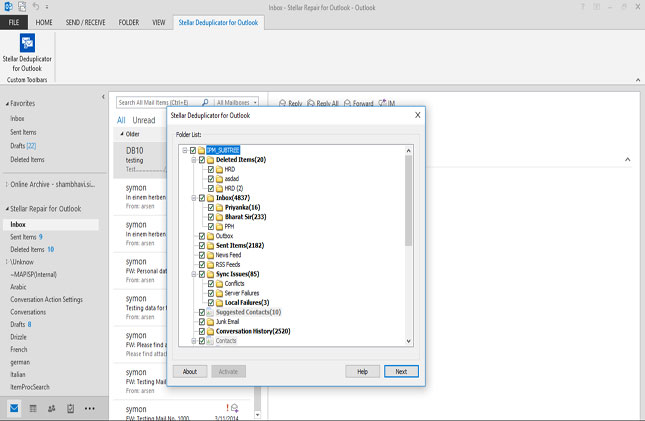
At start-up: list the Outlook profiles automatically, or choose a PST manually.
Features
You decide what counts as a duplicate
Stellar Deduplicator for Outlook compares on any mix of text, subject, sender email, sender name, recipient name, internet header, attachment files and sent time. The default ticks text, subject and sender email; adding sent time makes the match stricter.
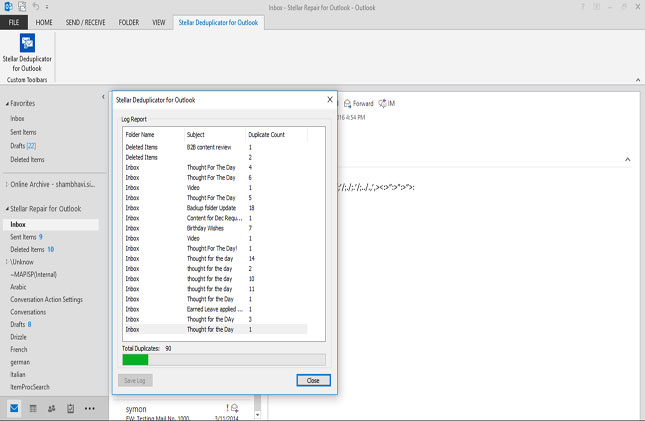
A PST's folder tree on the left; on the right the duration (Anytime), comparison criteria and action (move to Deleted Items).
Six actions, from careful to final
Stellar Deduplicator for Outlook can move duplicates to Deleted Items, delete them permanently, mark them as expired, flag them, or copy or move them to a folder, so you can review before anything is gone.
Time span and folder choice
Stellar Deduplicator for Outlook limits the search to a time span (last day, last 2 days, last 30 days, last year or anytime) and to the folders you tick, handy after one bad sync that only affected recent mail.
Log report and Outlook add-in
Stellar Deduplicator for Outlook keeps a log of every duplicate it processed, so you can trace what was removed, and installs an add-in button inside Outlook to start it from there.
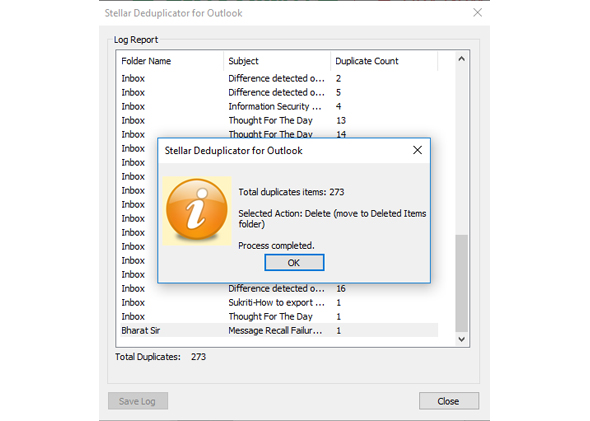
The log after a run: 217 duplicates found and moved to Deleted Items, listed by folder and subject.
Benefits
- A smaller PST. Fewer copies mean a lighter file and a faster Outlook.
- Safer than manual cleanup. Consistent rules, a log, and reversible actions.
- Cheap. $20 for a year covers repeated clean-ups.
- Know before you pay. The demo counts your duplicates.
Real-World Uses
- A PST imported twice. Every message appears two or three times; one run cleans it up.
- A Gmail account in Outlook that doubles sent items, a known Outlook-with-Gmail quirk.
- Merged archives. After combining old PST files, remove the overlap.
- A near-full PST. Cut its size before it hits Outlook's limit.
Who It's For, and Who Should Skip It
It suits Outlook users on Windows with a mailbox full of copies, and IT staff tidying up after migrations.
Skip it if your duplicates are contacts or calendar entries (Stellar's pages describe email duplicates), if you're on Outlook for Mac or Outlook on the web, or if only a handful of messages are doubled: sorting by subject and deleting by hand is quicker. If you also need PST repair, merging and compacting, Stellar's Toolkit for Outlook includes this tool.
Usage Guide
- Close Outlook, back up your PST file, then install and launch Stellar Deduplicator for Outlook.
- Choose List Profiles to find your Outlook profiles, or Choose Manually to pick a PST file.
- Tick the folders to search in the tree.
- Set the time span, tick the comparison criteria and choose an action. Start with moving duplicates to Deleted Items or another folder.
- Activate the license and click Run Process.
- Check the log, then look through Deleted Items (or the target folder) in Outlook before emptying it.
Where it falls short
- Yearly license for what's often a one-time cleanup.
- Folders, not single messages. It works on selected folders, not on one chosen email.
- Profile listing is slow and can't be stopped once started.
- Loose criteria are risky. Matching on subject alone can catch replies that only look alike.
What Users Say
Quoted on Stellar's order page
Stellar's buy page quotes Experts Exchange: "It is a worthwhile purchase for IT Support technicians who tend to do a lot of repair work for Outlook users." It also quotes a G2 description of the app as "an advanced software developed to eliminate duplicate mailbox items from your Microsoft Outlook." Both are picked by the vendor.
Trustpilot (Stellar as a company)
Stellar scores 4.8 out of 5 from 5,609 reviews across all its products (November 18, 2026), 89% five-star and 4% one-star. LaurentK praised a Stellar email tool that "allowed me to recover most of my lost emails from damaged PST."
On the critical side, Nick wrote "Do not purchase. Software is terrible and customer service worse." Neither names the Deduplicator.
Recurring themes
Independent hands-on reviews of this tool are scarce. Stellar's customers generally praise the simple screens and support; the complaints are about results on damaged data, which matters less for a duplicate cleaner than for a repair tool.
Comparisons
Stellar Deduplicator for Outlook vs Stellar Toolkit for Outlook
The Toolkit for Outlook bundles this deduplicator with PST repair, PST merging, PST compacting and PST password recovery. Buy the toolkit if you need those; for duplicates alone, the $20 Deduplicator is enough.
vs Outlook's Clean Up Conversation
Outlook's Clean Up removes redundant messages within a conversation thread, not exact copies spread across folders by an import. Stellar's tool targets the copies.
Editions and Pricing
| Edition | Price at checkout | License | PCs |
|---|
| Standard | $20 | One year | 1 |
Price checked on the order page on November 18, 2026.
FAQs
Does Stellar Deduplicator for Outlook work with Microsoft 365?
Yes. Stellar Deduplicator for Outlook supports the Outlook in Microsoft 365 and Outlook 2021, 2019, 2016, 2013, 2010 and 2007.
Can I get deleted duplicates back?
Yes, if you used a reversible action. Stellar Deduplicator for Outlook's default action moves duplicates to Deleted Items, and Move to folder keeps them aside. Delete permanently can't be undone, and the log shows what was removed.
What does the free demo do?
Stellar Deduplicator for Outlook's demo scans the selected mailboxes and reports how many duplicates there are. Removing them needs an activated license.
Can it work on a PST file that isn't in my Outlook profile?
Yes. Stellar Deduplicator for Outlook's Choose Manually option opens a PST file directly.
Is the license a subscription?
Yes. At checkout, Stellar Deduplicator for Outlook is a one-year license for $20.
System Requirements
- 64-bit Windows 11, 10, 8.1 or 8
- Microsoft Outlook (Microsoft 365 or 2021 back to 2007)
- Intel-compatible x86 or x64 processor
- 4 GB RAM minimum, 8 GB recommended
- 250 MB of free disk space
Conclusion
Stellar Deduplicator for Outlook is worth $20 if your Outlook is cluttered with copies after an import or sync problem. The one reason to buy it: flexible matching rules and reversible actions clear thousands of duplicates in one logged run.
The main reason not to: it's a yearly license for a job you may do once, and it handles email only. Let the demo count your duplicates first.
Download Free TrialBuy Now