Stellar Toolkit for File Repair: Fix Corrupt Word, Excel, PowerPoint and PDF Files From One App
Stellar Toolkit for File Repair is a Windows app, $59.95 a year at checkout, that bundles four repair tools: one each for Word, Excel, PowerPoint and PDF files that won't open, open as gibberish, or lose their formatting. It's for office workers, small businesses and IT support who run into more than one kind of damaged document.
A spreadsheet that Excel says is "unreadable", a Word report that opens blank after a crash, a PDF that was cut off during a download: Office's own Open and Repair fixes some of these and gives up on the rest. This toolkit goes further, shows you what it recovered, and saves a clean copy next to the damaged file.
Quick facts
- Version: 2.5.0.0, released February 2025
- Developer: Stellar, a data recovery and file repair company founded in 1993
- Platform: 64-bit Windows 11, 10, 8.1 and 8
- Repairs: Word (.doc, .docx), Excel (.xls, .xlsx, .xlsm, .xltx, .xltm), PowerPoint (.ppt, .pptx, .pptm) and PDF (versions 1.3 to 1.7, up to 2 GB)
- Office versions: files from Office 365, 2021, 2019, 2016, 2013, 2010 and earlier
- Price: $59.95 a year (Standard, one PC) or $199 a year (Technician, several PCs at one location) at checkout
- Free trial: repairs and previews your files; saving needs a license
- What we checked: the trial installer (version 2.5.0.0, 62 MB, signed by Stellar Information Technology Private Limited) downloaded from the vendor, and checkout prices of $59.95 for Standard and $199.00 for Technician, both renewing every 12 months, on November 17, 2026. We didn't repair damaged files ourselves.
Before you buy
Run the trial on your damaged file first. It repairs the file and shows the result in a preview, so you can see whether your sheet, document or slides came back before you pay. Stellar's refund policy gives 30 days on a first purchase, but not if you skipped the trial, and not on renewals.
If only one kind of file is damaged, Stellar also sells each repair tool on its own (Excel repair alone is $39 a year), so the toolkit pays off when you deal with two or more file types.
Download Free TrialBuy StandardBuy Technician
Overview
The toolkit opens to a launcher with four tiles: Repair Document, Repair Spreadsheet, Repair Presentation and Repair PDF. Each tile starts the matching Stellar repair app, so the toolkit is really four full programs under one license rather than a cut-down all-in-one.
The flow is the same in all four: select one or more files (or use Find to search a folder for them), click Repair, check the preview, then Save the repaired file to its original folder or another location you choose.

The launcher: one tile per file type, each opening its own repair tool.
Features
Excel repair with formulas and charts
Stellar Toolkit for File Repair repairs damaged .xls, .xlsx, .xlsm, .xltx and .xltm workbooks and recovers tables, charts, cell comments, images, formulas, sorts and filters, keeping worksheet properties and cell formatting. It handles the "unrecognizable format" and "unreadable content" errors Excel shows for broken files.
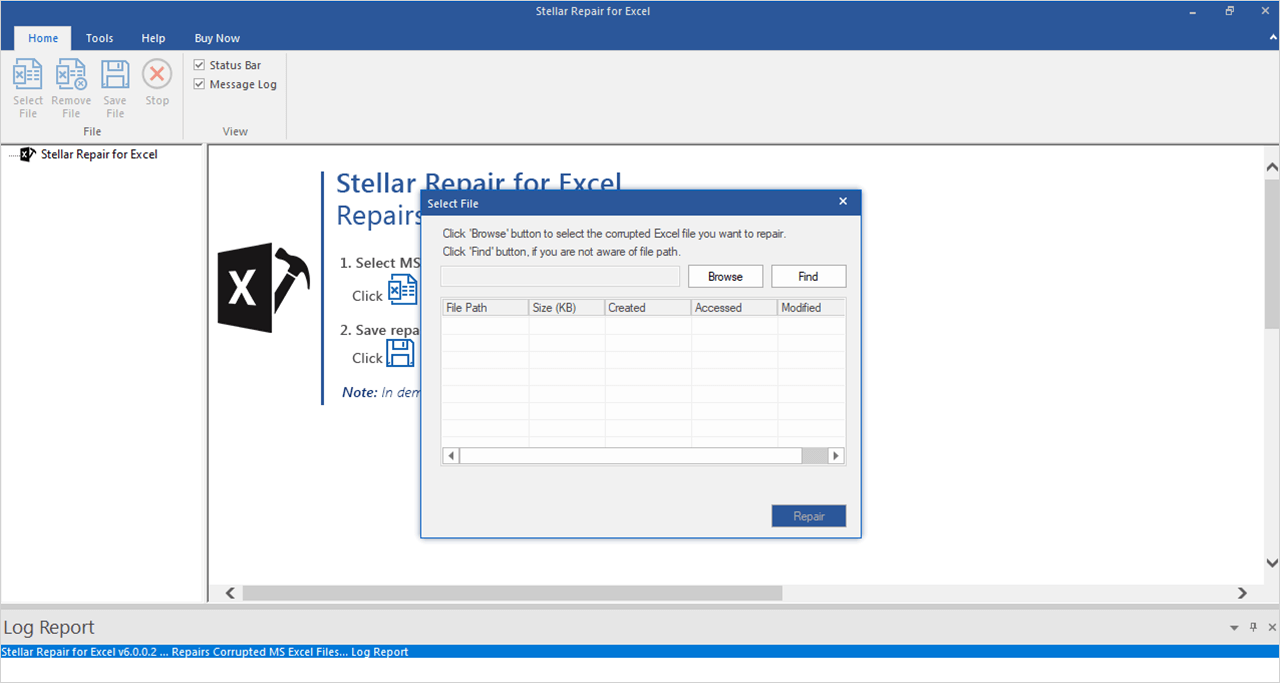
The Excel module: Browse to the workbook, or Find it when you don't know where it was saved, then Repair.
Word repair with a raw recovery fallback
Stellar Toolkit for File Repair repairs corrupt .doc and .docx files, including headers, footers, charts, captions, comments and pictures, and previews the result as the full document or as filtered text. When the normal repair result isn't good enough, a deeper repair mode is there for badly damaged files.
PowerPoint repair
Stellar Toolkit for File Repair repairs .ppt, .pptx and .pptm presentations with their formatting, and recovers VBA code, OLE objects, hyperlinks and tables. For severely damaged slides it offers a raw repair.
PDF repair up to 2 GB
Stellar Toolkit for File Repair repairs damaged PDFs (versions 1.3 to 1.7) up to 2 GB, restoring text, hyperlinks, forms, headers, footers, images and tables, without touching the original file.

The PDF module: add one or more PDFs to repair in a batch.
Batch repair and preview
Stellar Toolkit for File Repair repairs several files in one run in each module, and shows a preview of every repaired file before you save, so you can check the contents match what you lost.
Benefits
- One license for four problems. Word, Excel, PowerPoint and PDF damage all go through the same purchase.
- See it before you pay. The trial repairs and previews, so the license only buys the save step.
- No uploads. Files are repaired on your own PC, which matters for client spreadsheets and contracts.
- Batches save time. A folder of damaged files from the same crash can go through in one run.
Real-World Uses
- A budget workbook that won't open after a power cut. Repair Spreadsheet brings back the sheets, formulas and charts.
- A thesis chapter that opens blank. Repair Document recovers the text and formatting, or at least the raw text if the file is badly damaged.
- A sales deck corrupted on a USB stick. Repair Presentation rebuilds the slides before the meeting.
- A scanned contract PDF that was only half downloaded. Repair PDF recovers the pages that are still there.
- A small office help desk. The Technician edition covers several PCs at one site for whoever brings in the next broken file.
Who It's For, and Who Should Skip It
It suits people who work in Office every day, small businesses without an IT department, and support technicians (Technician edition) who see all kinds of damaged files.
Skip it if:
- Only one file type is the problem. The single repair tool costs less.
- You use a Mac. The toolkit is Windows only.
- The file was deleted, not damaged. You need data recovery software first; this toolkit only repairs files you still have.
- The file is on OneDrive or SharePoint. Try restoring an earlier version from version history first; it costs nothing.
Usage Guide
- Install and launch Stellar Toolkit for File Repair on 64-bit Windows.
- Pick a tile: Repair Document, Repair Spreadsheet, Repair Presentation or Repair PDF.
- Select the files. Browse to them, or use Find to search a drive or folder. You can add several files at once.
- Repair. Click Repair and wait for the progress to finish. The log at the bottom records each file.
- Preview. Click a repaired file to check its contents.
- Activate and save. Enter the activation key from your order email, then save the repaired copies to the original folder or a new location.
Where it falls short
- Windows only. There is no Mac version of the toolkit.
- A yearly license. Both editions renew every 12 months, which is a lot for a single emergency. Cancel the renewal if you don't expect to need it again.
- Badly damaged files lose formatting. The raw repair modes for Word and PowerPoint recover content, not always the layout.
- The trial won't save anything. It previews the repair, but you pay before you get the file back.
- Some modules look dated. The Excel and Word screens use an older ribbon design next to the newer PDF module.
What Users Say
There are few independent reviews of the toolkit as a bundle, but its Excel module, Stellar Repair for Excel, is the same program sold on its own, and it has a long review history.
Trustpilot: Stellar Repair for Excel
Stellar Repair for Excel has 4.8 out of 5 from 116 reviews on its Trustpilot product page (November 17, 2026), nearly all four or five stars. SELLA wrote, "I had a corrupted Excel file that wouldn't open at all," and Sells summed it up as "The product did what it claimed--recovered lost data." Russell Haskett said it "worked great to help recover my client's excel file. I will definitely use again if faced with a corrupted file."
Long-term users stick with it: David L Svoboda wrote, "I love the program, very easy to use and has fixed my problem every time I needed it too." Not every review is a rave, though. One four-star reviewer wrote "support is good ,but sw need to chk twice", and several reviews are about activation problems that support fixed, such as Oscar Puig's: "I had issues with the activation but help desk agent Akansh did a remote connection and could solve the problem quickly".
Trustpilot: Stellar as a company
Stellar overall scores 4.8 out of 5 on Trustpilot from about 5,600 reviews across all its products, with 4% one-star reviews. Those mostly come from buyers whose files couldn't be recovered.
The recurring themes: it opens files Office gave up on, it's easy to use, and support is quick to help with activation. The complaints are about results on badly damaged files and about paying before you can save.
Comparisons
Stellar Toolkit for File Repair vs Office's Open and Repair
Word and Excel have a free Open and Repair option in the Open dialog, and it's worth trying first. It often fails on badly damaged files and has nothing for PDFs. The toolkit repairs more, previews before saving and handles batches.
Toolkit vs a single Stellar repair tool
Stellar Repair for Excel alone costs $39 a year, the same program as the toolkit's Excel module. If spreadsheets are your only problem, buy that. The toolkit makes sense once Word, PowerPoint or PDF files are also in play.
Editions and Pricing
| Edition | Price at checkout | Covers | Buy |
|---|
| Standard | $59.95 a year | One PC, all four repair tools | Buy Standard |
| Technician | $199 a year | Several PCs at one location, all four repair tools | Buy Technician |
Prices checked on November 17, 2026. Stellar's own store lists the Standard edition at $69 a year.
FAQs
Can Stellar Toolkit for File Repair fix files from Office 365 and Office 2021?
Yes. Stellar Toolkit for File Repair repairs Word, Excel and PowerPoint files from Office 365, 2021, 2019, 2016 and earlier versions.
Is there a file size limit in Stellar Toolkit for File Repair?
For Word, Excel and PowerPoint files, Stellar says there is no size limit. The PDF module repairs PDFs of up to 2 GB.
Can I use Stellar Toolkit for File Repair on more than one PC?
Only with the Technician edition. Stellar Toolkit for File Repair Standard covers one PC; Technician covers several PCs at one location.
Where does Stellar Toolkit for File Repair save the repaired file?
Stellar Toolkit for File Repair saves the repaired file to the original folder or to a location you pick. Keep a copy of the damaged file anyway, in case you want to try again.
Does Stellar Toolkit for File Repair recover deleted files?
No. Stellar Toolkit for File Repair repairs damaged files you still have. To get back deleted files you need data recovery software, and then this toolkit if the recovered files won't open.
Is there a Mac version of Stellar Toolkit for File Repair?
No. Stellar Toolkit for File Repair runs on 64-bit Windows 8 to 11 only. Stellar sells some separate Mac repair tools, such as its PDF repair for Mac.
System Requirements
- 64-bit Windows 11, 10, 8.1 or 8
- Intel-compatible x64 processor
- 4 GB RAM minimum, 8 GB recommended
- 250 MB of free disk space for installation, plus room for repaired files
- Microsoft Office to open the repaired documents
Conclusion
Stellar Toolkit for File Repair is worth $59.95 if you handle Word, Excel, PowerPoint and PDF files for a living and want one tool for whichever breaks next. The one reason to buy it: four full repair programs for less than two of them bought separately, with a preview that shows the result before you pay.
The main reason not to: if only one spreadsheet is broken, the single Excel repair tool is cheaper, and both are yearly licenses. Repair your file in the trial, check the preview, and pick the license that matches how often you'll need it.
Download Free TrialBuy StandardBuy Technician