Stellar Converter for Windows Mail: Move Windows Live Mail Into Outlook
Stellar Converter for Windows Mail is a Windows app that converts Windows Live Mail and Windows Mail mailboxes into an Outlook PST file, emails and contacts included. At checkout the Standard license costs $39 a year and the Technician license for IT service providers $99 a year. It's for people with years of mail in Windows Live Mail, a program Microsoft discontinued long ago, who want it in Outlook.
Windows Live Mail stored each message as a separate .eml file inside an "identity" folder. Outlook can't open that folder, and the old Live Mail export to Outlook needed both programs working on the same PC. This converter reads the identity folder directly.
Quick facts
- Version: 4.0.0.0 (installer dated October 2022)
- Developer: Stellar, an email and data recovery tools company founded in 1993. The older version was called Stellar Windows Live Mail to PST Converter
- Platform: 64-bit Windows 11, 10, 8.1, 8 and Windows Server 2012, with Outlook 2003 to 2019 installed
- Converts: Windows Live Mail and Windows Mail emails and contacts to PST
- Price: Standard $39 a year (one PC), Technician $99 a year (three PCs), at checkout
- Free demo: previews each email's subject and body; no attachments, To, CC or BCC, and no saving
- What we checked: the installer (version 4.0.0.0, 16 MB, signed by Stellar Information Technology Private Limited) downloaded from Stellar, the user guide, and checkout prices of $39.00 (Standard) and $99.00 (Technician), each for 12 months, on November 18, 2026. We didn't convert a mailbox ourselves.
Before you buy
Outlook must be installed on the PC to save the PST file; the user guide lists Outlook 2003 to 2019. Copy the Windows Live Mail identity folder from the old PC (or backup) to the PC where you'll convert.
The licenses at checkout are yearly. For a one-off move you'll probably convert once and not renew. It converts one identity folder per run, and whole folders rather than single emails.
Download Free TrialBuy StandardBuy Technician
Overview
The app opens with a Select Identity Folder dialog. Point it at the Windows Live Mail identity folder and click Convert. The mailbox appears in a three-pane view: the account and its folders on the left, the message list in the middle and the selected email on the right, formatting and attachments included. Tick the folders you want, click Save Converted Data, and choose a new or existing PST file. Then open the PST in Outlook.
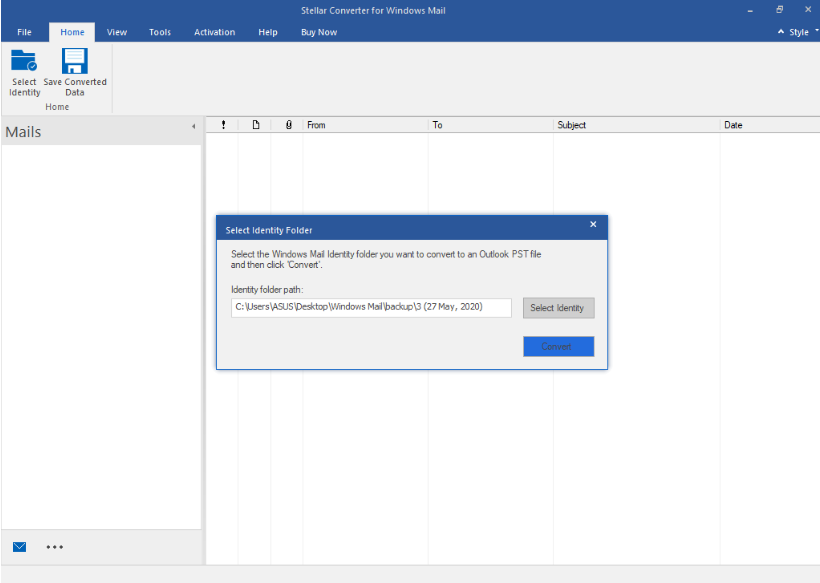
The first step: choose the Windows Mail identity folder to convert.
Features
Emails and contacts to PST
Stellar Converter for Windows Mail converts emails and contacts from Windows Live Mail and Windows Mail, keeping To, Cc, Bcc, From, sent and received dates, attachments and the original formatting, and the folder structure as it was on disk.
Preview every folder
Stellar Converter for Windows Mail shows the converted mailbox, Inbox, Sent, Drafts, Archive, Contacts and custom folders, with each email rendered in the preview pane, so you can check before you save.

A converted Yahoo account from Windows Live Mail: folders on the left, messages in the middle, a formatted email on the right.
Filters before saving
Stellar Converter for Windows Mail's Apply Filter includes or excludes a date range and leaves out mail from senders you list, so the PST holds only what you need.

The Apply Filter dialog: a date range to include or exclude, and a list of senders to leave out.
New or existing PST, with a log
Stellar Converter for Windows Mail saves to a new PST or adds to an existing one, and keeps a log (HTML and text) of the file path, start time and number of emails found. An Update Wizard fetches new versions.
Benefits
- No need for Windows Live Mail. It reads the identity folder itself, so the old program can stay uninstalled.
- Nothing lost in the move. Headers, attachments, formatting and folders come across.
- Check first. The demo shows each email's subject and body before you pay.
- Smaller archives. Filters keep junk and old years out of the PST.
Real-World Uses
- A new PC. Your old laptop ran Windows Live Mail; copy its identity folder and bring the mail into Outlook on the new one.
- A family archive. A parent's ten years of Live Mail, kept as one PST you can open anywhere.
- An office migration. An IT provider moves several staff from Live Mail to Outlook with the Technician license.
- A clean-up. Filter out a newsletter sender and everything before 2012, then save the rest.
Who It's For, and Who Should Skip It
It suits home users and small offices still holding Windows Live Mail or Windows Mail data that should end up in Outlook.
Skip it if you don't use Outlook (Thunderbird can import .eml files with a free add-on), if you have no Outlook installed to save the PST, or if Windows Live Mail still runs on the PC with Outlook beside it: its own export to Microsoft Exchange/Outlook may be enough for a small mailbox.
Usage Guide
- Copy the Windows Live Mail identity folder (usually under your user's AppData\Local\Microsoft\Windows Live Mail) to the PC that has Outlook.
- Install and launch Stellar Converter for Windows Mail.
- In Select Identity Folder, browse to the folder and click Convert.
- Check the folders and emails in the preview. Use Apply Filter if you want to leave mail out.
- Activate the license, click Save Converted Data, and choose a new or existing PST.
- Open the PST in Outlook with File, Open & Export.
Where it falls short
- Outlook required. No Outlook, no PST.
- Yearly license for a one-time job. Most buyers convert once.
- One identity folder at a time, and no single-email export.
- Limited demo. No attachments or recipient fields in the preview.
What Users Say
We found no recent independent review of this converter.
Trustpilot (Stellar as a company)
Stellar scores 4.8 out of 5 from 5,609 reviews across all its products (November 18, 2026), 89% five-star and 4% one-star. LaurentK wrote that a Stellar email tool "is excellent and allowed me to recover most of my lost emails from damaged PST."
Critics exist: Nick wrote "Do not purchase. Software is terrible and customer service worse." Neither review names the Windows Mail converter.
Recurring themes
Stellar's customers mostly praise its support and simple screens; complaints come when results disappoint on their own data. With a converter, the preview tells you up front.
Comparisons
Stellar Converter for Windows Mail vs Windows Live Mail's own export
Windows Live Mail could export to Outlook when both were installed on the same PC, a setup that's rare now that Live Mail is long discontinued. Stellar's converter works from a copied identity folder, adds a preview and filters, and saves to a PST you can move anywhere.
Standard vs Technician
Both convert the same way. Standard is for one PC and individual use; Technician covers three PCs and is meant for technicians and IT service providers.
Editions and Pricing
Prices checked on the order page on November 18, 2026. Each button orders that edition.
FAQs
Does Stellar Converter for Windows Mail need Windows Live Mail installed?
No. Stellar Converter for Windows Mail reads the identity folder directly. You do need Outlook installed to save the PST.
Which Outlook versions does it work with?
Stellar Converter for Windows Mail lists Outlook 2019, 2016, 2013, 2010, 2007 and 2003.
Can it convert several identity folders at once?
No. Stellar Converter for Windows Mail converts one identity folder per run; repeat for each one.
Can I add the mail to my existing Outlook PST?
Yes. Stellar Converter for Windows Mail asks whether to save to a new PST or an existing one; choose Existing PST and select the file.
What does the demo show?
Stellar Converter for Windows Mail's demo shows each email's subject and body. Attachments, the To, CC and BCC fields, and saving need a license.
Is there a mailbox size limit?
No. Stellar lists no file size limit for Stellar Converter for Windows Mail.
System Requirements
- 64-bit Windows 11, 10, 8.1, 8 or Windows Server 2012
- Microsoft Outlook 2019, 2016, 2013, 2010, 2007 or 2003
- Intel-compatible x64 processor
- 4 GB RAM minimum, 8 GB recommended
- 250 MB of free disk space
Conclusion
Stellar Converter for Windows Mail is worth $39 if you have a Windows Live Mail or Windows Mail mailbox to move into Outlook and no working way to do it with the old program. The one reason to buy it: it reads a copied identity folder and turns it into a clean PST, with a preview and filters.
The main reason not to: it needs Outlook installed and sells a yearly license for what's usually a one-time job. Try the demo on your identity folder first.
Download Free TrialBuy StandardBuy Technician