MobiKin Assistant for iOS: Move iPhone Data to a Windows PC Without iTunes
MobiKin Assistant for iOS is a $39.95 Windows program, with a lifetime license for 1 PC, that exports an iPhone, iPad or iPod touch's photos, messages, contacts and music to your computer and backs up the whole device. It's for Windows users who want their iPhone data as ordinary files, and who find iTunes the wrong tool for picking out a few items. It works over a USB cable.
Quick facts
- Version: 3.6.29, released August 24, 2026
- Developer: MobiKin
- Runs on: Windows 11, 10, 8 and 7. A Mac version is sold separately
- Devices: iPhone, iPad and iPod touch on iOS 5 and above, including iOS 27 and iPhone 18 models
- Price: $39.95 once for 1 PC, lifetime license
- Trial: previews everything but exports only the first item of each category
- Guarantee: 30 days money back, under set conditions
- What we checked: the installer is 33.4 MB and dated August 24, 2026, matching the version notes, and the order page showed a lifetime license at $39.95 with no renewal on November 6, 2026. We didn't connect an iPhone or run a backup.
Before you buy
- Think of it as export first. Photos, music and videos go from the iPhone to the PC. MobiKin's FAQ says it can't move music or movies directly from one Apple device to another.
- Turn off iCloud sync where it asks. Contacts, notes and bookmarks need iCloud switched off on the device before you can work with them here.
- Have your passcode handy. Messages, notes and voice memos trigger an unlock prompt on the iPhone that you need to answer quickly.
- Use the trial on your own device. Exporting one item from each category is enough to prove that your iPhone connects and your data appears.
Download Free TrialBuy Now
Overview
Connect your iPhone, tap Trust, and Assistant for iOS opens on a Summary page with the model, iOS version, battery cycles and a capacity bar showing what fills the storage. On the left, the data is grouped as Info (contacts, messages, notes, calendars, bookmarks), Media (music, videos, photos, books) and Apps. Pick one, tick the items, and click Export. A second tab, Super Toolkit, holds the iTunes backup tools.
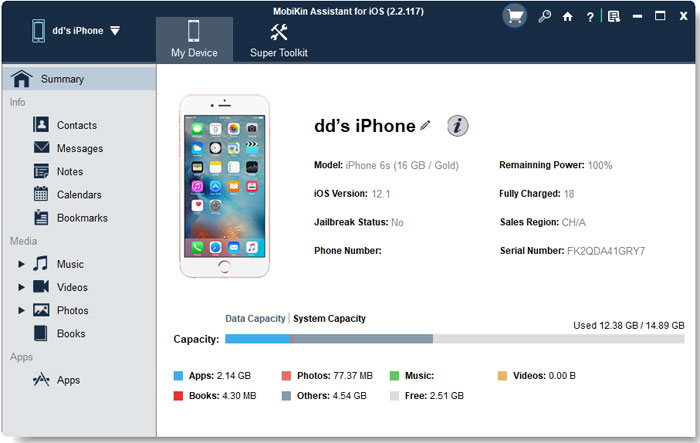
The Summary page in version 2.2.117. The current version may look slightly different.
Features
Contacts you can edit and export
MobiKin Assistant for iOS lets you add, edit and delete contacts on the PC, create groups and remove duplicates. Exports go to CSV, vCard or XML, which covers Excel, Outlook and most address books. Importing back to the iPhone is narrower: the guide says only XML files are supported at present, so keep an XML copy if you plan to restore contacts this way.
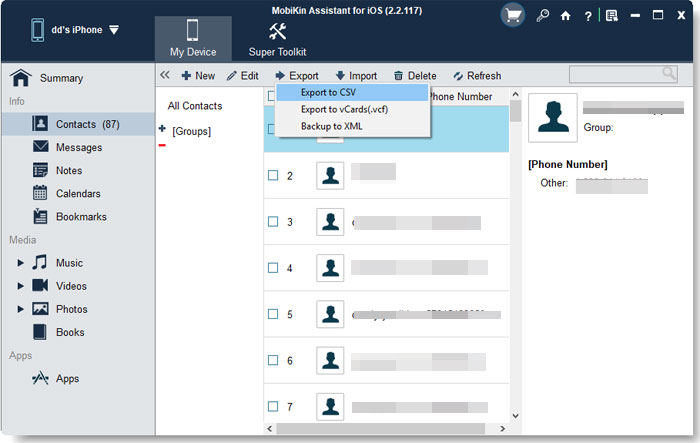
The Export menu on the contacts list. MobiKin has blurred the personal details.
Text messages saved as readable files
MobiKin Assistant for iOS exports iPhone messages to HTML, Text, CSV or DB, so you can read or print a conversation without any special software. Notes, calendars and Safari bookmarks export to HTML or XML. The exports are the point here: messages go out to the computer, and the guide describes no way to compose texts from the PC.
Photos, Live Photos, music and video
MobiKin Assistant for iOS lists photos with name, size, format, date and whether each one is on the device or only in iCloud, and it can delete them from the PC. Version 3.6.29 added exporting Live Photos and showing thumbnails. Music, voice memos, ringtones, movies and TV shows are listed the same way and export with a tick and a click.
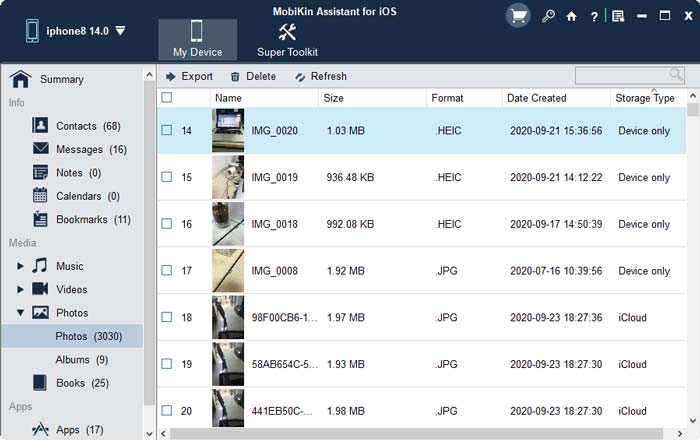
The photo list. The Storage Type column shows which pictures are on the phone and which are in iCloud.
Removing apps in a batch
MobiKin Assistant for iOS lists your installed apps with app size, version and purchase date, and uninstalls the ones you tick. It removes apps only, so don't expect to install them or back up their data here.
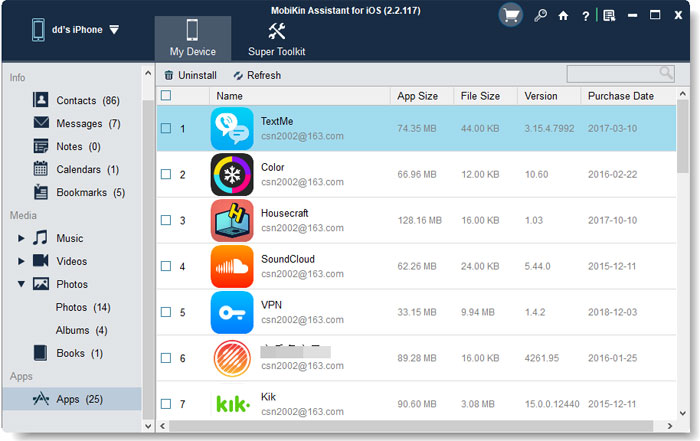
The Apps list with its Uninstall button.
Device backups you control
MobiKin Assistant for iOS backs up a device from Super Toolkit, either to the default iTunes location or to a folder you pick, so a new backup doesn't have to overwrite the last one. It lists the backups on your PC, restores a chosen one to the device, and deletes old ones to reclaim disk space. That's useful if your C: drive is small and iTunes keeps filling it.
Benefits
- Files, not a sealed backup. A contact list in CSV or a message thread in HTML opens anywhere.
- Pick what you want. Take 20 photos without syncing anything or touching your library.
- Space back on the phone. Copy videos to the PC, confirm they arrived, then delete them from the iPhone.
Real-World Uses
- A conversation for your records. Export one message thread to HTML before you change phones.
- A full iPhone with no iCloud plan. Clear years of videos to a PC or external drive.
- Rescuing a music library. Pull songs off an old iPod touch that iTunes would otherwise overwrite.
- Keeping dated backups. Save a backup to a new folder before each iOS update.
Who It's For, and Who Should Skip It
It fits Windows users who want iPhone data on their PC as files they can open, and who'd rather not work through iTunes.
Skip it if iCloud or Apple's own free backup already does what you need. Skip it if you want to move data to a new phone, because MobiKin Transfer for Mobile is the tool built for that. If you've lost data, look at a recovery tool. Mac owners need the separate Mac version, and Android owners need Assistant for Android.
Usage Guide
- Install the program on your PC and connect the device with its USB cable.
- Tap Trust on the iPhone and click Continue in the program.
- Once connected, choose a category in the left panel. Follow the prompt to turn off iCloud for contacts, notes or bookmarks.
- Tick the items you want and click Export, then choose the format and folder.
- For a backup, open Super Toolkit, choose iTunes Backup & Restore, click Backup and pick where to save it. Keep the iPhone connected until it finishes.
- To register, enter the licensed email and code from your order email.
Where it falls short
- USB only. There's no Wi-Fi connection, and several comments on MobiKin's own review page ask for one.
- Contact imports are XML only. A vCard or CSV from elsewhere can't go straight to the iPhone, according to the guide.
- DRM-protected books open blank. MobiKin says a protected ebook can export but won't open on the computer, and only books in Apple's Books app are found.
- Notes are limited on modern iOS. The Mac product page warns that notes can't be accessed from iOS 11 on, and MobiKin's Transfer for Mobile has the same limit, so test notes in the trial.
- The yearly plan renews. The 1 Year license renews automatically, so the lifetime license is the simpler buy.
What Users Say
Independent reviews of Assistant for iOS are thin. We found no recent magazine test, so here's what is available and how much weight to give it.
On MobiKin's own site
The comments here are short and we can't verify who wrote them, so treat them as a rough guide. The useful ones are specific:
"Makes transferring photos and contacts much easier than iTunes. Interface feels simple and clean." Daniel Harris, January 12, 2026
"Transfers my photos quickly, but sometimes it doesn't recognize my iPad immediately." Rachel Thompson, May 8, 2026
"Occasional connection issues interrupted my transfers..." Lucas Whitmore, July 31, 2026
"Transferred photos and contacts smoothly. I wish wireless connection was supported." Emily Carter, February 2, 2026
"MobiKin Assistant made managing my iPhone apps a breeze. A bit pricey, though." Emma Wilson, November 14, 2025
Trustpilot: 3.6 from 48 reviews (all MobiKin products)
Trustpilot covers the whole company, and most reviews don't say which product they mean. One clearly concerns moving music off an Apple device: "I used MobiKin to move 5000+ songs from my iPod Touch to my MacBook Pro because I did NOT want to sync them." and "Moving the files with MobiKin was fast and easy." Lauren Sue, June 21, 2023, 5 stars.
The low scores across the range mention stalled exports and hard-to-reach support. They're a reason to test early, inside the refund window.
The pattern: people like skipping iTunes and the clean layout. The repeated requests are wireless connection and better speed on large files, and the repeated complaint is a device that isn't recognized at first.
Comparisons
MobiKin Assistant for iOS vs iTunes and Apple Devices
Apple's tools are free and make a complete backup, and they're the safe default for restoring a whole iPhone. Assistant for iOS adds what they don't: single messages and contacts as files you can open, and the choice of backup folder. Pay for those if you need them, and keep Apple's tools for everything else.
MobiKin Assistant for iOS vs MobiKin Transfer for Mobile
Assistant for iOS moves data between an iPhone and a computer. Transfer for Mobile moves it from one phone to another through a computer. Both cost $39.95 for a lifetime license, and neither replaces the other.
Editions and Pricing
| Plan | Price | Term | Computers |
|---|
| Lifetime | $39.95 | One payment | 1 |
| 1 Year | $29.95 | Renews automatically | 1 |
| Lifetime | $59.95 | One payment | 2 to 5 |
| 1 Year | $49.95 | Renews automatically | 2 to 5 |
| Lifetime | $99.95 | One payment | 6 to 10 |
| 1 Year | $89.95 | Renews automatically | 6 to 10 |
All plans have the same features. The difference is the term and the number of computers, and plans go up to 26-30 computers. The Buy Now button on this page opens the Lifetime 1 PC license. Prices are from MobiKin's product catalog on November 6, 2026.
FAQs
Does MobiKin Assistant for iOS work with iPhone 18 and iOS 27?
MobiKin Assistant for iOS lists iPhone 18 models and iOS 27 as supported, along with iPads and iPod touch models back to iOS 5.
Does MobiKin Assistant for iOS work without iTunes?
MobiKin sells Assistant for iOS as an iTunes alternative, so you manage and export data in its own window. Its backups can still use the iTunes backup location if you choose it.
Can MobiKin Assistant for iOS copy my iPhone to my iTunes library?
MobiKin Assistant for iOS can't export to the iTunes library directly. It saves files to your computer, and you add them to iTunes yourself.
Is there a free version of MobiKin Assistant for iOS?
MobiKin also lists a free Windows edition, Assistant for iOS (Free), at the same version number. We didn't compare it with the paid program, so try it before you buy if your needs are simple.
How many iPhones does a MobiKin Assistant for iOS license cover?
MobiKin counts MobiKin Assistant for iOS licenses by computer, and its order page shows no limit on devices. A 1 PC license means one Windows computer.
Can I get a refund on MobiKin Assistant for iOS?
MobiKin Assistant for iOS has a 30-day money-back guarantee, but only under the accepted circumstances in MobiKin's policy. A change of mind doesn't qualify, and a refunded license is disabled.
System Requirements
- Windows 11, 10, 8 or 7
- 750 MHz Intel or AMD processor
- 512 MB RAM or more
- 1 GB or more of free disk space
- An iPhone, iPad or iPod touch and its USB cable
Conclusion
MobiKin Assistant for iOS is worth $39.95 if you often need iPhone data as real files on a Windows PC: message threads, contact lists, chosen photos. The reason to buy it is that it does what Apple's free tools won't, in a clear window, and it's kept up with iOS 27. The main reason not to is that independent testing is scarce, so you're relying on the trial. Use it to confirm that your device connects and your data appears. If you just want a safe full backup, Apple's tools are free.
Download Free TrialBuy Now