MobiKin Doctor for iOS for Mac: What It Can Really Recover From an iPhone
MobiKin Doctor for iOS for Mac is a $69.95 lifetime macOS tool that recovers contacts, messages and other data from an iPhone or iPad, an iTunes backup or iCloud, for up to 3 devices on one computer. It suits Mac users who've lost data and have a backup or a deleted contact or text to find, but it can only find deleted items in a few categories.
That last point matters more than the headline claim of 35+ data types. Most of those types are existing data that it copies off a phone or out of a backup. MobiKin's tech specs list only contacts, messages and message attachments as supported deleted files, so run the free trial's scan first, and check that your lost items appear before you pay.
Quick facts
- Version: 4.3.41, released March 3, 2026
- Developer: MobiKin
- Mac: Mac OS X 10.10 or later
- Devices: iPhone, iPad and iPod touch, iOS 5 to iOS 27
- Price: $69.95 lifetime, 3 devices on 1 computer
- Trial: free, with scan and preview before you buy
- Guarantee: 7 days, with conditions
What we checked: the disk image size (22.4 MB) on MobiKin's server, the version and tech specs on the vendor's page, and the $69.95 price with a one-time lifetime term on the order page, all on November 5, 2026. We didn't run a recovery on a real iPhone.
Before you buy
- Scan first, pay second. The trial shows you what can be found. If your lost file doesn't appear, the paid version won't produce it.
- The refund window is short. The buy page and refund policy give recovery products a 7-day guarantee, though the product page still shows 30 days. MobiKin rejects refunds for a change of mind.
- A backup is your best chance. Items in an iTunes or iCloud backup are far more reachable than ones deleted from the phone with no backup.
- iCloud recovery needs your Apple ID and password in the app. MobiKin says it never stores them, but decide whether you're comfortable with that.
- Check your Mac first. The tech specs list an Intel CPU, and one customer on MobiKin's page says it didn't work on their Mac Pro.
Download Free TrialBuy Now
Overview
Doctor for iOS has three recovery modes on its left side, plus a toolkit. You pick where to look: the device itself, an iTunes backup on your Mac, or iCloud. It scans, lists what it finds by category, marks deleted items in a different color, and lets you tick what to save to your Mac. It recovers to the computer, so it doesn't overwrite what's on your phone.
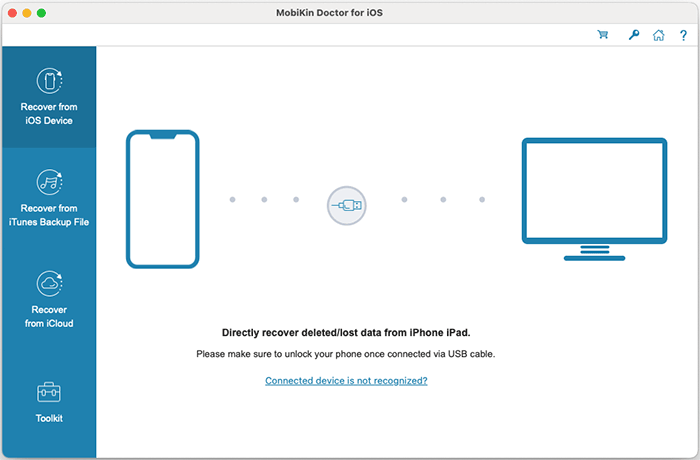
The main window, with the recovery modes down the left side and a prompt to connect and unlock your iPhone by USB cable.
Features
Scan an iPhone or iPad directly
MobiKin Doctor for iOS scans a connected device by USB and shows its existing data, including photos, videos, contacts, notes, calendars and WhatsApp chats. Deleted items are limited to contacts, messages and message attachments, according to the tech specs. Keep the phone unlocked during the scan, as it may ask you to unlock it again.

Scan results for messages: categories on the left, conversations in the middle with deleted ones in red, and the thread on the right, with a Recover to Computer button.
Pull selected data from an iTunes backup
MobiKin Doctor for iOS reads iPhone backups stored on your Mac and shows their contents by category, including contacts, messages, call history, notes, Safari data, calendars, voice memos, photos and WhatsApp chats. You can save only the items you need, without restoring the whole backup over your phone.
Download data from iCloud
MobiKin Doctor for iOS signs in to your iCloud account and downloads synced contacts, notes, calendars, reminders and photos to your Mac. MobiKin advises leaving the device unconnected during this, so that the iCloud files don't change. The latest version, 4.3.41, was a fix for iCloud sign-in issues.

The iCloud sign-in screen, where you enter your Apple ID and password.
Preview before you save
MobiKin Doctor for iOS lets you read messages and view photos one by one, and a switch shows only the deleted items. Contacts can be exported in readable formats, which is handy when one lost number is all you came for.
Benefits
- No wipe needed. You can take a few items from a backup without restoring and overwriting your phone.
- You know before you pay. The scan and preview show what's reachable.
- One-time price. The lifetime license avoids the yearly plan, which renews automatically.
Real-World Uses
- A number you never saved turns up after an upgrade. Helen, quoted on MobiKin's page, found a lost contact and her message history.
- A broken iPhone still has a backup on the Mac, and you pull the photos and messages from it.
- An old backup holds notes that an iOS update wiped from the phone.
- A switch to a new phone leaves you wanting a few old texts without restoring everything.
Who It's For, and Who Should Skip It
MobiKin Doctor for iOS fits Mac users with a backup on the Mac or in iCloud, or who've lost a contact or message and want to look for it.
Skip it if you've lost photos or videos from the phone with no backup, since those aren't on the supported deleted-file list. Skip it too if your iPhone is badly damaged and won't turn on: a data recovery lab is the realistic route. If you want everything back, and don't mind overwriting the phone, Apple's own restore from a backup is free. Windows users need the Windows version.
Usage Guide
- Download the disk image from the Mac page and install the app.
- Choose Recover from iOS Device, Recover from iTunes Backup File or Recover from iCloud.
- For a device, connect it by USB, unlock it and tap Trust.
- Pick the data types and click Start Scan.
- Preview results, and turn on Only display the deleted items if you want.
- Buy and register if what you need is there, then click Recover to Computer.
Where it falls short
- Deleted-file support is narrow. The headline says 35+ types, but deleted recovery covers contacts, messages and message attachments.
- Some items don't come back. Customers on MobiKin's own page report missing notes, photos and contacts, and some corrupted files.
- Scans can be slow. Speed is the most common complaint on MobiKin's page.
- The free version doesn't save much. Several buyers say it's very limited, so treat it as a test of whether your data can be found.
- Support and refunds get mixed reports. Trustpilot shows quick refunds for some customers and no refund for others.
What Users Say
Trustpilot: 3.6 out of 5 from 48 reviews of MobiKin
These cover all of MobiKin's products. None names Doctor for iOS, and auto-renewal comes up, which doesn't apply to the lifetime license here.
- "No refund back to Credit Card and no refund confirmation email from Mobikin." Micki Holmes, December 20, 2025
- "I cannot re-activate the Mobikin that I already paid for." Joseph C Gravina, February 4, 2026
- "They responded back right away and without hesitation stated that they would refund me the purchase price." Steve H, July 24, 2025
- "Peter was kind enough to grant me a refund after my year 2 payment had already gone through" Dante, August 28, 2026
Comments on MobiKin's product page
MobiKin rates the product 4.5 out of 5 from 128 reviews. These are on its own site and can't be checked independently, though they do include complaints.
- "The recovery process was smooth, and it didn't overwrite anything on my phone. Definitely worth trying." Michael Davis, June 30, 2025
- "Helped me recover notes after iOS update wiped them. Didn't expect it to work, but it did!" Carlos Mendoza, August 8, 2025
- "Not bad! Recovered my notes, but some files were corrupted." Ryan Mitchell, March 7, 2025
- "Saved my lost notes, but the free version is pretty limited. Be ready to pay for full features." Mark Davidson, March 21, 2025
- "this program does not work with my Mac Pro. I would like a refund" denise higginbotham, December 3, 2025
Reviews on other sites
Kunal Chowdhury's June 2021 review lists one con, "Registration is required to get all functions." Other write-ups we found read as promotional, and older ones describe versions without iCloud support, so we didn't rely on them.
The pattern: backup recovery and contacts get the most praise. The complaints are slow scans, a limited trial and items that don't come back, and buyers disagree about how refunds go.
Comparisons
Doctor for iOS vs Apple's restore
Restoring from an iCloud or Finder backup is free and brings everything back, but it replaces what's on the phone. Doctor for iOS costs $69.95 and lets you take just a few items out while your phone stays as it is.
Editions and Pricing
Prices are from MobiKin's Mac store on November 5, 2026. Only the lifetime 3-device license goes through the buttons on this page.
| License | 3 Devices, 1 PC | 9 Devices, 3 PCs | Unlimited Devices, 1 PC | Renewal |
|---|
| 1 Year | $49.95 | $59.95 | $199.95 | Automatic, can be cancelled |
| Lifetime | $69.95 | $109.95 | $309.95 | None |
The one-time lifetime license costs $20 more than a single year and has free updates, so it's the better choice for most people.
FAQs
Can MobiKin Doctor for iOS recover deleted photos without a backup?
MobiKin Doctor for iOS doesn't list photos as a supported deleted file, so don't count on it. It can copy existing photos, and it can pull photos from an iTunes backup.
Does MobiKin Doctor for iOS work with the iPhone 18 and iOS 27?
Yes. MobiKin lists iPhone 18 models and iOS 27 as supported on the Mac version.
Is the MobiKin Doctor for iOS lifetime license really one payment?
Yes. The order page shows a one-time lifetime term for this license, with no renewal, and MobiKin includes free updates.
Can I get a refund on MobiKin Doctor for iOS?
MobiKin gives its recovery tools a 7-day guarantee, and only in accepted circumstances. A change of mind isn't one of them, so use the trial to find out what can be recovered.
Does MobiKin Doctor for iOS overwrite the data on my iPhone?
No. MobiKin Doctor for iOS saves what it recovers to your Mac, not back to the phone.
How many iPhones does the MobiKin Doctor for iOS license cover?
The $69.95 license covers 3 devices on 1 computer. Bigger licenses cover 9 devices on 3 computers or unlimited devices on 1 computer.
System Requirements
- Mac OS X 10.10 or later
- Intel Core 1 GHz or faster
- 1 GB or more of free disk space
- iPhone, iPad or iPod touch on iOS 5 to iOS 27
- USB cable for device scans
Conclusion
MobiKin Doctor for iOS for Mac is worth $69.95 if its free scan shows the contact, message or backup item you've lost. The one reason to buy it is pulling selected items out of a backup, or a deleted contact or text, without wiping your phone. The main reason not to is that deleted-file recovery covers only a few types and the refund window is 7 days. Never buy it in the hope that it will find something the trial couldn't.
Download Free TrialBuy Now