MobiKin Assistant for Android for Mac: Manage and Back Up an Android Phone From Your Mac
MobiKin Assistant for Android for Mac is a $39.95 macOS program, with a lifetime license for 1 computer, that backs up an Android phone to your Mac and lets you manage its contacts, messages, photos and apps from a desktop window. Macs don't see Android phones the way they see iPhones, so this is for Mac owners who want one program for browsing, copying and backing up an Android device. It works over USB or Wi-Fi and doesn't need root.
Quick facts
- Version: 5.1.22, released July 3, 2026
- Developer: MobiKin
- Runs on: Mac OS X 10.10 or later. A Windows version is sold separately
- Phones: Android 6 and above, with models up to the Galaxy S26 series on the supported list
- Price: $39.95 once for 1 computer, lifetime license
- Trial: free download, scan and preview only
- Guarantee: 30 days money back, under set conditions
- What we checked: the installer is an 18.5 MB disk image dated July 3, 2026, matching the version notes, and the order page showed a lifetime license at $39.95 with no renewal on November 6, 2026. We didn't connect a phone or run a backup.
Before you buy
- Check your Mac first. The tech specs list an Intel CPU and say nothing about Apple silicon. One comment on MobiKin's site reports using it on a MacBook Pro M3, so run the trial on your own Mac before paying.
- The trial proves the connection, not the backup. It scans and previews your data, but backup, restore and export stay locked until you register.
- Do a real restore test soon after buying. You have 30 days for a refund, and a backup you've never restored isn't proven.
Download Free TrialBuy Now
Overview
Plug in your phone and Assistant for Android opens on a Home screen with the model, Android version, serial number and battery level, plus bars for phone and SD card storage. The left column lists Apps, Contacts, Messages, Music, Photos, Videos and Books, each with a count, and a Super Toolkit tab at the top holds one-click backup and restore. A camera button under the phone picture takes a screenshot of the phone.
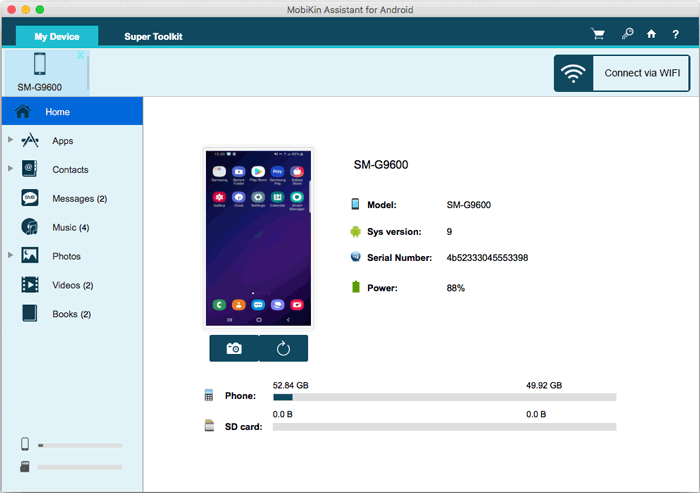
The Home screen with a Samsung phone connected: device details, storage use and the data categories.
Features
Contacts you can edit on the Mac
MobiKin Assistant for Android for Mac lets you add, edit and delete contacts from the desktop and see each one's full details in a side panel. Exports go to CSV, VCF, HTML, XML or BAK, and the CSV opens in Excel if you want a printable list. Imports take VCF, BAK or XML files. Call logs sit in their own list, where you can export them to XML, import them back or delete them.
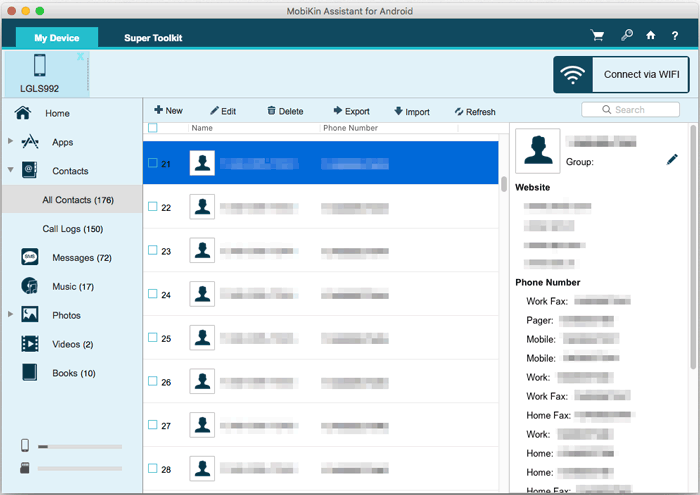
All Contacts with the toolbar across the top. MobiKin has blurred the personal details.
Text messages on a big screen
MobiKin Assistant for Android for Mac shows each conversation with its bubbles on the right, and buttons to forward, copy or delete a message. You can type a new text and send it to several contacts at once from the Mac. Messages export to HTML, XML, CSV, Text or BAK, and backups can go back to the phone from JSON, BAK or XML files. Version 4.0.4 added viewing MMS and exporting them to HTML.
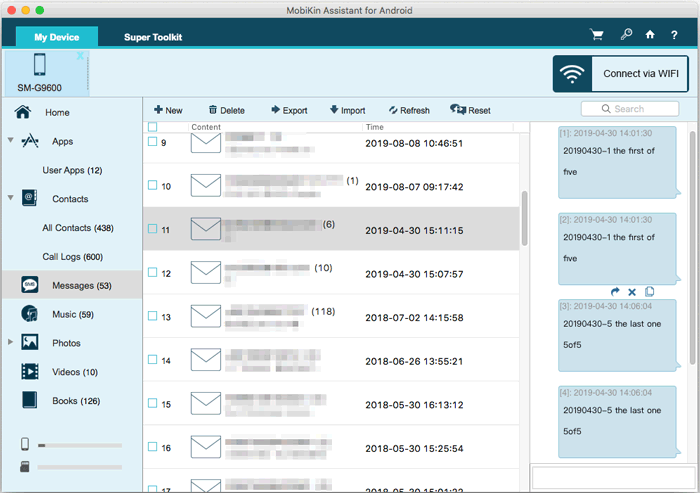
The Messages view: conversations on the left, the selected thread on the right.
Photos, music and video in both directions
MobiKin Assistant for Android for Mac lists photos by album with name, size, format and date, and can add, delete, export, copy or move them. Version 4.2.75 added exporting photos by album, handy if you want Camera on the Mac and not 600 saved images. Music and video lists work the same way.
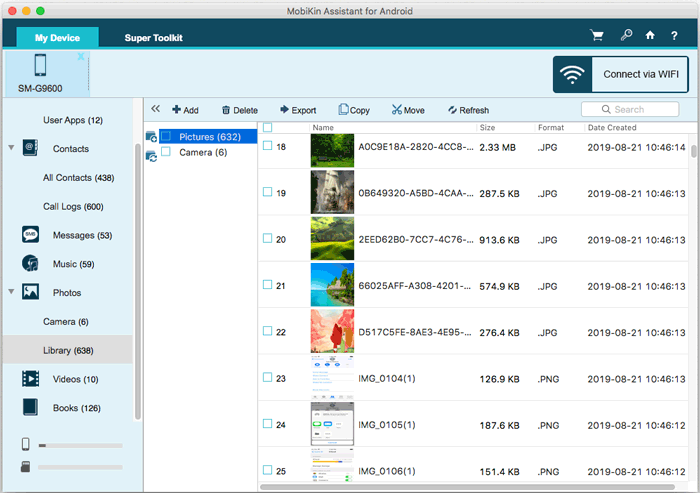
The photo Library, with Add, Delete, Export, Copy and Move in the toolbar.
App installs and removal in batches
MobiKin Assistant for Android for Mac shows your user apps with version, size and install date. You can install APK files from the Mac, uninstall several at once, or export them. Apps are backed up without their data, so saved games and logins inside an app don't come with them.
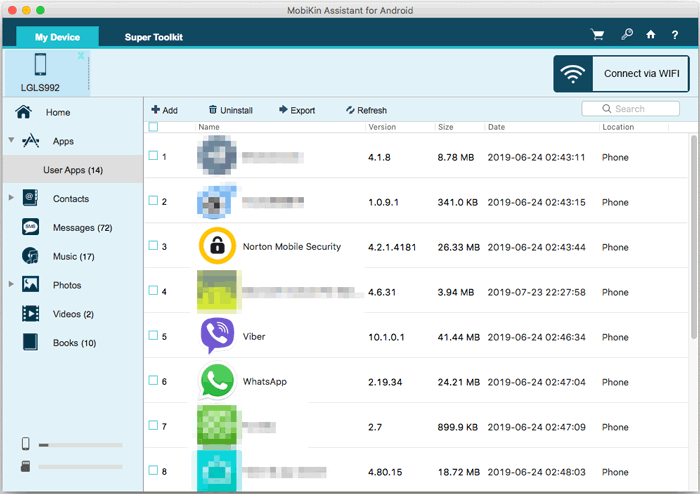
The User Apps list with Add, Uninstall and Export buttons.
One-click backup and restore
MobiKin Assistant for Android for Mac puts Backup and Restore under Super Toolkit. You tick the data types and choose where the backup goes on your Mac, with no cloud account involved. Version 5.1.16 fixed wrong backup and restore paths, and 4.0.38 fixed backups not saving to the chosen folder, so make sure you're on the current build before relying on it.
Benefits
- One tool for a phone the Mac ignores. Browsing, copying and backing up all happen in the same window, without Finder.
- A copy that stays with you. The backup sits on your own disk or external drive and there's no storage plan to pay for.
- Keyboard speed. Long texts and big contact clean-ups go faster with a real keyboard.
Real-World Uses
- Before a factory reset. Back up the phone to your Mac, reset it, then restore what you need.
- Clearing storage. Export a year of videos to the Mac by album, check they arrived, then delete them from the phone.
- Keeping a text record. Export a conversation to HTML or CSV for your files, or to print.
- Group messages. Send one text to a list of contacts while you're working at the Mac.
Who It's For, and Who Should Skip It
It fits Mac owners with an Android phone who want a desktop manager and a local backup in one purchase, and who'll use it more than once.
Skip it if you only need to pull a few photos across, since a free file-transfer tool does that. Skip it if you've already lost data: this isn't a recovery tool, and MobiKin sells Doctor for Android for that job. iPhone owners need the separate Assistant for iOS. And if your Mac runs Windows too, note that the Windows version gets updates sooner.
Usage Guide
- Download the disk image, install the app and open it on your Mac.
- Connect the phone by USB and turn on USB debugging when the program asks.
- Tap OK or Allow on the phone to authorize the Mac. Tap Show Again in the program if the prompt doesn't appear.
- The program installs the MobiKin Assistant for Android app on the phone. Tap Confirm to give it permissions.
- Pick a category on the left, such as Contacts, and use the toolbar to export, import or delete.
- For a full backup, open Super Toolkit, choose Backup, tick the data types and click Back Up.
- For Wi-Fi, click Connect via WIFI and scan the QR code with the phone app, with both devices on the same network. USB is better for large videos.
Where it falls short
- The Mac build trails Windows. On our check date the Mac version was 5.1.22 from July and the Windows version 5.4.39 from October. FileHorse's Mac listing also has "Mac Version Lacks Features" among its cons.
- Connection takes several steps. USB debugging, an authorization prompt and a phone app all have to work. FileHorse lists "Occasional Connection Issues".
- Not every phone is tested. MobiKin says some models may not work because it can't test them all, and asks you to report them.
- Refunds aren't unconditional. The policy rejects a change of mind, and you need to work with support on a technical problem first.
- The yearly plan renews. The 1 Year license renews automatically until you cancel, so the lifetime license is the simpler buy.
What Users Say
Reviews specific to the Mac version are scarce. Most independent coverage is about Assistant for Android in general, and Trustpilot rates the whole company rather than one product, so read these as a guide to the family.
FileHorse (Mac listing): 7.58 out of 10 from 7 ratings
The review on FileHorse's Mac page for version 5.1.22 lists "Wide Device Compatibility" and "Easy-to-Use Interface" as pros. Its cons are "Limited Free Version", "No Cloud Backup Option", "Mac Version Lacks Features" and "Occasional Connection Issues".
WebsiteBuilder.org
Dusan Trickovic's review from June 7, 2022 says: "after testing the software first-hand, our MobiKin Assistant for Android review can confirm that it performs as promised." It lists "Straightforward to use" and "Powerful phone data management" as pros.
The cons: "You need to buy a license code to access all the features" and "The UI could use some improvements". It's an older review, and it doesn't test the Mac build on its own.
GadgetByte Nepal
This hands-on review of Assistant for Android, from January 6, 2021, liked the speed: "The app is pretty fast too." It was blunter on the demo: "the trial version offers next to nothing." The verdict: "It delivers what it says, so no complaints there."
Trustpilot: 3.6 from 48 reviews (all MobiKin products)
The recent low scores are worth reading:
"tried using txt and html export. Both hang or stall after 5%." MudBots D Concrete Printers, September 16, 2026, 1 star
"I paid for a Lifetime of Assistant so I could download my pics from my Android phone." and "Terrible Website. NO CUSTOMER SERVICE. You cannot get through to anyone." Joseph C Gravina, February 4, 2026, 1 star
"provided multiple screenshots of app failing to restore their app backup." Micki Holmes, December 20, 2025, 1 star
There are good reports too: "We used MobiKin to transfer text messages from a phone to our computer, and it worked very well." Partners Real Estate Professionals, October 7, 2026, 5 stars
On MobiKin's own site
The comments there are short and favorable, so give them less weight. Two are useful: "I'm using a Pixel 8 Pro with a MacBook Pro M3. The connection was instant via USB." Persephone==, June 18, 2026. And: "Makes managing my contacts, messages, and media files so much easier - My only gripe? The free version is limited." Zefferyn*exley, July 30, 2025.
The pattern: people like the simple layout and having everything in one window. Complaints center on the tight trial, connection steps, failed exports or restores for a few buyers, and support that can be hard to reach.
Comparisons
Mac version vs Windows version
The two share a layout and the same prices, but they're separate purchases. The Windows build is further along in version number and was updated more recently. Mac users have no choice here, but if you own both kinds of computer, the Windows version is the one MobiKin updates first.
MobiKin Assistant vs Google's own tools
Google's backup is free and automatic, but your data stays in your Google account. Assistant for Android gives you a copy on your Mac, exports you can open, and desktop editing of contacts and messages, none of which Google's backup offers.
Editions and Pricing
| Plan | Price | Term | Computers |
|---|
| Lifetime | $39.95 | One payment | 1 |
| 1 Year | $29.95 | Renews automatically | 1 |
| Lifetime | $59.95 | One payment | 2 to 5 |
| 1 Year | $49.95 | Renews automatically | 2 to 5 |
| Lifetime | $99.95 | One payment | 6 to 10 |
| 1 Year | $89.95 | Renews automatically | 6 to 10 |
All plans have the same features. The difference is the term and the number of computers, and plans go up to 26-30 computers. The Buy Now button on this page opens the Lifetime license for 1 computer. Prices are from MobiKin's product catalog on November 6, 2026.
FAQs
Does MobiKin Assistant for Android for Mac need a rooted phone?
MobiKin Assistant for Android for Mac doesn't need root. It uses USB debugging and a companion app that you approve on the phone.
Does MobiKin Assistant for Android for Mac work over Wi-Fi?
MobiKin Assistant for Android for Mac connects over Wi-Fi once the free phone app is installed, by scanning a QR code with phone and Mac on the same network. MobiKin recommends USB for large video files.
Can MobiKin Assistant for Android back up app data on a Mac?
MobiKin Assistant for Android for Mac backs up the apps themselves but not the data inside them, according to MobiKin's FAQ.
Can I copy one Android phone straight to another with this program?
MobiKin Assistant for Android for Mac backs up a phone to the computer only. To move data directly between two phones, MobiKin sells Transfer for Mobile.
Can MobiKin Assistant for Android for Mac read a phone with a broken screen?
MobiKin Assistant for Android for Mac can reach the data on a broken phone only if USB debugging was already turned on before the damage, according to MobiKin.
Can I get a refund on MobiKin Assistant for Android for Mac?
MobiKin Assistant for Android for Mac has a 30-day money-back guarantee, but only under the accepted circumstances in MobiKin's policy. A change of mind doesn't qualify, and a refunded license is disabled.
Does a Windows license of MobiKin Assistant work on a Mac?
MobiKin Assistant for Android is sold separately for Mac and Windows, with different product codes at checkout, so buy the one for the computer you'll use.
System Requirements
- Mac OS X 10.10 or later
- Intel Core 1 GHz processor or above
- 1 GB or more of free disk space
- Android 6 or later, with a USB cable or the same Wi-Fi network as the Mac
Conclusion
MobiKin Assistant for Android for Mac is worth $39.95 if you want one program to back up and manage an Android phone from a Mac, and you'll use it again and again. The reason to buy it is that it covers contacts, messages, apps, media and backup together, in a space where macOS offers very little. The main reason not to is reliability: the Mac build trails Windows, company-wide Trustpilot reviews mention stalled exports and failed restores, and the specs don't mention Apple silicon. Run the trial on your own Mac, then test a full backup and restore inside the 30 days. If you only move a few photos, a free tool will do.
Download Free TrialBuy Now