MobiKin Assistant for iOS for Mac: Export iPhone Data to Your Mac as Files You Can Open
MobiKin Assistant for iOS for Mac is a $39.95 macOS program, with a lifetime license for 1 computer, that copies an iPhone, iPad or iPod touch's contacts, messages, photos and music to your Mac and manages its backups. It suits Mac owners who want individual items out of an iPhone as normal files, which Finder syncing doesn't give you. It connects over USB.
Quick facts
- Version: 4.1.45, released December 18, 2025
- Developer: MobiKin
- Runs on: Mac OS X 10.10 or later. A Windows version is sold separately
- Devices: iPhone, iPad and iPod touch. MobiKin lists iOS 5 through iOS 27
- Price: $39.95 once for 1 computer, lifetime license
- Trial: previews everything but exports only the first item of each category
- Guarantee: 30 days money back, under set conditions
- What we checked: the installer is a 4.6 MB disk image dated December 18, 2025, matching the version notes, and the order page showed a lifetime license at $39.95 with no renewal on November 6, 2026. We didn't connect an iPhone or run a backup.
Before you buy
- Check the build date against your iOS. The latest Mac installer is from December 2025, while the Windows version was updated in August 2026. MobiKin still lists iOS 27 and iPhone 18 as supported, but test your own device in the trial first.
- Check your Mac too. The tech specs name an Intel CPU and don't mention Apple silicon.
- It's a copy-out tool first. Music, video and photos go from the device to the Mac. Getting media back onto a device means going through Finder or iTunes yourself.
- Switch off iCloud where the program asks. Contacts, notes, calendars and bookmarks need their iCloud sync turned off on the device.
Download Free TrialBuy Now
Overview
Connect the device, tap Trust, and the Summary page shows its model, iOS version, charge cycles and a capacity bar split into apps, photos, music, videos, books and others. The sidebar groups the data under Info, Media and Apps. You click a category, preview what's there, tick the items and export them. Super Toolkit, the second tab, handles device backups.
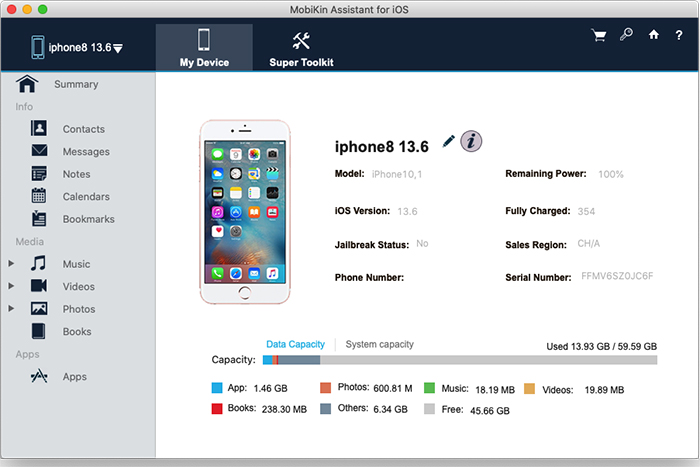
The Summary page on a Mac, with an iPhone 8 connected.
Features
Contact lists in three formats
MobiKin Assistant for iOS for Mac exports contacts to CSV, vCard or XML, and you can add new ones or edit existing ones on the Mac. Groups appear in their own column. Importing is more limited: at present it only takes XML files, so export to XML if you want a copy that can go back to the device through this program.
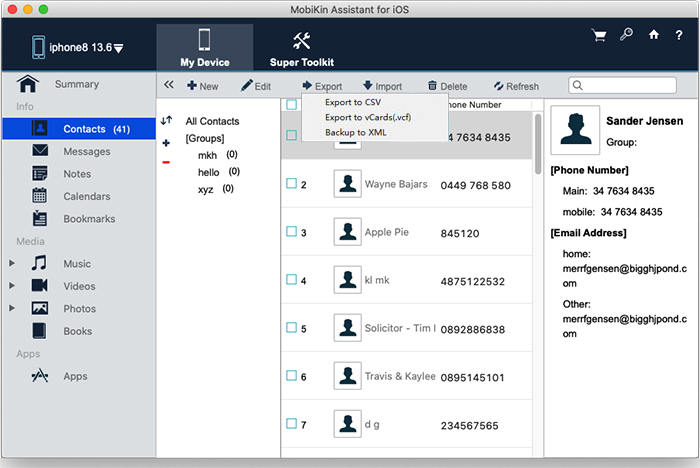
The Export menu on the Mac version, with contact groups in the middle column. Some details are blurred by MobiKin.
Messages, notes and calendars
MobiKin Assistant for iOS for Mac saves text messages as HTML, Text, CSV or DB files you can read or search later. Notes, calendars and bookmarks export to HTML or XML, and notes and calendars can also be imported from the Mac. MobiKin warns that iPhone notes can't be accessed in iOS 11, and it doesn't say what's changed since, so check your notes appear in the trial if they matter to you.
Photos, music and video by type
MobiKin Assistant for iOS for Mac sorts media into songs, voice memos, tones, movies, TV shows, music videos, photos and albums. Photos are listed with size, format and date, and you can export or delete them. Version 4.1.45 added exporting Live Photos. It's useful for an old iPod touch, where the songs aren't anywhere else.
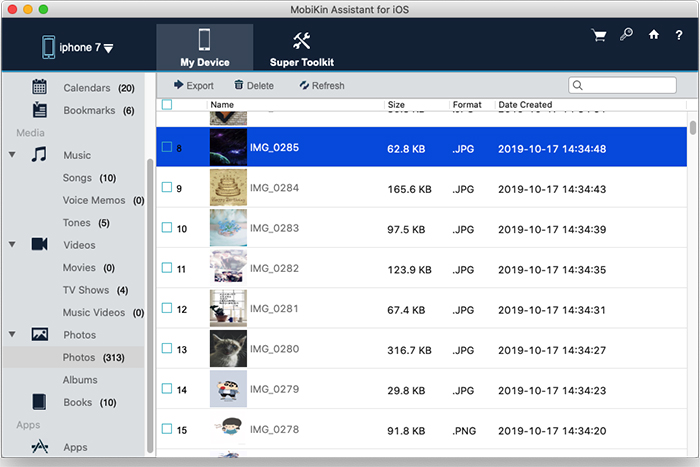
Photos on an iPhone 7, with the media subcategories opened in the sidebar.
Apps, removed from the desktop
MobiKin Assistant for iOS for Mac shows each app with its size and version, and uninstalls the ones you pick. It's a simple way to clear space, though it can't add apps.

The Apps view with its Uninstall button.
iTunes-style backups you can manage
MobiKin Assistant for iOS for Mac backs up a device to the default location or a folder you choose, lists the backups on your Mac, restores one to the device and deletes those you don't need. It suits a Mac with a small internal drive, because the backup can live on an external disk.
Benefits
- Your data in plain formats. A CSV of contacts or an HTML message thread doesn't need this program to open.
- Keep what the phone can't hold. Move years of video to a Mac or external drive and free up the device.
- No syncing. Exporting leaves your Music library and the device untouched.
Real-World Uses
- An old iPod touch. Copy the songs to a Mac without a sync that could wipe them.
- Before you trade in. Save message threads and contacts as files you'll still be able to read later.
- An external-drive backup. Point the device backup at a separate disk to spare your Mac's storage.
- Family devices. Pull photos from several iPhones onto one Mac. Licenses count computers.
Who It's For, and Who Should Skip It
It fits Mac owners who regularly need individual iPhone items as files, or who have an old device with content they can't lose.
Skip it if iCloud Photos and Finder backups already cover you, since both are free. Skip it if you're moving to a new phone, because that's a job for MobiKin Transfer for Mobile. If you're on the latest iPhone and need certainty on compatibility, the Windows build is newer. Android owners need Assistant for Android.
Usage Guide
- Download the disk image, install the app and launch it.
- Connect the iPhone, iPad or iPod with its USB cable and tap Trust on the device.
- Click a category such as Contacts in the left panel. Turn off iCloud for it on the device if asked.
- Tick the items, click Export and choose a format and location.
- For photos, music or video, open the category, choose a subcategory such as Albums or Tones, then export.
- Open Super Toolkit to back up, restore or delete device backups.
Where it falls short
- Fewer updates. Its last release came in December 2025, so it trails the Windows version by eight months.
- USB only. Several comments on MobiKin's review page ask for wireless transfer.
- Some features are still marked Coming Soon. The product page says this about adding, deleting or creating folders in backup files.
- The yearly plan renews. The 1 Year license renews automatically, so the lifetime license is the simpler buy.
What Users Say
We found no independent review of the Mac version, so this section is short. Here's what exists.
Trustpilot: 3.6 from 48 reviews (all MobiKin products)
The score covers all of MobiKin's products, and few reviews name one. This one fits the Mac use case well, under the title "Moved songs from iPad to MacBook Pro with no problem and no syncing":
"I used MobiKin to move 5000+ songs from my iPod Touch to my MacBook Pro because I did NOT want to sync them." and "Moving the files with MobiKin was fast and easy." Lauren Sue, June 21, 2023, 5 stars
On MobiKin's own site
These comments are short and unverified, so they're a rough guide at best. Unusually for a vendor page, many are lukewarm:
"Easy to use and stable, but price feels a bit high." Stephanie Wright, March 23, 2026
"I had some trouble connecting my device at first. After troubleshooting, all worked fine." Isabella Allen, March 9, 2026
"It works well but sometimes struggles with large video files." Matthew Lewis, September 19, 2025
"I had trouble with some of my music files not syncing properly." Michael Johnson, December 15, 2025
"Adding wireless transfer support would make this tool much more convenient." Amelia Foster, July 31, 2026
The pattern: people find it easy for photos, contacts and music. The repeated wishes are wireless transfer and better handling of large files, with the odd connection problem at the start.
Comparisons
MobiKin Assistant for iOS vs Finder on a Mac
Finder is free and makes a full device backup, and it's what you should use for a whole-iPhone restore. Assistant for iOS gives you what Finder doesn't: contacts, messages and individual media as separate files.
Mac version vs Windows version
The two cost the same and look alike, but they're separate purchases. The Windows build is newer, at version 3.6.29 from August 2026, and its number is lower only because the two are numbered separately.
Editions and Pricing
| Plan | Price | Term | Computers |
|---|
| Lifetime | $39.95 | One payment | 1 |
| 1 Year | $29.95 | Renews automatically | 1 |
| Lifetime | $59.95 | One payment | 2 to 5 |
| 1 Year | $49.95 | Renews automatically | 2 to 5 |
| Lifetime | $99.95 | One payment | 6 to 10 |
| 1 Year | $89.95 | Renews automatically | 6 to 10 |
All plans have the same features. The difference is the term and the number of computers, and plans go up to 26-30 computers. The Buy Now button on this page opens the Lifetime license for 1 computer. Prices are from MobiKin's product catalog on November 6, 2026.
FAQs
Can MobiKin Assistant for iOS for Mac add music to my iPhone?
MobiKin Assistant for iOS for Mac exports music to the Mac. MobiKin's FAQ says to add files to your library and sync them to a device yourself.
Can MobiKin Assistant for iOS for Mac move data between two iPhones?
MobiKin Assistant for iOS for Mac only copies data between a device and the Mac. Its FAQ says you can't transfer music and movies straight from one Apple device to another.
Why are my ebooks missing in MobiKin Assistant for iOS for Mac?
MobiKin Assistant for iOS for Mac finds books only in Apple's Books app, and they must be downloaded from iCloud first. Books in Kindle or other reader apps don't appear, and DRM-protected books export but won't open.
Is there a free version of MobiKin Assistant for iOS for Mac?
MobiKin also lists Assistant for iOS (Free Mac Version). We have not compared it with the paid program, so try it before you buy if your needs are simple.
Does the MobiKin Assistant for iOS license transfer from Windows to Mac?
MobiKin Assistant for iOS is sold separately for Mac and Windows, with different product codes at checkout, so buy the version for the computer you'll use.
Can I get a refund on MobiKin Assistant for iOS for Mac?
MobiKin Assistant for iOS for Mac has a 30-day money-back guarantee, but only under the accepted circumstances in MobiKin's policy. A change of mind doesn't qualify.
System Requirements
- Mac OS X 10.10 or later
- Intel Core 1 GHz processor or above
- 1 GB or more of free disk space
- An iPhone, iPad or iPod touch and its USB cable
Conclusion
MobiKin Assistant for iOS for Mac is worth $39.95 if you need iPhone contacts, messages or an old device's music on your Mac as ordinary files. The reason to buy it is that a Finder backup is a sealed package, while this gives you contacts, messages and media as separate files you can open. The main reason not to is that the Mac build hasn't been updated since December 2025 and no independent review vouches for it. Run the trial on your own Mac and device, and confirm that a contact and a message export properly before you pay.
Download Free TrialBuy Now