MobiKin Assistant for Android: Back Up and Manage Your Android Phone From a Windows PC
MobiKin Assistant for Android is a $39.95 Windows program, with a lifetime license for 1 PC, that backs up an Android phone to your computer and lets you manage its contacts, messages, photos and apps from a desktop window. It's for Android owners who want a local copy of their phone, or who'd rather edit contacts and move files with a keyboard and mouse. It works over USB or Wi-Fi and doesn't need root.
Quick facts
- Version: 5.4.39, released October 20, 2026
- Developer: MobiKin
- Runs on: Windows 11, 10, 8 and 7. A Mac version is sold separately
- Phones: Android 6 and above, including Android 17
- Price: $39.95 once for 1 PC, lifetime license
- Trial: free download, limited
- Guarantee: 30 days money back, under set conditions
- What we checked: the installer is 23.9 MB and its download is dated October 20, 2026, matching the version notes, and the order page showed a lifetime license at $39.95 with no renewal on November 5, 2026. We didn't connect a phone or run a backup.
Before you buy
- Buy to back up, not to rescue. It needs a phone that turns on, unlocks and accepts a connection. It isn't a recovery tool for deleted data.
- Do a real restore test soon after buying. You have 30 days for a refund, and a few recent buyers report trouble with exports and restores. A backup you've never restored isn't proven.
- Expect a modest trial. MobiKin doesn't spell out its limits, and reviewers describe it as very restricted, so it mainly shows whether your phone connects.
Download Free TrialBuy Now
Overview
Connect your phone and Assistant for Android shows it in a dashboard, with its model, Android version, storage breakdown and a column of data types on the left: Contacts, Call Logs, SMS, Music, Videos, Photos, Books and User Apps. Click one and you get a list you can select from, export, import or delete. A second tab, Super Toolkit, holds the one-click backup and restore.
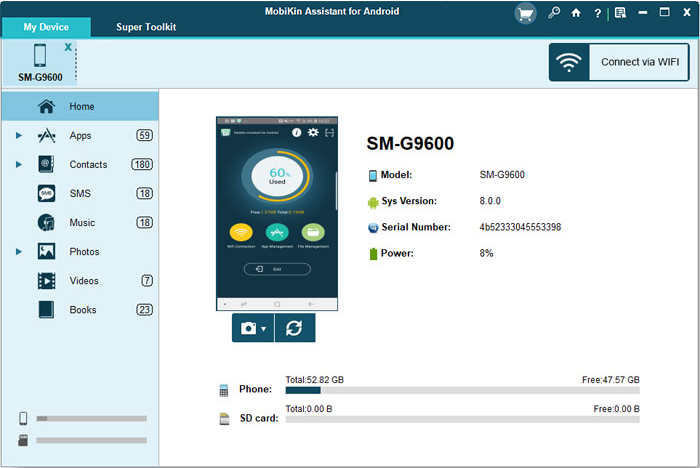
The dashboard with a Galaxy A14 5G connected: device details, storage use and the data categories.
Features
One-click backup and restore
MobiKin Assistant for Android backs up SMS, contacts, call logs, apps, music, photos, videos and books to a folder of your choice, and you can tick only the types you want. The same toolkit restores a backup to the phone. Keeping the backup on your own disk or an external drive means no cloud quota and no account.
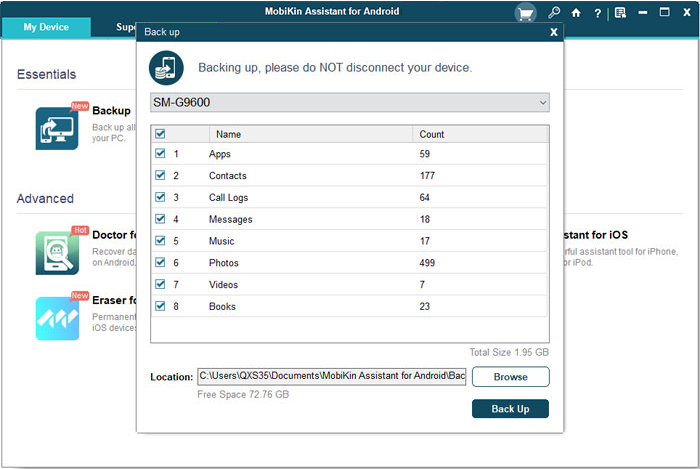
The Back up window: tick what to include and pick a location.
Contacts and messages from your desktop
MobiKin Assistant for Android lets you add, edit and delete contacts on the PC, find duplicates, and export to HTML, VCF, CSV, XML, Outlook or BAK. It imports VCF, Outlook and XML files too. SMS can be exported in readable formats and sent or forwarded from the computer, which is useful for typing long messages or texting a group.
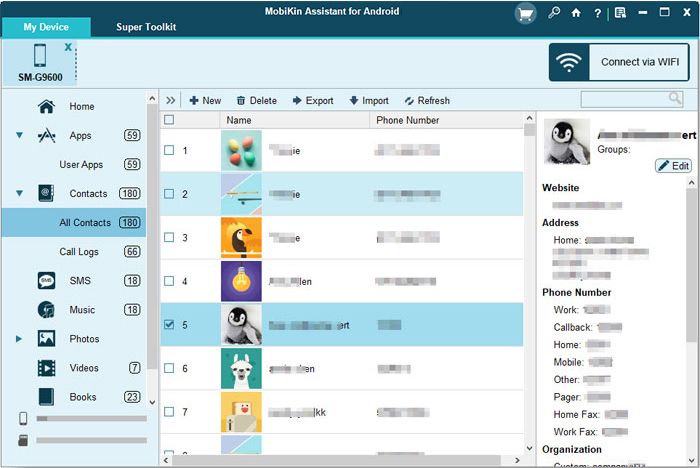
The Contacts view, with the toolbar for adding, deleting, exporting and importing.
Batch app management
MobiKin Assistant for Android installs, uninstalls and exports apps in batches, showing each app's version, size and install date. That beats tapping through your phone's settings when clearing out a long list.
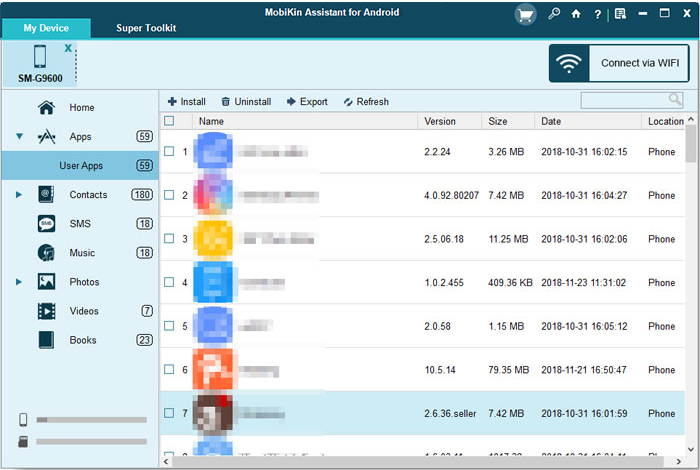
The User Apps list with Install, Uninstall and Export buttons.
Photos, music and video in both directions
MobiKin Assistant for Android copies media between phone and PC, and manages photo albums, so you can add, delete and rearrange them from the desktop. It can also find and remove duplicate songs and videos to free up space.
Several phones at once, by USB or Wi-Fi
MobiKin Assistant for Android connects by USB or Wi-Fi, and shows multiple connected devices as tabs across the top. Its Wi-Fi option uses a QR code and the same network for phone and PC. The newer CoolTransfer app from Google Play is quicker to set up, though MobiKin says it can't handle SMS or app management.

Two phones connected at once, in an older version of the interface.
Benefits
- A backup you hold. Your data sits on your own disk, in place of a cloud account that can fill up or lapse.
- Faster bulk work. Clearing 200 contacts or 30 apps goes much quicker with a mouse.
- Readable exports. Messages and contacts saved as HTML or CSV can be opened without the software.
Real-World Uses
- Before a factory reset. Back up everything to the PC, reset the phone, then restore it.
- Saving text messages. Export a conversation history as a readable file for your records.
- Tidying contacts. Clear years of duplicates on a big screen and export a clean VCF.
- Helping relatives. Keep a family's phones backed up from one PC. A 1 PC license covers one computer, and multiple devices can connect.
Who It's For, and Who Should Skip It
It fits Windows users with an Android phone who want a one-stop desktop manager and a local backup.
Skip it if you're only copying photos, since a USB cable and File Explorer do that for free, and Google's own backup covers the basics. Skip it for iPhones: MobiKin sells a separate Assistant for iOS. If you've lost data already, you want a recovery tool such as MobiKin's Doctor for Android, not this. And on a Mac, get the separate Mac version.
Usage Guide
- Install the program on your PC and connect your phone by USB.
- Turn on USB debugging when prompted. The program downloads a driver if it needs one, and installs the Assistant app on your phone. Approve the prompts on the phone.
- Once connected, click a category on the left, such as Contacts, to view and manage it.
- For a full backup, open Super Toolkit, choose Backup, tick the data types, pick a location and click Back Up.
- For Wi-Fi, click Connect via Wi-Fi and scan the QR code with the Assistant app, with phone and PC on the same network.
- To register, enter your licensed email and code from the order email.
Where it falls short
- Connection is the common sticking point. It relies on USB debugging, a driver and a phone app, and all the authorization prompts must be accepted. FileHorse lists "Occasional connection issues", and one reviewer's Wi-Fi link kept failing after a USB session until he restarted the program.
- Refunds aren't unconditional. The policy rejects a change of mind, and refusing to try support's suggested fixes can also block one.
- The yearly plan renews. The 1 Year license renews automatically until you cancel, so the lifetime license is the simpler buy.
- Screenshots over USB only. The screen capture doesn't work over Wi-Fi.
What Users Say
Reviews are mixed. Editors and download sites are fairly positive, and the vendor's own page rates it 4.5 from 177 reviews, while Trustpilot's recent reviews of the company are much cooler. The one hands-on review we could read dates from 2021, so it's much older than the current version.
GadgetByte Nepal
This hands-on review from January 6, 2021 timed a 1.6 GB backup at under three minutes. "The app dashboard is minimalistic," it says, and "The app is pretty fast too."
On the downsides: "It is not a cheap application by any means; however, it does do its job perfectly." And on the trial: "the trial version offers next to nothing." The Wi-Fi link was also troublesome after a USB session: "the app repeatedly shows error. It will not recognize my device unless I restart the whole application."
The verdict: "It delivers what it says, so no complaints there."
FileHorse: 8.78 out of 10 from 18 ratings
FileHorse's listing for version 5.4.39 lists "Easy-to-use interface", "One-click backup & restore" and "Works with most Android devices" as pros, and "Requires USB debugging enabled", "May not support all phone brands" and "Occasional connection issues" as cons. Note that one of its cons, "No wireless transfer option", doesn't match the current product, which has Wi-Fi.
Trustpilot: 3.6 from 48 reviews (all MobiKin products)
This covers the whole company. The low scores are recent and worth reading:
"tried using txt and html export. Both hang or stall after 5%." MudBots D Concrete Printers, September 16, 2026, 1 star
"I paid for a Lifetime of Assistant so I could download my pics from my Android phone." and "Terrible Website. NO CUSTOMER SERVICE. You cannot get through to anyone." Joseph C Gravina, February 4, 2026, 1 star
"provided multiple screenshots of app failing to restore their app backup." Micki Holmes, December 20, 2025, 1 star
"I finally get told they only transfer a very limited amount of the data unless I buy the product." Kevin, May 21, 2026, 2 stars
On MobiKin's own site
Testimonials there are favorable, as you'd expect, though this one is a real use case: "Yesterday I had to format my Sanmsung because my phone seemed to be infected by viruses and all the files were gone . Then I recovered my phone with the backup that I made with the software. Now everything is all right." Caroline
A newer review on its review page gives a useful tip: "After contacting customer service, I found out that I had to tap all the authorization prompts on my phone before it could function normally again." Zia E Quee, October 14, 2026
The pattern: people like the simple layout and the speed once it's connected. Complaints center on connection steps, a tight trial, failed exports or restores for a few users, and support that can be slow to reach.
Comparisons
MobiKin Assistant vs Coolmuster Android Assistant
The two are close cousins in layout and function: each pairs a Windows or Mac program with a phone app to manage and back up Android data. Coolmuster starts at $29.95 on its store and MobiKin's yearly plan is the same price, so decide on which one connects best to your phone in a trial.
MobiKin Assistant vs Google's own tools
Google's backup is free and automatic, but it keeps your data in your Google account. Assistant for Android gives you a local copy, exports you can read, and desktop editing of contacts and messages, which Google's backup doesn't offer.
Editions and Pricing
All plans have the same features, and the difference is the term and the number of computers. The Buy Now button on this page opens the Lifetime 1 PC license. MobiKin's site marks these as sale prices.
| Plan | Price | List price | Term | Computers |
|---|
| Lifetime | $39.95 | $59.95 | One payment | 1 |
| 1 Year | $29.95 | $49.95 | Renews automatically | 1 |
| Lifetime | $59.95 | $99.95 | One payment | 2 to 5 |
| 1 Year | $49.95 | $89.95 | Renews automatically | 2 to 5 |
| Lifetime | $99.95 | $119.95 | One payment | 6 to 10 |
Plans go up to 26-30 PCs.
FAQs
Does MobiKin Assistant for Android need root?
MobiKin Assistant for Android doesn't need a rooted phone. It uses USB debugging and a companion app with your approval on the phone.
Will MobiKin Assistant for Android work with my Samsung Galaxy S26?
MobiKin Assistant for Android lists the Galaxy S26 series and Android 17 in its supported devices. For a phone that isn't listed, MobiKin suggests trying the free trial and emailing support@mobikin.com if it won't connect.
Can MobiKin Assistant for Android move data to an iPhone?
MobiKin Assistant for Android only manages Android devices. Its restore goes back to an Android phone, so moving to an iPhone needs a different tool.
Can I get a refund on MobiKin Assistant for Android?
MobiKin Assistant for Android has a 30-day money-back guarantee, but only under the accepted circumstances in MobiKin's policy. A change of mind doesn't qualify, and you need to work with support on any technical problem first.
Does the 1 PC license of MobiKin Assistant limit how many phones I can use?
MobiKin Assistant for Android's plans are counted by computer, and the purchase page lists no limit on phones. The Doctor for Android plans, by contrast, do count devices.
Is my data uploaded by MobiKin Assistant for Android?
MobiKin Assistant for Android stores backups in the folder you choose on your PC or external drive, and Wi-Fi connections run across your own local network.
System Requirements
- Windows 11, 10, 8 or 7
- 750 MHz Intel or AMD processor
- 512 MB RAM or more
- 1 GB or more of free disk space
- Android 6 or later, with a USB cable or the same Wi-Fi network as the PC
Conclusion
MobiKin Assistant for Android is worth $39.95 if you want a full local backup of an Android phone and a desktop way to manage it, and you'll use it more than once. The reason to buy it is the combination of one-click backup and proper contact, message and app management, updated often enough to support Android 17. The main reason not to is reliability reports: recent Trustpilot complaints about stalled exports, failed restores and hard-to-reach support mean you should test a full backup and restore inside the 30-day window. If you only need to copy photos, your USB cable is free.
Download Free TrialBuy Now