Aiseesoft 4K Converter for Mac: Shrink 4K Footage to 1080p, or Push HD Up to 4K
Aiseesoft 4K Converter for Mac is a Mac app that converts 4K video to 1080p, 720p or SD files, switches 4K clips between formats such as H.265/HEVC MP4 and MKV, and upscales lower-resolution video to 4K. The Buy Now button sells a $69.96 lifetime license for 3 Macs (one-time payment); a lifetime license for one Mac costs $49.95 on Aiseesoft's own store.
The problem it solves is a familiar one. Your iPhone, drone or camera records in 4K, and the files are huge: a few minutes of footage can fill a phone, choke an older iPad, or refuse to play on a 1080p TV. Downscaling the clip to 1080p keeps it looking sharp on those screens at a fraction of the size. This app does that in batches, with a basic editor on the side.
Quick facts
- Version: 9.2.30.97409 (installer dated January 31, 2024)
- Developer: Aiseesoft Studio
- Runs on: OS X 10.7 Lion or later, including macOS Sequoia and Tahoe, on Intel and Apple silicon Macs. A separate Windows edition exists.
- 4K input: MP4, TS, MKV, AVI, FLV, WebM, MOV, MXF
- 4K output: H.265/HEVC MP4 and MKV, H.264 MP4, MPEG-4, WebM (VP8/VP9), TS, AVI, FLV, MKV, plus a YouTube 4K profile
- Price: $69.96 one-time on the order page for a lifetime license covering 3 Macs. A 1-Mac lifetime license ($49.95) and a monthly plan are sold on Aiseesoft's store (see Editions and Pricing).
- Refunds: 30-day money-back guarantee when there's a quality problem with the software
- What we checked: the 49.2 MB installer, whose app bundle reports version 9.2.30.97409, on November 3, 2026, and the order page, which sells the Lifetime/3 Macs license at $69.96, on November 4, 2026. We didn't run a conversion on a Mac.
Before you buy: 1 Mac or 3 Macs?
The Buy Now button below sells the lifetime license for 3 Macs at $69.96, a one-time payment that doesn't renew. If you only need it on one Mac, Aiseesoft's own store sells a 1-Mac lifetime license for $49.95 list. For a single one-off job, Aiseesoft's store also has a $24.90 monthly plan.
The installer was last rebuilt in January 2024. Aiseesoft lists support for current macOS versions and M-series chips, but this is a mature product, not one that gets frequent new features.
Download Free TrialBuy Now
Overview
4K Converter for Mac is a cut-down sibling of Aiseesoft's bigger video converters, focused on one job: moving video between 4K and lower resolutions. The window is simple. Your clips sit in a list on the left, each showing its source and output resolution, a preview player sits on the right, and the Profile and Destination fields plus a big orange Convert button run along the bottom. A toolbar across the top opens Enhance, Trim, 3D and Edit.
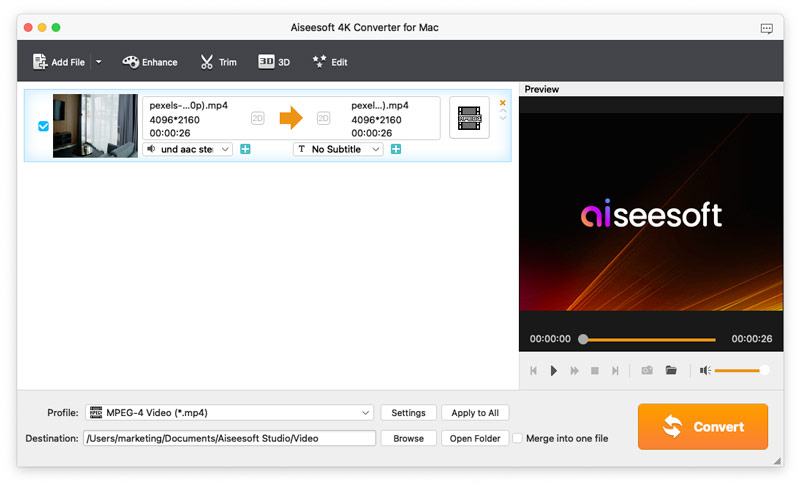
The main window with a 4096x2160 MP4 clip loaded: audio track and subtitle menus under the clip, the preview player on the right, and the MPEG-4 profile, destination folder and Convert button at the bottom.
Features
Downscale 4K to 1080p, 720p or SD
Aiseesoft 4K Converter for Mac turns 4K clips into 1080p, 720p or standard-definition files for devices that can't handle 4K. Instead of guessing settings, you pick a device or format from the Profile list, which has ready-made profiles for iPhone, iPad, Apple TV, Samsung, Sony, LG, Xbox, PlayStation and editing apps like Final Cut Pro, iMovie, Avid Media Composer and Adobe Premiere. A search box at the bottom of the list finds "1080p" quickly.
Convert between 4K formats, including HEVC
Aiseesoft 4K Converter for Mac also keeps 4K resolution while changing the container or codec. The 4K Video category offers H.265/HEVC MP4 and MKV, H.264 MP4, MPEG-4, WebM with VP8 or VP9, TS, AVI, XviD, FLV, MKV and a YouTube 4K profile. HEVC is the useful one for storage: the same 4K picture in a noticeably smaller file than H.264.

The Profile list open on 4K Video, with HEVC MP4 and MKV, H.264, WebM VP8/VP9, TS, AVI, FLV, MKV and YouTube 4K profiles, and device categories down the left.
Upscale, denoise and steady your video
Aiseesoft 4K Converter for Mac has an Enhance panel with four checkboxes: upscale resolution (for turning 1080p into 4K), optimize brightness and contrast, remove video noise, and reduce shaking. The deshake option only works on footage where the whole frame moves. Upscaling can't invent detail the camera never captured, so expect a cleaner, sharper 1080p-to-4K result, not true 4K.
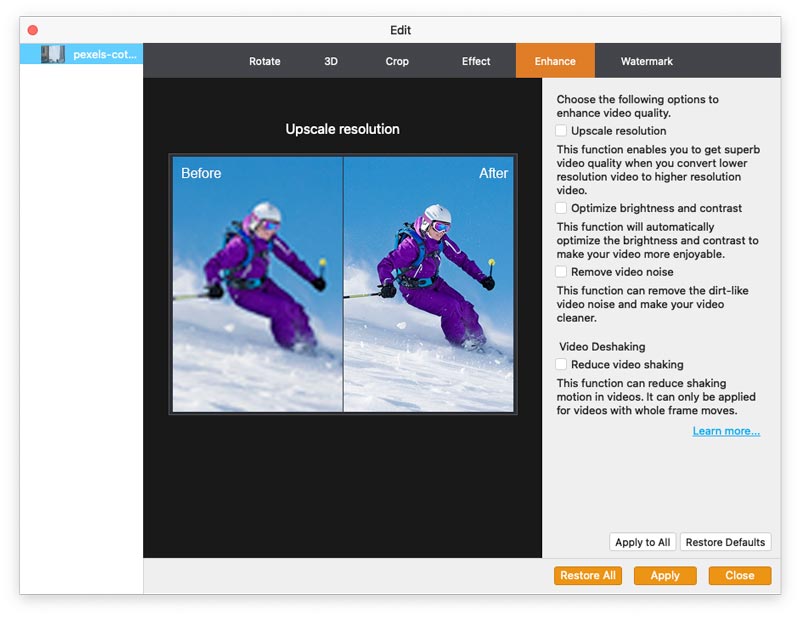
The Enhance tab of the Edit window: a before/after sample image and the upscale resolution, brightness and contrast, noise removal and video shaking options.
A basic editor: trim, crop, rotate, merge, watermark
Aiseesoft 4K Converter for Mac covers the edits you'd want before a conversion. You can rotate 90 degrees either way or flip the picture, crop with Letterbox, Center, Pan & Scan or Full zoom modes, cut out unwanted parts, merge several clips into one file, and stamp a text or image watermark with adjustable position and transparency. The Effect tab adjusts brightness, contrast, saturation, hue and volume, and can deinterlace old camcorder footage. Original and output previews sit side by side, so you see the change before you apply it.
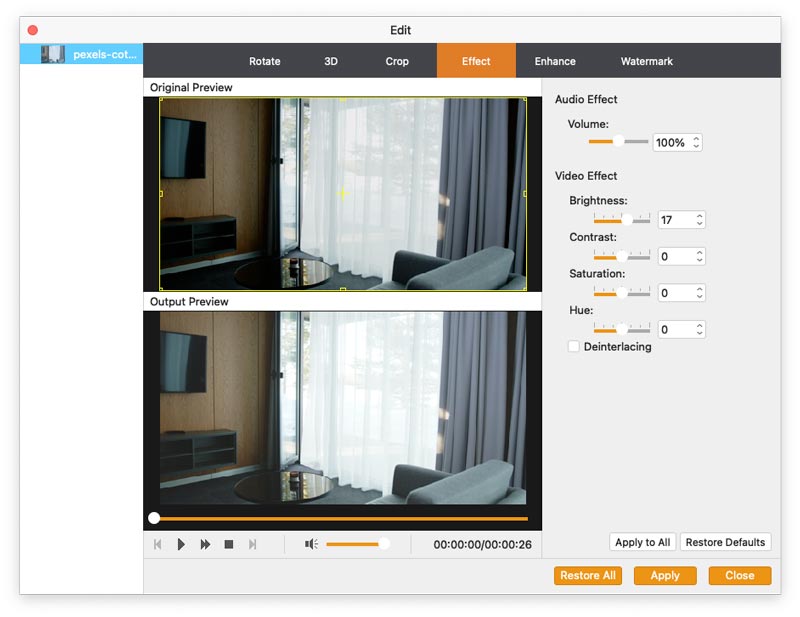
The Effect tab: original and output previews on the left, and volume, brightness, contrast, saturation, hue and deinterlacing controls on the right.
2D to 3D conversion
Aiseesoft 4K Converter for Mac can turn ordinary video into 3D: red/cyan anaglyph for cheap paper glasses, or side-by-side and top-and-bottom split screen (half or full size) for 3D TVs and VR viewers, with a depth slider and a switch to swap the left and right eye. There are matching 3D output profiles in MP4, MKV, TS, AVI and FLV.
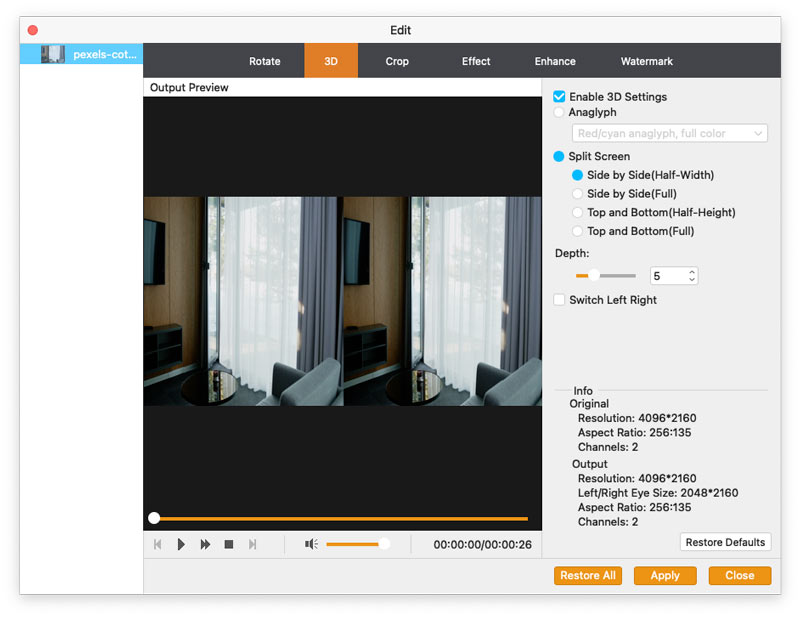
The 3D tab with Split Screen side-by-side (half-width) selected, a depth of 5, and the original and output resolution of a 4096x2160 clip.
Extra audio tracks and subtitles
Aiseesoft 4K Converter for Mac lets you pick which audio track to keep, add an external audio track, and add an external subtitle file to a clip, all from the menus under each video in the list. It's handy for adding a translated soundtrack or subtitles to a home video before sharing it.
Benefits
- Space back on your Mac and phone. A 1080p or HEVC copy of a 4K clip takes far less room, which matters on a 256 GB MacBook or an iPhone that's always full.
- Playback that just works. Device profiles take the guesswork out of codecs and bitrates, so the file plays on the TV, tablet or console you picked.
- One pass instead of three apps. Trim, crop, fix the brightness and add a watermark in the same step as the conversion.
- Batch work. Load a folder of clips, apply one profile to all of them, and let it run.
Real-World Uses
- Drone and action-cam footage: downscale a day's 4K flights to 1080p MP4 to share with friends or play on an older TV.
- Freeing up storage: re-encode a library of 4K H.264 clips to 4K HEVC to keep the resolution in smaller files.
- Older 1080p videos on a new 4K TV: upscale with denoise switched on so they look cleaner full-screen.
- YouTube uploads: trim the start and end, add a logo watermark, and export with the YouTube 4K profile.
- 3D viewers: turn a holiday clip into side-by-side 3D for a VR headset.
Who It's For, and Who Should Skip It
It's a good fit for Mac owners with a pile of 4K phone, drone or camera footage who want a simple drag-in, pick-a-profile, convert tool, and who'd rather not learn the settings of a professional encoder.
Skip it if:
- You need to convert DVDs, Blu-rays or online videos. This app handles video files only. Aiseesoft's Video Converter Ultimate for Mac covers more ground.
- You only need an occasional 4K-to-1080p job and don't mind a learning curve. The free, open-source HandBrake does that on a Mac.
- You edit seriously. Final Cut Pro or DaVinci Resolve export 1080p and HEVC on their own, so a separate converter adds little.
- You're on Windows. Get Aiseesoft 4K Converter (the Windows edition) instead.
Usage Guide
- Install and launch. Download the DMG, drag the app to Applications and open it. The title bar says "(Unregistered)" until you enter the email address and registration code Aiseesoft sends after purchase.
- Add your videos. Click Add File or drag 4K clips onto the window. Each one shows its resolution and length.
- Edit if needed. Use Trim, Enhance, 3D or Edit (rotate, crop, effects, watermark). Apply to All copies the settings to every clip.
- Pick the output. Open Profile and choose a device, or a format under HD Video, 4K Video or 3D Video. Type "1080p" in the search box to find HD profiles quickly. Settings lets you change the resolution, bitrate and frame rate.
- Convert. Choose the Destination folder, tick "Merge into one file" if you want a single output, and click Convert. Open Folder shows the results.
Where it falls short
- Few outside reviews. Almost all the praise comes from testimonials on Aiseesoft's own site. MacUpdate lists the current build with no user reviews yet.
- The 30-day guarantee is narrow. Aiseesoft refunds within 30 days when there's a quality problem with the software, not because you changed your mind. Its purchase page states the refund policy for lifetime licenses, so don't count on it for the monthly plan sold on its store.
- Subscription complaints about the company. On Trustpilot, the recurring negative theme across Aiseesoft's products is unexpected charges and difficult refunds. The license behind our Buy Now button is a one-time payment; if you buy the monthly plan on Aiseesoft's store instead, untick automatic renewal if you only want one month.
- Old-fashioned profiles. The device list still features Nokia, BlackBerry, PSP and Wii, while newer devices are covered by the generic HD and 4K profiles.
What Users Say
Independent reviews of the Mac edition are rare, so here's what is available, labeled by where it comes from.
Testimonials on Aiseesoft's site (5.0 from 102 ratings)
Aiseesoft's product page shows a 5.0 rating from 102 reviews. These are posted on the vendor's own site, so read them as testimonials rather than independent opinions.
Olivia Harris (January 22, 2025): "This Mac 4K video converter app is fantastic. It handles high-resolution files effortlessly and maintains superb quality. A must-have for any video enthusiast."
Ethan Lee (November 10, 2024): "I've tried many converters, and this one stands out. The conversion speed is fast, and the output quality is excellent. Highly recommended for 4K videos."
Park (June 18, 2018): "This 4K video converter does a great job to convert 4k UHD to 720p HD and regular video. The converted video will still keep a good image quality and reduce lots of storage."
Zack (July 28, 2018): "I mainly use it convert some common MOV videos to 4K for my TV. I'm very satisfied with the output quality."
Vanessa (February 8, 2016): "Easily convert my 4K videos to 1080p on my Mac. And now I have transferred the video to my iPad. The video quality is still high on my iPad. Highly recommend this product."
Trustpilot: Aiseesoft as a company (3.8 from 610 reviews)
Trustpilot rates Aiseesoft as a whole, not this app, at 3.8 out of 5 from 610 reviews. The reviews we read didn't mention 4K Converter for Mac, but they show how the company handles licenses and money:
Several five-star reviews praise support for resetting licenses on new computers. Lowell, "Company reset my registration to…" (October 12, 2026): "Company reset my registration to reregister my software on a new computer."
The one-star reviews are mostly about billing. caitlin hardwick, "Refusal to comply with consumer rights" (October 2026): "When signing up to a 'free trial' online, my card was charged." Owend, "Refund Endless Cycle - Don't Trust" (September 14, 2026), about a different Aiseesoft product: "First warning sign was they try to push you into a subscription".
(Trustpilot blocks direct downloads, so these quotes were read through a summarizing tool and are excerpts.)
The recurring themes
Users who post about this converter like the output quality, the speed and how easy it is to drag in clips and convert. On the company side, support gets credit for sorting out registration codes, while the complaints center on subscriptions and refunds. Read the order page carefully before you pay.
Comparisons
4K Converter for Mac vs HandBrake
HandBrake is free and open source, runs on a Mac, and converts 4K to 1080p or HEVC very well. It's the better pick if you're comfortable with its many encoder settings. Aiseesoft's app wins on simplicity: device profiles, a visual editor with watermarks and effects, 2D-to-3D conversion, and external subtitles and audio tracks in one window.
4K Converter for Mac vs Aiseesoft Video Converter Ultimate for Mac
Video Converter Ultimate is Aiseesoft's all-in-one converter, with DVD ripping, more formats and a larger toolbox. If all you do is resize and re-encode 4K files, 4K Converter for Mac covers it for less.
Editions and Pricing
| License | Price | Term | Macs | Where |
|---|
| 1 Month License | $24.90 a month | Renews monthly until cancelled | 1 | Aiseesoft's store |
| Lifetime License | $49.95 | One-time payment | 1 | Aiseesoft's store |
| Lifetime License, 3 Macs | $69.96 (list $149.85) | One-time payment | 3 | Our Buy Now button |
Aiseesoft's store often shows coupon prices below these (the 1-Mac lifetime license at $39.96 and the first month at $12.45 when we looked). Prices are in US dollars, before any sales tax or VAT.
FAQs
Does Aiseesoft 4K Converter for Mac run on Apple silicon Macs (M1 to M5)?
Yes. Aiseesoft 4K Converter for Mac lists Intel processors and Apple M-series chips, including M5, in its specifications, and its supported systems run from OS X 10.7 Lion up to macOS Tahoe.
Does the Buy Now license renew?
No. The Buy Now button sells a lifetime license for 3 Macs at $69.96, a one-time payment through 2Checkout, Aiseesoft's online store. Only the monthly plan on Aiseesoft's store renews; to stop it, untick automatic renewal before you pay or contact Aiseesoft or 2Checkout support before the next billing date.
Can I use one license on both my Mac and my Windows PC?
No. Aiseesoft 4K Converter for Mac and the Windows Aiseesoft 4K Converter are separate products with separate licenses. For 20 or more computers, Aiseesoft's store has a form to request a custom license covering Windows, macOS or both.
Will converting 4K to 1080p lose quality?
Aiseesoft 4K Converter for Mac reduces the resolution, so the file holds less detail than the 4K original, but on a 1080p screen, a phone or a tablet the difference is hard to see. Keep the original 4K file if you might need it again.
Can it convert iPhone HEVC (H.265) videos?
Yes. Aiseesoft 4K Converter for Mac reads MOV and MP4 4K files and outputs both H.265/HEVC and H.264, so you can turn iPhone HEVC clips into H.264 MP4 for devices that can't play HEVC.
I moved to a new Mac. Can I transfer my license?
Aiseesoft 4K Converter for Mac's license covers one Mac at a time. Aiseesoft support resets registrations so you can register on a new computer, according to several customer reviews on Trustpilot.
System Requirements
- macOS: OS X 10.7 Lion or later, including Mavericks through Big Sur, Sequoia and Tahoe
- Processor: Intel, or Apple silicon M-series
- RAM: 512 MB or more
- Display: 800x600 or higher, 16-bit graphics card or better
- Download: 49.2 MB DMG
Conclusion
Aiseesoft 4K Converter for Mac does what its name says, simply: drag in 4K clips, pick a profile, and get 1080p, HEVC or upscaled 4K files, with a handy editor and 2D-to-3D on the side. The one reason to buy it is ease of use. It's far less fiddly than free tools like HandBrake. The main reason not to is that it's a mature product that rarely gets new features. The button below sells a $69.96 lifetime license for 3 Macs; if you only need one Mac, Aiseesoft's store sells a 1-Mac lifetime license for $49.95. Try the free download on your own footage first.
Download Free TrialBuy Now