Aiseesoft Mac FoneTrans: Move Photos, Music, Messages and Contacts Between Your iPhone and Mac Without iTunes Headaches
Your iPhone says storage is full, and half of it is photos and songs you'd like to keep on your Mac instead. Or you want a copy of years of text messages before switching phones. Or you just want to drop an album onto your iPad without letting a sync wipe what's already there. Apple's own tools handle some of this, some of the time, and rarely the way you want.
Aiseesoft Mac FoneTrans is a file manager for iOS devices on the Mac. Connect an iPhone, iPad or iPod touch, browse everything on it by category, and copy files in any direction: phone to Mac, Mac to phone, phone to phone, or phone to your iTunes library.
Quick facts
- Version: 9.3.18
- Developer: Aiseesoft Studio
- Runs on: Mac OS X 10.7 or later, on Intel and Apple silicon Macs. A Windows version, FoneTrans, is sold separately.
- Devices: iPhone, iPad and iPod touch with iOS 6 or later, up to the latest models
- Transfers: photos, music, videos, ringtones, audiobooks, voice memos, playlists, books, contacts and messages
- Price: $62.45 USD for a lifetime license on 1 Mac (the checkout has been taking 20% off, to $49.96)
- Guarantee: 30-day money-back guarantee when there is a quality problem
Overview
The window is laid out like a simple file manager. A sidebar on the left lists categories: Photos, Music, Videos, Contacts, Messages, Others and a Toolbox. Pick one and you see every item on the connected device, with sub-folders such as Camera Roll albums, iTunes U, Podcasts, Ringtones and Audiobooks. A toolbar across the top adds, exports, deletes and converts files, and the device selector at the top switches between connected iPhones and iPads.
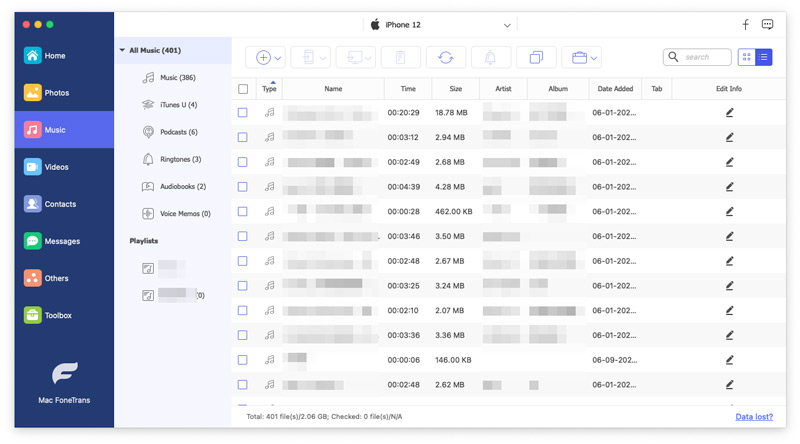
The Music section for a connected iPhone 12: 401 items split into Music, iTunes U, Podcasts, Ringtones, Audiobooks and Voice Memos, with playlists below and each track's time, size, artist, album and date added.
Features
Export from your iPhone to your Mac or iTunes
Tick the files you want and choose Export to Mac or Export to iTunes. Music, ringtones, voice memos, podcasts and audiobooks can all come off the device this way. Photos from the Camera Roll, Photo Library and albums can be copied in common formats such as JPG, PNG, BMP and GIF.
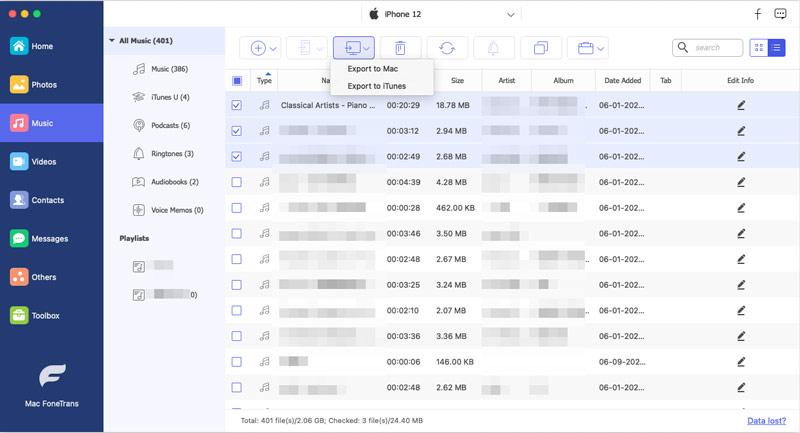
Three songs ticked in the iPhone's music list, with the export menu open showing Export to Mac and Export to iTunes.
Add files from your Mac without syncing
Click Add to put music, videos, photos, ePub books or PDFs from your Mac onto the device, without wiping what's already there. If a video or audio file is in a format the iPhone or iPad can't play, Mac FoneTrans converts it automatically to a compatible format such as MP4, MOV, MP3, WAV or AIFF as it copies.
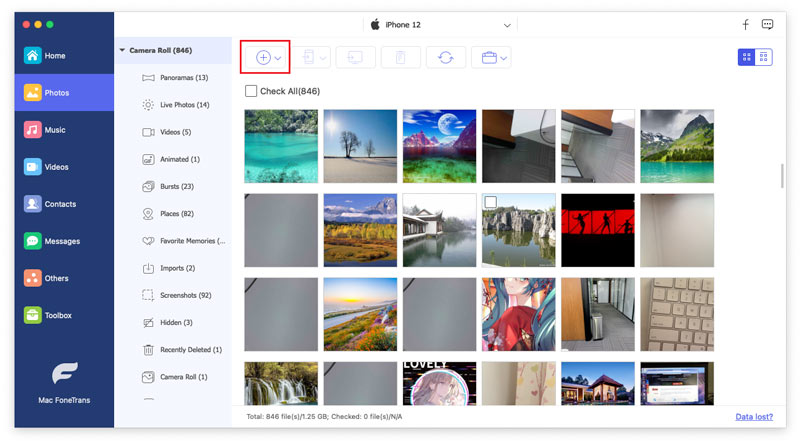
The Photos section showing an iPhone's Camera Roll (846 items) with albums such as Panoramas, Live Photos, Bursts and Screenshots, and the Add button highlighted.
Phone to phone
Connect two iOS devices at once and send photos, music, contacts and other files straight from one to the other, which is handy when moving to a new iPhone or sharing an album with a family member's iPad.
Save your messages and chats
Export SMS, MMS and iMessages to the Mac as CSV, HTML or TXT files, after previewing the list and choosing which conversations to keep. Aiseesoft also lists exporting chats from WhatsApp, Kik, Line, Viber, Messenger and WeChat, along with notes, calendars, Safari data and call history.
Contacts backup, editing and de-duplication
Back up all your contacts in one go as CSV (for Outlook, Hotmail and AOL) or vCard (for Gmail, Yahoo and others) and restore them to any device. You can add or edit contacts before restoring them to a new iPhone, and a de-duplicate function clears out repeated entries.
Toolbox extras
The Toolbox includes a Ringtone Maker that turns MP3, FLAC, AAC and other audio into iPhone ringtones, and a HEIC Converter that changes iPhone photos to JPG or JPEG for sharing. You can also manage playlists (create, add to, delete) so they come across intact.
Benefits
The biggest benefit is control. Instead of an all-or-nothing sync, you choose exactly which files move, in which direction, without anything being erased on the other side.
It also frees up iPhone storage safely. Copy your music, videos and photo albums to the Mac, check they arrived, and then delete them from the phone with confidence.
And it makes records you can keep. Messages saved as HTML or CSV and contacts saved as vCard are readable on any computer, long after the phone is gone.
Real-World Uses
- A full iPhone. Move a few thousand Camera Roll photos and old videos to the Mac, then clear space on the phone.
- Switching phones. Connect the old and new iPhone and copy music, photos and contacts directly across.
- Keeping a conversation. Export an important message thread to HTML before trading in your iPhone.
- Music from anywhere. Copy songs from the Mac to an iPod or iPad, with odd formats converted automatically.
- Custom ringtones. Turn a favorite song into a ringtone and send it to the phone.
Who It's For
Mac FoneTrans suits Mac owners who find Finder or iTunes syncing too rigid. That covers families sharing music across devices, people with big photo libraries on their phones, and anyone who wants their messages and contacts backed up as ordinary files. It's not a cloud tool: everything happens over a USB cable to your Mac.
Usage Guide
- Install and launch. Open the downloaded installer, which fetches and installs the app, then launch Mac FoneTrans.
- Register if you've bought it. Enter the email address from your order and the registration code from your confirmation email.
- Connect your device. Plug in the iPhone, iPad or iPod with a USB cable, enter its passcode and tap Trust. On iOS 13 and later you may be asked for your device passcode, sometimes twice, while it reads data.
- Pick a category. Choose Photos, Music, Videos, Contacts, Messages or Others in the sidebar.
- Transfer. To export, tick files and choose Export to Mac, Export to iTunes or another device. To import, click Add and pick files on your Mac.
Tips
- Keep iTunes or the Apple device drivers in place. Aiseesoft's FAQ asks you to keep iTunes installed so the Mac can recognize your device.
- Encrypted backup? If you've encrypted your iTunes backups, you'll need that backup password as well as your device passcode.
- Not detected? Try another cable or port, wake the phone and tap Trust, and restart both devices.
What Users Say
Aiseesoft's product page quotes customer testimonials. Gray: "I don't normally write reviews, but this software actually does exactly what it promises. I often use it to transfer photos and songs between my iPhone and Mac, very easy to use." Pauline: "If you are tired of having to sync things to your iPhone through the often clumsy and bloated interface that is iTunes, you should TOTALY give Mac FoneTrans a try."
For an independent view, Aiseesoft Studio holds a 3.9 out of 5 score on Trustpilot across all its products, where the most common complaints concern refunds and devices that weren't recognized. Test the free download with your own iPhone first.
Comparisons
Mac FoneTrans vs. Finder and iTunes syncing
Apple's sync is free but works one way at a time and can replace a device's library with your Mac's. Mac FoneTrans moves individual files both ways, between devices, and to the Mac, and exports messages and contacts as files.
Mac FoneTrans vs. Aiseesoft Mac FoneLab
FoneTrans moves and manages files that are on your device now. Aiseesoft's FoneLab iPhone Data Recovery is for getting back data that's been deleted.
Mac vs. Windows
This is the Mac edition. Aiseesoft sells FoneTrans for Windows separately.
Editions and Pricing
The license sold here is the Lifetime License for 1 Mac at $62.45 USD, and the checkout has been applying a 20% discount to $49.96. Aiseesoft's store also offers a 1-month license, a 3-Mac multi-user license and a commercial license for up to 30 Macs. Every plan carries a 30-day money-back guarantee when there's a quality problem.
FAQs
Do I still need iTunes installed?
Aiseesoft recommends keeping iTunes installed on your Mac, because it provides the drivers that let the Mac recognize your iPhone.
Does it work with Apple silicon Macs?
Yes. Aiseesoft provides separate builds for Intel and Apple silicon Macs, and its specs list M-series chips.
Can I connect more than one device?
Yes. You can connect several Apple devices at the same time and transfer files between them.
Will adding music erase what's already on my iPhone?
No. Files you add are copied onto the device alongside what's there, rather than replacing the library the way a sync can.
Can I use one license on two Macs?
The lifetime license sold here covers 1 Mac. Aiseesoft's multi-user license covers 3 Macs.
How do I check my version and update?
Aiseesoft's FAQ for Mac FoneTrans explains how to find your version number and how to upgrade.
System Requirements
- macOS: Mac OS X 10.7 or later
- Processor: 1 GHz Intel processor or Apple M-series chip
- Memory: 1 GB RAM or more
- Devices: iPhone 3GS through the latest iPhones, iPad models, and iPod touch 4 to 7, with iOS 6 or later
- Other: USB cable, and iTunes installed for device drivers
Conclusion
Aiseesoft Mac FoneTrans fills the gaps Apple leaves in moving files between an iPhone and a Mac: copying in any direction, phone to phone, exporting messages and contacts as files, and converting media as it goes. The interface is clear, and the lifetime license means you pay once.
As with any device tool, check that it recognizes your iPhone with the free download before buying. If it does, it's an easy way to finally get your photos, music and messages organized.