Aiseesoft Mac Blu-ray Player: Watch Blu-ray Discs, Folders and ISO Files on a Mac
Aiseesoft Mac Blu-ray Player is a Mac app that plays Blu-ray discs (from an external Blu-ray drive), Blu-ray folders and Blu-ray ISO images, and doubles as a general video player for MKV, MP4, AVI and other files. Our Buy Now button sells the lifetime license for up to 3 Macs at $79.96 (a one-time payment); a lifetime license for one Mac is $62.45 on Aiseesoft's own store.
Apple has never supported Blu-ray. No Mac ships with a Blu-ray drive, QuickTime and the TV app won't open a Blu-ray disc, and even with a USB Blu-ray drive plugged in, macOS just shows you a folder of files it can't play. If you own a shelf of Blu-ray movies or a folder of ripped BDMV backups, you need third-party player software, and this is one of the handful of paid options.
Quick facts
- Version: 6.6.70 for Apple silicon (package dated October 16, 2026); the Intel package was updated June 17, 2026
- Developer: Aiseesoft Studio
- Runs on: macOS 10.12 Sierra or later, including Sonoma, Sequoia and Tahoe, on Intel and Apple silicon Macs. A separate Windows edition exists.
- Plays: Blu-ray discs, Blu-ray folders (BDMV) and Blu-ray ISO files, plus MP4, MKV, AVI, MOV, WMV, MTS/M2TS, WebM and audio such as FLAC, APE, MP3 and AAC
- You also need: an internal or USB Blu-ray drive to play discs
- Price: $79.96 one-time on the order page for a lifetime license covering up to 3 Macs (listed at checkout as "Up to 3 PCs License"). A 1-Mac lifetime license ($62.45) and a monthly plan are sold on Aiseesoft's store (see Editions and Pricing).
- Refunds: 30-day money-back guarantee when there's a quality problem with the software
- What we checked: the 4.7 MB online installer, the Apple silicon app package it downloads (version 6.6.70.166022, 94 MB) on November 3, 2026, and the order page on November 4, 2026, which sells the 3-Mac lifetime license at $79.96 with no renewal. We didn't play a Blu-ray disc with it.
Before you buy: test your own discs first
Blu-ray playback on a Mac is fiddly for every app, because commercial discs are encrypted and new releases keep changing the protection. The independent evidence on this player is thin and mixed (see What Users Say): Amazon buyers rate it 3.0 out of 5, and the only hands-on comparison we found had it stall on all three test discs. So download the free version, put in the discs you actually own, and confirm they play smoothly before you pay.
Also note that the Buy Now button opens the lifetime license for up to 3 Macs at $79.96, a one-time payment with no renewal. If you only need it on one Mac, Aiseesoft's own store sells a 1-Mac lifetime license for $62.45.
Download Free TrialBuy Now
Overview
Mac Blu-ray Player keeps things minimal. It opens to a dark window with two big buttons, Open File and Open Disc, and a control bar along the bottom with stop, play, snapshot, open-folder, eject, volume and full-screen buttons. Everything else lives in the macOS menu bar under Controls, Audio, Video and Tools. There's no library, no playlists to manage and no conversion features: it's a player, nothing more.
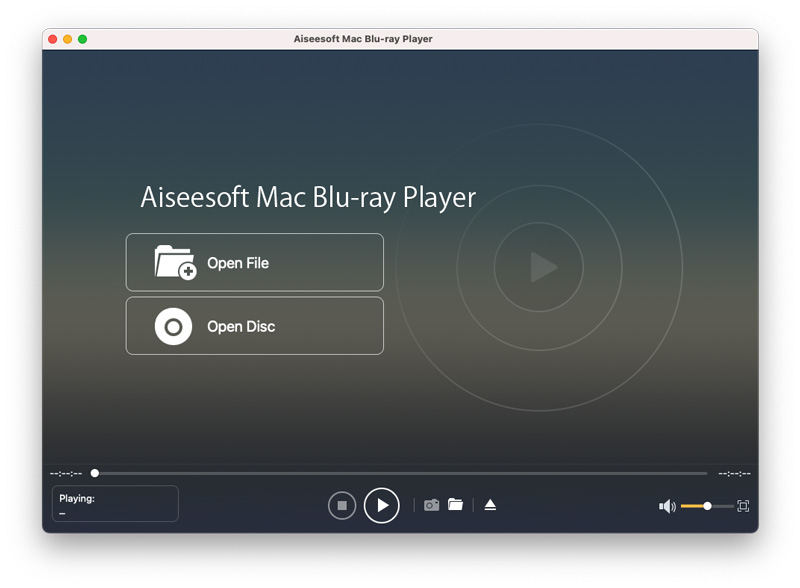
The start window: Open File and Open Disc buttons, with the playback controls, snapshot, eject, volume and full-screen buttons along the bottom.
Features
Blu-ray discs, folders and ISO images
Aiseesoft Mac Blu-ray Player plays a Blu-ray disc from a connected drive with Open Disc, and a Blu-ray folder (BDMV) or ISO image from your hard drive with Open File. That second part is useful if you've backed up your discs to a NAS or external drive and don't want to dig out the physical disc. Aiseesoft says it handles discs from any region.
Jump to the movie, a chapter, audio or subtitles
Aiseesoft Mac Blu-ray Player shows its own navigation menu over the video, with Play Movie, Chapter, Audio, Subtitle and Other Titles. It's not the disc's original animated Blu-ray menu, but it gets you straight to the main feature, a specific chapter, or a different language track.

The player's navigation menu (Play Movie, Chapter, Audio, Subtitle, Other Titles) over a playing video.
Surround sound and audio device choice
Aiseesoft Mac Blu-ray Player supports Dolby Digital and DTS 5.1/7.1 soundtracks according to Aiseesoft, and its Audio menu lets you pick the audio track, a stereo mode (stereo, reverse stereo, left, right) and the output device, so you can send the sound to an external display, AV receiver or headphones without changing your Mac's system settings.

The Audio menu, twice: the Stereo Mode submenu, and the Audio Device submenu switching between the system output and an external monitor.
Screen size, deinterlacing and snapshots
Aiseesoft Mac Blu-ray Player's Video menu switches between half size, normal size, double size, fit to screen and full screen (Command-F), picks the video and subtitle track, and can deinterlace older 1080i material. The camera button saves a still frame from the movie, and hotkeys handle play, stop, skip and volume so you can leave the mouse alone.

The Video menu: video and subtitle tracks, full screen, half, normal and double size, fit to screen and deinterlacing.
An everyday video and music player too
Aiseesoft Mac Blu-ray Player opens the formats QuickTime refuses, such as MKV, AVI, WMV, FLV and AVCHD camcorder files (MTS/M2TS), in resolutions up to 4K, and plays lossless audio like FLAC and APE. Several of Aiseesoft's testimonials come from people who use it as their default video player for exactly that reason.

Playback in progress: an MP4 file playing, with the time bar, controls and the name of the current file in the bottom left.
Benefits
- Your Blu-ray collection works on your Mac. Add a USB Blu-ray drive and the Mac becomes a Blu-ray player for a laptop on the go or a Mac mini hooked to the TV.
- Disc backups without the discs. ISO images and BDMV folders play straight from a drive or NAS.
- Nothing to learn. Two buttons and a menu bar; anyone in the house can use it.
- One player for odd formats. MKV, AVI and camcorder MTS files that QuickTime won't open play here too.
Real-World Uses
- Movie night on a MacBook: plug in a USB Blu-ray drive, connect the laptop to the TV with HDMI, and send DTS audio to the TV with the Audio Device menu.
- Watching ripped backups: open a Blu-ray ISO stored on an external SSD while travelling, with no disc or drive needed.
- Language learning: switch audio tracks and subtitles from the navigation menu to watch a film in its original language.
- Old camcorder footage: play AVCHD MTS clips and deinterlace them for a clean picture.
Who It's For, and Who Should Skip It
It's for Mac owners who have Blu-ray discs or Blu-ray backups and want a simple app that opens them, without learning a complicated media center.
Skip it if:
- You want 4K UHD Blu-ray discs. Aiseesoft promises 4K video and 4K Blu-ray ISO playback but doesn't spell out support for encrypted UHD discs, which most Mac players can't handle. Test one in the trial before you count on it.
- You need the original disc menus. You get the player's own navigation menu, not the studio's interactive Blu-ray menu.
- You only play regular video files. The free IINA or VLC handle MKV and AVI files fine; you only need this app for Blu-ray.
- You need guaranteed playback of new releases. Copy protection changes, and the independent reports below show discs that wouldn't play.
Usage Guide
- Connect a Blu-ray drive. Macs don't have one, so plug an external Blu-ray drive into a USB port.
- Install the app. Download the small DMG and run it. It's an online installer, so it downloads the full app (45 MB for Intel, 94 MB for Apple silicon) during setup. Keep the Mac online.
- Insert the disc and click Open Disc. For an ISO image or a BDMV folder, click Open File instead and choose it.
- Pick what to watch. Use Play Movie for the main feature, or Chapter, Audio, Subtitle or Other Titles from the navigation menu.
- Adjust playback. Use the Audio menu for the track and output device, the Video menu for screen size and subtitles, and Command-F for full screen.
Where it falls short
- Disc playback is hit and miss in independent reports. A side-by-side test of Mac Blu-ray players found it froze or stalled on all three commercial discs tested, and Amazon buyers rate it just 3.0 out of 5. Those reports are old, but they're the only independent ones there are.
- No original Blu-ray menus. The 2015 comparison noted that none of the Mac players tested fully supported Blu-ray menus, and this one uses its own simplified menu.
- The refund guarantee is narrow. Aiseesoft refunds within 30 days only for a quality problem with the software, and its purchase page states that policy for lifetime licenses.
- Company billing complaints. On Trustpilot, the recurring negative theme across Aiseesoft's products is unexpected charges and difficult refunds. If you buy Aiseesoft's monthly plan on its store, check whether automatic renewal is ticked.
What Users Say
Opinions split sharply depending on where you look: glowing on Aiseesoft's own site, mixed on Amazon, and poor in the one hands-on comparison we found.
Testimonials on Aiseesoft's site (5.0 from 233 ratings)
Aiseesoft's product page shows a 5.0 rating from 233 reviews. These are posted on the vendor's own site, so read them as testimonials.
Alexa (October 18, 2018): "Very easy to use. I only need to insert my Bu-ray disc into the drive, and use this software to open it directly for watching."
Larry: "I use it as the Blu-ray player and my video player as the alternative to QuickTime. Very powerful to play any video files on my Mac currently."
Strubhar: "These hotkeys are very easy to use. Now, I do not need the mouse to forward the movie file."
Krayenhagen: "It is the one of the best Blu-ray players in my list. Very easy to use, and the interface is simple. Perfect for me."
A hands-on comparison (Experts Exchange, July 2015)
Ji Li tested five Mac Blu-ray players with the discs Taken 3, Unbroken and Fury and wrote of this one: "Its interface is as simple as Macgo's, only two buttons, "Open File" and "Open Disc". TAKEN 3 got stuck at 00:03:28. UNBROKEN was smooth at first, but when I tried to preview the movie so I clicked on the timeline of Control Panel, it suddenly froze."
The verdict: "Aiseesoft failed to play all of them," and the reviewer called it "overpriced for its quality."
Keep the context in mind: the test is from 2015, on a much older version, and the article recommends a competitor (Macgo). The editor's note says the author "has yet to declare if they have an interest in any of the products described".
Amazon (3.0 from 31 ratings)
The download version sold on Amazon averages 3.0 out of 5 stars from 31 global ratings, well below the vendor's own figure.
Trustpilot: Aiseesoft as a company (3.8 from 610 reviews)
Trustpilot rates Aiseesoft as a whole at 3.8 out of 5 from 610 reviews. Two recent five-star reviews mention its Blu-ray player license and the help they got moving it to new hardware: Ro, "Customer Support as it should be." (September 14, 2026): "Bought a new computer but the licence for my BluRay player wouldn't authorise." Máx Rockátánsky, "Great software, Great customer service!" (September 24, 2026): "Had an issue with my PC hardware which required new parts, flagging my code up as having already been used."
The one-star reviews are mostly about billing and refunds on other Aiseesoft products. (Trustpilot blocks direct downloads, so these quotes were read through a summarizing tool and are excerpts.)
The recurring themes
People who get it working like how simple it is, the hotkeys, and having one app for Blu-rays and odd video formats. The criticism is about the thing that matters most: some commercial discs not playing or freezing. Support gets credit for resetting licenses on new computers. Put together, the free trial on your own discs is the deciding test.
Comparisons
Aiseesoft Mac Blu-ray Player vs VLC
VLC is free and plays almost any video file on a Mac, but it can't play encrypted commercial Blu-ray discs without extra key files and some technical setup. Aiseesoft's player is built to open commercial discs directly, which is the main reason to pay for it.
Aiseesoft Mac Blu-ray Player vs other paid Mac Blu-ray players
Macgo Mac Blu-ray Player, Leawo Blu-ray Player for Mac and AnyMP4 Mac Blu-ray Player do the same job with similar two-button interfaces. Since disc compatibility is what separates them, try two of them on the same disc before deciding.
Editions and Pricing
| License | Price | Term | Macs | Where |
|---|
| 1 Month License | $31.20 a month | Renews monthly until cancelled | 1 | Aiseesoft's store |
| Lifetime License | $62.45 | One-time payment | 1 | Aiseesoft's store |
| Lifetime License, up to 3 Macs | $79.96 (list $187.35) | One-time payment | 3 | Our Buy Now button |
Aiseesoft's store often shows coupon prices below these (the lifetime license at $49.96 and the first month at $15.60 when we looked). Prices are in US dollars, before any sales tax or VAT.
FAQs
Do I need a Blu-ray drive to use Aiseesoft Mac Blu-ray Player?
Only for discs. Aiseesoft Mac Blu-ray Player needs an internal or USB Blu-ray drive to read a physical disc, since no current Mac has one. Blu-ray ISO files and BDMV folders play from any drive without one.
Does Aiseesoft Mac Blu-ray Player work on M1, M2, M3, M4 and M5 Macs?
Yes. Aiseesoft Mac Blu-ray Player has a native Apple silicon build (version 6.6.70 when we checked), and Aiseesoft lists M-series chips up to M5 and macOS Tahoe as supported.
Does it need an internet connection?
Aiseesoft Mac Blu-ray Player's installer downloads the app during setup, so you need to be online to install it. For commercial discs, Mac Blu-ray players typically fetch decryption keys online the first time you insert a new disc, as the 2015 comparison above noted for all the apps it tested, so keep the Mac connected when you try a new movie.
Can it play Blu-ray discs from other regions?
Aiseesoft says Mac Blu-ray Player plays Blu-ray discs released in different regions without limitation. As with disc compatibility in general, check an imported disc in the free version before buying.
Can I rip or copy Blu-rays with it?
No. Aiseesoft Mac Blu-ray Player only plays discs and files. Ripping a Blu-ray to MP4 or MKV takes a separate ripper, which Aiseesoft and others sell as different products.
I bought a new Mac. Can I move my license?
Aiseesoft Mac Blu-ray Player's 1-Mac license covers one Mac at a time (the license sold through our Buy Now button covers up to 3), and Trustpilot reviewers report that Aiseesoft support reset their Blu-ray player codes so they could register on new hardware.
System Requirements
- macOS: 10.12 Sierra or later, including Sonoma, Sequoia and Tahoe
- Processor: 1 GHz Intel, or Apple silicon M-series
- RAM: 1 GB or more
- Drive: internal or external Blu-ray drive for discs
- Download: 4.7 MB online installer, which fetches a 45 MB (Intel) or 94 MB (Apple silicon) app
Conclusion
Aiseesoft Mac Blu-ray Player is simple, current (an Apple silicon build from October 2026) and inexpensive as a lifetime purchase, and it covers discs, ISO files, BDMV folders and everyday video formats in one app. The one reason to buy it is that it plays Blu-rays on a Mac with no setup beyond a USB drive. The main reason not to is uncertain disc compatibility: independent reports include commercial discs that froze or wouldn't play. Our verdict: worth it only if the free version plays your own discs smoothly, and then a one-time lifetime license (the 3-Mac one at $79.96 through our Buy Now button, or 1 Mac for $62.45 on Aiseesoft's store) beats paying $31.20 a month.
Download Free TrialBuy Now