Short answer
Short answer: WinZip PDF Pro ($74.99 a year) is the simplest editor here for everyday jobs: fix a typo, sign a contract, merge and compress scans, convert to Word. If you edit scanned documents, you need OCR, which WinZip PDF Pro doesn't list: EaseUS PDF Editor has it for $49.95 a year or $79.95 once, and SwifDoo PDF ($129 once) and Wondershare PDFelement ($129.99 once) are the fullest one-time editors. Systweak PDF Editor Pro is the cheapest to own outright.
Every editor here has a free trial. Run it on one of your own PDFs, because how well text edits keep their layout depends on the file.
At a glance: five Windows PDF editors
| WinZip PDF Pro | EaseUS PDF Editor | Systweak PDF Editor Pro | SwifDoo PDF | PDFelement |
|---|
| Price | $74.99 a year | $49.95 a year or $79.95 lifetime | $69.95 a year or $99.95 lifetime (30% off with the code our button applies) | $129 one-time (1 PC); $69 a year | $129.99 one-time |
| One-time licence | ✗ | ✓ | ✓ | ✓ | ✓ |
| Edit text and images | ✓ (pop-up editor) | ✓ | ✓ | ✓ | ✓ |
| OCR for scanned PDFs | ✗ not listed | ✓ 29 languages | ✓ | ✓ | ✓ |
| Convert to Word, Excel, PowerPoint | ✓ | ✓ | ✓ | ✓ (also CAD) | ✓ |
| Fill and sign forms | ✓ | ✓ (also builds forms) | ✓ (certificate signing) | ✓ | ✓ |
| Compare two PDFs | ✗ not listed | ✗ not listed | ✓ | ✗ not listed | ✓ |
| Free trial | 7 days, all features, no email | Free version: first 3 pages per job, watermark | 7 days; merging and conversion limited | 7 days, all features | 14 days after sign-up, watermark |
| Mac version | ✗ | Separate purchase | Separate app | Separate app | Same licence covers Windows or Mac, not both |
| Refunds | 30-day money-back | 30 days, technical faults only | 60-day money-back | Only for bugs SwifDoo can't fix | Up to 30 days for most products |
How we picked
- We looked at the Windows PDF editors on this site that are sold today and cost under $135 to own or under $75 a year, and left out readers and single-purpose converters.
- For each one we compared editing, OCR, conversion, forms and signing, trial limits, licence terms and refund rules, from the vendors' product pages, FAQs, order pages and installers.
- We gathered independent reviews (TechRadar, PCWorld) and Trustpilot comments, including complaints about billing and activation.
- What we checked: the regular prices on the vendors' order pages and store data in November 2026: WinZip PDF Pro $74.99 a year (November 28), EaseUS PDF Editor $49.95 a year and $79.95 lifetime (November 20), Systweak PDF Editor Pro $69.95 a year and $99.95 lifetime before the code (November 19), SwifDoo PDF $129 perpetual for one PC (November 10) and Wondershare PDFelement $129.99 one-time (November 11), all in USD.
We compared features, prices and trials. We didn't run the same document through every editor, so we can't rank their OCR accuracy or how well each keeps a layout after editing.
Prices compared
Cheapest way to own it (USD)
Systweak PDF Editor Pro lifetime (with code)$69.96
EaseUS PDF Editor lifetime$79.95
SwifDoo PDF perpetual, 1 PC$129.00
Wondershare PDFelement perpetual$129.99
Regular prices on the order pages, November 2026. WinZip PDF Pro has no one-time licence. Systweak's price is with the 30per-glb code that our Buy button applies.
One year (USD)
Systweak PDF Editor Pro yearly (with code)$48.96
EaseUS PDF Editor 1-Year$49.95
SwifDoo PDF yearly (2 devices)$69.00
Yearly plans renew automatically. PDFelement's subscriptions are sold on Wondershare's own store and aren't charted.
1. WinZip PDF Pro: the simplest for everyday PDF jobs
- Price: $74.99 a year (subscription only)
- Runs on: Windows 11, 10, 8 and 7; 2 GB RAM, 220 MB disk
- Version: 7.0 (April 2026), from WinZip Computing (part of Corel)
- Best for: people who sign, fix, merge and convert PDFs every week and want a plain interface
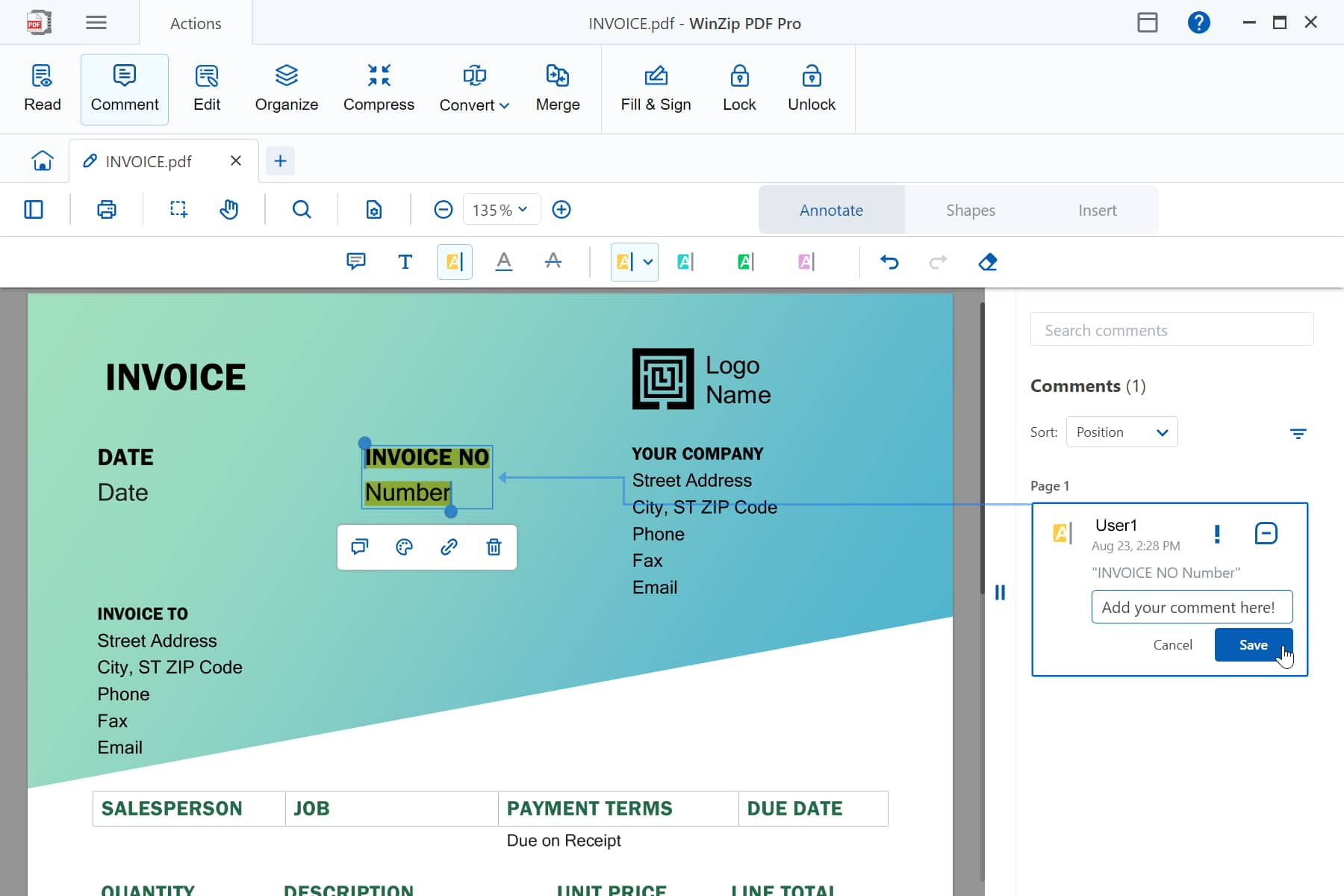
WinZip PDF Pro in Comment mode: Read, Comment, Edit, Organize, Compress, Convert, Merge, Fill & Sign, Lock and Unlock across the top (from WinZip's guide).
WinZip PDF Pro puts its tools as large buttons along the top: Read, Comment, Edit, Organize, Compress, Convert, Merge, Fill & Sign, Lock and Unlock. It edits text through a pop-up editor (double-click a block, change it, click Apply), adds images, links, stamps, watermarks and page numbers, reorders and extracts pages, converts to and from Word, Excel, PowerPoint, JPG and PNG, and e-signs and password-protects documents. Comments can be given a status (Accepted, Rejected, Completed), which helps when several people review one file.
WinZip PDF Pro's strength is that there's little to learn, and the 7-day trial needs no email or card; after it ends, reading PDFs stays free. The limits: it's subscription-only, Windows-only, and WinZip doesn't list OCR, so scanned pages stay as images.
What we like
- Clean, simple toolbar
- Trial with every feature and no registration
- Comment statuses for team review
- Free PDF reading after the subscription ends
Watch out for
- Subscription only
- No OCR or batch processing listed
- Text edits go through a pop-up, so layout changes appear only after you apply them
- Keeps asking to become the default PDF app
"WinZip PDF Pro offers a clean, simple interface for any PC user needing to manipulate and otherwise interact with PDF documents."
TechRadar (Steve Paris), updated December 19, 2024
"It's not perfect, mind, and WinZip PDF Pro does feature some annoying glitches."
TechRadar, same review (Tools 4/5, Pricing 3/5, Interface 2.5/5)
Download WinZip PDF Pro Free TrialBuy WinZip PDF Pro
2. EaseUS PDF Editor: the best value with OCR
- Price: $49.95 a year, $79.95 lifetime upgrades, $19.95 a month
- Runs on: Windows 11, 10, 8 and 7 (Mac version sold separately)
- Version: 6.4.1.0
- Best for: home and small-office users who convert scans and fill forms
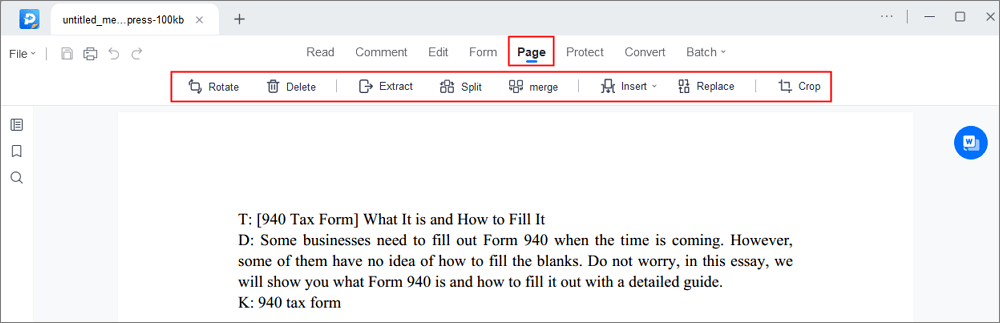
EaseUS PDF Editor's ribbon-style tabs (Read, Comment, Edit, Form, Page, Protect, Convert, Batch), here with the Page tools open.
EaseUS PDF Editor edits text, images and links, inserts, extracts, splits and crops pages, adds headers, footers and watermarks, and converts PDFs to Word, Excel, PowerPoint and images. Its OCR reads scanned PDFs in 29 languages, it builds fillable forms with check boxes, list boxes and text fields, and a Batch tab handles several files at once.
EaseUS PDF Editor is the cheapest editor here with OCR on a yearly plan, and the $79.95 lifetime licence beats the yearly price after about 18 months. The free version only works on the first three pages of each job and watermarks output. Trustpilot reviews of it are mostly about licences: hitting the activation limit after a reinstall, and one buyer who found "lifetime upgrades" didn't cover a new release.
What we like
- OCR in 29 languages
- $79.95 lifetime option
- Form builder and batch tools
- Free version to test on short files
Watch out for
- Free version limited to 3 pages per job, with a watermark
- Activation limits when you change PCs
- Refunds only for technical faults
- Mac licence is separate
"I also then purchased their PDF editor software. Easy to use and so much better than the other 'BIG' company."
Thomas Devine, 5 stars on Trustpilot, May 7, 2026
"Purchased a lifetime license to pdf editor only to find that it does not in fact apply to updates."
Bob, 1 star on Trustpilot, May 26, 2026
Download EaseUS PDF Editor Free TrialBuy EaseUS PDF Editor
3. Systweak PDF Editor Pro: cheapest to own, works offline
- Price: $69.95 a year or $99.95 lifetime; $48.96 and $69.96 with code 30per-glb (applied by our Buy button)
- Runs on: Windows 11, 10, 8.1, 8 and 7 SP1, 32- and 64-bit
- Version: 1.0.0.11389
- Best for: people who don't want to upload private documents to online tools
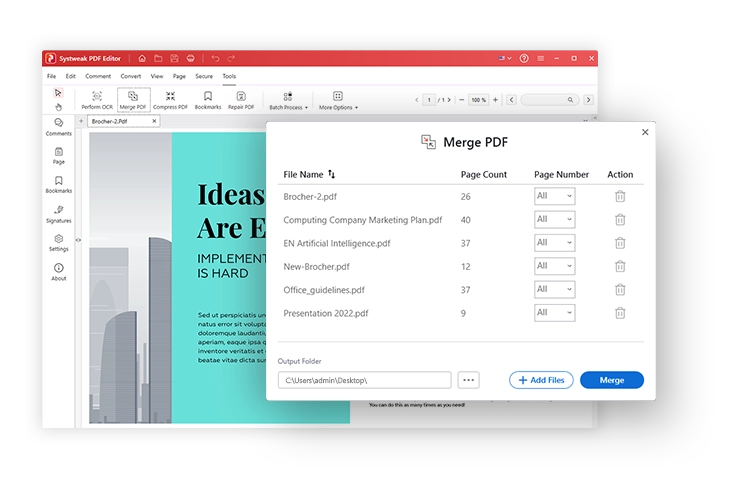
Systweak PDF Editor's Merge PDF dialog over the main window, with Perform OCR, Compress PDF and Repair PDF on the Tools tab (from Systweak's product page).
Systweak PDF Editor Pro uses an Office-style ribbon (Edit, Comment, Convert, View, Page, Secure, Forms, Tools) and does its work on your PC: editing, conversion, OCR, merging, compression, signing with certificate files and password protection. It also compares two versions of a document and colours the deleted and replaced text, a tool only PDFelement matches among these five.
Systweak PDF Editor Pro is the cheapest lifetime licence here and has the longest refund window (60 days). The trial is more limited than Systweak's "fully functional" label suggests: merging stops at 3 files, conversion at the first 3 pages, and text editing, OCR and batch processing need Pro. Systweak's reputation is mixed: Malwarebytes flags a family of Systweak programs, starting with its registry cleaner, as potentially unwanted, though the PDF editor installer carries a valid Systweak signature.
What we like
- Cheapest lifetime licence ($69.96 with the code)
- Works offline; files aren't uploaded
- Document comparison and certificate signing
- 60-day money-back guarantee
Watch out for
- Trial doesn't include editing, OCR or batch jobs
- Little independent testing
- Some security tools are wary of Systweak software
- Billing complaints on the company's Trustpilot page
"Recently used Systweak PDF Editor to edit and recreate a resume using a template and it works like a gem."
Dishank Sharma, 5 stars on Trustpilot, February 2024
Systweak's Trustpilot profile has a TrustScore of 3.9 from 279 reviews across all its products.
Download Systweak PDF Editor Pro Free TrialBuy Systweak PDF Editor Pro
4. SwifDoo PDF: the fullest one-time editor for one PC
- Price: $129 one-time for 1 PC with lifetime updates; $69 a year or $159 one-time for 2 PCs
- Runs on: Windows 11, 10, 8 and 7
- Version: 2.0.8.0
- Best for: weekly PDF work, including scans and CAD conversion, without a subscription
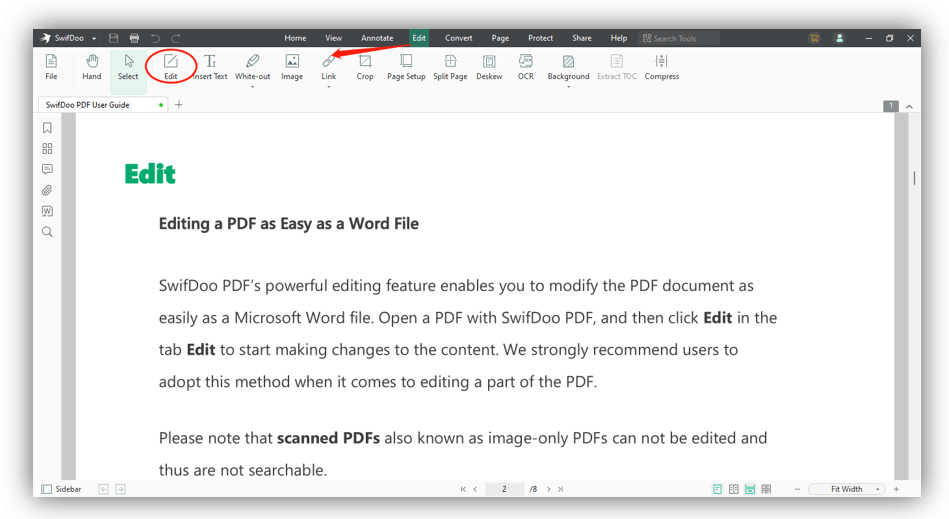
SwifDoo PDF's Edit tab: Edit, Insert Text, White-out, Image, Link, Crop, Page Setup, OCR and more (from SwifDoo's user guide).
SwifDoo PDF looks like a word processor, with tabs for Home, View, Annotate, Edit, Convert, Page, Protect and Share. It edits text and images in place, runs OCR on scanned pages, crops pages and changes page size, converts to Word, Excel, PowerPoint, images, CAD, HTML, EPUB and PDF/A, and signs and protects documents. The perpetual plan includes lifetime updates.
SwifDoo PDF has the broadest converter here and a full 7-day trial. Two things to know first: the licence is tied to a SwifDoo account rather than a key, and perpetual owners on Trustpilot complain about signing in again every so often; and SwifDoo refunds a perpetual licence only for a bug it can't fix within 14 business days of a report.
What we like
- Lifetime updates on the perpetual plan
- OCR and conversion to CAD, EPUB and PDF/A
- Full-featured 7-day trial
- PCWorld: 4 out of 5
Watch out for
- Licence tied to an account; periodic sign-ins
- Strict refund policy
- AI assistant costs extra
- No print-production tools
"Swifdoo PDF is a full-featured, low-priced Acrobat alternative that should serve most users well."
PCWorld (Michael Ansaldo), updated February 3, 2025, 4 out of 5
Download SwifDoo PDF Free TrialBuy SwifDoo PDF
SwifDoo's Black Friday code BF26 runs until December 4, 2026 and is applied by the Buy button above: the perpetual licence for 2 PCs is $79.50 instead of $159.
5. Wondershare PDFelement: the most polished, with AI extras
- Price: $129.99 one-time (single-platform perpetual plan)
- Runs on: Windows 7, 8, 10 and 11 (Mac, iOS and Android apps too)
- Version: 13.0.0 (September 2026)
- Best for: office users who want an Acrobat-style editor with page-box tools and AI summaries
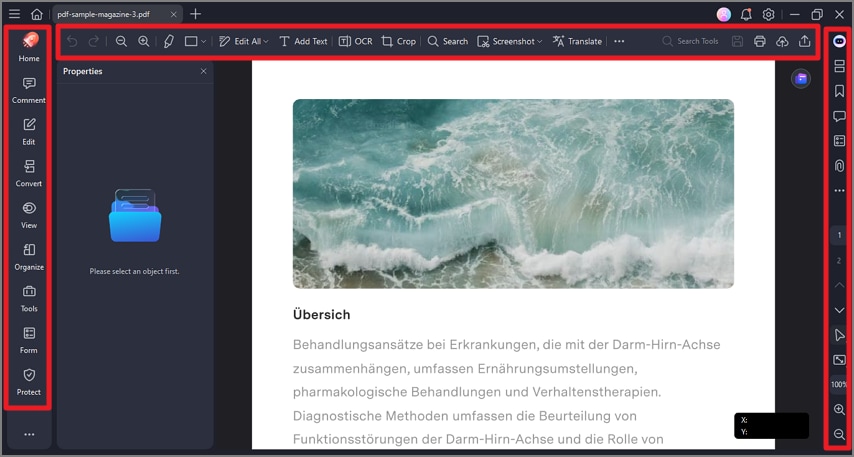
Wondershare PDFelement for Windows: modes down the left (Home, Comment, Edit, Convert, View, Organize, Tools, Form, Protect), tools across the top (from Wondershare's user guide).
Wondershare PDFelement opens documents in tabs and switches tools by mode. It edits text and images in place, converts to and from Office files, runs OCR, fills and signs forms, and sets crop, trim and bleed boxes for print shops. It also has AI summaries and translation, which run on a set number of uses per plan and need an internet connection.
Wondershare PDFelement is the most polished editor here and has the largest review base (4.6 out of 5 from about 3,100 reviews on Trustpilot). The perpetual plan sold here is named for version 11 while the current release is 13, so check which version your key activates, and expect upgrade prompts when a new major version comes out.
What we like
- Polished interface with tool search
- OCR, page boxes and form tools
- One-time price
- Strong Trustpilot rating
Watch out for
- Perpetual plan is tied to a version
- Upgrade and cross-sell prompts
- AI features are metered
- Trial watermarks every saved file
"Excellent product, easy to use, much cheaper than Adobe for what you pay."
MrBill_NC, 5 stars on Trustpilot, October 2025
Download Wondershare PDFelement Free TrialBuy Wondershare PDFelement
Which should you choose?
| Your situation | Pick | Why |
|---|
| Sign, fix and merge PDFs, nothing fancy | WinZip PDF Pro | The simplest toolbar, and a no-registration trial |
| Edit scanned documents on a budget | EaseUS PDF Editor | OCR in 29 languages for $49.95 a year or $79.95 once |
| Lowest price to own, files stay on your PC | Systweak PDF Editor Pro | $69.96 lifetime with the code, offline processing, 60-day refund window |
| Weekly heavy use, no subscription | SwifDoo PDF | $129 once with lifetime updates and the broadest converter |
| Print-shop page sizes, AI summaries | Wondershare PDFelement | Page-box tools and AI features in a polished editor |
| Review documents with a team | WinZip PDF Pro | Comment statuses (Accepted, Rejected, Completed) |
Who should skip each one
What commonly goes wrong
- Editing a scanned PDF without OCR. A scan is a picture of text. Without OCR there is nothing to edit, which rules out WinZip PDF Pro for scans.
- Expecting perfect layout after edits. Every editor here rebuilds text when you change it, and complex layouts can shift. WinZip warns about this in its editor, and it applies to all of them.
- Assuming "lifetime" means every future version. PDFelement's perpetual plan is tied to a version, and one EaseUS lifetime buyer reports a new release wasn't covered. SwifDoo's perpetual plan says lifetime updates.
- Forgetting auto-renewal. All the yearly plans renew. Cancel in your account, or by email as one EaseUS reviewer advises, if you only need one project.
- Buying before testing. EaseUS refunds only technical faults and SwifDoo only unfixable bugs. Test on your own documents during the trial.
FAQs
What is the best PDF editor for Windows?
For simple everyday editing and signing, WinZip PDF Pro is the easiest to use at $74.99 a year. For scanned documents choose an editor with OCR: EaseUS PDF Editor is the best value ($79.95 lifetime), and SwifDoo PDF ($129 once) is the fullest one-time option.
Which PDF editor can I buy without a subscription?
Systweak PDF Editor Pro ($99.95 lifetime, $69.96 with the code our button applies), EaseUS PDF Editor ($79.95), SwifDoo PDF ($129) and Wondershare PDFelement ($129.99) all sell one-time licences. WinZip PDF Pro is subscription-only.
Does WinZip PDF Pro have OCR?
WinZip doesn't list OCR for WinZip PDF Pro, so scanned pages can't be turned into editable text with it. Use EaseUS PDF Editor, Systweak PDF Editor Pro, SwifDoo PDF or PDFelement for scans.
Is WinZip PDF Pro free?
WinZip PDF Pro is free for 7 days with every feature and no registration. After that, reading PDFs stays free, but editing, converting, signing and protecting need the $74.99-a-year subscription.
Can I edit the text in a PDF like a Word document?
Yes, with all five editors, as long as the PDF contains real text rather than a scan. For scans, run OCR first, then edit. Complex layouts may shift slightly after editing.
Which PDF editor works without uploading my files?
All five are desktop programs that edit on your PC. Systweak PDF Editor Pro states that conversion, OCR, signing and redaction all run offline; the others need the internet for activation, and PDFelement's AI features need it too.
Which of these PDF editors also runs on Mac?
EaseUS, Systweak, SwifDoo and Wondershare all have Mac versions, sold or licensed separately. WinZip PDF Pro is Windows-only.
More on PDFs: PDFelement vs SwifDoo PDF, Best OCR PDF Editors for Scanned Documents and How to Convert a PDF to Word and Keep the Formatting.