You have a shelf of audio CDs and a computer that no longer has anything to do with them. You want the tracks as files you can carry around, named properly, without retyping every title. MP3 CD Ripper from EZ SoftMagic handles that job. It also converts audio files you already have into other formats.
Quick facts
- Version: 5.01
- Platform: Windows (32-bit and 64-bit builds)
- Price: Personal License $24.95, Business License $29.95
- Trial: downloadable trial; the vendor says you can use it without time or function restrictions until you register
- Download size: about 2.6 MB
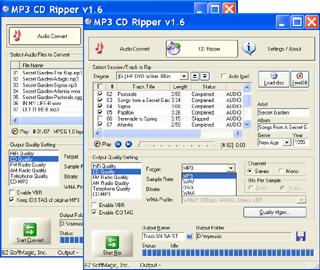
Key features
Rip CD tracks to MP3, WAV, WMA, OGG, FLAC, APE, MPC or VOX
The Audio CD Ripper saves tracks directly into MP3, WAV, WMA, Ogg Vorbis, FLAC, Monkey's Audio, Musepack and Dialogic ADPCM files, so you choose the format that fits your player.
Jitter correction for damaged or scratched discs
The ripping engine uses jitter correction to compensate for reading errors, which helps when a disc is not in perfect shape.
Track names filled in from an online CD database
With CDDB support, the program can retrieve album information such as track names and titles, so you don't type them by hand.
A built-in audio converter for files you already own
The Audio Converter handles many popular formats, including MP3, WMA, WAV, Apple Lossless M4A, OGG, AAC, MP4, AC3, FLAC and APE. It supports batch and folder conversion and conversion quality management. You can also re-encode a file to the same format with different encoding parameters.
Preview tracks with the built-in player
A built-in audio player lets you listen to tracks inside the program.
Who it's for
You'll get the most from it if you want one small tool for both ripping discs and converting files, and you don't need a large media suite. It suits anyone digitizing a personal CD collection. The separate Business License is there if you plan to use it at work.
Pros and cons
Pros
- Ripper and converter in one small download
- Wide choice of output formats, including lossless FLAC and APE
- Automatic track naming through an online database
- Batch and folder conversion
Cons
- Windows only
- The ripper is a straightforward tool; the vendor lists no extras such as editing or burning
- Paid license required after the trial
FAQs
Which formats can I rip a CD to?
MP3, WAV, WMA, OGG, FLAC, APE, MPC and VOX.
Does it name the tracks for me?
Yes. It can retrieve album details from the CDDB online database.
Can it convert files that are not on a CD?
Yes. The Audio Converter converts files between many audio formats, such as MP3, WMA, WAV and FLAC.
Is there a 64-bit version?
The vendor's download covers both 32-bit and 64-bit Windows.
How much does it cost?
The Personal License is $24.95 and the Business License is $29.95.
System requirements
- Processor: Intel Pentium or compatible
- Memory: 64 MB
- Disk space: 10 MB
- Drive: CD / DVD device
- Operating system: Windows