You want to save a song from an internet stream, digitize an old cassette, or capture your own voice, and the sound is only playing through your sound card. Audio Recorder Pro records whatever passes through that card and saves it straight to a file.
Quick facts
- Version: 3.90
- Platforms: Windows, with 32-bit and 64-bit builds in one download
- Price: $24.95 personal license, $34.95 business license
- Trial: free trial download, about 1.9 MB
- Output formats: MP3, OGG, WAV
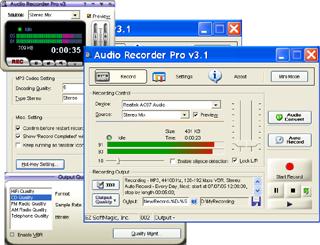
Key features
Save recordings directly as MP3, OGG or WAV
You choose the format before you record, so there is no separate conversion step afterwards.
Record from nearly any source
It works with a microphone, streaming audio from the internet, external devices such as CDs, LPs, cassettes and phone lines, and other programs such as Winamp or Media Player.
Start and stop recording on a timer
A built-in timer begins and ends a recording for you, so you don't have to be at the computer.
Skip silence with voice activation
Silence detection means recording runs only while there is sound.
Preset quality settings and preview your device
You can define recording quality presets to switch between settings quickly. You can also preview the recording device before you start.
Start recording when the program launches
Recording can be set to begin automatically as soon as the program starts.
Who it's for
It suits you if you want a simple sound-card recorder: people digitizing tapes and records, or saving streams and voice notes. It is not a full audio editor, so plan to use another tool for editing.
Pros and cons
Pros
- Small download of about 1.9 MB
- Three common output formats
- Timer and voice-activated recording
- Works with many input sources
Cons
- Trial only; you need a license to keep using it
- Windows only
- The more advanced Audio Recorder Platinum is a separate, higher-priced product
What users say
"Easy to use and record sound with preview." - Testimonial on the EZ SoftMagic download page
"Your program fit my needs perfectly." - Testimonial on the EZ SoftMagic download page
FAQs
Can I record streaming audio?
Yes. It records streaming audio from the internet and from other programs that play through your sound card.
Which formats can I save to?
MP3, OGG and WAV.
What is the difference between Pro and Platinum?
Platinum is the advanced version of Pro and adds more features.
How much does it cost?
The personal license is $24.95 and the business license is $34.95. The personal license is for home, non-commercial use only.
System requirements
- Intel Pentium or compatible processor
- 64 MB memory
- 10 MB hard disk space
- Sound card
- Windows, 32-bit or 64-bit