You have a folder full of M4A, WMA or FLAC files, and your player, phone or video editor only wants MP3. Converting them one at a time is slow. MP3 Audio Converter from EZ SoftMagic is built for this job. It turns whole folders of audio into the format you need in a single run.
Quick facts
- Version: 5.01
- Platforms: Windows 2000, XP, Vista, Windows 7 and Windows 8
- Trial: a free trial download is available
- Output formats: MP3, WAV, WMA, OGG, APE, FLAC, MPC and VOX
- Input formats: up to 27 audio formats
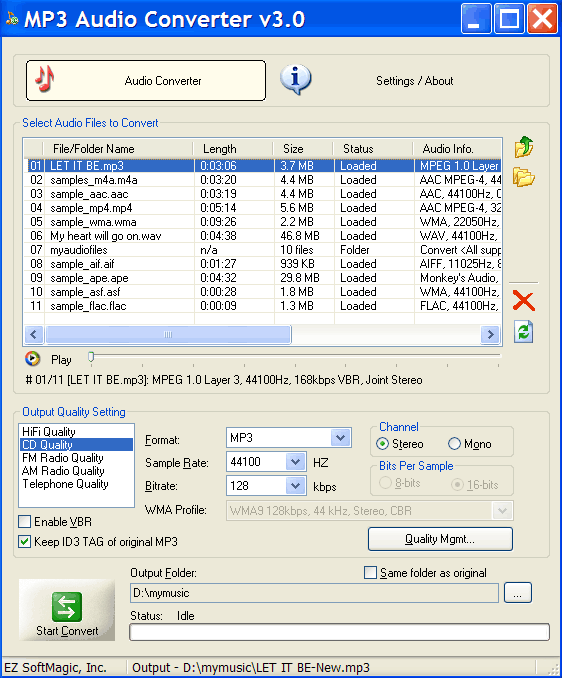
Key features
Convert whole folders in one pass
With batch and folder conversion, you can mix files of different formats, or add an entire folder, and convert everything at once. You can also drag and drop files or folders into the conversion list.
Read up to 27 audio formats
The program handles MP3, WMA, WAV, OGG, AAC, Apple Lossless M4A, MP4, AC3, FLAC, APE, WavPack, TTA and more. Version 5.01 added ADX and AIX files. You can go from one format to another, such as M4A to MP3 or WMA to MP3. You can also keep the same format and change the encoding parameters, such as sample rate and bitrate.
Pick a quality preset or build your own
Ready-made conversion qualities such as HiFi, CD and FM quality set the encoding values for you. You can edit them or create your own.
Even out loudness during conversion
The normalize option adjusts the audio data while converting. It accepts values from 0% to 100%.
Preview files without another player
A built-in audio player lets you play files without a third-party player. You can also convert to WAV with different codecs: PCM, ADPCM, U-Law or A-Law.
Who it's for
It suits you if you have a music library in assorted formats and want it in one format for a portable player, a video project or sharing. It is also a fit if you want a plain converter with no editing suite attached.
Pros and cons
Pros
- Handles many formats, including less common ones such as Musepack, Monkey's Audio and OptimFROG
- Batch and folder conversion
- Light hardware needs
- Free trial to test it first
Cons
- Windows only
- Audio conversion only; there is no ripping or editing in this product
- The trial is a limited evaluation, so you need to buy the full version for unrestricted use
What users say
"What a great product- batch converted a full copy of my iTunes folder to mp3 so that I could use in Studio video editing software." - Brian, testimonial on the EZ SoftMagic site
FAQs
Can it convert M4A files to MP3?
Yes. Apple Lossless M4A files can be converted to MP3, WMA or FLAC.
Can I convert a whole folder at once?
Yes. You can add multiple files of different formats or entire folders, then convert them in one go.
Can I change the bitrate of an existing MP3?
Yes. You can convert MP3, WAV, WMA, OGG, FLAC, APE or MPC to the same format with different encoding parameters, such as sample rate and bitrate.
Does it work on Windows 8?
Yes. Windows 8 is listed alongside Windows 7, Vista, XP and 2000.
System requirements
- OS: Windows 2000, XP, Vista, Windows 7, Windows 8
- Processor: Pentium 233 MHz (Pentium 500 MHz or greater recommended)
- Memory: 64 MB RAM (128 MB or more recommended)
- Disk space: 10 MB
- Sound card: optional