RadioCaster: Turn Any Audio on Your PC Into an Internet Radio Stream
RadioCaster is a $59 Windows program from DJSoft.Net that takes any audio on your computer, from a line-in or microphone to what's already playing, and streams it to a Shoutcast or Icecast server. It's for small stations, churches, clubs and hobby broadcasters who already have a sound source and need an encoder to put it online. It doesn't play music itself: it sends out what it's given, so you need a source and a streaming server.
Quick facts
- Version: 3.7.4 (installer dated August 4, 2026)
- Developer: DJSoft.Net, the maker of RadioBOSS
- Runs on: Windows 11, 10, 8.1 and 7 SP1, plus Windows Server 2012 R2 to 2019, 32-bit or 64-bit. There's no Mac version
- Formats: MP3, AAC+, FLAC, OGG, OPUS, WMA
- Servers: Icecast 2, Shoutcast v1 and v2, Windows Media Services and compatible servers
- Price: $59 once, with one year of updates and support
- Trial: free for evaluation, not for commercial use
- What we checked: the installer's file version is 3.7.4.0 (12.2 MB), and the order page showed RadioCaster at $59 with no discount on November 5, 2026. We didn't run a live broadcast.
Download Free TrialBuy Now
Overview
Most of what RadioCaster does happens before you press anything: you choose a source, add one or more encoders with your server's details, and tick them on. From there it's a small window with a level meter, a list of connections with their status and a listener count. The vendor calls it a live audio encoder, and that's the accurate description. Think of it as the box between your mixer and the streaming server.
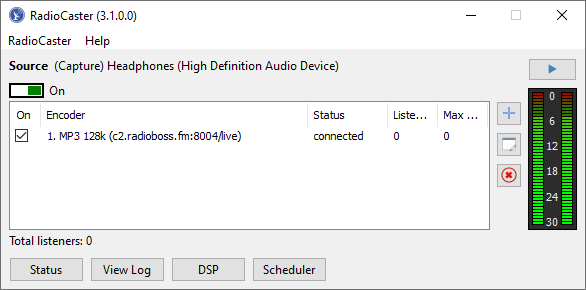
The main window, here from version 3.1: the source at the top, one connected encoder, and buttons for Status, View Log, DSP and Scheduler.
Features
Broadcast from any audio source
RadioCaster takes its audio from one of three places: Capture playback (whatever the computer is playing through a chosen sound card), Sound card input (a line-in or microphone, so an old analog mixer works), or Network stream (the URL of a stream already online). That last one lets you re-broadcast and transcode an existing stream.
Several formats and servers at once
RadioCaster sends to several encoders at the same time, each with its own format and bitrate, so you can run a 128 kbps MP3 stream beside a lower-bitrate AAC+ one for phones. A Configuration Wizard helps with the server details, and each connection has its own auto-reconnect delay.

The Encoder window: server, password, format, bitrate and an auto-reconnect time.
Sound shaping with plugins
RadioCaster has a built-in equalizer and compressor, and supports VST and Winamp DSP plugins, so you can level your broadcast without separate hardware.
Track titles from a file or the stream
RadioCaster updates the title listeners see from a file your playout software writes, from an XML file, or from the stream being re-broadcast. Post-process rules can change the text or skip certain entries, which keeps station IDs and ads out of the title display.
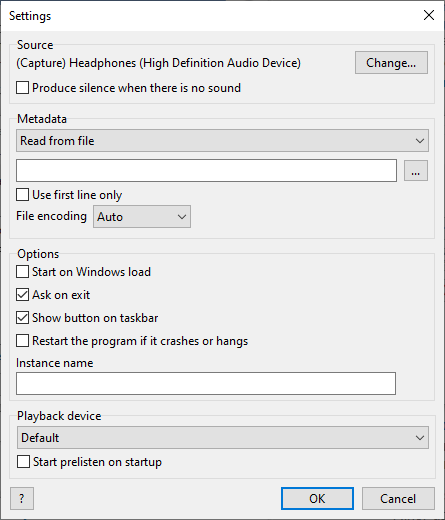
Settings: source, track title source, and options such as restarting if the program crashes or hangs.
Listener statistics and a scheduler
RadioCaster shows current and peak listeners, uptime and the current track title in a Status window. A scheduler starts and stops broadcasting at set times, so a weekly show can go out without anyone at the desk.

The Status window: listeners, peak, uptime and track title.
RTMP streaming to video services
RadioCaster can push audio to RTMP services such as YouTube and Facebook through a custom encoder, using a still image or video file as the picture. This needs an extra plugin, installed from the same window.
Benefits
- It keeps your existing setup. Analog desks, old playout PCs and hardware sources stay in place, since anything that reaches the sound card can go out.
- It can run unattended. It can start with Windows, stop the PC from sleeping and restart itself after a crash.
- You pay once. The license never expires, and there are no per-listener fees from DJSoft.
Real-World Uses
- A community FM station going online. Feed the studio output into line-in and stream it to a hosted Shoutcast server.
- A church service. Take the sound desk's output, stream it live and let the scheduler handle the start and stop times.
- Re-broadcasting a network feed. Pull an online stream and pass it on in another format to your own server.
- Audio across a local network. Use the built-in server to send audio between buildings or sister stations.
Who It's For, and Who Should Skip It
It fits broadcasters who already have the audio and need a dependable Windows encoder with format choice, DSP and unattended options.
Skip it if you want software to play your music on a schedule: RadioCaster has no playlist or player, so you want radio automation software such as DJSoft's own RadioBOSS instead. Skip it on a Mac or Linux. And if you just want to send one stream to a server occasionally, the free BUTT encoder does that, and you may not need to pay.
Usage Guide
- Run the installer and start RadioCaster.
- Open RadioCaster, then Settings, and click Change under Source to choose playback capture, a sound card input or a network stream.
- Pick how track names are updated, under Metadata.
- Click the + button in the main window to add an encoder. Enter the server address and password from your stream host, or use the Configuration Wizard. If you're unsure of the format, the vendor suggests 44100 Hz, 128 kbps stereo.
- Tick the encoder in the list. The report should show "Connected to server!". Then click Status to watch your listeners.
- After buying, choose Help, then Enter registration code, and paste the key from your email.
Before you buy
- You need a streaming server. Your host supplies the address and password. Stream hosting isn't part of the $59.
- Updates end after a year. The program keeps working forever, but new versions after the first year cost extra. The 3.7 update was $30 for owners whose update year had run out, and it was free to those who bought after March 25, 2025.
- The trial is for evaluation only. The license rules out commercial use during the trial, and the program disables itself when the trial ends. DJSoft doesn't publish the trial's length.
Where it falls short
- The built-in server isn't for public radio. The manual advises against using it for internet radio, since its functions are limited. It's meant for local networks and links between stations.
- Silence can drop your connection. Most servers disconnect a source that sends nothing, so turn on "Produce silence when there is no sound" if your source can go quiet.
- The published screenshots are old. They show version 3.1, and the manual is labelled for 3.6, so details of the current 3.7.4 window may differ.
- The manual is thin. It covers setup in about 30 pages, so troubleshooting usually means the vendor's forum.
What Users Say
RadioCaster is a niche tool, and we couldn't find independent magazine reviews or ratings on Capterra, G2 or Trustpilot. Its SourceForge listing has no user reviews. So there's little to go on, and what follows is everything we could verify.
On the vendor's site
"Thank you for your program. It's very comfortable and easy to use even for novices. We are happy with it!" Radio "Zebra", on the RadioCaster page
On the DJSoft forum
The most useful picture comes from the vendor's forum, where stations post real problems. In a 2020 thread a user reported: "It seems to run okay for about 48 hours now and then becomes unstable. The streams skip." Nine days later the same user wrote: "I've established that the problem is my streaming host at this point." squirrelfmradio
In a 2019 thread, a user said a network stream input "looses connection after some time" and stayed silent after an internet outage. DJSoft's reply was that RadioCaster "will reconnect automatically" and asked him to install the latest version. Marcel-, January 2019. Note that these threads are several years old and concern older versions.
The pattern: forum threads on dropped streams tend to end at the streaming host or the connection, and the developer answers directly. That's useful support for a small product, though it's no substitute for testing on your own stream.
Comparisons
RadioCaster vs RadioBOSS
Both come from DJSoft.Net. RadioBOSS is radio automation: playlists, scheduling and playback for a whole station. RadioCaster only encodes and streams audio that comes from elsewhere. If your music lives on the PC and should play by itself, look at RadioBOSS. If a mixer or another program already makes the sound, RadioCaster is the smaller purchase.
RadioCaster vs BUTT
BUTT is a free, open-source encoder for Icecast and Shoutcast that also runs on Mac and Linux. RadioCaster earns its $59 with several simultaneous encoders, DSP plugins, a scheduler, re-broadcasting of network streams and vendor support.
Editions and Pricing
There's one edition. Extra licenses are sold at a discount through the vendor's store.
| Item | Price | What you get |
|---|
| RadioCaster license | $59 | Perpetual license, one year of updates and support |
| Update after the first year | $30 (price for version 3.7) | The newer version and another period of updates |
FAQs
Can RadioCaster stream to YouTube?
RadioCaster can stream to YouTube and Facebook over RTMP using a custom encoder, a stream key from the service, and an image or video file as the background. You install a plugin for it the first time.
Do I need a hosting plan to use RadioCaster?
RadioCaster needs a Shoutcast, Icecast or compatible server for internet radio, so most users rent stream hosting. You can run your own server instead, and the built-in server covers local networks.
Does RadioCaster still work after the first year?
RadioCaster keeps working with no limitations after the first year, because the license is perpetual. Only new versions and support need a renewal.
Can RadioCaster broadcast securely over HTTPS?
RadioCaster's built-in server supports https connections once you add certificate and private key files in PEM format to its settings folder and restart the program.
Can blind or low-vision users operate RadioCaster?
RadioCaster has an accessibility mode for screen readers, turned on from its menu. Version 3.6 listed improved accessibility as a main change.
Is there a 64-bit version of RadioCaster?
RadioCaster comes in 32-bit and 64-bit installers, and both are on the vendor's download page.
System Requirements
- Windows 11, 10, 8.1 or 7 SP1, or Windows Server 2019, 2016 or 2012 R2 (32-bit or 64-bit)
- 2 GHz dual-core processor
- 1 GB RAM
- 1 GB hard disk space
Conclusion
RadioCaster is worth $59 if you run a small station or a regular live broadcast from a Windows PC and need more than a bare encoder: several streams at once, DSP, a scheduler and unattended restarts. The reason to buy it is that it does one job with very little setup and comes from a developer that answers questions on its own forum. The main reason not to is that it isn't a radio station in a box: there's no player, no playlist and no hosting. If you only need one stream now and then, try a free encoder first. If you're unsure, the free evaluation will show you whether it connects to your server.
Download Free TrialBuy Now