Able Photo Slide Show: Point It at a Folder and Your Photos Play Themselves
Able Photo Slide Show is a $25 Windows program from GraphicRegion.com that plays a folder of photos as a full-screen slideshow with 250 transitions, and can save the show as a standalone EXE, a screensaver, a web gallery or a video. It suits people who want photos on a screen with almost no setup: a family PC at a party, a TV in a club bar, a monitor in a shop window or a photographer's waiting room.
Most slideshow makers want you to build a project, drag every picture onto a timeline and render it before anything appears. Able Photo Slide Show starts from the other end. You pick a folder, set how long each picture stays up, and press Start. Big pictures are shrunk to fit, small ones are centered, and sideways phone shots are turned upright from their EXIF tag. If you later want a show you can send to someone, the same pictures go into the Project Manager and come out as a file.
Quick facts
- Version: 2.26.6.10, released June 10, 2026
- Developer: GraphicRegion.com (Vancouver, Canada)
- Platform: Windows only (Windows 11, 10, 8, 7, Vista, XP and Windows Server). No Mac version
- Price: $25 personal license, $35 business license, one-time payment with one year of free upgrades
- Trial: 30 days. The unregistered copy shows a DEMO notice
- Outputs: live full-screen slideshow, standalone EXE, screensaver (SCR), HTML web gallery, video file
- Installer: 31 MB
- What we checked: installer version 2.26.6.10 (31 MB, digitally signed by Graphic-Region Development) downloaded from the vendor on October 18, 2026, and a price of $25 for the personal license on the order page on October 18, 2026. We didn't run the program or time a video export.
Before you buy: personal vs business license
The $25 personal license covers non-commercial use at home only. A slideshow running in a restaurant, shop, school, office, club or studio needs the $35 business license. Many of the program's most popular uses (a specials board, a sponsor loop, a waiting-room display) fall on the business side, so pick the license before you check out.
Download Free TrialBuy Now
Overview
Able Photo Slide Show has been around since version 1.0 in December 2002 and is still updated: the June 2026 release added WebP support without a plugin, viewing of multi-page PDF and TIFF files, and looping music in video slideshows. It is really three tools in one window. The viewer plays pictures from a folder or a saved project. The Project Manager builds shows to hand out as files. The image browser sorts, renames, fixes and prints the pictures before they go into a show.
The interface is plain and old-fashioned, with big toolbar buttons and tabbed option dialogs. That is part of the appeal for its users: there's no timeline, no account and no cloud upload, and a show can be running a minute after installation.
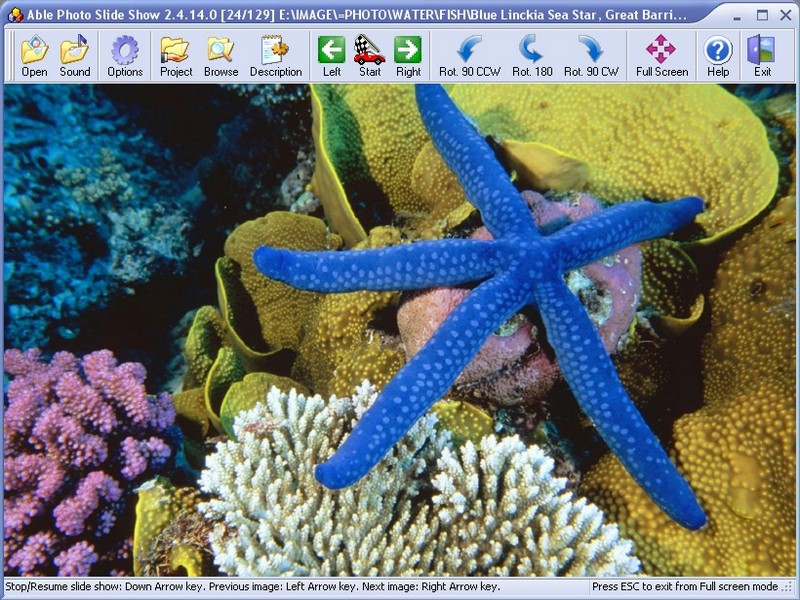
The main window (from version 2.4) playing picture 24 of 129 from a folder, with the toolbar for sound, options, the Project Manager, the browser, captions, rotation and full screen.
Features
A slideshow from any folder, with no project to build
Able Photo Slide Show plays every picture in a folder, and optionally its subfolders, in forward, reverse, random or random-without-repeat order. You set the delay between slides and the transition length, choose one of 250 transition effects or let it pick at random, and decide whether big pictures shrink and small ones stretch to fill the screen. Full-screen mode hides the cursor and the status bar, so nothing but the photos shows.
It reads JPEG, PNG, TIFF, GIF (including animated GIF), BMP, PCX, TGA, WMF/EMF and other older formats, plus HEIC, HEIF, WebP and JPEG XR through Windows Imaging Component. It also plays AVI, MP4 and MKV clips in the same show.
Folder monitoring for live displays
Able Photo Slide Show can watch a folder and add new pictures to a running show as they arrive, with no restart. Copy a file into the folder from another PC on the network, a camera's tethering software or a synced cloud folder, and it appears in the rotation. Command-line switches (/fullscr, /start, /monitor, /resume, /showdelay=) let a shortcut or a Windows startup entry launch the show full screen with nobody at the keyboard, and /resume picks up at the last slide shown.
Shows you can send: EXE, screensaver, web gallery and video
The Project Manager in Able Photo Slide Show collects pictures from any number of folders into one ordered list, with its own rotation, transition and interval for each picture. From there, Make EXE, SCR saves a standalone program that plays on a Windows PC with nothing installed, or a screensaver file. Web Gallery writes an HTML gallery for a website, and Make VIDEO renders the show to a video file at a resolution and frame rate you choose, with the music track looped if it is shorter than the show.
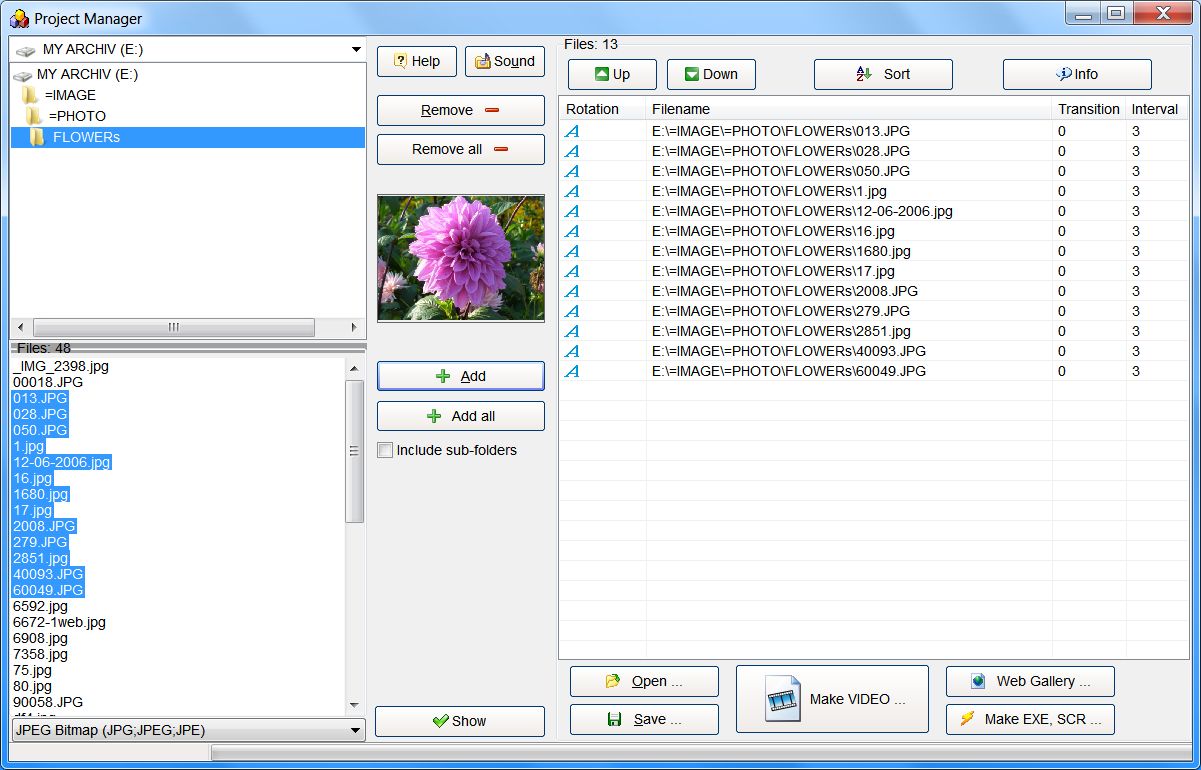
The Project Manager: a folder tree and file list on the left, the 13 pictures in the show on the right with their rotation, transition and interval, and the Make VIDEO, Web Gallery and Make EXE, SCR buttons at the bottom.
Music synchronized to the slides
Able Photo Slide Show plays a playlist of WAV, MIDI and MP3 files behind the pictures and has a "Synchronize slides with audio" option to keep the slides in step with the music. You can also record a voice-over through a microphone and add it to the playlist. MP3 playback relies on an MP3 codec being present in Windows, which current Windows versions include.
Captions, watermarks, Panorama and Zoom
Able Photo Slide Show can show a caption bar with the file name or a description, add a text or image watermark (your studio name or logo) to every slide, and apply Panorama and Zoom effects, the slow pan-and-zoom often called the Ken Burns effect. The Description Manager writes a caption into each JPEG, TIFF, GIF or TGA file itself, so the text travels with the picture.
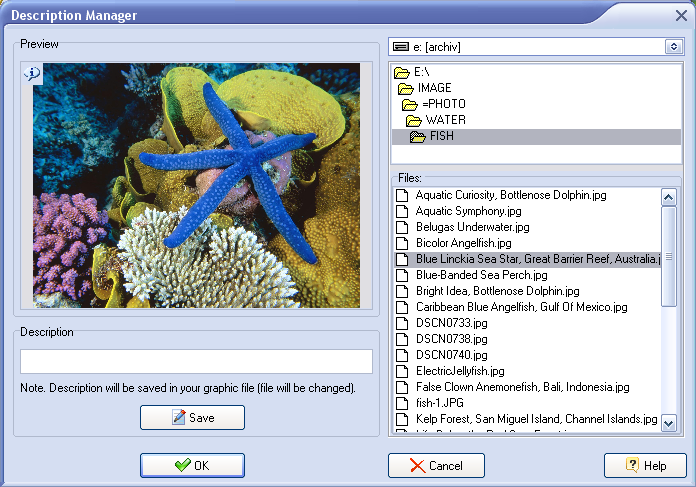
The Description Manager: pick a file on the right, type its description, and Save writes it into the image file.
A built-in image browser for tidying up first
The Browse window in Able Photo Slide Show shows thumbnails of a folder and handles the jobs you usually do before a show: rename, move, copy, delete, rotate, flip, crop and resize pictures, fix red eye, adjust color, keep a favorites list and e-mail files. It also prints a single picture, every picture in a folder, or contact sheets of thumbnails.
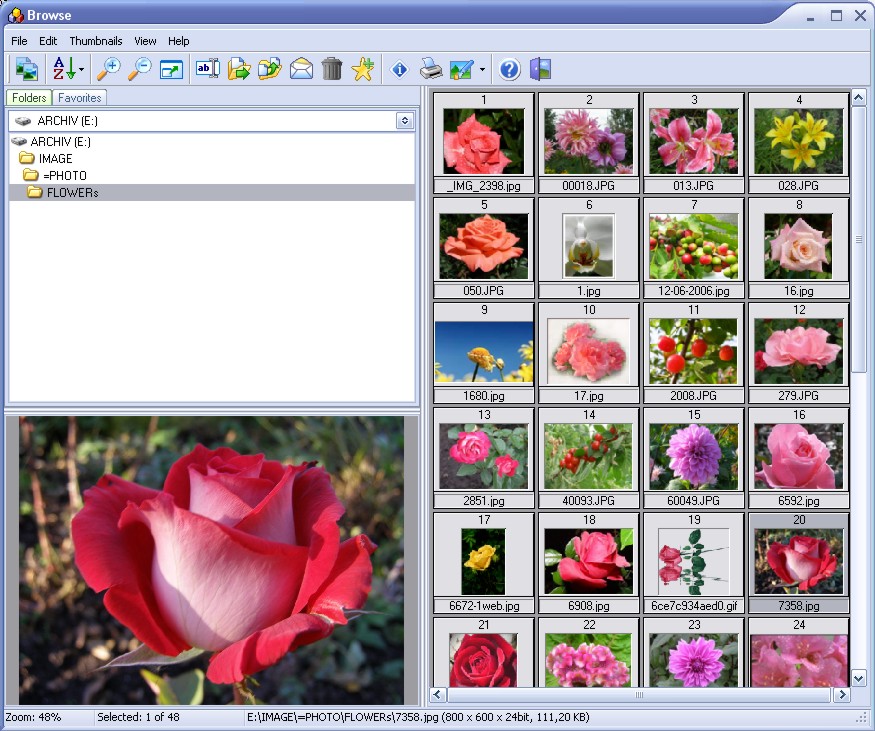
The Browse window (older version): folder tree, a large preview of the selected picture and numbered thumbnails of the 48 files in the folder.
Benefits
- Almost no setup time. A show that runs from a folder doesn't need building, so a party, a memorial or an open day can have photos on screen in minutes.
- Runs unattended. Folder monitoring and the command-line switches turn an old PC and a TV into a display that updates itself.
- Nothing to install for viewers. An EXE show plays on someone else's Windows PC without asking them to install anything.
- One payment. There's no subscription, and the personal license costs less than a month of many online slideshow services.
Real-World Uses
- A digital photo frame from an old laptop or tablet. Point it at a folder of family photos, set random order and full screen, and add the command line to Windows startup.
- A self-updating screen for a club, shop or restaurant. Staff drop new specials, results or sponsor logos into a shared folder, and folder monitoring shows them without anyone touching the display PC (business license).
- A photographer's waiting room. Shots copied off the camera into a watched folder appear on the client screen during the session, already rotated by their EXIF tag.
- An anniversary, reunion or memorial. Hundreds of photos from several folders go into one project with captions and music, then out as an EXE or a video for relatives.
- A classroom or lecture. A timed sequence of maps or diagrams runs alongside a talk, with the caption bar showing what each one is.
Who It's For, and Who Should Skip It
Able Photo Slide Show fits Windows users who want photos on a screen with the least effort: home users running a slideshow on the TV, small businesses and clubs building a cheap digital sign, and anyone who needs a slideshow that someone else can play by double-clicking a file.
Skip it if:
- You're on a Mac or Chromebook. It's Windows only, and an EXE show won't play on a Mac either.
- You want a polished, edited video for YouTube or a wedding. There's no timeline, no titles over video and no per-slide music cues. A video editor or a dedicated slideshow video maker with templates suits that job better.
- You only need a basic folder slideshow at home. GraphicRegion's own Free Photo Slide Show does that at no cost, and Easy Photo Slide Show adds music and folder monitoring for $7.95.
- You manage screens in several locations. A digital-signage service with remote management and scheduling is the better tool once you have more than one or two displays.
Usage Guide
- Install and launch. Download the 31 MB installer from GraphicRegion, run it and open Able Photo Slide Show from the Start menu.
- Set the timing. Click Options. On the Slide Show tab, set "Automatically after" to the seconds each picture should stay up, and pick the transition duration and effect (or "0 - RANDOM").
- Play a folder. Click Open, select a folder, tick Folder monitoring if new pictures will arrive, and click Start, then Full Screen. Esc leaves full screen.
- Add music. Options, Appearance tab, Sound Playback, then Add your MP3 or WAV files. Turn on "Synchronize slides with audio" on the Slide Show tab to fit the show to the music.
- Build a show to share. Click Project, add pictures from any folders, reorder them with Up and Down, and set a rotation, transition or interval per picture.
- Export. In the Project Manager, click Make EXE, SCR for a standalone program or screensaver, Web Gallery for HTML, or Make VIDEO and choose the output folder, resolution, frame rate and video codec.
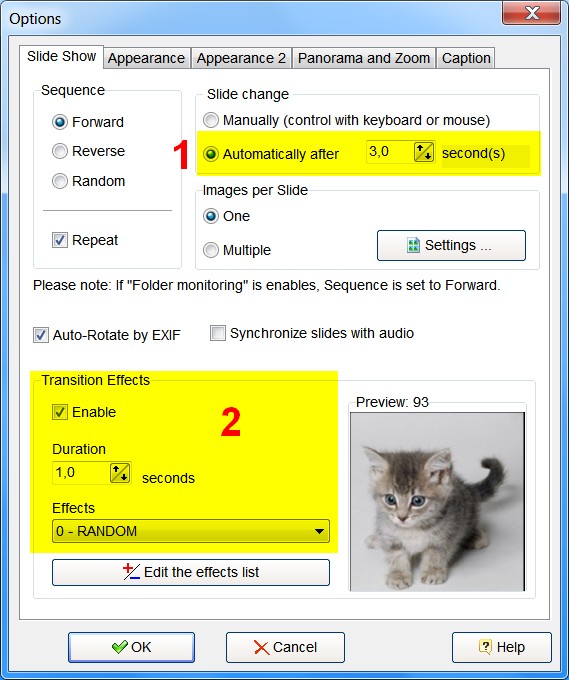
The Options dialog, Slide Show tab: (1) slides change automatically after 3 seconds, (2) transitions are enabled for 1 second with random effects, previewed on the right.
Tips
- Install a codec before making videos. GraphicRegion recommends Xvid or another modern codec. The Make VIDEO dialog lists the codecs Windows has, and the Recommendations button links to free codec packs.
- Remove the grey status line in full screen with Options, Appearance, "Show the status bar" off.
- Show several pictures at once with Options, Slide Show tab, Images per Slide set to Multiple (for example a 2x2 grid).
- Network folders work most reliably when mapped to a drive letter first.
Where it falls short
- Settings are hard to find. GraphicRegion's own FAQ is full of questions from users who couldn't locate the transition speed, the music playlist, captions or the status bar switch. Most answers are three menus deep in Options.
- The interface looks dated. Toolbars, icons and dialogs date from the Windows XP and 7 era, and the vendor's screenshots still show version 2.4 in places.
- Video export depends on your codecs. Quality, file size and even whether a codec works vary with what is installed, and GraphicRegion warns that some video compressors may not work properly.
- EXE shows are Windows only, and some e-mail services and company networks block .exe attachments, so a video is often the safer way to send a show.
- Few independent reviews. Nearly all published feedback is on the vendor's own testimonials page, so try the 30-day trial on your own photos and screen before paying.
What Users Say
Able Photo Slide Show has little coverage on review sites, and none of the big user-review platforms list it. The comments below come from GraphicRegion's testimonials page, which only shows praise, plus two editors' reviews reprinted there. They are useful mainly for showing how people actually use it: digital frames, club and shop displays, and family events.
Displays at clubs, shops and studios
Steve Neunhoffer (testimonials page): "We use the application on a computer that is connected to a 55" screen in the Club's Member's bar. It scrolls through Sponsors Logos, Upcoming events, action photos of the junior squadron on the water, up-to-the-minute bay wind conditions and Club race results. I have written a batch script that copies various files from different folders on different computers into one target folder that the slide show then displays."
Keith Johnson, professional photographer (testimonials page): "I use it to display a slide show of photos in my waiting area as I shoot them." Asked about the most interesting feature: "I like that it monitors a folder and displays them as they appear, and that it auto-rotates them."
Leonard Mattie (testimonials page): "I am mounting a monitor vertically at the entrance an i wanted to show my specials on it. I tried using Powerpoint but it was complicated. I found your software by Googling the keywords "software, slideshow, full screen, simple"." He adds: "It's ease is very impressive."
Home, family and photo frames
Phil G. (testimonials page): "I'm using the software to turn an old and slightly damaged Microsoft Surface Pro 3 into a digital photo frame. I wanted something that would monitor a folder and automatically change the slide show - your software does exactly what I wanted."
Alvin Bruss (testimonials page), after 13 years of RV travel and 13,000+ photos, tried the Windows 10 lock-screen slideshow first: "The Lock Screen Slideshow would fill the screen by cropping photos which we did not like." On this program: "Able Photo Screen Show is doing what we wanted. Great product once I figured it out."
Kel Bradstock, Photos in a Flash (testimonials page): "Absolutely love it, simple effective and very professional. I am able to produce stunning slideshows for family, friends and clients in a matter of minutes. The ability to make an true executable disk is sensational."
Mostyn Krollig (testimonials page): "All I wanted was to point to a folder (or folders) and say, show me the images in this folder. It was an unexpected surprise & delight to find you have the 'Caption' option."
Editors' reviews (reprinted on GraphicRegion's testimonials page)
CNET editors' review: "Software to build slideshows from digital photos is easy to find, but this tool makes the job easier than most. All a user has to do to get started is select a folder where pictures can be found, and the software takes over from there." It concludes: "On the whole, we see this download as a well-designed addition to any digital photographer's set of tools."
3d2f.com editors: "Able Photo SlideShow has a really convenient Project Manager, which allows you to easily select photos from all over your disks, filter them and arrange. It also has Description Manager, which allows providing nice caption texts for your nice photos. Entire projects can be exported to "standalone" slide-shows: application only (.exe) or even screensavers."
The recurring themes
People praise the point-at-a-folder simplicity, folder monitoring for live displays, EXIF auto-rotation, captions and the standalone EXE. The complaints show up indirectly: Alvin Bruss's "once I figured it out" and the long list of "where do I find..." questions in the vendor's FAQ point to settings that take some hunting. Because every comment here was chosen by the vendor, treat them as use cases rather than a balanced verdict.
Comparisons
Able Photo Slide Show vs Easy Photo Slide Show vs Free Photo Slide Show
GraphicRegion sells three versions of the same viewer. Able Photo Slide Show is the full one, and the only one that saves a show as a file.
| Feature | Free Photo Slide Show | Easy Photo Slide Show | Able Photo Slide Show |
|---|
| Price (personal) | Free | $7.95 | $25 |
| Transition effects | 100 | 250 | 250 |
| Several folders at once | No | Yes | Yes |
| Music, folder monitoring, captions, multiple images per slide | No | Yes | Yes |
| Project Manager, watermarks, Panorama and Zoom, audio sync | No | No | Yes |
| EXE, screensaver, web gallery, video export | No | No | Yes |
| Image browser and editing, video clips, animated GIF | No | No | Yes |
If all you want is a looping folder on a screen with music and folder monitoring, Easy Photo Slide Show covers it for a third of the price. Able Photo Slide Show earns its extra cost when you need to hand a show to someone else or edit pictures first.
Editions and Pricing
| License | Price | Term | Allowed use |
|---|
| Personal | $25 | One-time payment, one year of free upgrades | Non-commercial use at home |
| Business | $35 | One-time payment, one year of free upgrades | Corporate, government and business use |
| Graphic Studio bundle | $75 personal, $127 business | One-time payment | Adds Able Fax Tif View and Able Batch Image Converter |
Orders go through PayPro Global, and the registration details arrive by e-mail.
FAQs
Does Able Photo Slide Show work on Windows 11?
Yes. GraphicRegion lists Windows 11 among the supported systems, along with Windows 10, 8, 7, Vista, XP and Windows Server. The program is Windows only, with no Mac or Linux version.
Can I use the personal license for a slideshow in my shop or restaurant?
No. Able Photo Slide Show's $25 personal license is for non-commercial use at home. A display in a business, school, office or government building needs the $35 business license.
What happens after the first year of upgrades?
Able Photo Slide Show keeps working with the version you have. The license includes free upgrades for one year from purchase, and after that GraphicRegion offers newer versions to existing customers at a 50% discount.
Will an EXE slideshow play on a Mac or a smart TV?
No. An EXE slideshow made with Able Photo Slide Show is a Windows program and runs only on Windows PCs. For a Mac, a phone or a TV with a USB port, export the show as a video file instead.
Can Able Photo Slide Show open iPhone HEIC photos?
Yes. Able Photo Slide Show reads HEIC and HEIF through Windows Imaging Component, so the photos show once Windows itself can decode them (on many PCs that needs Microsoft's HEIF Image Extensions). WebP opens without any extra plugin since version 2.26.6.10.
Can I start the slideshow automatically when the PC boots?
Yes. Able Photo Slide Show accepts command-line switches, so a shortcut such as ablephotoslideshow.exe "D:\Photos" /fullscr /start /monitor in the Windows Startup folder opens the folder full screen, starts the show and watches for new pictures.
Does the trial limit the slideshows I make?
Able Photo Slide Show runs for 30 days as a trial, and the unregistered copy shows a DEMO notice. Registering removes the notice, so try it on the same screen and photos you plan to use, then register before making the shows you hand out.
System Requirements
- Windows 11, 10, 8, 7, Vista or XP, or Windows Server
- Pentium 500 MHz processor and 256 MB RAM minimum (any current PC far exceeds this)
- About 31 MB for the installer
- A video codec such as Xvid for video slideshows. An MP3 codec for MP3 music, which current Windows versions include
Conclusion
Able Photo Slide Show is worth $25 if you want photos on a Windows screen with almost no effort, and especially if that screen should run unattended. The one reason to buy it is the combination of point-at-a-folder playback, folder monitoring and command-line start: an old PC and a TV become a self-updating photo frame or notice board in minutes, and the same program can still package a show as an EXE or video for relatives. The main reason not to is that it's an old-style Windows utility. The settings take some hunting, video export depends on your codecs, and there's no Mac version. If you only need a folder slideshow at home, try GraphicRegion's free or $7.95 versions first. For a business display, budget for the $35 business license.
Download Free TrialBuy Now