RonyaSoft CD DVD Label Maker: Disc Labels, Covers and Inserts for Windows
RonyaSoft CD DVD Label Maker is a $19.95 one-time Windows program for people who still burn discs and want them to look finished: it designs and prints CD and DVD labels, DVD and Blu-ray covers, case inserts and paper sleeves. A Home license is for noncommercial use, and a $29.95 Business license covers commercial work.
You have a wedding video, a band demo or a shelf of backup discs with marker scrawled across them. This program gives each one a proper printed label, sized for the sticky label sheets you buy at an office store or for a printer that prints directly on the disc.
Quick facts
- Version: 3.02.29, build dated April 23, 2026. The last version with new features, 3.02, came out in June 2016.
- Developer: RonyaSoft
- Platform: Windows XP through Windows 11, 32-bit and 64-bit. There's no Mac version.
- Price: $19.95 Home, $29.95 Business, $495 Enterprise, all one-time payments with no auto-renewal
- Trial: free with no time limit, but the output carries a watermark
- Guarantee: 30 days, money back
- Delivery: registration key by email, within 5 minutes according to RonyaSoft
- What we checked: the 13.3 MB trial download, whose installer has a valid digital signature, the supported label and printer lists on the vendor's site, and the three license prices on the order page, all on November 7, 2026. We read the program's documentation but didn't install it or print a label.
Before you buy
- Selling labels or using them at work needs the Business license. The Home license is noncommercial only, and RonyaSoft says Business licenses are required for all types of businesses.
- The program is kept available more than it's developed. RonyaSoft's version history ends with 3.02 in June 2016. The current download is a newer build, and the extra template pack was refreshed on July 18, 2026, but don't expect new features.
- Printing on a disc needs a printer that can do it. A regular printer works with label sheets or plain paper. Direct printing needs a disc tray and printable discs.
Download Free TrialBuy Now
Overview
RonyaSoft CD DVD Label Maker is a small desktop layout program built around disc packaging and nothing else. That narrow focus is the reason to use it over a general graphics tool: the shapes, bleed margins, fold lines and label sheet positions are already set up, so you aren't measuring a jewel case with a ruler.
The editor works the way a simple page layout program does. Text, images, shapes and clipart are separate objects you can drag, rotate, layer and fade. The result saves as a project file you can reopen, or as a JPG or PDF for a print shop.
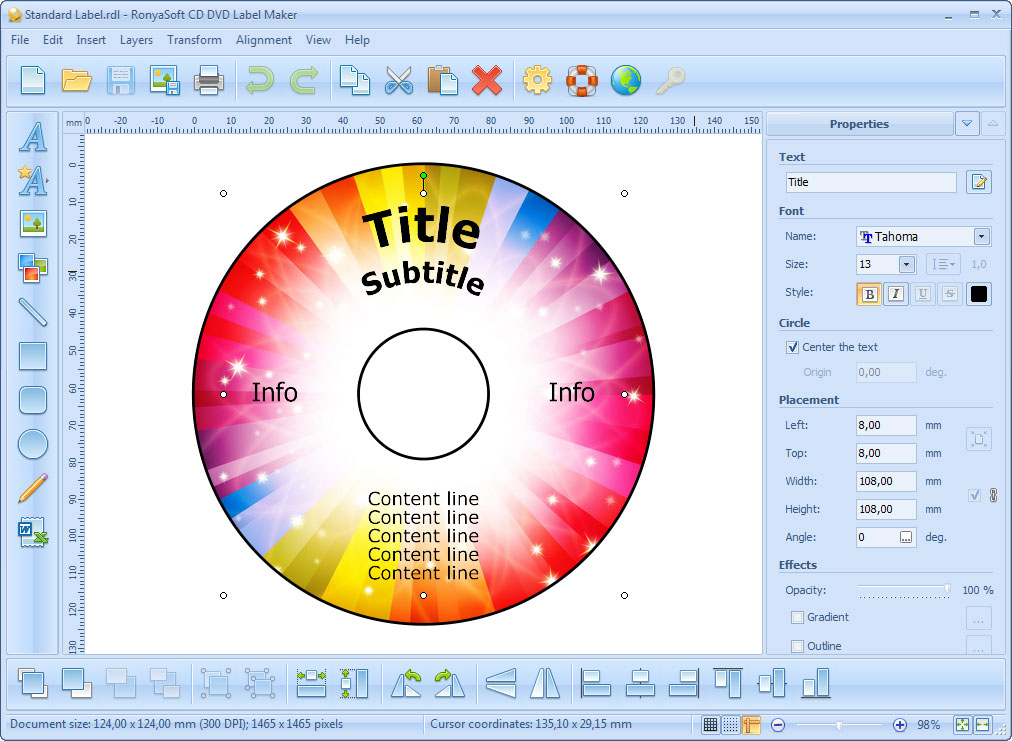
The main window with a Standard Label template open: tools down the left, alignment tools along the bottom, and text, font and placement properties on the right.
Features
Templates for every common disc package
RonyaSoft CD DVD Label Maker includes templates for standard and full-face labels, with or without bleeds, CD front, back and slim inserts, standard and slim DVD covers, US and UK Blu-ray covers, Blu-ray inserts, paper sleeves and origami CD cases. A separate free extra template pack, a 254 MB download, works with both the trial and the paid version.
A template generator for odd sizes
RonyaSoft CD DVD Label Maker has a built-in generator for non-standard layouts, which is how you handle a multi-disc set, a game case such as a Wii or PlayStation 3 cover, or any box the standard templates miss. You set the dimensions and save the result as your own template.
Text that follows the disc
RonyaSoft CD DVD Label Maker sets text along a circle, arc, wave or perspective, so a title can curve around the hub instead of sitting flat across it. You can edit text directly on the canvas and add shadow, outline and gradient effects.

A full-face label for a band, with a curved title and a track list set over a photo. The status bar shows the document at 4.88 x 4.88 inches and 300 DPI.
Backgrounds and clipart in the box
RonyaSoft CD DVD Label Maker comes with a background collection and a clipart library, which RonyaSoft put at more than 3,000 images when version 3.02 launched. You can also paste text, images and Word or Excel data from the clipboard.
A long list of label sheets and disc printers
RonyaSoft CD DVD Label Maker knows the positions on roughly 400 label stock products, from brands including Avery, Neato, Memorex, PressIt and Zweckform. Its printer list runs to about 350 models, mostly Canon, Epson and HP, for printing straight on the disc.
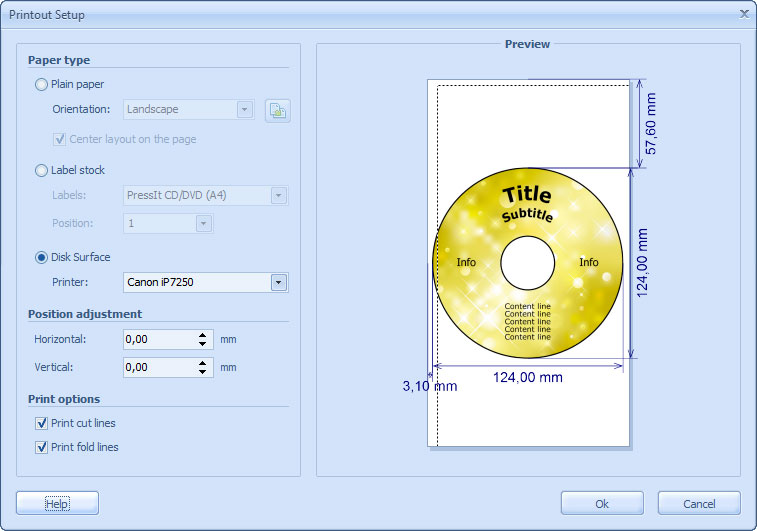
Printout Setup offers plain paper, label stock or the disk surface, with horizontal and vertical position adjustment and optional cut and fold lines.
Benefits
- Less wasted label stock. Sheet presets and position adjustment mean you aren't working out the layout by trial and error on sheets that cost money.
- No design software to learn. You don't need Photoshop or Corel, and you don't need to look up what size a slim DVD cover is.
- One payment. A hobbyist labelling a few discs a year isn't paying a monthly fee for it.
Real-World Uses
- A band's demo run: a full-face disc label, a jewel case insert and a track list, printed at home in matching artwork. This one needs a Business license if you're selling the discs.
- Family video archives: a set of DVDs with covers showing the year and the event, so nobody has to play each disc to find the wedding.
- Office backups: a plain, consistent label for archive discs, saved as your own template so every disc matches.
- Gifts: a paper sleeve or an origami CD case for a mix disc, which needs nothing more than plain paper and a printer.
- Print shop jobs: a design saved as PDF or JPG, then handed to a shop for a higher quality run.
Who It's For, and Who Should Skip It
This suits Windows users who make a modest number of discs and want them neatly packaged: musicians, videographers, small offices and hobbyists with a disc collection. It also fits anyone with an older Canon or Epson disc-printing printer that still works.
Skip it if you're on a Mac, since there's no Mac version. Skip it too if you need to merge a list of names or serial numbers onto a batch of labels: RonyaSoft lists no data merge feature, so a label program that has one will serve you better. And if you already design in a full graphics application, a downloaded template for it may be all you need.
Usage Guide
- Download the trial, open the zip file and run the installer. The program starts automatically when installation finishes.
- Pick a template from the startup screen, or use the Template Generator for a custom size.
- Click each text object and replace the title and description. Add your images and align them with the other elements.
- Set a background image, or choose one from the built-in collection.
- Open Printout Setup and choose plain paper, label stock or the disc surface. For label stock, pick your product and which position on the sheet to print.
- Print on plain paper first and hold it against the sheet to check alignment, then print on the real stock.
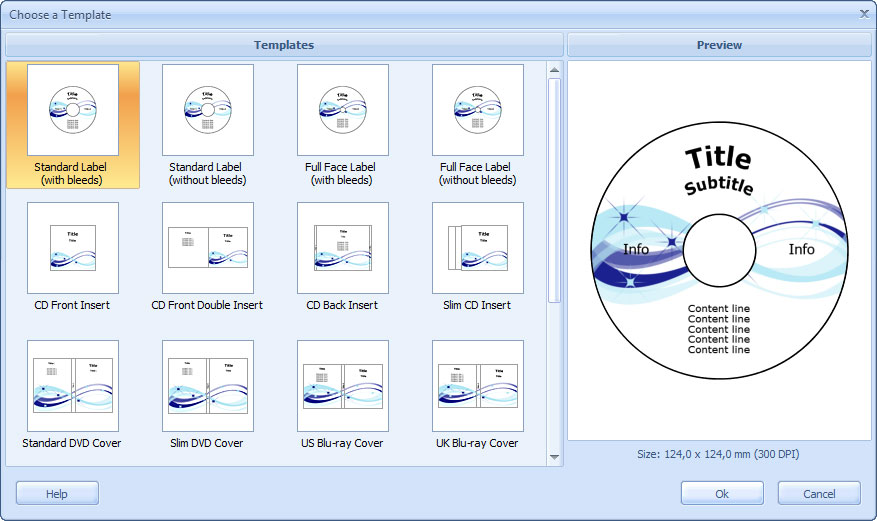
The Choose a Template dialog, with label, insert, DVD cover and Blu-ray cover layouts and a preview on the right.
Where it falls short
- One label per print run. RonyaSoft's FAQ says you can't print two labels on a sheet at the same time. You print the first, feed the same sheet back in and print the second.
- Print settings don't stick. Printer choices last for one session unless you change the Windows defaults, and paper settings have to be entered for each new project unless you save it as a template.
- Disc printing takes one extra step. You have to switch the printer's feed to the disc tray in the printer properties. If you only tick Disk Surface in the program, the job comes out on paper.
- Unlisted paper means editing a file. For a label sheet or printer that isn't listed, you can adjust the position by hand on plain paper settings or copy and edit an INI file. Neither is hard, but it's not a friendly dialog.
- The help is dated. Requirements and folder paths in the documentation still refer to older Windows versions, and the requirements list stops at Windows 10, though the product page lists Windows 11.
What Users Say
Independent feedback on this program is scarce, so this section is short.
AlternativeTo
The one user review there, by Anna Krovich in November 2018, is positive: "The favourite CD label software for me. Support and well work on Win 10 and my two printers". The site shows it as a low-activity account and doesn't count it toward the app's rating.
RonyaSoft's own site
These two come from the vendor, so they're the comments it chose to show. Joey Harri of Washington, USA: "I'm very impressed with your software and it's wonderful to make labels with it. Please keep up the great work!" Dennis Austerlitz of Berlin, Germany: "Used to make own templates in Publisher some years ago. Now I'm cutting corners with a smart program like yours!!!"
The theme is that it's easy and does the job, but a handful of short comments can't tell you much. RonyaSoft also lists 5-star badges from download sites, and those aren't reviews in any useful sense. Run the trial on your own printer instead: it will tell you more than any of these.
Comparisons
Label stock vs plain paper vs printing on the disc
Label stock is the way to get a full color label if your printer has no disc tray, and it's what the sheet presets are for. Peel it, and put it on carefully or with a labeller. Plain paper is right for inserts, covers, sleeves and origami cases, and for test prints. Printing on the disc gives the cleanest result, with no sticker to peel or unbalance the disc, but it needs a supported printer and printable discs.
Editions and Pricing
All three licenses are the same program. They differ in who may use it and on how many computers.
| License | Price | Use | Computers | Registered to |
|---|
| Home | $19.95 | Noncommercial only | 1, for all its users | User's name |
| Business | $29.95 | Commercial | 1, for all its users | User or company |
| Enterprise | $495.00 | Commercial or noncommercial | Unlimited, in one organization | Company |
Buy Home ($19.95)Buy Business ($29.95)Buy Enterprise ($495)
FAQs
Does RonyaSoft CD DVD Label Maker work on Windows 11?
RonyaSoft lists Windows 11 as compatible on the product page, alongside XP through 10. Its older requirements pages stop at Windows 10. The free trial is the easy way to confirm it on your PC and printer before paying.
Does the RonyaSoft CD DVD Label Maker trial expire?
No. The license agreement lets you use the unregistered copy for an unlimited time. The catch is the watermark on your output, which a license key removes.
Why are the bleed templates bigger than a real CD?
RonyaSoft CD DVD Label Maker's bleed templates add 4 mm at the inner and outer edges to hide small centering errors when you print on label stock. If you don't need that margin, choose the template version without bleeds.
Can I use RonyaSoft CD DVD Label Maker for discs I sell?
Yes, with a Business license. The Home license is noncommercial only, and the extra cost is $10 over the Home price.
What are the standard CD label dimensions?
RonyaSoft gives 116 mm outside and 45 mm inside diameter for a standard CD label, and 21 mm inside for a full-size label. CD front inserts are 120 x 120 mm and back inserts 151 x 118 mm.
Can I open a RonyaSoft label on another computer or at a print shop?
Label projects use RonyaSoft's own .rdl format. To print elsewhere, save the design with File, Save As Image/PDF, and hand over the JPG or PDF.
How do I get the license after paying?
RonyaSoft sends a registration key by email, and it says this arrives within 5 minutes. Orders run through PayPro Global, and you enter the key in the trial you've already installed.
System Requirements
- Windows XP, Vista, 7, 8, 10 or 11, 32-bit or 64-bit
- Pentium III 1500 processor or better
- 512 MB of RAM
- 100 MB of disk space, plus 254 MB for the optional extra template pack
- A regular printer or a CD/DVD label printer
Conclusion
RonyaSoft CD DVD Label Maker is worth $19.95 if you make discs at home and want tidy labels and covers without learning a design program. The one reason to buy it is the ready-made sizing: templates, label sheet presets and printer positions that spare you the fiddly measuring. The main reason not to is that it's a finished product, not a growing one, with no new features since 2016 and a few clumsy print settings. Commercial users should budget $29.95. Since the trial never expires, print a watermarked test on your own stock first, and buy only if the alignment comes out right.
Download Free TrialBuy Now