RonyaSoft Poster Printer: Big Posters from an Ordinary Printer
RonyaSoft Poster Printer is a $19.95 one-time Windows program that splits an image across as many sheets as it needs, so a home or office printer can produce posters, banners and murals up to 10 x 10 meters. A Home license is for noncommercial use, and a $29.95 Business license covers commercial work.
A print shop wants real money for one large poster you need by Saturday. Your printer only takes Letter or A4, but the party banner doesn't have to be one piece of paper. Print it in sections, trim them, glue or tape them together, and it's on the wall.
Quick facts
- Version: 3.02.29, build dated April 23, 2026. The last version with new features, 3.02, came out in October 2015.
- Developer: RonyaSoft
- Platform: Windows XP through Windows 11, 32-bit and 64-bit. There's no Mac version.
- Maximum size: 10 x 10 meters
- Price: $19.95 Home, $29.95 Business, $495 Enterprise, all one-time payments with no auto-renewal
- Trial: free, but it prints only the first three pages of a poster
- Guarantee: 30 days, money back
- What we checked: the 5.6 MB trial download, whose installer has a valid digital signature, the license terms inside it, and the three license prices on the order page, all on November 7, 2026. We read the program's documentation but didn't install it or print a poster.
Before you buy
- Your image sets the quality. Enlarging a small photo to wall size gives you a large, blurry photo. RonyaSoft's own tutorial tells you to start from a high-resolution image without fine detail.
- Count the cost of ink and paper. A big poster takes a lot of sheets. PCWorld worked out about 1,400 letter-size pages for a 32-foot print, and a home printer's cartridges can run dry on a job far smaller than that.
- Work use needs the Business license. The Home license is noncommercial only, and Business licenses are required for any commercial enterprise, whatever its size.
- The program is kept available more than it's developed. RonyaSoft's version history ends with 3.02 in October 2015, so expect a newer build of the same program, not new features.
Download Free TrialBuy Now
Overview
RonyaSoft Poster Printer does one job, which is why it's so simple. The left side of the window is a numbered list of seven steps, from choosing an image to pressing Print, and the right side shows your poster with the page grid drawn over it. Change the size and you see at once how many sheets it will take.
This is a printing tool and not a design tool. You bring the picture. If you want to build the artwork too, with text, templates and clipart, that's RonyaSoft's separate Poster Designer, which can send its work to this program.
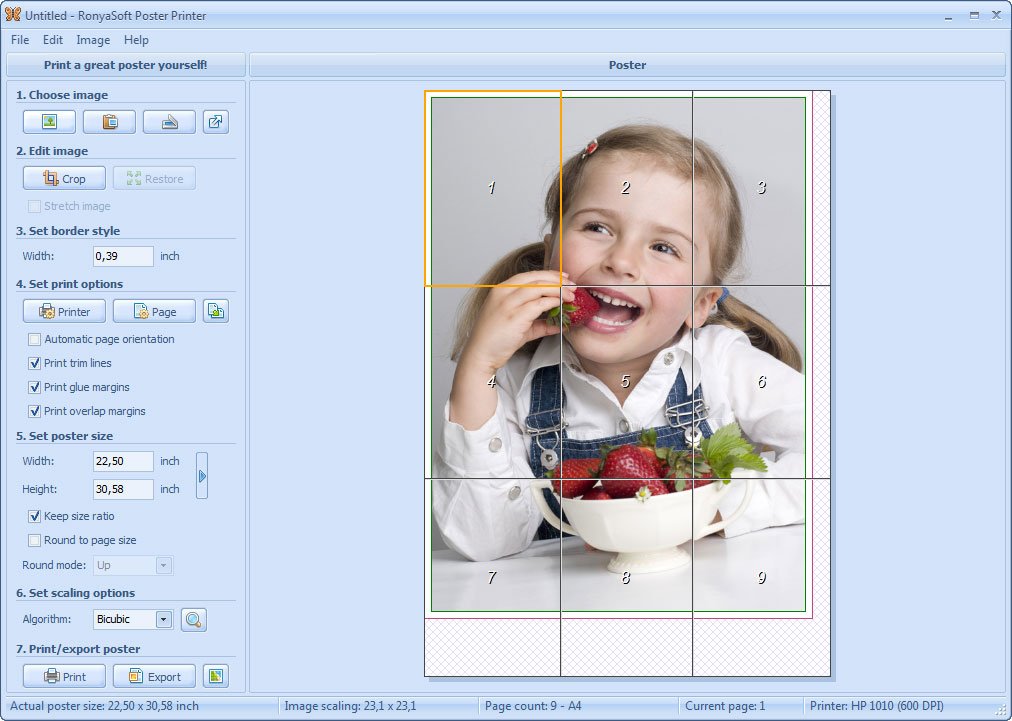
The main window with its seven numbered steps on the left. This 22.5 x 30.58 inch poster takes nine A4 pages, as the status bar shows.
Features
Automatic page splitting
RonyaSoft Poster Printer works out the number of pages from the poster size, your paper and your print settings, then slices and resamples the image to match. Its Round to page size option fills whole sheets and centers the poster, so you don't waste part of a row.
Trim lines, glue margins and overlap
RonyaSoft Poster Printer can print trim lines, glue margins and overlap margins on every sheet, which is what makes assembly practical. Overlap margins repeat a strip of the image, so the seams are easier to line up and rough trimmed edges are easier to hide.
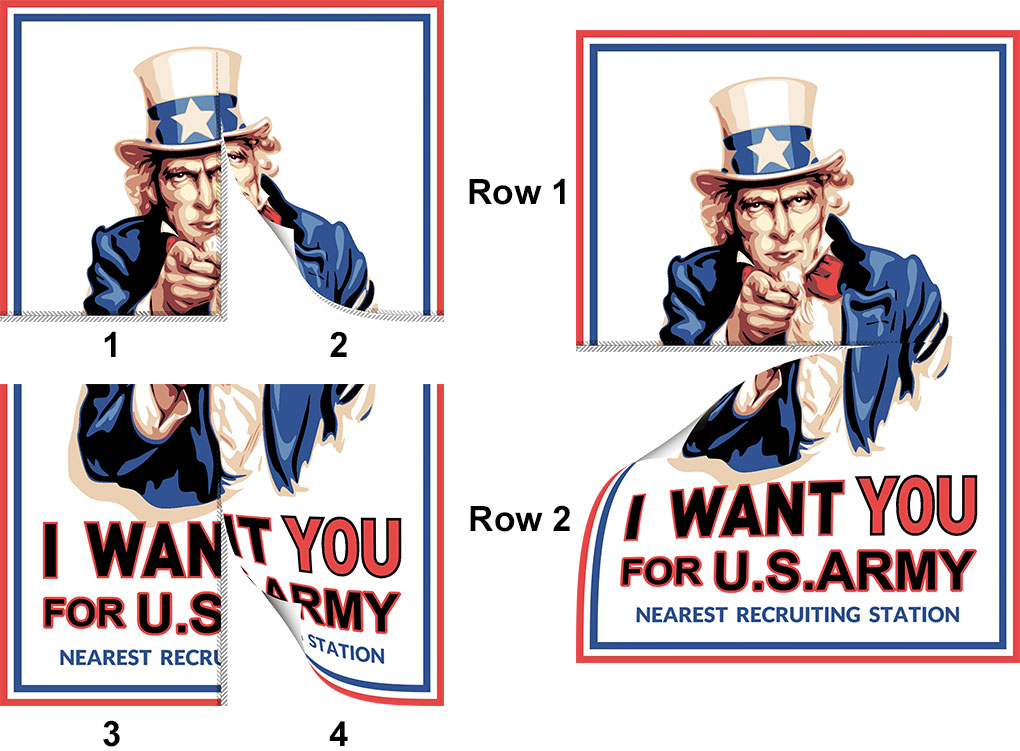
From RonyaSoft's tutorial: four sheets are joined into two rows, then the rows are joined into the finished poster.
Sources beyond photo files
RonyaSoft Poster Printer opens BMP, GIF, JPG, PNG and TIFF images and WMF and EMF vector files. It also takes input from a scanner or camera through TWAIN, and anything you can copy to the clipboard, which is how Word, Excel and PowerPoint content gets in.
A choice of scaling methods
RonyaSoft Poster Printer offers Bilinear, Bicubic, Hermite and Lanczos resampling and shows a 1:1 preview of the result, so you can compare them before using up paper. That preview is the best place to spot a picture that won't survive the enlargement.

Image Scaling Setup with the Lanczos algorithm selected. The large preview shows the printed result at 1:1 scale.
Reprint only what you need
RonyaSoft Poster Printer supports partial printing, so one smudged sheet doesn't mean running the whole poster again. Posters can also be saved as projects and reopened, or saved as PDF, JPG, PNG or TIFF to send to a print shop.
Paper sizes from A5 to A0
RonyaSoft Poster Printer works with regular printers using US Letter, A5, A4 or A3 paper and with plotters using A2, A1 or A0. It has predefined poster sizes, accepts metric and imperial measurements, and supports printers from HP, Canon, Epson, Lexmark, Brother and others.
Benefits
- A one-off poster stays cheap to make. After the license, the cost of each job is paper, ink and glue.
- You can print the same day. There's no waiting for a shop to open or a delivery to arrive.
- Cheap proofs. As PCWorld pointed out, a rough full-size print on office paper lets you judge a sign or display before paying for the real one.
Real-World Uses
- Party banners: a "Happy Birthday" strip several sheets long, taped together the morning of the event.
- Classroom or office walls: a map or chart big enough to read from across the room, pasted from a document or image.
- Murals: a favorite photo across a whole wall, with the pages glued straight to the wall.
- Engineering prints: a large CAD drawing or diagram laid out at size for a review.
- Stencils: an outline enlarged to full size for painting or stitching.
Who It's For, and Who Should Skip It
This is a good fit for Windows users who occasionally need something large and have a decent printer: parents, teachers, clubs, small shops and anyone who wants a mural on a budget. The step-by-step layout means a first poster doesn't call for any graphics knowledge.
Skip it if your source is already a PDF, because PDF isn't among the file types it opens, and the free Adobe Acrobat Reader has a Poster print option that tiles a PDF across pages. Skip it too if you want a professional finish: a joined poster shows its seams, so anything customers will judge your business by belongs at a print shop. There's no Mac version.
Usage Guide
- Download the trial, open the zip file and run the installer.
- Load your image from a file, the clipboard, a scanner or camera, or by dragging it in. Crop it if needed.
- Set the border width. Use 0 for no border.
- Choose your printer and page settings, then tick Print trim lines, Print glue margins and Print overlap margins.
- Enter the poster size. Tick Keep size ratio to avoid distortion and Round to page size to fill whole sheets. The status bar shows the page count.
- Choose a scaling algorithm and check the 1:1 preview.
- Print, then trim the margins and splice the sheets together, row by row.
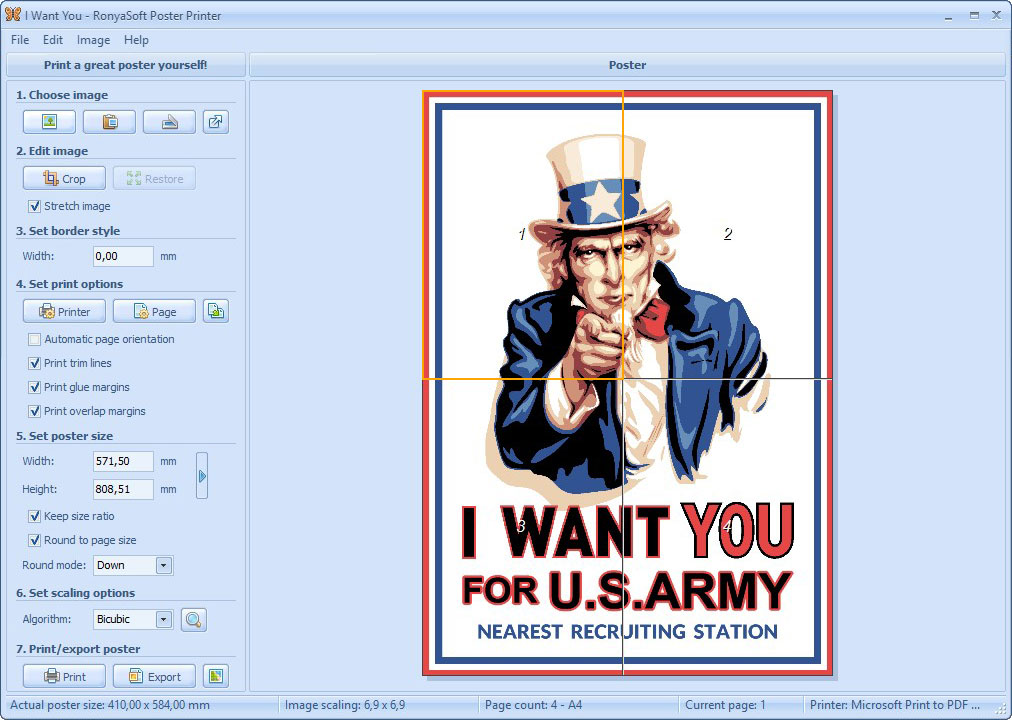
With Round to page size ticked, this poster fills four A4 sheets. The status bar shows the actual size of 410 x 584 mm.
Where it falls short
- No print preview window. It was removed in version 3.01. RonyaSoft's suggestion is to save the poster as a PDF and look at that instead.
- No PDF import. PCWorld wished for it in 2011, and PDF still isn't in the supported file list. Vector support is limited to WMF and EMF, so SVG and AI files need converting first.
- No warning about low resolution. PCWorld found that it doesn't warn you when an image is too small for the size you've set. Check the 1:1 preview yourself.
- Printer quirks are yours to solve. RonyaSoft's FAQ covers color shifting from page to page, cropped images and uneven margins, and the fixes involve turning off printer enhancements, adjusting margin values or straightening the paper tray.
- The trial proves less than you'd like. Three pages can show you the output quality, but not a whole poster.
What Users Say
This program has one solid independent review and little else, so the section is short.
PCWorld (Clare Brandt, March 2011)
This review is old, but it covers the program's core job, which hasn't changed. On the appeal: "RonyaSoft Poster Printer is an indispensable tool to help you create informal banners and posters for your next surprise party, or oversized display materials for a business meeting."
On assembly: "Assembling the poster isn't as bad as it sounds, since RonyaSoft Poster Printer adds glue- and crop-marks to ease reassembly."
On the costs and limits: "Not all images will be of sufficient resolution for the largest magnifications, and RonyaSoft Poster Printer doesn't warn you when you've resized an image of an original resolution too low to avoid pixelation the size of Lego bricks."
And the verdict: "Weighing the costs of in-house consumables versus Kinkos, RonyaSoft Poster Printer is a viable alternative, and so simple it gets the job done with minimal effort."
SnapFiles
SnapFiles gives it an editor's rating of 4 stars. It has no user reviews there yet.
RonyaSoft's own site
This one comes from the vendor, so it's a comment it chose to show. Eli Reuel of Los Angeles, USA: "RonyaSoft's Poster Printer is better and easier to use than other software programs I have tried!"
The recurring themes are simplicity and value, with resolution and consumables as the warnings. The trial's three pages are enough to test your own printer's color and alignment.
Comparisons
RonyaSoft Poster Printer vs The Rasterbator
The Rasterbator is a free tool that enlarges an image across pages and gives you a multi-page PDF to print. If you only make a poster now and then, try it first. RonyaSoft Poster Printer earns its price with offline use, a choice of scaling methods, clipboard and scanner input, and glue and overlap margins you control.
RonyaSoft Poster Printer vs Adobe Acrobat Reader's Poster option
Adobe Acrobat Reader tiles a PDF across pages for free from its Print dialog. It only prints PDFs, so a photo has to be converted first. RonyaSoft Poster Printer starts from an image and handles the sizing for you.
RonyaSoft Poster Printer vs a print shop
A print shop gives you one continuous sheet and needs nothing from you but a file. Printing at home costs time, paper, ink and glue, but it pays off for informal jobs and proofs. PCWorld's point stands: it's "a viable alternative", not a replacement.
Editions and Pricing
All three licenses are the same program. They differ in who may use it and on how many computers.
| License | Price | Use | Computers | Registered to |
|---|
| Home | $19.95 | Noncommercial only | 1, for all its users | User's name |
| Business | $29.95 | Commercial | 1, for all its users | User or company |
| Enterprise | $495.00 | Commercial or noncommercial | Unlimited, in one organization | Company |
Buy Home ($19.95)Buy Business ($29.95)Buy Enterprise ($495)
FAQs
Does RonyaSoft Poster Printer work on Windows 11?
RonyaSoft lists Windows 11 as compatible at the top of the product page, though its older requirements text stops at Windows 10. Run the trial and print a few pages to confirm it with your PC and printer.
Can RonyaSoft Poster Printer print borderless?
RonyaSoft Poster Printer can, if your printer supports borderless printing. You have to calibrate the printer driver with its own tools, then keep Detect automatically enabled in the Page setup dialog. Most printers have an unprintable edge, so otherwise you trim the white margins off.
Can I print a Word document as a poster?
Yes, by copying. Select what you need in Word, copy it to the clipboard and paste it into RonyaSoft Poster Printer. The same applies to other standard Windows applications.
Do I need a printer connected to use RonyaSoft Poster Printer?
No. Working without a printer installed has been supported since version 2.01, and you can save the result as a PDF or image to print somewhere else.
How do I join the sheets of a RonyaSoft poster?
RonyaSoft describes three ways: glue overlapped pages together for a standard poster, glue the pages directly to the wall, or fix them with adhesive tape. For the first, trim the left and top margins from every page except the topmost and leftmost ones, then join the sheets in rows.
Can I add my own poster sizes?
Yes. RonyaSoft Poster Printer reads custom size templates from a SizeTemplates.txt file in its application data folder, and the file contains its own instructions.
Can everyone on one PC use a single license?
Yes. A Home or Business license covers one computer and all of its users. Enter the registration data while running the program with administrator privileges, and it offers to register for all users.
System Requirements
- Windows XP, Vista, 7, 8, 10 or 11, 32-bit or 64-bit
- Pentium III 1500 processor or better
- 512 MB of RAM
- 100 MB of disk space
- A regular printer (US Letter, A5, A4 or A3) or a plotter (A2, A1 or A0)
Conclusion
RonyaSoft Poster Printer is worth $19.95 if you print large posters from images more than once or twice. The one reason to buy it is control over the parts that make a tiled poster work: trim and glue margins, overlap, page rounding and scaling, in a layout anyone can follow. The main reason not to is that free tools handle a simple one-off job, and this program hasn't gained a feature since 2015. For occasional use, start with a free tool. If you want better control of the seams, or you print often, this is the better tool. Commercial users need the $29.95 Business license.
Download Free TrialBuy Now