BatchOutput PDF: Drop PDFs in a Folder and They Print Themselves
BatchOutput PDF is a $24.95 Mac app from Zevrix Solutions that prints PDF files automatically: drop them into a watched "hot folder" and they print in the background with that folder's printer and settings. It's for print shops, offices and designers who print many PDFs a day with recurring settings. A Server edition at $99.95 lets unlimited users on a network submit files through shared hot folders.
Printing PDFs one at a time on a Mac means open, Print, pick the printer, set the paper, copies and duplex, click Print, close, repeat. With a few hundred files a week, or the same five settings over and over, that's an afternoon gone. BatchOutput PDF turns each combination of settings into a folder.
Quick facts
- Version: BatchOutput PDF 3.1.8
- Developer: Zevrix Solutions
- Platform: macOS 10.13 to macOS 27, native on Intel and Apple Silicon; no Windows version
- Editions: BatchOutput PDF ($24.95, one Mac, local hot folders) and BatchOutput PDF Server ($99.95, unlimited network users)
- License: one-time payment, perpetual
- Trial: 30 days, fully working
- Refunds: 30-day money-back guarantee for technical problems or software that doesn't work as advertised
- What we checked: the trial download BatchOutputPDF.dmg (27.1 MB, version 3.1.8 on the download page) and order page prices of $24.95 for BatchOutput PDF and $99.95 for BatchOutput PDF Server, both lifetime licenses, on November 22, 2026. We didn't print with it.
Download Free TrialBuy BatchOutput PDFBuy BatchOutput PDF Server
Overview
BatchOutput PDF is built around print presets. A preset holds everything you'd set in the Print dialog: printer, copies and collation, page range, shrink to fit, paper size, orientation and scale, pages per sheet and layout direction, border, two-sided printing, paper source for the first and remaining pages, and the printer's own features. Each hot folder uses one preset. Drop a PDF in and BatchOutput PDF queues it, prints it in the background while you keep working, then moves it to a success or error folder and logs it in the History list, from which any file can be reprinted.
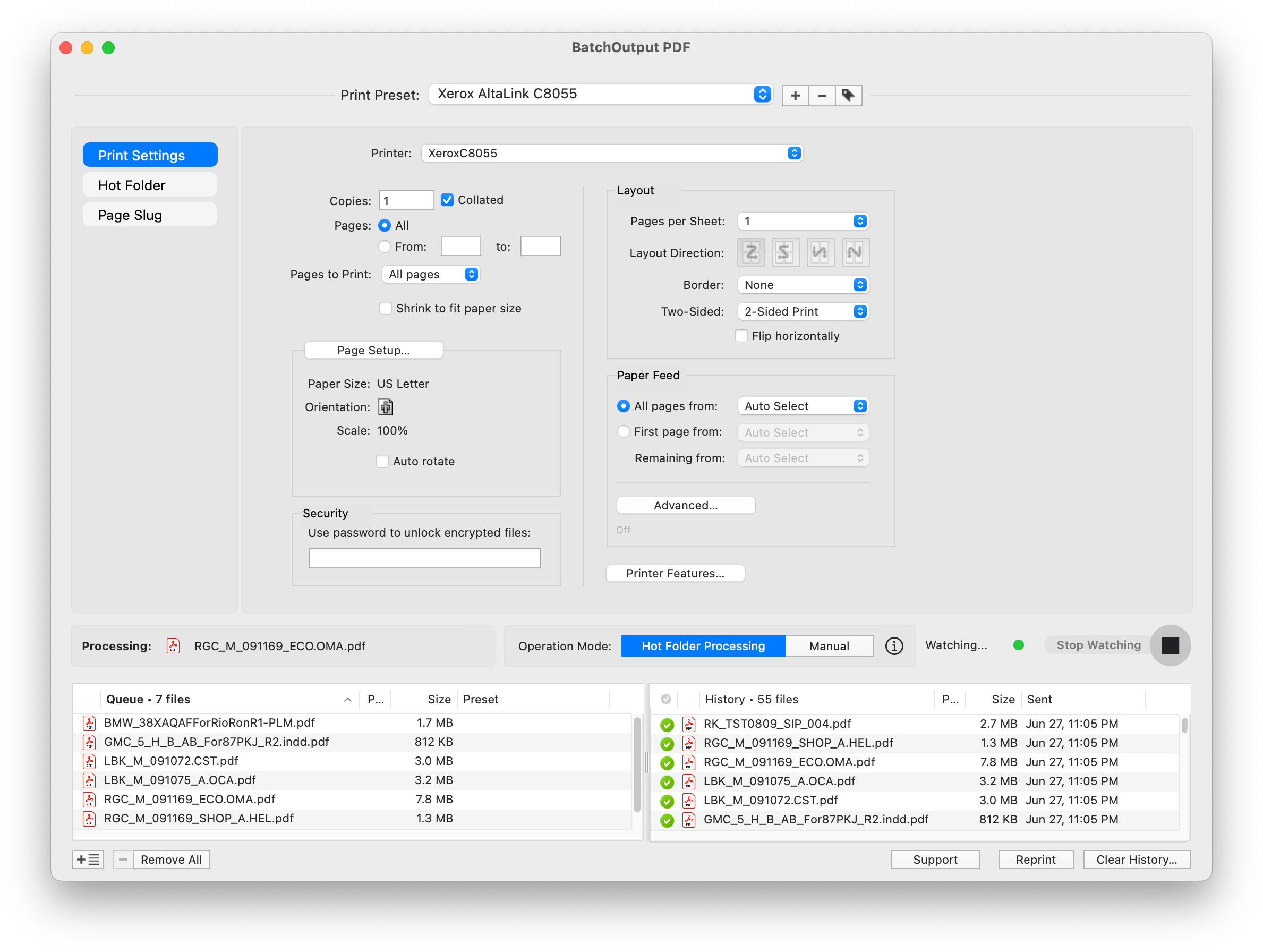
The BatchOutput PDF window: a print preset for a Xerox printer, layout, two-sided and paper feed settings, Hot Folder Processing mode watching, and the queue and history of printed files.
Features
Hot folders for every printing setup
BatchOutput PDF lets you set up one hot folder per setup, for example "Color printer, Tabloid at 100%" and "B&W printer, A4, shrink to fit". Anything dropped in a folder prints with its settings, and printed files move to success or error folders so you can see at a glance what went through.
Manual mode for one-off batches
BatchOutput PDF's Manual mode, new in version 3, skips hot folders: drop files on the app and print them with the selected preset, sorted by file name, so a set of PDFs comes out in the order you expect.
Page slugs from variable tokens
BatchOutput PDF can print a slug line on each page, built from tokens such as file name, file path, page number or label, printer, user name, computer name, date and time, with separate content on the left and right. That makes every proof traceable to the file and printer it came from.
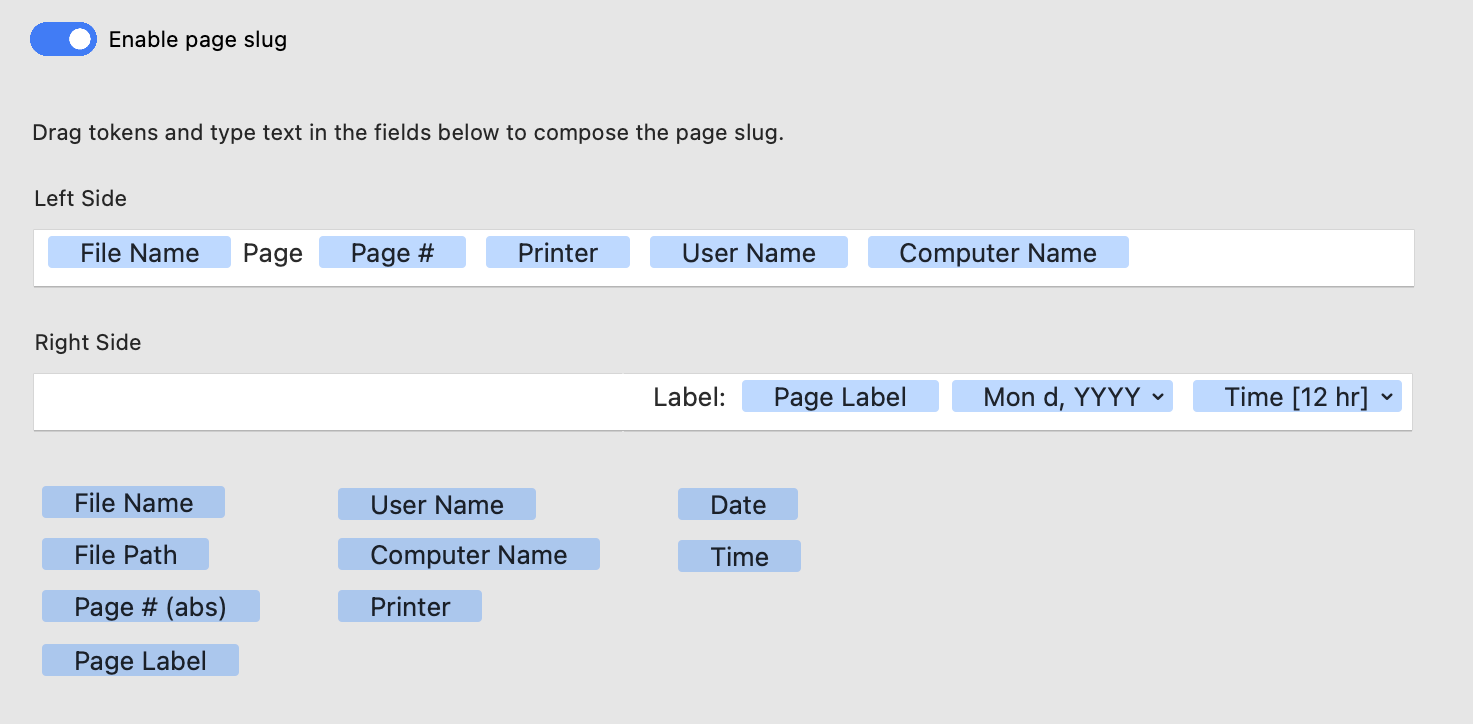
Page slug setup: tokens for file name, page number, printer, user and computer name on the left side, and page label, date and time on the right.
Encrypted PDFs and history
BatchOutput PDF can store a password to open encrypted PDFs as they arrive, and keeps a history of every printed file with its page count, size and time sent, with Reprint and Clear History buttons.
A print server for a workgroup (Server edition)
BatchOutput PDF Server can watch hot folders on network volumes, so anyone on the network, on any platform, can submit PDFs by copying them into a shared folder, and one copy of the app serves unlimited users. The single-user edition can't use hot folders on network volumes.
Benefits
- No more Print dialogs. Settings are chosen once, per folder, and reused forever.
- Fewer wrong prints. The color job can't go to the mono printer by accident when each printer has its own folder.
- Work keeps going. Printing runs in the background.
- Cheap automation. $24.95 for one Mac, $99.95 for a whole team.
Real-World Uses
- A print shop routes thousands of prints a week to the right printers with the right settings, from one place.
- A design studio drops client proofs into a "Proof, tabloid, slug" folder so every page carries the file name, date and time.
- An office runs the Server edition on one Mac and lets Windows and Mac colleagues print duplex handouts by dropping PDFs on a network share.
- A school prints a stack of worksheets in Manual mode in file-name order.
Who It's For, and Who Should Skip It
BatchOutput PDF is for anyone on a Mac who prints PDFs in volume or with repeated settings: print shops, prepress, studios, schools and offices. The Server edition suits teams that want a simple drop-folder print service without a print server product.
Skip it if you print the odd PDF, or if you're on Windows. If the files you print are InDesign documents rather than PDFs, Zevrix's Output Factory handles InDesign output; for Word, Excel and PowerPoint files there's BatchOutput Office.
Usage Guide
- Install the trial. Download BatchOutputPDF.dmg, open it and copy BatchOutput PDF to Applications. It runs fully for 30 days.
- Create a print preset. Click + next to Print Preset, choose the printer, then set copies, pages, paper, layout, two-sided and paper feed, plus Printer Features if you need them.
- Assign a hot folder. On the Hot Folder tab, pick or create the folder this preset watches, and the success and error folders.
- Add a slug on the Page Slug tab if you want one.
- Start watching. Choose Hot Folder Processing and start watching, then drop PDFs into the folder. For a one-off batch, switch to Manual, drop the files and click Print.
- Register. After purchase, enter the serial number you receive to turn the trial into the full version.
Where it falls short
- PDF only. It prints PDF files; other formats need converting first, or another Zevrix tool.
- Network hot folders need the Server edition. The $24.95 edition only watches folders on the Mac it runs on.
- Older macOS needs version 2. Version 3 starts at macOS 10.13; BatchOutput PDF 2 (macOS 10.9 to 13) is the legacy build.
- App Store copies don't upgrade cheaply there. Apple offers no discounted upgrades, so App Store owners either rebuy on the App Store or contact Zevrix for a 50% upgrade to the direct version.
- Refunds aren't for change of mind. The 30-day guarantee covers technical problems, so use the trial.
What Users Say
Quoted on Zevrix's product page
"This is one of those Apps that you never knew you needed until you spend a day using it. If you handle a large number of PDFs daily this will save you time, without a doubt." Glen Saville, Graphic Designer, Hornchurch, UK
"The cost is very low compared to the power this app has. We produce thousands of prints every week and direct them to the right printers with the correct settings. To be able to make adjustments in one place for every workflow is easy and efficient." Mark Lenaerts, ZwartOpWit Printing, Herenthout, Belgium
Both quotes come from the vendor's page, so expect praise. They point at the same two strengths: time saved on volume printing and keeping every printer's settings in one place.
Comparisons
BatchOutput PDF vs BatchOutput PDF Server
Both editions have the same printing features. BatchOutput PDF ($24.95) serves one user on one Mac and can't use hot folders on network volumes. BatchOutput PDF Server ($99.95) adds hot folders on network volumes, so unlimited users across the network, on any platform, submit files to one installation. Owners of the single-user edition can upgrade to Server for $75 through Zevrix.
BatchOutput PDF vs printing from Preview
macOS Preview can print several open PDFs, but you still choose settings in the Print dialog each time and can't watch a folder or stamp slugs. BatchOutput PDF's value is saved presets, folders that print by themselves, slugs and a printed-file history.
Editions and Pricing
| Edition | Price | Users | Network hot folders | Buy |
|---|
| BatchOutput PDF | $24.95, perpetual | One Mac station | No | Buy Single |
| BatchOutput PDF Server | $99.95, perpetual | Unlimited users on a network | Yes | Buy Server |
Upgrades from version 2 cost $12.47 (single) or $49.97 (Server) through Zevrix.
FAQs
Does BatchOutput PDF run on Apple Silicon Macs and macOS Tahoe?
Yes. BatchOutput PDF 3 runs natively on Intel and Apple Silicon Macs and supports macOS 10.13 through macOS 27.
Can Windows users print through BatchOutput PDF Server?
Yes. BatchOutput PDF Server watches hot folders on network volumes, and operators can submit PDFs from any machine on the network, whatever its platform, by copying files into those folders.
Is BatchOutput PDF also on the Mac App Store?
Yes, BatchOutput PDF 3 and BatchOutput PDF Server 3 are also sold on the Mac App Store. App Store purchases can't be upgraded at a discount there; Zevrix offers App Store owners a 50% upgrade to its direct version on request.
Can I move from the single-user edition to Server later?
Yes. Zevrix upgrades BatchOutput PDF to BatchOutput PDF Server for $75 on request.
Is BatchOutput PDF a subscription?
No. BatchOutput PDF is a one-time purchase; all Zevrix licenses are perpetual, and the vendor says new features keep arriving in free updates for version 3.
System Requirements
- macOS 10.13 High Sierra to macOS 27
- Intel or Apple Silicon Mac (native on both)
- A printer set up in macOS
Conclusion
BatchOutput PDF is an easy buy at $24.95 for anyone on a Mac who prints PDFs regularly with the same few setups: presets, hot folders, slugs and a history replace endless Print dialogs. The Server edition at $99.95 is a cheap way to give a whole team drop-folder printing. The reason to buy is set-once, print-forever automation; the reasons to skip it are occasional printing, non-PDF files or a Windows-only office. Try it free for 30 days.
Download Free TrialBuy BatchOutput PDFBuy BatchOutput PDF Server