Deliver: Send Files to FTP, SFTP or S3 and Email the Recipient Automatically
Deliver is a $19.95 Mac app from Zevrix Solutions that uploads files to saved destinations (FTP, SFTP, WebDAV, Amazon S3, Google Storage, network shares or a local disk) and then emails the recipients a notification with the download link, without you writing a word. It's for designers, studios and publishers who send finished files to printers, newspapers and clients every day.
The routine it replaces: open an FTP client, find the right server and folder, upload, wait, then write an email saying "the file is on your server, here's the path". Deliver keeps every destination with its login, folder, contacts and email template, so sending becomes drag, drop, done.
Quick facts
- Version: Deliver 2.7.13
- Developer: Zevrix Solutions
- Platform: macOS 10.9 to macOS 27; on macOS 27 it currently runs under Rosetta
- Destinations: FTP, SFTP, WebDAV, Amazon S3, Google Storage, AFP/SMB, local disks, email
- Price: $19.95, one-time (perpetual license)
- Trial: 30 days, fully working
- Refunds: 30-day money-back guarantee for technical problems or software that doesn't work as advertised
- What we checked: the trial download Deliver.dmg (23.4 MB, version 2.7.13 on the download page) and the order page price of $19.95 for a lifetime license, both on November 22, 2026. We didn't upload files with it.
Before you buy: Deliver or Deliver Express?
This page's Buy button orders Deliver, where you start each delivery by dropping files on the app. If you want hot folders that send whatever lands in them, unattended, for unlimited users on a network, you need Deliver Express ($29.95 Standard with up to 50 destinations, $299.95 Enterprise with unlimited), sold on Zevrix's own site. Zevrix also offers an upgrade from Deliver to Deliver Express.
Download Free TrialBuy Now
Overview
Deliver is organized around a list of destinations. Each one has a name and four tabs: Location (destination type, server, port, path, user and password, and an optional HTTP address for download links), E-mail (To and Cc contacts and the template), Compression, and Advanced. To send, drop files or folders on the Deliver icon and pick one or more destinations. Deliver uploads them, then sends the notification email, and logs the result in History or Errors.
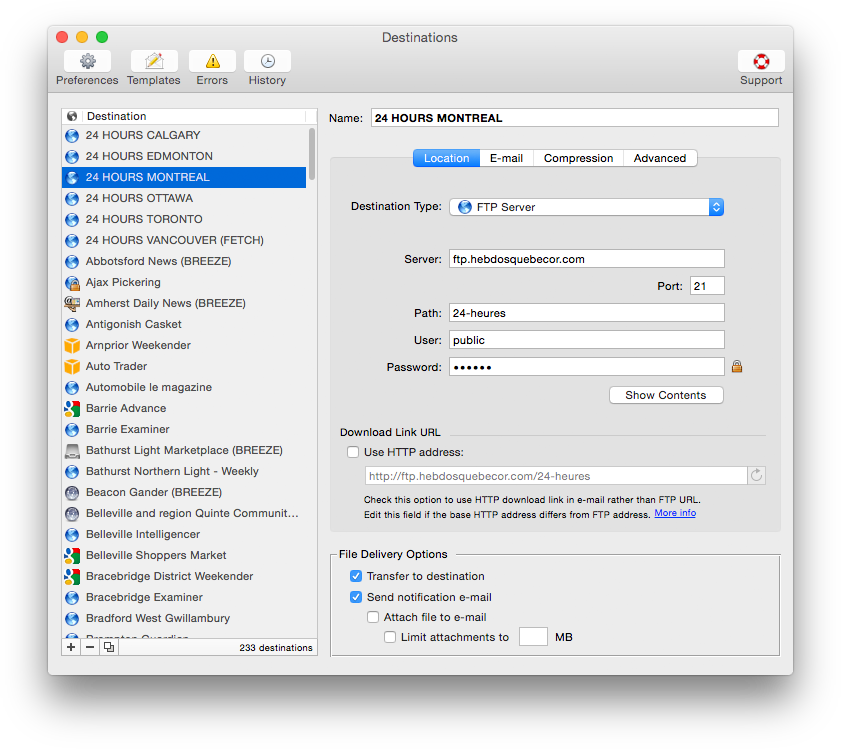
The Destinations window (shown on an older macOS): 233 saved newspaper destinations, with the FTP server, path, login, download link and delivery options for the selected one.
Features
Automatic email notifications
Deliver emails each destination's contacts as soon as the upload finishes, with a link the recipient can click to download the file. If you'd rather write the email yourself, copy the file's download link instead. The email can also carry the file as an attachment, with an optional size limit.
Variable email templates
Deliver builds notifications from templates with tokens for file name, destination, host, user, password, folder path, item download link, link to the enclosing folder, timestamp, date parts, time, user name and computer name. A template can carry a global Cc list, such as a coordinator who should see every delivery, and its own SMTP server settings.
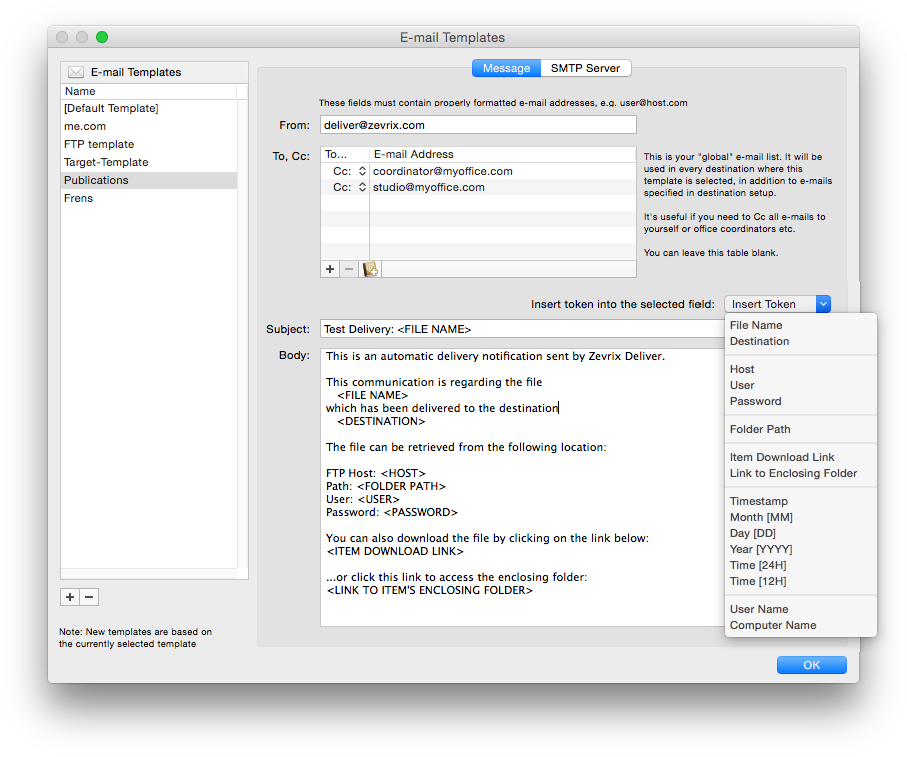
E-mail Templates: a notification body with file, destination, host and download-link tokens, and the Insert Token menu.
Lo-res PDF previews
When you send a PDF, Deliver can make a lo-res RGB copy on the fly and attach it to the notification, so the recipient sees what arrived without downloading a large print file.
Compression and encryption
Deliver compresses files and folders into .zip or .dmg before sending, and can protect disk images with a password, so a folder of loose files arrives as one package.
Many destinations, many services
Deliver handles FTP, SFTP, WebDAV, Amazon S3, Google Storage, AFP and SMB shares, local disks and plain email, and one drop can go to several destinations at once. The Deliver edition has no limit on the number of destinations.
Benefits
- No more "did you get it?" emails. Recipients are told automatically, with a working link.
- No retyping server details. Every printer, publication and client is a saved destination.
- Consistent messages. Templates make every notification complete and professional.
- Cheap. $19.95 once.
Real-World Uses
- An ad agency keeps hundreds of newspapers as destinations and sends each ad to its paper's FTP with an automatic email to the production desk.
- A designer sends print PDFs to the printer's SFTP server and the printer's rep gets a lo-res preview attached to the notice.
- A photographer uploads a zipped, password-protected disk image to Amazon S3 and the client gets the download link.
- A studio copies finished jobs to the archive share and the server at the same time with one drop.
Who It's For, and Who Should Skip It
Deliver suits Mac users who send files to the same set of servers and people over and over, especially in advertising, publishing and print, where every delivery needs an email to go with it.
Skip it if you upload occasionally and don't need notifications; a general FTP client or a file-sharing service is enough. Skip the manual edition if you want unattended hot-folder delivery for a team; that's Deliver Express. And on macOS 27, expect it to run under Rosetta until Zevrix ships the native Apple Silicon version.
Usage Guide
- Install the trial. Download Deliver.dmg, open it and copy Deliver to Applications. It runs fully for 30 days.
- Set up email. In Templates, set the From address and SMTP server, and edit the default message.
- Add destinations. In Destinations, click +, choose the type (for example FTP Server), and fill in server, path, user and password; add the contacts on the E-mail tab.
- Choose options. Set compression or encryption and whether to attach the file or a PDF preview.
- Send. Drop files on Deliver and pick the destinations. Check History and Errors afterwards.
- Register. After purchase, enter the serial number you receive to turn the trial into the full version.
Where it falls short
- Not native on Apple Silicon yet. Deliver relies on a third-party connection framework that still has to be updated, so on macOS 27 it needs Rosetta; Zevrix expects native versions by the end of the year.
- Manual only. Every delivery starts with you; hot folders are in Deliver Express.
- Refunds aren't for change of mind. The 30-day guarantee covers technical problems, so use the trial.
What Users Say
Mac360, quoted on Zevrix's product page
"Deliver Express comes close to fulfilling the laundry list of requirements. What's great about Deliver Express for organizations is the unattended nature of using a hot folder." Natalia Nowak, Mac360 review site
That review is about Deliver Express, the hot-folder edition, and its praise is for the unattended delivery this manual edition doesn't have. For Deliver itself, the 30-day trial is the best way to judge it.
Comparisons
Deliver vs Deliver Express
Both upload to the same services with the same email notifications. Deliver ($19.95) sends when you drop files on it and has unlimited destinations. Deliver Express adds watched hot folders that run unattended and serve unlimited users on a network: $29.95 for the Standard license with up to 50 destinations, or $299.95 for Enterprise with unlimited destinations.
Deliver vs a regular FTP client
FTP clients such as Transmit or Cyberduck are better for browsing and managing files on servers. Deliver is narrower: it's about sending to known destinations and telling people, with templates, preview PDFs and compression built in.
Editions and Pricing
| Edition | Price | Hot folders | Destinations |
|---|
| Deliver | $19.95, one-time | No | Unlimited |
| Deliver Express Standard (from Zevrix) | $29.95, one-time | Yes | Up to 50 |
| Deliver Express Enterprise (from Zevrix) | $299.95, one-time | Yes | Unlimited |
FAQs
Does Deliver work on macOS 27 and Apple Silicon Macs?
Yes, with Rosetta. Deliver is compatible with macOS 27, but it currently needs Rosetta, which macOS offers to install the first time. Zevrix expects native Apple Silicon versions of Deliver and Deliver Express by the end of the year.
Can Deliver send to Amazon S3 and Google Cloud Storage?
Yes. Deliver supports Amazon S3 and Google Storage as destination types, alongside FTP, SFTP, WebDAV, AFP/SMB shares, local disks and email.
Do recipients need any software to get the files?
No. Deliver's notification includes a download link the recipient clicks, or the server details they already use; encrypted disk images only need the password you give them.
Can I upgrade from Deliver to Deliver Express later?
Yes. Zevrix offers upgrades from Deliver to Deliver Express, and from Deliver Express Standard to Enterprise, on request.
Is Deliver a subscription?
No. Deliver is a one-time $19.95 purchase; Zevrix licenses are perpetual.
System Requirements
- macOS 10.9 to macOS 27
- Rosetta on Apple Silicon Macs running macOS 27, until the native version ships
- An SMTP email account for notifications
Conclusion
Deliver is good value at $19.95 for Mac users who send files to the same servers and people every day and are tired of writing the "it's uploaded" email: saved destinations, automatic notifications with links, PDF previews and compression in one drop. The reason to buy is that send-and-notify routine; the reasons to look elsewhere are wanting unattended hot folders (Deliver Express) or a native Apple Silicon app today. Try it free for 30 days.
Download Free TrialBuy Now