ArtOptimizer: Right-Size the Images Linked in Your Illustrator Files
ArtOptimizer is a $119.95 Mac tool from Zevrix Solutions that downsizes, converts and relinks the images placed in Adobe Illustrator documents, using Photoshop for the image work, so each one carries only the resolution the artwork needs. It's for packaging designers, illustrators and prepress staff whose .ai files link large photos and textures. It works with Illustrator CS6 through 2027 on macOS 12 through 27.
Illustrator files that link 300 MB of photos scaled down to a fraction of their size are slow to open, slow to send and slow to RIP. Fixing each link by hand means a Photoshop round-trip per image. ArtOptimizer does the round-trips for every linked image in one or many Illustrator files.
Quick facts
- Version: ArtOptimizer 3.2
- Developer: Zevrix Solutions, makers of LinkOptimizer for InDesign
- Platform: macOS 12 to macOS 27; no Windows version
- Works with: Adobe Illustrator CS6 to 2027, with Photoshop doing the image processing
- Price: $119.95, one-time (perpetual license); upgrade from earlier versions $59.97
- Trial: 30 days, fully working
- Refunds: 30-day money-back guarantee for technical problems or software that doesn't work as advertised
- What we checked: the trial download ArtOptimizer.dmg (9.3 MB, version 3.2 on the download page) and the order page price of $119.95 for a lifetime license, both on November 22, 2026. We didn't run it on an Illustrator file.
Download Free TrialBuy Now
Overview
ArtOptimizer is a standalone Mac app that works between Illustrator and Photoshop. You add Illustrator documents (or tick "Process active Illustrator document only"), pick a preset, and click Analyze Documents. For each linked image it works out the effective resolution from the placed size, then has Photoshop resample the image to your target resolution, apply any color or format changes, save it, and reimport it into Illustrator at 100% scale.
Version 3 was a major rewrite that brought much of LinkOptimizer's InDesign feature set to Illustrator: a new interface, settings presets, batch processing of several Illustrator files, image format conversion and variable image names. A counter in the main window keeps a running total of files processed and disk space saved.
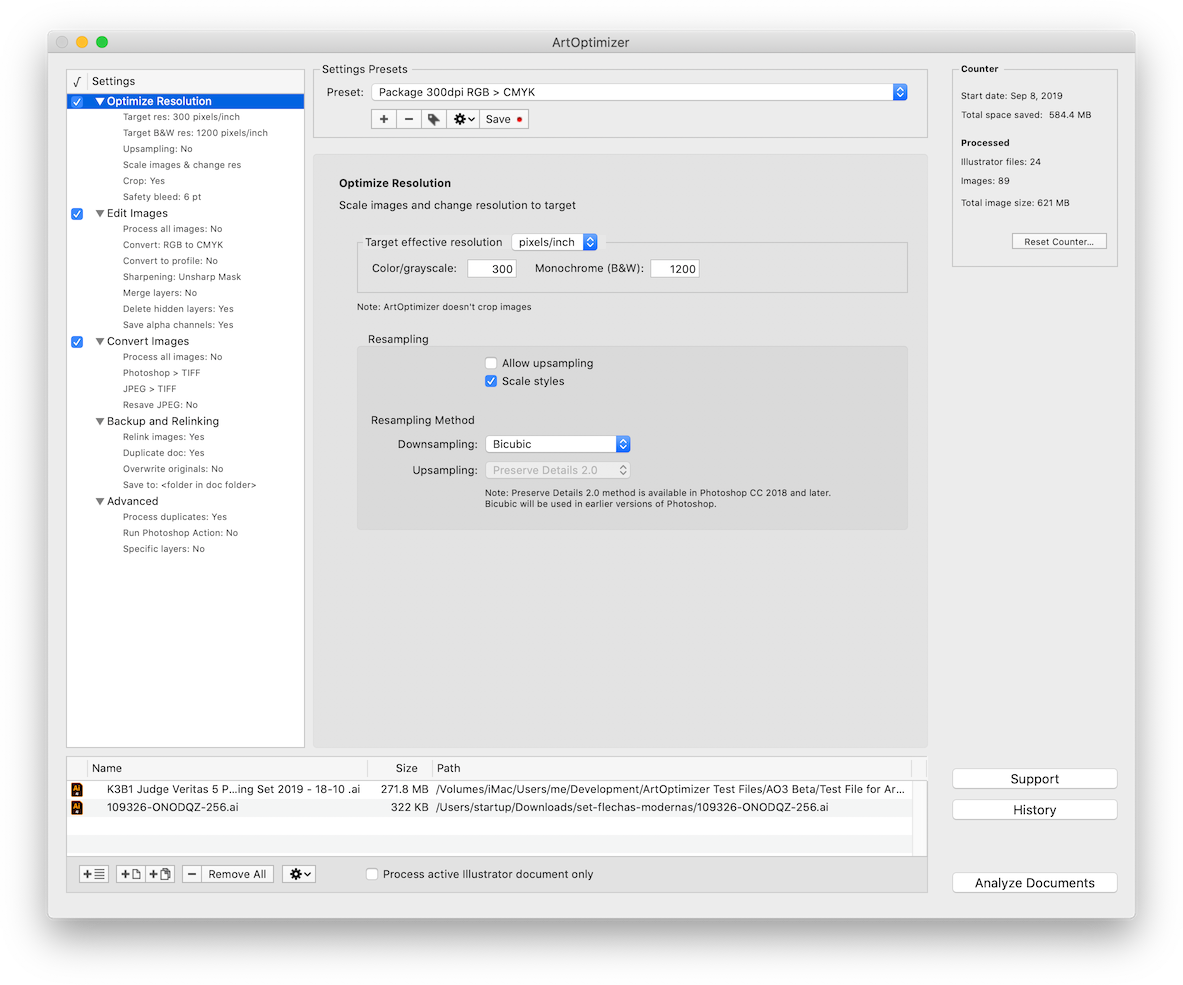
The ArtOptimizer 3 main window: the settings summary on the left, the Optimize Resolution panel with a "Package 300dpi RGB > CMYK" preset, a counter of space saved, and the list of Illustrator files to process.
Features
Resolution matched to the artwork
ArtOptimizer resamples each linked image to a target effective resolution, separately for color and grayscale (for example 300 ppi) and for black-and-white bitmaps (for example 1200 ppi), based on how large it's placed in the Illustrator document. You decide whether upsampling is allowed and which Photoshop method is used, including Preserve Details 2.0 in Photoshop CC 2018 and later. Unlike LinkOptimizer, ArtOptimizer doesn't crop images to their visible area.
Color, sharpening and layers
ArtOptimizer can convert linked images to CMYK, RGB or grayscale, convert them to an ICC profile, apply sharpening such as Unsharp Mask, merge or delete hidden layers, flatten images and keep alpha channels, so a job built in RGB arrives at the printer in the right color space.
Format conversion
ArtOptimizer converts linked images between formats by rule, such as JPEG to TIFF or PNG to PSD, with per-format settings like TIFF compression. You can also re-save files in their own format to apply new settings.
Copies, backups and names
ArtOptimizer can leave originals untouched, duplicate the Illustrator document, and save processed images to a folder inside the document's folder, named with variable tokens. It can also make optimized copies for outside use, such as a web version, without relinking them in Illustrator.
Photoshop actions, presets and batches
ArtOptimizer runs a chosen Photoshop action on every image, processes several Illustrator files in one run, handles images placed more than once, and saves all of it as named presets.
Benefits
- Lighter Illustrator files that open, save, package and print faster.
- Print-ready links in the right resolution and color space before they reach prepress.
- No repetitive Photoshop work. Dozens of round-trips become one batch.
- Repeatable results from presets shared across a studio.
Real-World Uses
- A packaging studio runs each label's .ai file through a "300 dpi RGB to CMYK" preset before sending it to the converter.
- An illustrator who places large textures and photo references shrinks them to the resolution actually used, so the working file stays responsive.
- A sign shop converts PNG and JPEG links to TIFF with LZW compression to suit its RIP.
- A marketing team makes low-resolution web copies of a poster's images without touching the print file.
Who It's For, and Who Should Skip It
ArtOptimizer suits Mac users who build Illustrator documents around linked raster images: packaging, labels, posters, signage and technical illustration, especially when files go to print regularly.
Skip it if your Illustrator work is mostly vector with few placed images,. It's Mac only and needs Photoshop. If your images live in InDesign layouts, Zevrix's LinkOptimizer is the tool, and it also crops images to their frames, which ArtOptimizer doesn't.
Usage Guide
- Install the trial. Download ArtOptimizer.dmg, open it and copy ArtOptimizer to Applications. The trial runs fully for 30 days.
- Protect your originals. In Backup and Relinking, keep original images untouched and duplicate the document until you trust your settings.
- Set the target resolution and resampling method in Optimize Resolution.
- Add edits and conversions if you need them: color conversion, sharpening, format rules or a Photoshop action.
- Save a preset with the Save button next to the preset menu.
- Add files and run. Add Illustrator documents to the list, click Analyze Documents, review, then process.
- Register. After purchase, enter the serial number you receive to turn the trial into the full version.
Where it falls short
- No cropping. Images are resampled but keep their full canvas, so a photo masked to a small area still carries the hidden pixels.
- Mac and Photoshop only. There's no Windows version, and you need your own licensed Photoshop alongside Illustrator.
- macOS 12 minimum. Older Macs that can't run Monterey are out.
- Refunds aren't for change of mind. The 30-day guarantee covers technical problems; a working product you no longer need may not be refunded, so test with the trial.
Comparisons
ArtOptimizer vs LinkOptimizer
Both come from Zevrix and share the same approach: analyze the layout, process each linked image in Photoshop, relink it. LinkOptimizer ($259.95) is for InDesign documents and books and also crops images to their frames; ArtOptimizer ($119.95) is for Illustrator files and doesn't crop. Studios that use both apps need both tools; Zevrix applies a bundle discount when you order more than one product.
ArtOptimizer vs a Photoshop batch
Photoshop's Image Processor or a droplet can resize a folder of images to one size, but it doesn't know how large each image is placed in the Illustrator file, and it doesn't relink. ArtOptimizer reads each placement, so every image gets its own correct size and goes back into the artwork automatically.
Editions and Pricing
| License | Price | Term |
|---|
| ArtOptimizer, new license | $119.95 | Perpetual |
| Upgrade from earlier versions (from Zevrix) | $59.97 | Perpetual |
Volume discounts apply automatically: 5% for 3 to 9 copies and 10% for 10 to 19, with larger quantities quoted by Zevrix.
FAQs
Does ArtOptimizer work with Illustrator 2026 on macOS Tahoe?
Yes. ArtOptimizer supports Adobe Illustrator CS6 through 2027 and macOS 12 Monterey through macOS 27.
Is ArtOptimizer a subscription?
No. ArtOptimizer is a one-time purchase, and all Zevrix licenses are perpetual. Updates within version 3 are free; owners of older versions upgrade for $59.97.
Can ArtOptimizer process several Illustrator files at once?
Yes. ArtOptimizer 3 batch-processes a list of Illustrator documents in one run, or only the active document if you tick that option.
How many Macs does one ArtOptimizer license cover?
One ArtOptimizer license covers one seat; the serial number you receive covers all the seats you ordered, and Zevrix can add new seats to an existing serial.
System Requirements
- macOS 12 Monterey to macOS 27
- Adobe Illustrator CS6 to Illustrator 2027
- Adobe Photoshop, which ArtOptimizer uses to process the images
Conclusion
ArtOptimizer is worth $119.95 if you regularly send Illustrator files with heavy linked images to print: it resamples every link to the resolution the artwork actually uses, fixes color and format, and relinks it, in one batch. The reason to buy is that placement-aware processing, which a plain Photoshop batch can't do. The main reasons not to are that it doesn't crop, and that it needs a Mac and Photoshop. Try it for 30 days on a real job before you buy.
Download Free TrialBuy Now