InPreflight: Preflight and Batch-Package InDesign Files on the Mac
InPreflight is a $99.95 Mac app from Zevrix Solutions that checks Adobe InDesign documents for print problems against rules you set, prints graphic preflight reports, and packages many InDesign jobs at once, optionally into one folder with shared fonts and links. It's for prepress operators, production artists and designers who send InDesign files to printers or archive them. It supports InDesign CS6 through 2027 on macOS 10.12 through 27.
InDesign's own Preflight panel and Package command work one document at a time and spread the answers across several panels. If you've ever packaged twenty catalog pages that share the same logos and fonts, and ended up with twenty copies of everything, InPreflight is aimed squarely at you.
Quick facts
- Version: InPreflight 3.1 (version 3 was rebuilt from the ground up and is many times faster than 2.x)
- Developer: Zevrix Solutions
- Platform: macOS 10.12 to macOS 27; no Windows version
- Works with: Adobe InDesign CS6 to 2027
- Price: $99.95, one-time (perpetual license); upgrade to version 3 from earlier versions $49.95
- Trial: 30 days, fully working
- Refunds: 30-day money-back guarantee for technical problems or software that doesn't work as advertised
- What we checked: the trial download InPreflight.dmg (11.9 MB, version 3.1 on the download page) and the order page price of $99.95 for a lifetime license, both on November 22, 2026. We didn't preflight a document with it.
Download Free TrialBuy Now
Overview
InPreflight puts everything about an InDesign document in one window: document details (InDesign version, pages, page size), every font with its type, every color swatch with its values, and every link with page, kind, size, color mode, ICC profile, scale, actual and effective resolution. Pick a preflight preset, click Preflight, and items that break your rules turn red with a warning icon, with a summary such as "35 errors found: Fonts: 3, Colors: 9, Links: 23". Select a link to see its preview, metadata and the exact alerts it triggered.
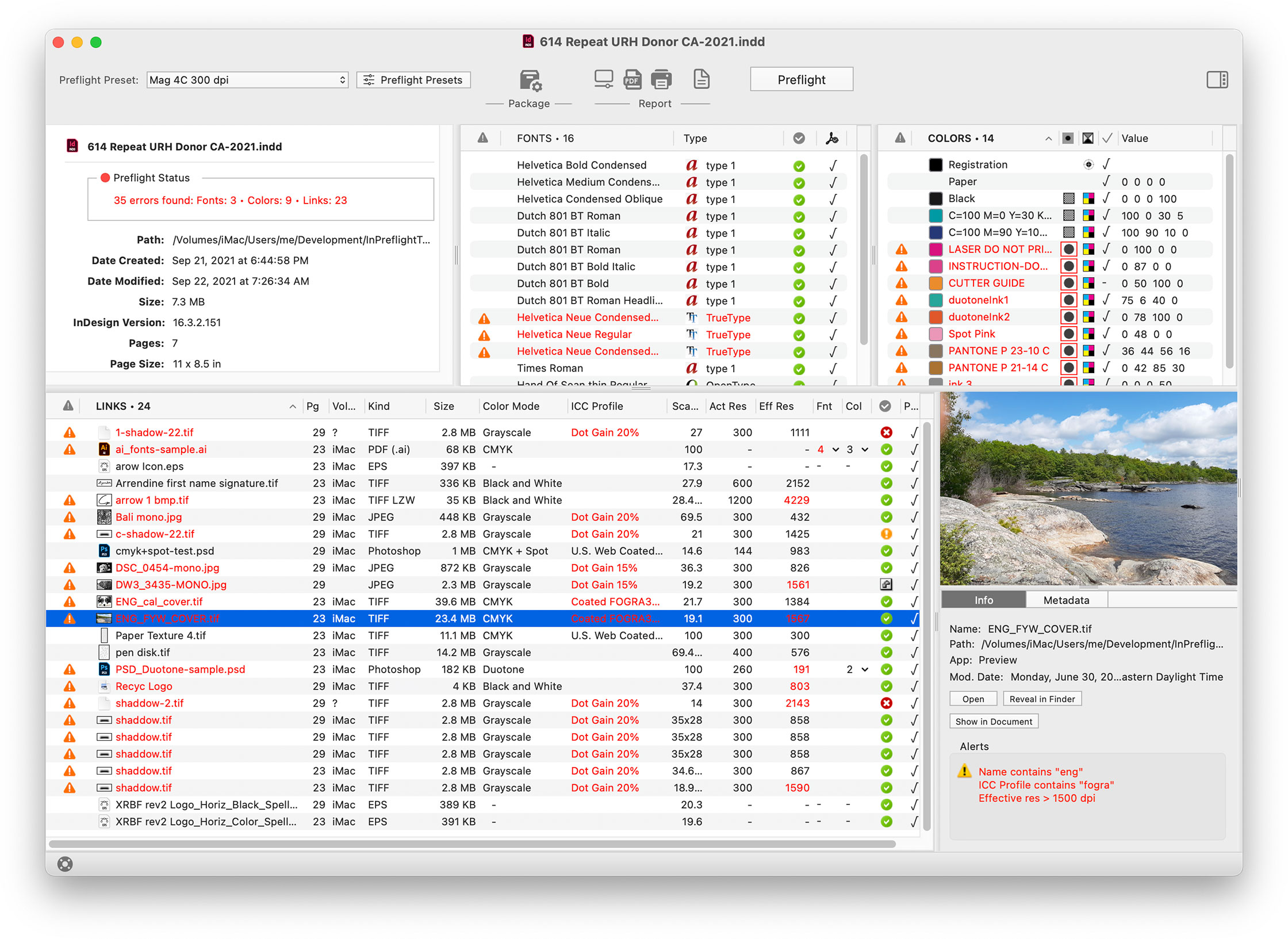
The InPreflight main window: document info, fonts, color swatches and links of one InDesign file, with flagged items in red and a link's preview and alerts on the right.
The other half of the app is packaging. Instead of running InDesign's Package on each file, you add a batch of documents and InPreflight collects them in one run, either each into its own folder or all into a single folder whose fonts and links are shared, so a logo used in twenty documents is copied once.
Features
Preflight presets with your own rules
InPreflight presets flag fonts, colors and links that match rules you define: link kind (for example GIF), an ICC profile that doesn't contain "coated", RGB color mode, a path containing "lo-res", effective resolution below or above set limits for color and for black-and-white images, file size, fonts inside EPS and AI files, non-proportional scaling and non-printing items. Keep one preset per job type, such as magazine, two-color brochure, newsprint or ebook.
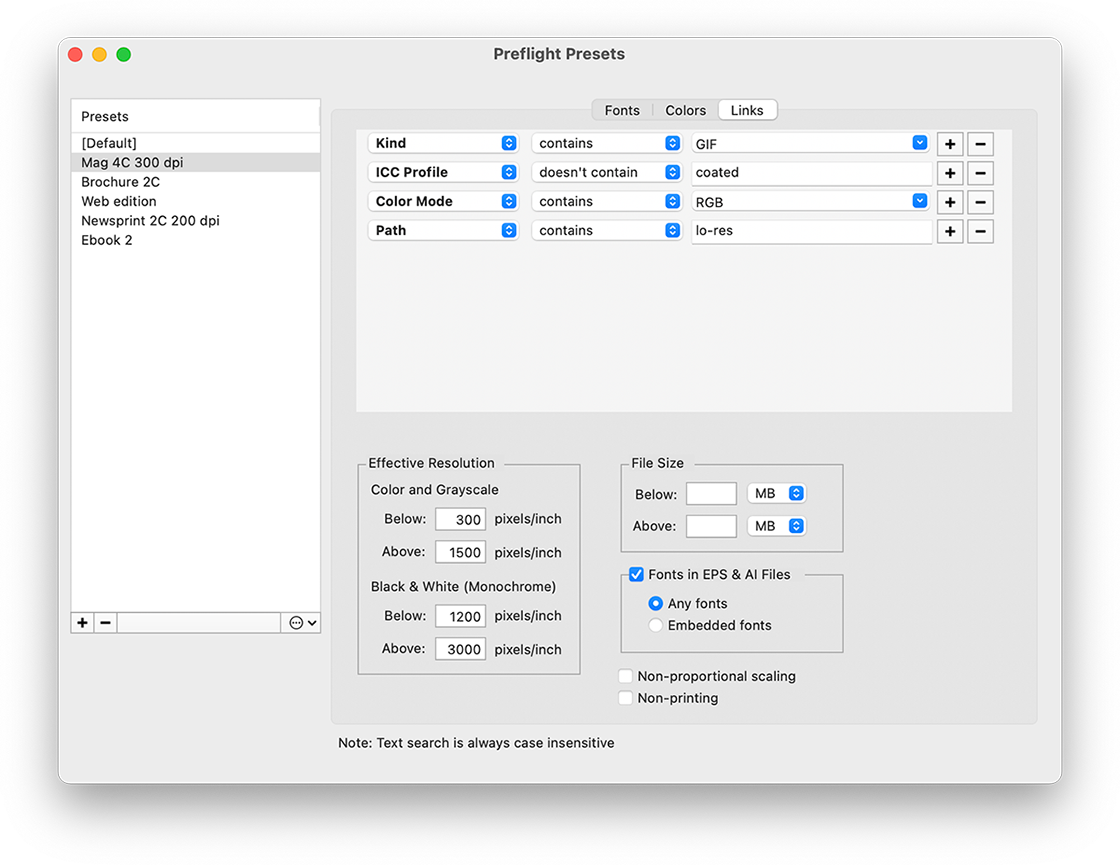
Preflight Presets: rules for links (kind, ICC profile, color mode, path), effective resolution limits and file size, with presets for different publications on the left.
Batch packaging, unified or separate
InPreflight's Advanced Packaging copies fonts and linked graphics for a list of InDesign documents, relinks to the packaged copies, and can also create a PDF with a chosen preset, an IDML file and PDF or text reports for each. Extra files and folders can ride along in a named subfolder, the package folder name can carry a date, and nested Illustrator links are collected too. When it's done, the package can go straight to an FTP or SFTP server with Zevrix's Deliver app.
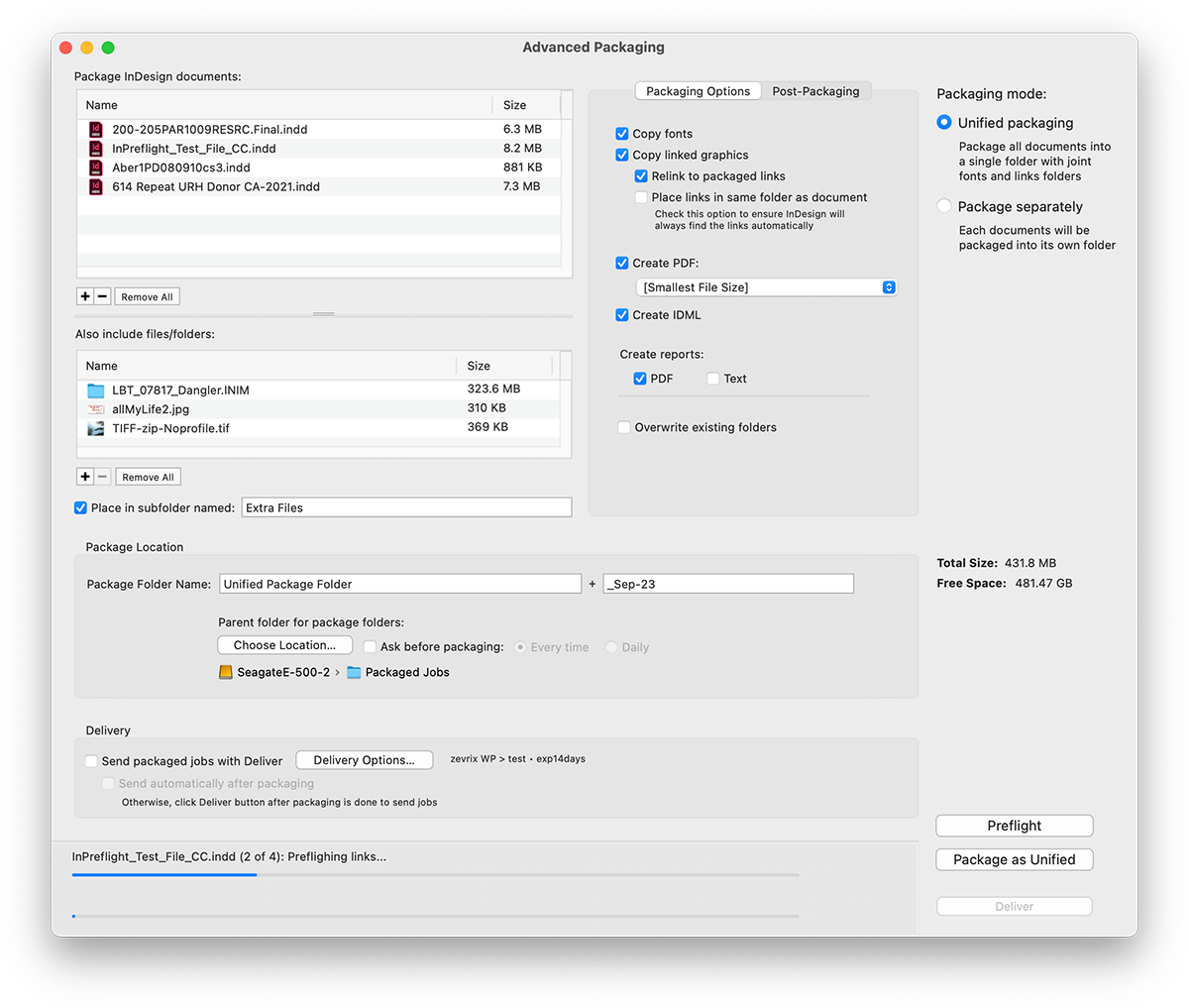
Advanced Packaging: four InDesign documents packaged into one unified folder, with fonts, graphics, PDF, IDML and PDF reports, plus extra files and an optional Deliver upload.
Graphic preflight reports
InPreflight prints a graphic preflight report, or saves it as PDF, with a summary of the document, its fonts, colors and links tables and the flagged items, so you can send a printer or client exactly what's wrong. You can sort and resize the tables to shape the report, include paragraph styles, and create detailed text reports as well.
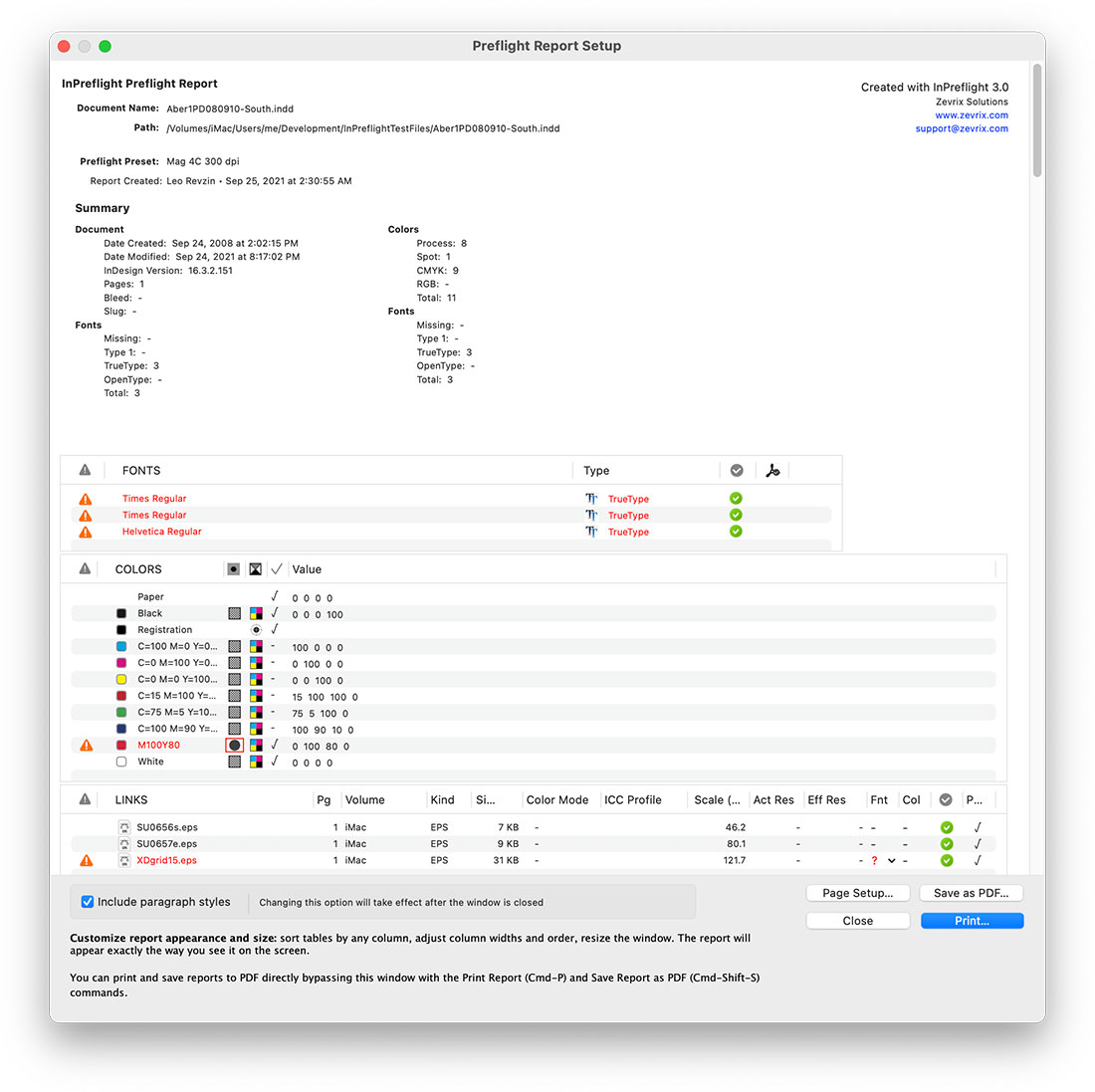
Preflight Report Setup: the report's summary, fonts, colors and links sections, ready to print or save as PDF.
Link previews, metadata and renaming
InPreflight 3 shows a preview and metadata for each link, can open it or reveal it in the Finder, shows it in the document, and lets you rename individual linked files. It uses its own file copying for packaging, which is part of why version 3 runs more than ten times faster than version 2.
Benefits
- Fewer rejected jobs. Low-resolution images, wrong profiles and RGB links are caught before the printer finds them.
- Less disk space. Unified packaging stores shared fonts and links once instead of in every job folder.
- Faster checks. Fonts, colors and links in one window, with no hopping between InDesign panels.
- Proof for the printer. A PDF report documents what was checked and what was fixed.
Real-World Uses
- A printer's prepress desk runs incoming customer files against a "Mag 4C 300 dpi" preset and emails the PDF report back with the problems marked.
- A catalog team packages forty InDesign spreads that share product shots into one unified folder for the archive.
- A book designer keeps a large art book's many documents in order by preflighting and packaging them together.
- An agency packages the final files with PDFs and IDML and sends them to the client's server with Deliver in one step.
Who It's For, and Who Should Skip It
InPreflight is for Mac-based prepress and production people who check and collect InDesign files every week, especially multi-document jobs like catalogs, books and magazine issues.
Skip it if you package one document now and then: InDesign's built-in Preflight panel and File > Package are free and fine for that. It's Mac only. And if you want packaging to run unattended from hot folders for a whole network, Zevrix's separate Package Central is built for that.
Usage Guide
- Install the trial. Download InPreflight.dmg, open it and copy InPreflight to Applications. It runs fully for 30 days.
- Make a preset. Open Preflight Presets and add rules for fonts, colors and links, with resolution limits for your printer.
- Preflight. Add an InDesign document in InPreflight, choose the preset and click Preflight. Review the red items and the alerts for each link.
- Report. Print the report or save it as PDF from the Report buttons.
- Package. Open Advanced Packaging, add the documents, choose unified or separate packaging and the options (fonts, graphics, PDF, IDML, reports), pick a location and click Package.
- Register. After purchase, enter the serial number you receive to turn the trial into the full version.
Where it falls short
- It finds problems; it doesn't fix images. InPreflight reports a low-resolution or RGB link but doesn't resample or convert it; that's Zevrix's LinkOptimizer.
- Mac only. There's no Windows version.
- Not a hot-folder server. Packaging runs when you start it in the app; automatic, networked packaging is a separate product.
- Refunds aren't for change of mind. The 30-day guarantee covers technical problems; a working product you no longer need may not be refunded, so use the trial.
What Users Say
Quoted on Zevrix's product page
"InPreflight is delightfully simple to use and does its job well." Macworld, by James Dempsey
"Love the program – a real time saver in prepress situations. InPreflight is great at finding problems ahead of schedule." John Farnell, Bigtime Productions, Auckland, New Zealand
"InPreflight provides excellent display of document's elements with full control over preflighting and file collection. I am designing very big books on art, and InPreflight lets me keep all my documents in perfect order." Michael Anikst, Anikst Design, London, UK
These are quotes the vendor chose, so they're positive by design. They agree on the two things the app is built for: seeing every font, color and link in one place, and catching problems before the file reaches the printer.
Comparisons
InPreflight vs InDesign's built-in Preflight and Package
InDesign's live Preflight panel and Package command are included with InDesign and handle one document at a time. InPreflight adds batch packaging of many documents, a unified package with shared fonts and links, rules such as ICC profile names and link paths, effective resolution limits for color and monochrome images, and printable graphic reports. If you package single documents occasionally, InDesign is enough; if you package many at once or send reports to clients, InPreflight saves the repetition.
InPreflight vs LinkOptimizer
Both are Zevrix tools for InDesign. InPreflight ($99.95) checks documents and collects them; LinkOptimizer ($259.95) actually changes the images, resizing, cropping and converting them. Many shops use InPreflight to find the problems and LinkOptimizer to fix the image ones.
Editions and Pricing
| License | Price | Term |
|---|
| InPreflight 3, new license | $99.95 | Perpetual |
| Upgrade to InPreflight 3 from earlier versions (from Zevrix) | $49.95 | Perpetual |
Volume discounts apply automatically: 5% for 3 to 9 copies and 10% for 10 to 19.
FAQs
Does InPreflight work with InDesign 2026 and macOS Tahoe?
Yes. InPreflight supports Adobe InDesign CS6 through 2027 and macOS 10.12 through macOS 27.
Is InPreflight Pro the same product?
InPreflight Pro was the name of version 2, which supports up to macOS 10.14 and InDesign 2020. InPreflight 3 replaced it and is the version sold now; owners of older versions can upgrade for $49.95.
Can InPreflight package files without opening each one in InDesign?
InPreflight's Advanced Packaging takes a list of InDesign documents and packages them in one run, showing its progress document by document, so you don't open and package each file yourself.
Is InPreflight a subscription?
No. InPreflight is a one-time purchase; all Zevrix licenses are perpetual, not subscriptions.
Can I share preflight reports with clients who don't have InPreflight?
Yes. InPreflight saves its graphic reports as PDF, which anyone can open, and can also create plain text reports.
System Requirements
- macOS 10.12 Sierra to macOS 27
- Adobe InDesign CS6 to InDesign 2027
Conclusion
InPreflight is worth $99.95 for Mac prepress and production staff who check and package InDesign files in bulk: one window for fonts, colors and links, rules tuned to each printer, PDF reports, and unified packaging that stores shared assets once. The reason to buy is batch packaging plus richer preflight rules than InDesign offers; the reason to skip it is light use, where InDesign's free tools cover you. Run the 30-day trial on a real multi-document job first.
Download Free TrialBuy Now