LinkOptimizer: Shrink and Prepare Every InDesign Image Link in One Pass
LinkOptimizer is a $259.95 Mac tool from Zevrix Solutions that resizes, crops, converts and relinks the images placed in Adobe InDesign documents, using Photoshop to do the pixel work, so each image ends up at exactly the size and resolution the layout needs. It's for production artists, prepress staff, publishers and retouchers who hand InDesign files to printers or archive them. A cheaper Lite edition costs $179.95.
The problem it solves is familiar to anyone who has packaged a magazine: a 170 MB PSD placed at 26% scale, a dozen RGB JPEGs in a CMYK job, PNGs and EPS files the printer doesn't want. Fixing them by hand means opening each one in Photoshop, cropping, resampling, converting, saving and relinking. LinkOptimizer runs that whole routine across every link in one or many documents.
Quick facts
- Version: LinkOptimizer 7.1.1 (version 7 is the first paid upgrade in over five years)
- Developer: Zevrix Solutions, making InDesign automation tools since 2006
- Platform: macOS 10.12 to macOS 27, native on Apple Silicon; no Windows version
- Works with: Adobe InDesign CS6 to 2027, with Photoshop doing the image processing
- Price: $259.95 for the full version, $179.95 for LinkOptimizer Lite; perpetual licenses, not subscriptions
- Trial: 30 days, fully working; a serial number registers the trial after purchase
- Refunds: 30-day money-back guarantee if the software has technical problems or doesn't work as advertised
- What we checked: the trial download LinkOptimizer.dmg (12.9 MB, version 7.1.1 on the download page) on November 22, 2026; order page prices of $259.95 for LinkOptimizer and $179.95 for LinkOptimizer Lite, both lifetime licenses, on November 22, 2026. We didn't run it on an InDesign document.
Download Free TrialBuy LinkOptimizerBuy LinkOptimizer Lite
Overview
LinkOptimizer is a standalone Mac app that drives InDesign and Photoshop. You point it at InDesign documents or books, and it analyzes every placed image before touching anything: kind, color mode, size, effective resolution, ICC profile, and the exact action it plans (resample, crop, edit, convert), with an estimate of the total size after processing. You then process the lot with one click.
The core operation is resolution optimization. An image placed at 30% scale carries three times the pixels the page can use. LinkOptimizer scales and crops it in Photoshop to its real InDesign dimensions at your target resolution, saves it, and relinks it at 100% scale. On the sample job in Zevrix's own screenshot, 21 links totalling 1.75 GB come down to an estimated 361 MB, an 80% saving.
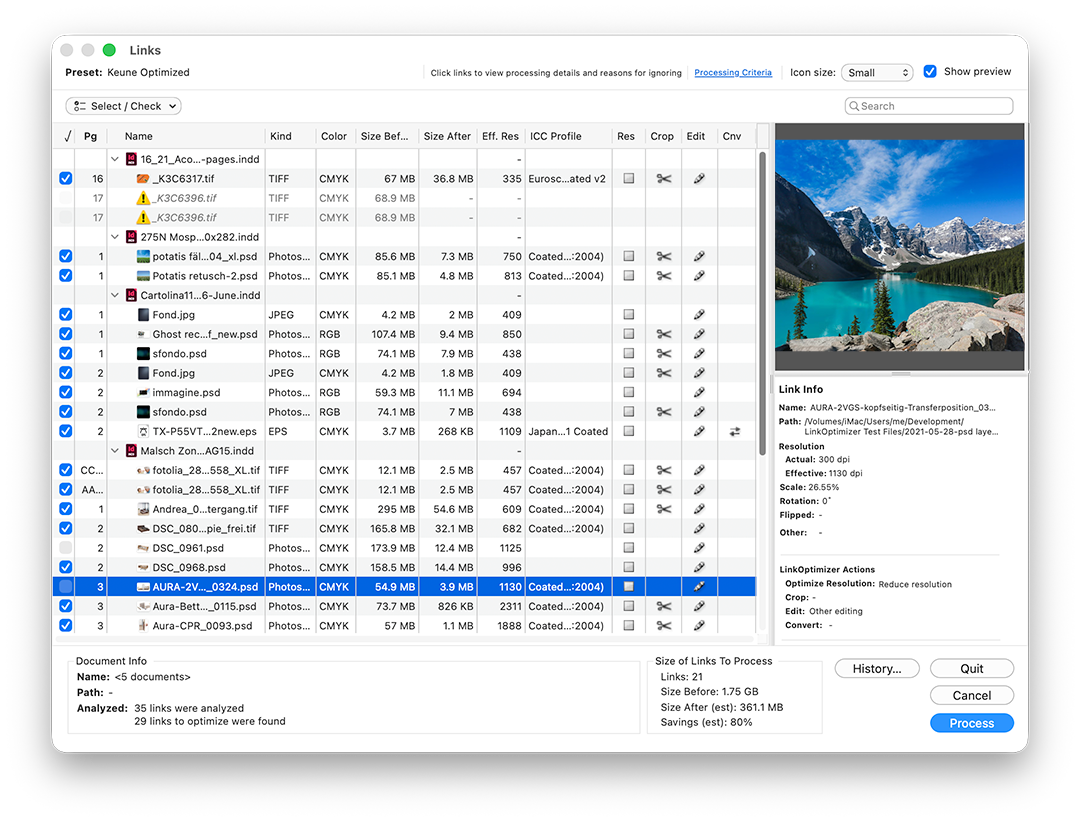
The Links window: each document's images with size before and after, effective resolution, ICC profile and the resample, crop, edit and convert actions, plus a preview and the estimated savings for the whole job.
Features
Resolution matched to the layout
LinkOptimizer sets a target effective resolution (for example 300 ppi for color and grayscale, 1200 for monochrome), then either scales and crops each image to its InDesign frame with an optional safety bleed, or only changes the resolution so images keep their dimensions across several similar documents. You choose whether upsampling is allowed and which Photoshop resampling method to use, including Preserve Details 2.0 in Photoshop CC 2018 and later.
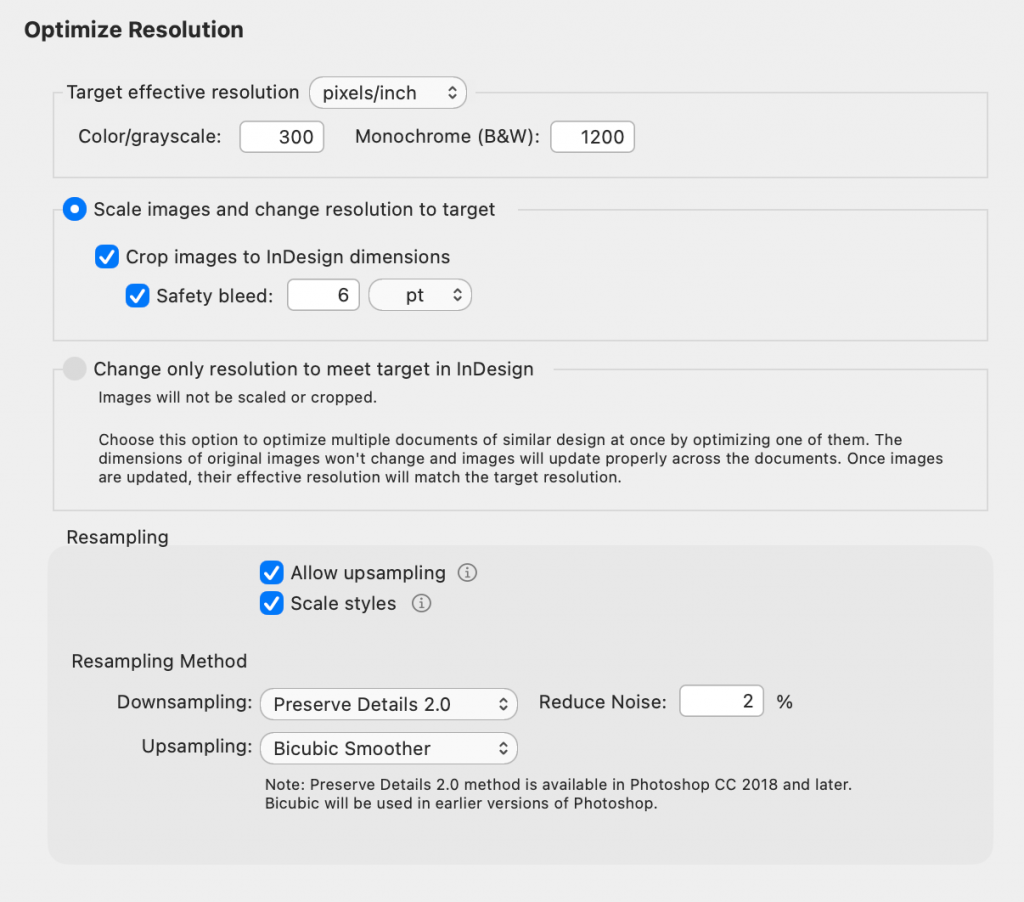
Optimize Resolution settings: target resolution, scale and crop to InDesign dimensions with a 6 pt safety bleed, and the downsampling and upsampling methods.
Format and color conversion (full version)
LinkOptimizer converts linked images between formats by rule, such as PSD to TIFF, JPEG or PNG to PSD, and, new in version 7, WebP. PSD links can keep the layer visibility set in InDesign. It also converts colors to CMYK, RGB or grayscale, assigns ICC profiles, sharpens, merges or flattens layers and deletes hidden layers. Format conversion is one of the two things the Lite edition leaves out.
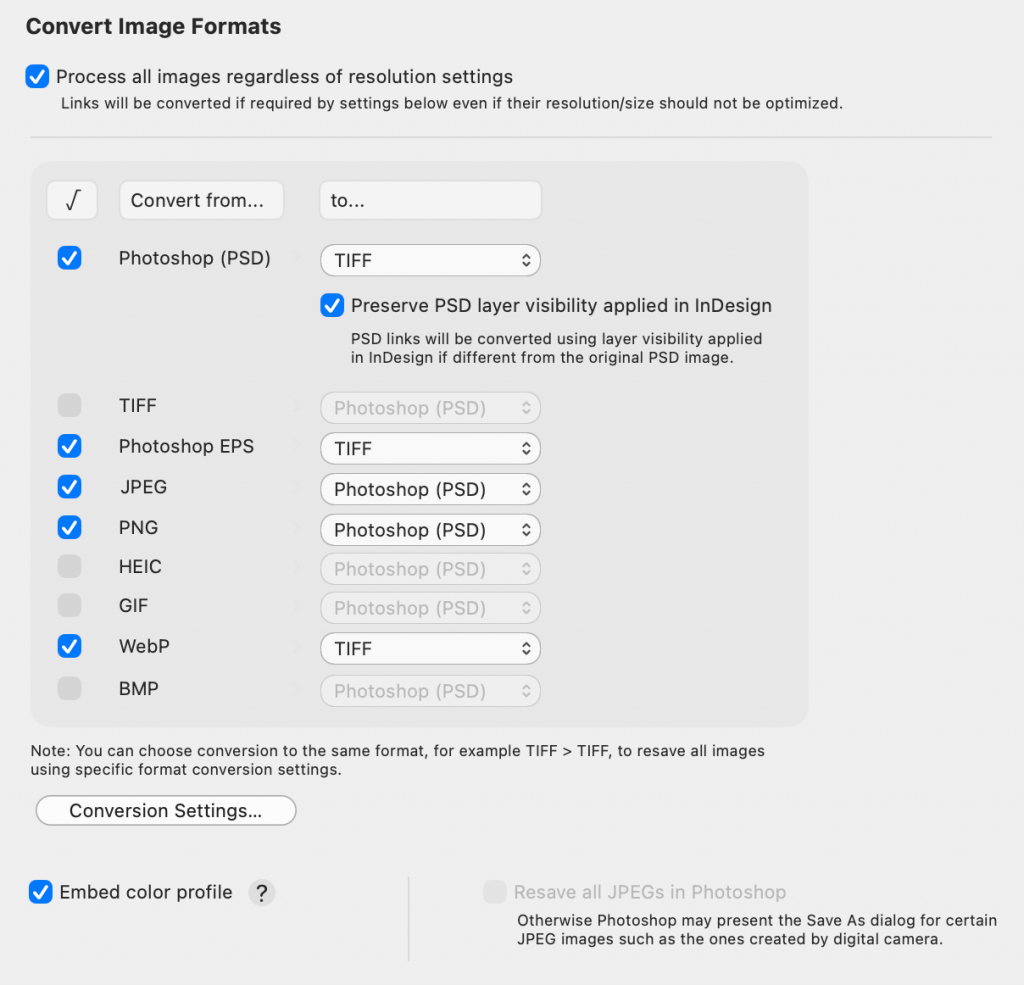
Convert Image Formats: a target format for each source type, with the option to keep PSD layer visibility from InDesign.
Safe by default: copies, backups and naming
LinkOptimizer can overwrite originals, but it doesn't have to: it can duplicate the InDesign document and process copies of the images into a folder you name with tokens such as the document name and date, or optimize images for external use, like a web version, without relinking them at all. Version 7 can also copy the links it didn't need to process into the same folder and relink them, so a finished job has every image in one place, under one naming convention.
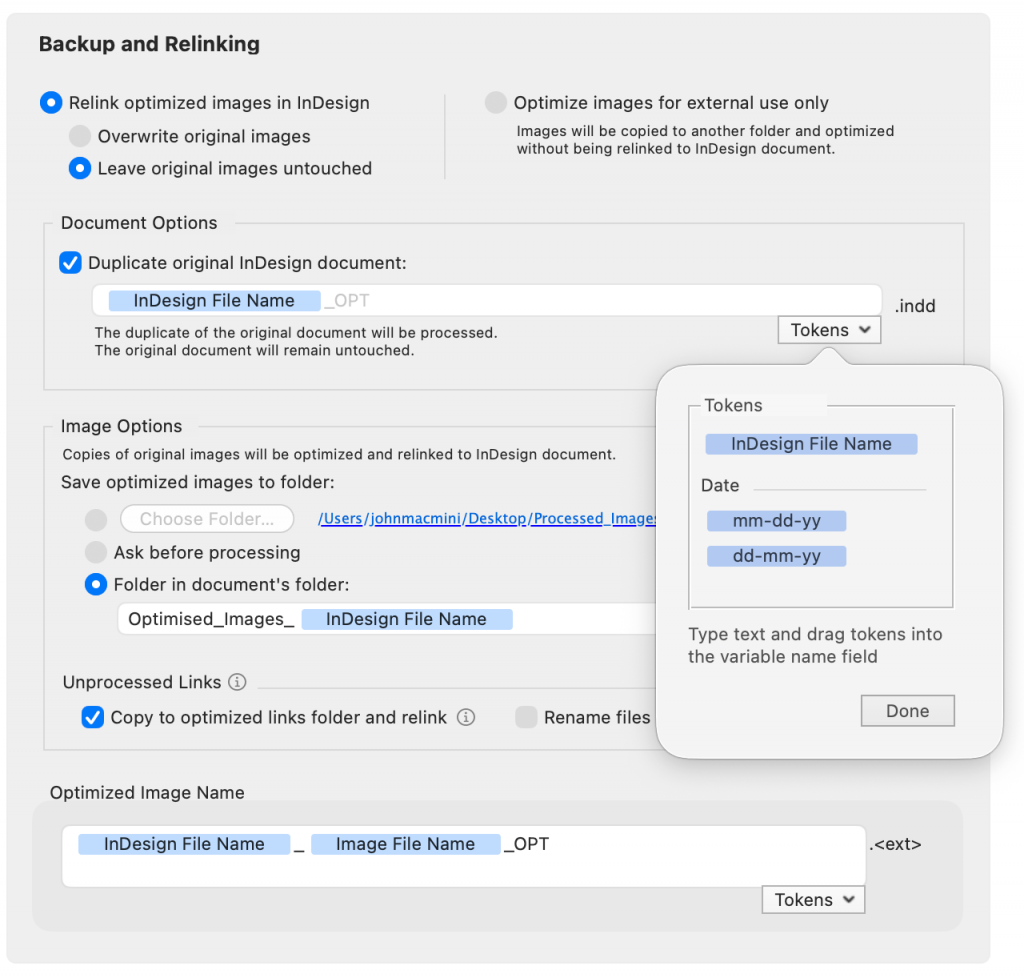
Backup and Relinking: duplicate the InDesign document, save optimized copies to a named folder, copy unprocessed links too, and build file names from tokens.
Photoshop actions, batches and duplicate links
LinkOptimizer can run any Photoshop action on each image during processing, so a house retouching or sharpening recipe is applied consistently. It processes several InDesign files and books in one run, and the full version handles images placed more than once, with their own settings panel in version 7. Presets save each workflow, and a selection menu checks, unchecks or inverts which links get processed.
Benefits
- Smaller packages and archives. Oversized images are the bulk of most InDesign packages, and trimming them to the layout's needs cuts storage and transfer time.
- Faster output and fewer preflight errors. Images arrive at the printer at the right resolution and color space instead of being fixed at RIP time.
- Hours back on big jobs. Work that took a day of Photoshop round-trips runs unattended.
- Consistency. The same preset and Photoshop action are applied to every image, every time.
Real-World Uses
- A quarterly magazine drops each issue's InDesign book into LinkOptimizer, which crops every photographer's full-frame PSD to its frame at 300 ppi and converts the RGB ones to CMYK before the files go to print.
- A catalog publisher converts hundreds of PNG and WebP product shots to TIFF in one pass, with names built from the document and image names.
- An agency archiving finished jobs duplicates each document and collects all links, processed or not, into one optimized folder that takes a fraction of the original space.
- A web team uses "optimize for external use" to make reduced copies of a brochure's images without touching the print layout.
Who It's For, and Who Should Skip It
LinkOptimizer is for Mac-based production people who handle InDesign documents with many placed images: prepress departments, magazine and book publishers, catalog studios and retouchers. The more images per job, the faster it pays back.
Skip it if you work on Windows, since it's macOS only, or if you don't own Photoshop. A designer who places a handful of images per project won't save enough time to justify $259.95; InDesign's own Package command and a quick Photoshop batch will do. And if you only need resizing and cropping, not format conversion, the $179.95 Lite edition is the better buy.
Usage Guide
- Install the trial. Download LinkOptimizer.dmg, open it and copy LinkOptimizer to your Applications folder. The trial runs fully for 30 days.
- Back up first. Until you trust your settings, choose "Leave original images untouched" and "Duplicate original InDesign document" in Backup and Relinking.
- Set the target. In Optimize Resolution, enter your target resolution and choose whether to crop to the InDesign frame.
- Add conversions. Set color conversion, ICC profile and format rules if your printer needs them, and pick a Photoshop action if you use one.
- Analyze. Add your InDesign documents or books and review the Links window: each image's planned action and the estimated size after processing.
- Process. Click Process. LinkOptimizer opens the images in Photoshop, processes them and relinks them in InDesign.
- Save a preset for each client or publication so the next job is one click.
- Buy and register. After purchase you receive a serial number that registers the installed trial.
Where it falls short
- Mac only, and Photoshop required. The image work happens in your own copy of Photoshop, so you need both Adobe apps installed and licensed.
- Version 6 has an end date. LinkOptimizer 6 supports InDesign up to 2026 and macOS up to 26 and won't be updated beyond them; owners need the paid upgrade to version 7 for later versions.
- Cropping is permanent on the copies. Cropped images lose the pixels outside the frame, so keep the originals if a layout might be redesigned.
- Refunds aren't for change of mind. The 30-day guarantee covers technical problems; a refund can be declined if the software works but you no longer need it, so use the trial.
- Not cheap for occasional use. $259.95 is easy to justify for weekly production, harder for a few jobs a year.
What Users Say
Quoted on Zevrix's product page
"LinkOptimizer converted 10000 images in a 1800 pages project saving us at least 40 hours work, and it proved to be 100% accurate." Nynke Tiekstra, ColtsfootMedia, Friesland, Netherlands
"Today LinkOptimizer batched a huge book project and another magazine project in minutes vs. hours. Now I can take the afternoon off and drink beer. Thanks for freeing up my afternoon, rather than doing production work." Brian Donahue, Bedesign studio, Minneapolis, Minnesota
"LinkOptimizer has changed my life and saved me days and days of work as a retoucher for an international quarterly magazine. It's a lifesaver". Steve Krason, SK Design Group, Chicago
"This is the best extension I ever purchased for any design app... It saves hours of time, tediously replacing linked images, resizing and batch processing. Worth every penny..." Wayne Guy, Edge Graphics, Van Nuys, California
"LinkOptimizer has become an essential part of our workflow. LinkOptimizer makes our projects so much easier to prep for the printer." Peter Blossom, American Cruise Lines, Guilford, Connecticut
"LinkOptimizer makes cutting huge linked images down to size a cinch... For those wanting to quickly optimize their images and cut down on processing time, LinkOptimizer is a very smart choice." Computer Arts Magazine
These are testimonials the vendor chose, so they're all positive. The common thread is time: large books and magazines with thousands of images, where LinkOptimizer replaces days of manual Photoshop work. Users who place few images per job are the ones least likely to see that payoff.
Comparisons
LinkOptimizer vs LinkOptimizer Lite
Both reduce link size, optimize resolution, and scale and crop images to their InDesign dimensions. LinkOptimizer Lite leaves out image format conversion and duplicate link processing. If your printer is happy with the formats you already use and images rarely repeat in a document, Lite saves $80. Zevrix offers a Lite-to-full upgrade if you need the rest later.
LinkOptimizer vs doing it in InDesign and Photoshop
InDesign's Package command collects links but doesn't resize them, and Photoshop's Image Processor or a droplet can resample a folder but doesn't know each image's scale and crop in the layout, and doesn't relink. LinkOptimizer's value is that it reads the layout, processes each image to fit it, and relinks the result.
Editions and Pricing
| Edition | Price | License | What it includes | Buy |
|---|
| LinkOptimizer | $259.95 | Perpetual | Everything: resolution, crop, color, format conversion, duplicate links, Photoshop actions | Buy Full |
| LinkOptimizer Lite | $179.95 | Perpetual | Reduce link size, optimize resolution, scale and crop; no format conversion or duplicate link processing | Buy Lite |
Zevrix applies volume discounts automatically (5% for 3 to 9 copies, 10% for 10 to 19) and bundle discounts when you order several of its products together.
FAQs
Does LinkOptimizer work with InDesign 2026 and macOS Tahoe?
Yes. LinkOptimizer 7 supports InDesign CS6 through 2027 and macOS 10.12 through macOS 27, and runs natively on Apple Silicon. LinkOptimizer 6 supports up to InDesign 2026 and macOS 26 Tahoe but won't be updated for later versions.
Is LinkOptimizer a subscription?
No. LinkOptimizer is a one-time purchase; all Zevrix licenses are perpetual. Major versions can be paid upgrades (version 7 was the first in over five years), while updates within a version are free.
Does LinkOptimizer change my original images?
Only if you tell it to. LinkOptimizer can overwrite originals, but it can also leave them untouched and process copies into a separate folder, and duplicate the InDesign document so the original layout stays as it was.
Can I install LinkOptimizer on more than one Mac?
LinkOptimizer is licensed per seat: the serial number covers the number of copies you ordered. To add seats to an existing serial, place a new order and ask Zevrix to merge the licenses.
Can I upgrade from LinkOptimizer Lite to the full version later?
Yes. Zevrix offers a Lite-to-full upgrade on request from the LinkOptimizer page, so starting with Lite doesn't lock you in.
Does LinkOptimizer handle Illustrator files?
LinkOptimizer works on InDesign documents. For images linked in Adobe Illustrator files, Zevrix sells a separate tool, ArtOptimizer.
System Requirements
- macOS 10.12 Sierra to macOS 27, Intel or Apple Silicon (native)
- Adobe InDesign CS6 to InDesign 2027
- Adobe Photoshop, which LinkOptimizer uses to process the images
Conclusion
LinkOptimizer is worth $259.95 for anyone who prepares image-heavy InDesign documents on a Mac every week: it reads each image's real placement, fixes resolution, crop, color and format in Photoshop, and relinks everything, turning a day of manual work into a batch run. The reason to buy is that layout-aware processing, which neither InDesign nor Photoshop does on its own. The reason to hold back is cost for light use, and the need for a Mac and Photoshop. Pick Lite at $179.95 if you only need resizing and cropping, and run the 30-day trial on a real job first, since refunds are for technical problems rather than change of mind.
Download Free TrialBuy LinkOptimizerBuy LinkOptimizer Lite