RonyaSoft Poster Designer: Template-Based Posters, Signs and Banners for Windows
RonyaSoft Poster Designer is a $29.95 one-time Windows program for making posters, banners, signs and award certificates from more than 500 templates or a blank page, with no design experience needed. A Home license is for noncommercial use, and a $49.95 Business license covers commercial work.
The office needs a caution sign by lunchtime, the school fair needs a poster, or you want a joke "Wanted" poster of a colleague who's always late. Pick a template, swap the photo and the words, and print it.
Quick facts
- Version: 2.03.31, build dated April 23, 2026. The last version with new features, 2.03, came out in February 2016.
- Developer: RonyaSoft
- Platform: Windows XP through Windows 11, 32-bit and 64-bit. There's no Mac version.
- Templates: more than 500, plus a free 63.7 MB extra pack dated January 20, 2026
- Price: $29.95 Home, $49.95 Business, $695 Enterprise, all one-time payments with no auto-renewal
- Trial: free with no time limit, but the output carries watermarks
- Guarantee: 30 days, money back
- What we checked: the 40.7 MB trial download, whose installer has a valid digital signature, the license terms inside it, and the three license prices on the order page, all on November 7, 2026. We read the program's documentation but didn't install it or print a poster.
Before you buy
- Large multi-sheet posters need a second program. Poster Designer prints on one sheet. To spread a poster over several, you need RonyaSoft Poster Printer, sold separately from $19.95.
- Business use needs the Business license. The Home license is noncommercial only. A shop sign or a company event poster calls for the $49.95 license.
- The program is kept available more than it's developed. RonyaSoft's version history ends with 2.03 in February 2016, so expect a newer build of the same program, not new features.
- Certificates are for awards and fun. The diploma and certificate templates suit a sports day or a joke gift. Don't use them to imitate an official document.
Download Free TrialBuy Now
Overview
RonyaSoft Poster Designer is a desktop layout program with a template library attached. It starts with a wizard that asks whether you want a template, a blank document or a previous project. From there, every element on the page is a separate object you can move, resize, rotate, layer and fade.
The appeal is that it's a local program you pay for once. Your designs stay on your PC, and you don't have an online account to manage. The trade-off is that the feature set hasn't moved since 2016.

The main window with an image selected: drawing tools on the left, alignment tools along the bottom, and placement, opacity and effect settings on the right. The status bar shows an A3-sized document at 600 DPI.
Features
More than 500 ready-made templates
RonyaSoft Poster Designer's templates are sorted into categories: Funny, Holiday, Event, Party, Music, Sale, Business, Infographic, Motivational, Kids and more. Dozens of banner, sign, certificate and coloring-book templates sit beside the posters, including caution and prohibition signs that are ready to print with little editing.
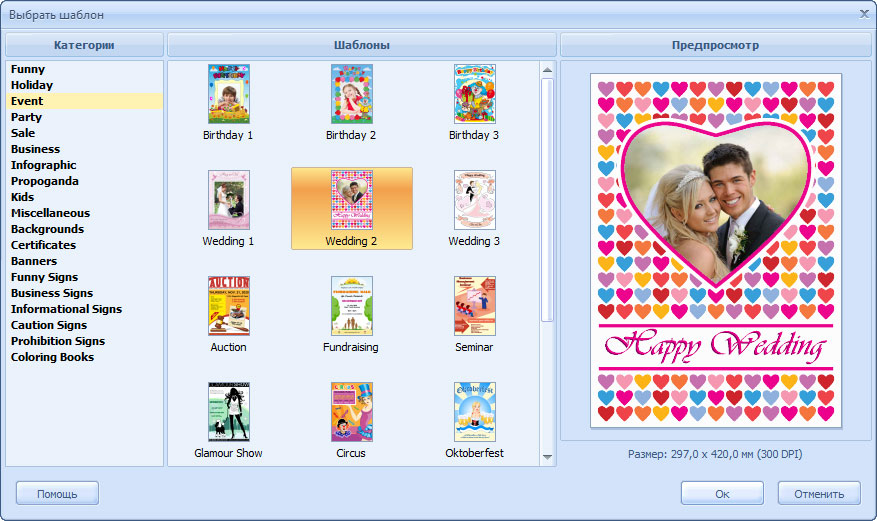
The template chooser, shown here with some Russian interface labels. Categories are on the left, thumbnails in the middle and a preview on the right.
A drag-and-drop object editor
RonyaSoft Poster Designer handles images, text, rectangles, circles, lines and freehand objects, with layers, grouping, transparency and rotation. Rulers, a grid and alignment tools keep the layout tidy, which is the part beginners usually find hardest.
Text and effects
RonyaSoft Poster Designer can set text along a circle, arc, wave or perspective, and adds shadow, outline and gradient effects to objects. You can edit text directly on the canvas and copy an effect from one shape to another.
Clipart and backgrounds
RonyaSoft Poster Designer includes a clipart library and a collection of background images, so a sale sign doesn't need a trip to a stock photo site. You can also paste text, images and Word or Excel data from the clipboard.
Printing and export
RonyaSoft Poster Designer prints through a Printout Setup dialog where you set position, size, orientation and cut lines against a preview. It saves to JPG or PDF for a print shop or for sharing online.
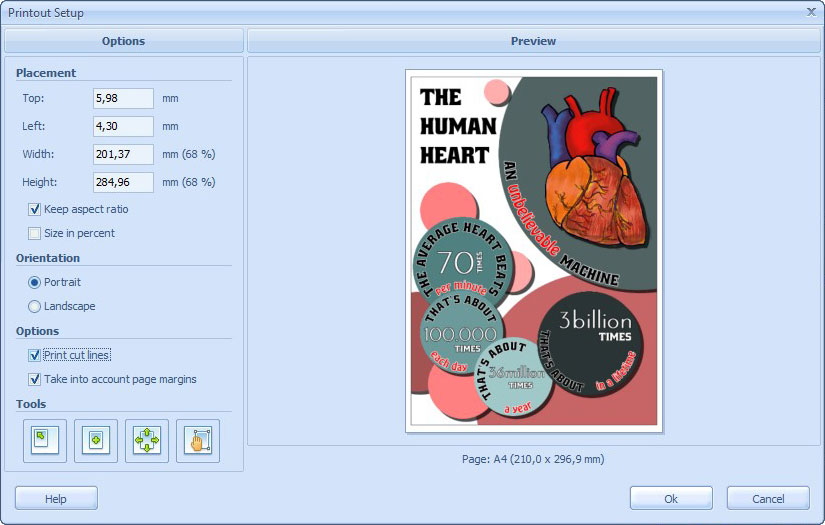
Printout Setup with placement, orientation and cut line options next to a preview of the finished poster on an A4 page.
Benefits
- Quick results. Most small jobs are a matter of replacing text and a photo in a template.
- Nothing to subscribe to. You pay once, and your files stay on your own computer.
- Everyday signs in stock. Caution, prohibition and informational signs cover the small notices every office and shop needs.
Real-World Uses
- Small shops: a sale poster and an opening hours sign in the same style. This needs a Business license.
- Schools and clubs: event posters, infographics, award certificates and coloring-book pages for a class.
- Parties: birthday and wedding posters with your own photos.
- Office humor: Wanted posters, fake magazine covers and motivational posters.
- Science fairs: a simple infographic poster, then a PDF to a print shop for the large version.
Who It's For, and Who Should Skip It
This suits Windows users who want a simple, offline way to make printed notices and fun posters, and who'd rather pay once than keep an online account. It's also a natural partner to RonyaSoft Poster Printer if you want to go wall-sized.
Skip it if you want social media graphics, or if you need to work on a design with colleagues: an online design service is the better fit. Skip it if you use a Mac. And if you already know a real graphics application, you'd outgrow this quickly.
Usage Guide
- Download the trial, open the zip file and run the installer. The Startup Wizard appears when you launch it.
- Choose Start from a Template, Start from a Blank Document or Open a Previous Document.
- Click each text box to replace the wording, and load your own picture into each image object.
- Add clipart, shapes or effects from the toolbar on the left, and use the bottom toolbar to line things up.
- Save the project, which uses RonyaSoft's .rpd format.
- Choose Print from the File menu, pick your printer, set the layout in Printout Setup and print. For a file instead, use File, Save As Image/PDF.
- For a poster across several sheets, choose Print Multipage in the File menu, which sends the design to Poster Printer if you have it.
Where it falls short
- One background image only. The background stretches to fit the document. For several images behind your content, you add them as ordinary objects and send them to the back.
- Image cropping takes some learning. With Keep aspect ratio on, reloading a different-shaped image opens a crop step and can cut part of it off. RonyaSoft's FAQ spends several entries on working around this.
- Grouped objects hide their settings. You have to ungroup them to edit a color or similar property, then group them again.
- Save at the right size for large prints. For sharp output, RonyaSoft says to choose Original in the Save As Image/PDF dialog's Image size box.
- More templates mean asking. Beyond the extra pack, RonyaSoft's answer to wanting more templates is to check for a newer version or email them your ideas.
What Users Say
Independent feedback on this program is scarce, so this section is short.
AlternativeTo
The one user comment, from PortugueseGui in October 2019, sums up the program's pitch: "Easy to use. Good collection of templates. Fair price."
SnapFiles
SnapFiles gives it an editor's rating of 3.5 stars and describes a program for "single page posters, fake magazine covers and signs using a combination of photos, clipart and text". It has no user reviews there yet.
RonyaSoft's own site
This one comes from the vendor, so it's a comment it chose to show. Mark Alley of New York, USA: "Funny app to make funny posters."
The common thread is that it's easy and good fun for simple jobs. Nobody is calling it a professional tool. With a trial that never expires, your own test will tell you more than these comments can.
Comparisons
RonyaSoft Poster Designer vs RonyaSoft Poster Printer
The two programs do different jobs. Poster Designer creates the artwork and prints it on a single sheet. Poster Printer takes finished artwork and splits it across many sheets. Buy Designer if you need to make the design, Printer if you already have the picture, and both for a large poster made from scratch.
RonyaSoft Poster Designer vs Canva
Canva is a browser-based design service with a much larger user base, and it's the better choice for social media graphics and for sharing designs with others. RonyaSoft Poster Designer is a better fit if you want an offline Windows program, a one-time price and a focus on printed signs and posters.
Editions and Pricing
All three licenses are the same program. They differ in who may use it and on how many computers.
| License | Price | Use | Computers | Registered to |
|---|
| Home | $29.95 | Noncommercial only | 1, for all its users | User's name |
| Business | $49.95 | Commercial | 1, for all its users | User or company |
| Enterprise | $695.00 | Commercial or noncommercial | Unlimited, in one organization | Company |
Buy Home ($29.95)Buy Business ($49.95)Buy Enterprise ($695)
FAQs
Does RonyaSoft Poster Designer work on Windows 11?
RonyaSoft lists Windows 11 as supported at the top of the product page, though its older requirements text stops at Windows 10. The trial doesn't expire, so you can confirm it on your own PC before paying.
Does the RonyaSoft Poster Designer trial expire?
No. The license agreement allows you to use the unregistered copy for an unlimited time, but everything you output has watermarks until you register it.
What poster sizes can RonyaSoft Poster Designer make?
RonyaSoft Poster Designer has preset sizes and accepts custom sizes. RonyaSoft points to common US sizes such as One Sheet at 27 x 40 inches, 18 x 24 inches and 24 x 36 inches. A size bigger than your printer's paper needs Poster Printer or a print shop.
Can I send a RonyaSoft Poster Designer file to a print shop?
Yes, as a JPG or PDF. The .rpd project format is specific to the program, so save with File, Save As Image/PDF and choose Original for the image size to keep the highest resolution.
How do I move a design into RonyaSoft Poster Printer?
Choose Print Multipage from Poster Designer's File menu, and Poster Printer opens with your design. Or save it as an image with the Original size setting and open that in Poster Printer.
Is RonyaSoft Poster Designer the same as Poster Forge?
Yes. Poster Forge is the program's earlier name, and it still appears in the readme and in RonyaSoft's web addresses.
Can a company use the Home license?
No. The Home license is for noncommercial use only, and any business needs a $49.95 Business license per computer or a $695 Enterprise license for unlimited computers in one organization.
System Requirements
- Windows XP, Vista, 7, 8, 10 or 11, 32-bit or 64-bit
- Pentium III 1500 processor or better
- 512 MB of RAM
- 100 MB of disk space
- A regular printer or plotter
Conclusion
RonyaSoft Poster Designer is worth $29.95 if you want a simple Windows program for printed signs, posters and party pieces, and you dislike subscriptions and online accounts. The one reason to buy it is speed: hundreds of templates mean most small jobs are done in minutes. The main reason not to is that free online design services exist, and this program has had no new features since 2016. Try the trial first, since it doesn't expire, and check that the template styles suit you. Businesses should budget for the $49.95 license, and anyone wanting wall-sized output should add Poster Printer.
Download Free TrialBuy Now