Screensaver Wonder 7: turn your photos and videos into a Windows screensaver
Screensaver Wonder 7 is a $59.95 Windows program from Blumentals that makes real screensavers from your own photos and video clips, with music, captions and smooth transitions, and packs them into a setup file you can send to friends. It's licensed for personal, non-commercial use only.
Think of the family photo slideshow you'd like on grandma's PC, a screensaver of your band's tour pictures for the fan club, or a looping video of last winter's ski trip. Windows can show a folder of photos by itself, but it can't add music, captions or video, or give you an installer to share.
Quick facts
- Version: 7.11 on the vendor's download page. Version 7 was released in February 2017 alongside Screensaver Factory 7.
- Developer: Blumentals Solutions SIA, Latvia
- Platform: Windows 7, 8, 10 and 11; the screensavers it makes are Windows-only
- Content: JPG, PNG (with transparency), BMP and GIF pictures, AVI, MPEG, WMV and other video, MP3, WAV, WMA and MIDI music
- Output: SCR files, self-installing setup files and screensaver CDs
- Price: $59.95 one-time, free updates to version 7; $29.95 upgrade from an older version
- License: personal, non-commercial use only
- Trial: free evaluation version that limits some features and runs for a limited time
- What we checked: the installer (scrwon7.exe, 26.30 MB, digitally signed by Blumentals Solutions SIA), which the vendor's server dates August 30, 2024 and whose file properties say 7.10, and the one-time price of $59.95 on the order page, on November 8, 2026. We didn't build a screensaver with it.
Download Free TrialBuy Now
Overview
Screensaver Wonder is the home edition of Blumentals' screensaver tools. It shares the editor and effects of its sister product, Screensaver Factory, but drops the business features: no selling tools, no promotion or branding options, and no clock, calendar, RSS or animated effects. What's left is a tidy six-step editor (Media, Music, Background, Attributes, Options and Create) plus a wizard for people who just want a result.
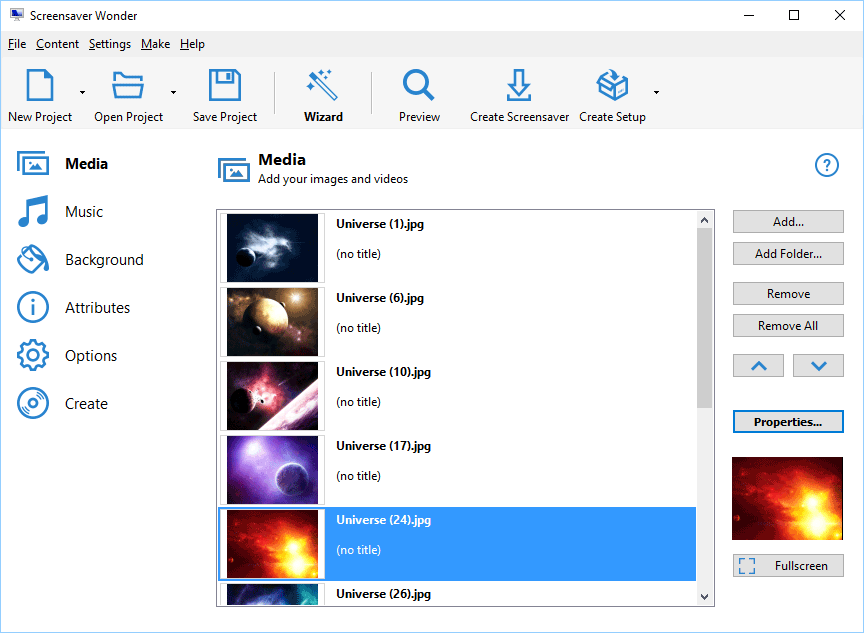
The Screensaver Wonder main window: six steps on the left, a list of space pictures on the Media page, and buttons to add files or folders, open an item's properties and preview it full screen.
Features
A wizard for picture or video screensavers
Screensaver Wonder's wizard asks one question first: a slideshow from pictures, or a screensaver from a video file. It then walks you through picking the files and settings, so a first screensaver takes a few minutes even if you've never made one.

The wizard's first page: "Screen saver from pictures" or "Video screen saver", with a note that more advanced screensavers are made in the main interface.
Captions, music and per-picture settings
Screensaver Wonder lets you give each picture its own text label (font, size and position), duration and transition, and play them in order, at random or mixed. Large photos are resized automatically, and transparent PNG and GIF images keep their transparency. For sound, use a background playlist with shuffle and mute options, or attach a short sound clip to individual pictures.
Over 100 transitions and slow pan-and-zoom
Screensaver Wonder has more than 100 transition effects between pictures, plus constant movement that slowly slides, rotates and zooms each photo so a slideshow doesn't look static. Photo frames, image masks and a color, gradient or picture background finish the look. The effects screen is the same one Screensaver Factory uses.

The Image Effects tab: a checklist of transitions with a live preview, a smooth-to-fast slider and the Pan and Zoom and Rotate and Zoom display effects.
Edit while watching it full screen
Screensaver Wonder can run your screensaver full screen while you edit, with a small toolbar to step through pictures, change a caption or the duration, and open an item's properties. You see exactly what it will look like on the screen it's going to.

Full-screen editing, shown on the vendor's Screensaver Wonder page: a captioned photo with the Previous, Next, Label, Duration and Properties toolbar and a right-click menu.
Setup files and CDs for sharing
Screensaver Wonder saves your project as a plain SCR file, a self-installing setup file with Start menu and desktop shortcuts and an uninstall entry, or a screensaver CD. Projects are self-contained files with built-in compression, so you can move them between PCs.

The Create page's setup tab: where to save setup.exe, Add/Remove list and shortcut options, the installation folder, and Create Setup, Create Setup CD and Preview Setup buttons.
Benefits
- A gift people can install. A setup file installs like any program, so a non-technical relative gets your slideshow with a double-click.
- Video and music without fuss. Windows' own photo screensaver can't do either.
- Paid once. There's no subscription, and updates to version 7 are free.
Real-World Uses
- A wedding or anniversary slideshow with the couple's song, sent to family as a setup file.
- A holiday video clip looping as the screensaver on your living-room PC.
- A photo club sharing members' best shots with captions naming each photographer.
- A school project screensaver of space or nature pictures with labels.
Who It's For, and Who Should Skip It
Screensaver Wonder suits home users who want a polished screensaver from their own pictures or videos, for themselves or to share with friends and family.
Skip it if the screensaver is for a business, a client or for sale: the license rules out commercial use, and Screensaver Factory ($99.95 and up) is the version licensed for that. Skip it too if you only want a plain slideshow of a photo folder on your own PC, which Windows' built-in Photos screensaver does for free, or if you need screensavers for Mac.
Usage Guide
- Download the trial with the button on this page and run scrwon7.exe on Windows 7, 8, 10 or 11.
- Click Wizard and choose a picture or a video screensaver, or start a new project in the main window.
- On Media, add pictures or a whole folder, then use Properties to add captions and set durations.
- Add songs on Music and pick a background on Background.
- Choose transitions and movement on Options, then click Preview.
- Name the screensaver on Attributes, and on Create install it on your PC or build a setup file or CD to share.
Before you buy
- "Non-commercial" is strict: Blumentals says personal licenses are for private individuals using them for purposes other than making money. A screensaver for your company, shop or clients needs Screensaver Factory. You can move from a personal to a commercial license later through the vendor's upgrade option.
- Free updates cover version 7 only.
Download Free TrialBuy Now
Where it falls short
- Little development. The forum's release notes since 2017 are for Screensaver Factory (most recently 7.10 in August 2024 and 7.11 in April 2025); Screensaver Wonder shares the version number, but the setup file we downloaded still reports 7.10.
- Old Flash screensavers broke. A user reported in January 2021 that their Screensaver Wonder screensaver stopped working after Adobe ended Flash Player at the end of 2020. Version 7 is built around pictures and video, so stick to those.
- Freezes on some PCs. A forum user reported in 2016 and 2017 that screensavers froze some HP machines; the developer asked him to try version 7.1, which fixed a number of bugs, and the thread ends there.
- Thin independent coverage. We couldn't find recent independent reviews or user ratings.
What Users Say
Screensaver Wonder gets little attention from review sites. Its testimonial page on blumentals.net is shared with Screensaver Factory, and the quotes there are about Blumentals' screensaver tools in general.
Quotes on the vendor's testimonial page
"This program makes professional screensaver construction an absolute breeze." (Simon Baillie, SharewareJunkies.com)
"This program makes it simple to create a professional, self-installing screensaver." (CNET, Download.com)
"Wow, this is what I call customer service! I've experienced a so kind and good treatment of the customers nowhere else like this!" (Peter Velosy)
Reports on the Blumentals support forum
Mohammed82, January 2021: "Screensaver is stop and not working", after "Adobe will no longer be supporting Flash Player after December 31, 2020." No staff reply followed.
kn22, 2016 and 2017, reported "some machines that are freezing up with the new screen saver" on HP 5800 PCs, running version 6.10. A Blumentals developer answered: "Could you please try the newest version (7.1) as a number of bugs were fixed, and see if the issue persists?"
In short: the praise is about how easy the Blumentals tools are and about their support; the problems on record are old, tied to Flash or to version 6.
Comparisons
Screensaver Wonder vs Screensaver Factory
Screensaver Factory starts at $99.95 and is licensed for commercial use. On top of what Wonder does, it adds Flash content, animated effects such as falling snow, clock, calendar and RSS overlays, promotion features that open web pages, and tools for selling screensavers as trial versions with registration keys. Wonder is $40 cheaper and has everything a personal slideshow needs.
Screensaver Wonder vs the Windows Photos screensaver
Windows' built-in Photos screensaver is free and shows a folder of pictures with basic shuffle. Screensaver Wonder adds video, music, captions, 100+ transitions and a setup file you can give to someone else.
FAQs
Can I use Screensaver Wonder for my business?
No. Screensaver Wonder is licensed for personal, non-commercial use only. For a business, client or for-sale screensaver, Blumentals sells Screensaver Factory, and you can upgrade from a personal license to a commercial one.
Do my friends need Screensaver Wonder to run the screensaver I send them?
No. Screensaver Wonder builds a self-installing setup file, so your friends just run it on their Windows PC; they don't need the program itself.
Is there a Mac version of Screensaver Wonder?
No. Screensaver Wonder runs on Windows and makes Windows screensavers only.
Is Screensaver Wonder a subscription?
No. Screensaver Wonder is a one-time purchase of $59.95 with free updates for version 7. Owners of an older version can upgrade for $29.95.
How do I update Screensaver Wonder?
Download the latest Screensaver Wonder installer from the vendor and install it over your copy. Your settings stay and the license stays activated.
System Requirements
- Windows 7, 8, 10 or 11
- About 27 MB for the installer
- Screensavers you create run on Windows only
Conclusion
Screensaver Wonder 7 is a good buy if you want a personal screensaver with video, music and captions that you can hand to friends as a normal installer; that's the job Windows' free slideshow can't do. The reason to hesitate is that it gets little attention from its developer, so try it on your own PC first. And if there's any business use involved, skip it and look at Screensaver Factory, because the Wonder license doesn't allow it.
Download Free TrialBuy Now