Screensaver Factory 7: make picture and video screensavers you can give away or sell
Screensaver Factory 7 is a Windows program from Blumentals that turns your photos, videos and Flash files into real Windows screensavers, packaged as self-installing setup files you can hand out royalty-free. The Standard edition costs $99.95 once; Professional ($129.95) and Enterprise ($199.95) add branding, selling and automation features.
It's built for people who need a screensaver as a product: a company putting its brand on every office PC, a photographer selling a picture pack, a marketing team handing out a promotional screensaver at a trade show. If you just want your holiday photos on your own screen, Windows can already do that for free.
Quick facts
- Version: 7.11, announced April 7, 2025 (a fix for a rare crash when a screensaver closes). Version 7 first came out in February 2017.
- Developer: Blumentals Solutions SIA, Latvia
- Platform: Windows 7, 8, 10 and 11. The screensavers it makes are Windows-only too; there's no Mac version.
- Content: JPG, PNG (with transparency), BMP and GIF images, AVI, MPEG, WMV and other video, SWF Flash, MP3, WAV, WMA and MIDI music
- Output: standalone SCR files, self-installing setup packages and setup CDs
- Price: $99.95 Standard, $129.95 Professional, $199.95 Enterprise, all one-time fees with free updates to version 7
- Royalties: none. You can distribute or sell what you make without extra fees.
- Trial: free evaluation version that limits some features and runs for a limited time
- What we checked: the installer (scrfct7.exe, 36.96 MB, digitally signed by Blumentals Solutions SIA) downloaded from the vendor, whose file properties say 7.10 and whose server date is August 30, 2024, while the download page lists 7.11; and the Standard edition's one-time price of $99.95 on the order page, on November 8, 2026. We didn't build or distribute a screensaver with it.
Download Free TrialBuy Now
Overview
Screensaver Factory has been around since the early 2000s; Blumentals' forum lists release notes back to version 3.2 in 2004. Version 7 was a rebuild for modern screens: a new interface, support for high-resolution displays and Windows DPI settings, better multi-monitor support and better Windows 10 compatibility. Since then it has had small maintenance releases (7.5 and 7.6 in 2021, 7.7 in January 2022, 7.10 in August 2024 and 7.11 in April 2025) rather than new features.
The program is laid out as a list of steps down the left side: Media, Music, Background, Visuals, Attributes, Options, Promotion, Selling, Developer and Create. You fill in what you need and skip the rest, or let the wizard walk you through it.
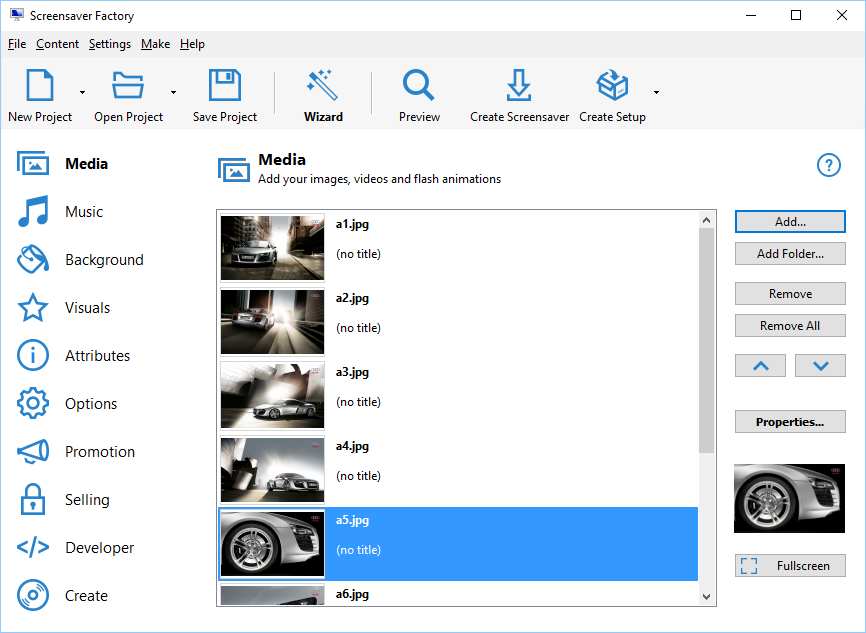
The Screensaver Factory 7 main window: the steps on the left, the Media page with a list of car photos, and buttons to add files or a whole folder, preview and create the screensaver or its setup.
Features
Picture, video and Flash screensavers
Screensaver Factory builds a screensaver from any mix of images, video files and SWF Flash animations. Large pictures are resized automatically, and transparent GIF and PNG files keep their transparency. Video plays through a built-in FFmpeg engine, so the computers that run your screensaver don't need extra codecs. Each item can have its own text label, position, size, duration and transition, set in a properties window with a live preview.

The Properties window for one picture: label position, font color, background, shadow and the caption text "Yellow flower", with tabs for size and position, image options and the transition effect.
Over 100 transitions, movement and animation effects
Screensaver Factory lets you pick from more than 100 transition effects between slides, from simple fades to puzzle crossfades and rotating zooms. Pan-and-zoom and rotate-and-zoom movement keeps still photos from looking static. On top of that you can add animated effects such as falling snow, leaves, petals, glitter or rising bubbles, or define your own, plus photo frames, image masks, a solid, gradient or picture background, and a clock or calendar overlay.

The Image Effects tab: a checklist of transitions (Puzzle Crossfade, Zoom In And Rotate and others) with a preview, a smooth-to-fast slider, and the Pan and Zoom and Rotate and Zoom display effects.
Full-screen editing
Screensaver Factory can open your screensaver full screen while you edit it, so you adjust labels, sizes and image options while seeing exactly what the viewer will see, with a floating toolbar for moving between slides and changing the duration.

Full-screen editing: a captioned car photo with the Previous, Next, Label, Duration and Properties toolbar and a right-click menu for size, position and image options.
Setup packages and CDs for easy distribution
Screensaver Factory packages your screensaver as a self-installing setup file with your own readme and license agreement, Start menu and desktop shortcuts and an Add/Remove Programs entry, or as a setup CD or a bare SCR file. It supports digital signatures and silent installs, and screensavers made with a paid copy carry no Blumentals logos, links or captions.

The Create page: the setup file's location, options for the Add/Remove list and shortcuts, the installation folder, and buttons for Create Setup, Create Setup CD and Preview Setup.
Selling and promotion tools
Screensaver Factory can turn a screensaver into a try-before-you-buy product: time- or feature-limited trial versions, a nag screen and banner, and an ordering page address. Every edition supports one common registration key; Professional and Enterprise add unique keys per customer from a built-in key generator. For marketing screensavers, Professional adds web links, a banner in the settings window and RSS feeds, and Enterprise adds your logo on every image and an image popup on exit that can link to your website.

The Selling page with "Create shareware screen saver" ticked: common or unique registration keys, a key seed and Key Generator, and the ordering page address, with tabs for the nag screen, nag banner and limitations.
Enterprise automation and auto-updates
Screensaver Factory Enterprise can build screensavers and setup packages from the command line with no user interaction, which Blumentals suggests for things like a "screensaver of the day" service or a website that builds a custom screensaver from a visitor's photos. Enterprise screensavers can also update themselves from an XML file on your server, and it can save a slideshow as a stand-alone EXE presentation.
Benefits
- One payment, unlimited distribution. There are no per-copy royalties, so a screensaver installed on 10,000 customer PCs costs the same as one on your own.
- Looks professional on the receiving end. Your customers get a normal Windows installer with your license text and no third-party branding.
- No codec support calls. Because video plays through the built-in FFmpeg engine, a video screensaver doesn't depend on what's installed on each PC.
- Quick for simple jobs. The wizard gets a photo slideshow screensaver out in a few minutes, while the step pages are there when you need detail.
Real-World Uses
- Company branding: an IT department rolls out a screensaver with product photos and the company logo on every image (Enterprise), installed silently on all office PCs.
- Trade-show giveaways: a marketing team builds a screensaver that opens the product website when the viewer presses a key, and hands it out as a setup file or CD.
- Selling photo collections: a nature photographer sells a screensaver pack as a time-limited trial that unlocks with a per-customer key (Professional).
- Information screens: a school or club shows a calendar, clock and RSS news headlines on idle PCs (Professional).
- Automated services: a developer runs Enterprise from the command line to produce a fresh screensaver from new content every day.
Who It's For, and Who Should Skip It
Screensaver Factory fits businesses, marketers, photographers and software authors who make screensavers for other people to install, especially in numbers or for sale. The Standard edition is enough when you only need a clean, self-installing screensaver; the paid extras in Professional and Enterprise are about branding, selling and automation.
Skip it if you only want your own photos on your own screen: the Photos slideshow screensaver built into Windows does that for free, and Blumentals' own Screensaver Wonder ($59.95) covers screensavers for your own PC or to share with friends, for personal, non-commercial use. Skip it too if your audience uses Macs, since everything it makes is Windows-only, or if your content is mostly Flash (see below).
Usage Guide
- Download the trial from the button on this page and run scrfct7.exe to install Screensaver Factory 7 on Windows 7, 8, 10 or 11.
- Start a new project, or click Wizard on the toolbar if you'd like to be guided through it.
- On the Media page, click Add or Add Folder to bring in your images, videos or Flash files, and use the arrows to set their order.
- Add music on the Music page, and pick a background and any animation effects on Background and Visuals.
- Under Options, choose transitions, display effects and durations, then click Preview to watch it full screen.
- Fill in Attributes (name, icon, readme, license), and if needed Promotion and Selling.
- On Create, choose a screensaver file, a setup package or a setup CD, and test the result on another PC before you distribute it.
Before you buy
- Check the edition table below first. Clock and calendar overlays, RSS, web links, a custom icon, multi-language screensavers and unique registration keys all need Professional or higher, and the logo-on-every-image, exit popup, auto-update and command-line features need Enterprise.
- A license covers the computers running Screensaver Factory itself (one computer and one laptop for Standard and Professional, up to 3 computers for Enterprise), not the PCs that run your screensavers.
- Free updates cover version 7. A future version 8 would be a paid upgrade.
Download Free TrialBuy Now
Where it falls short
- Flash is a dead format. Screensaver Factory still advertises SWF Flash screensavers, but Adobe stopped supporting Flash Player after December 31, 2020. A Screensaver Wonder user reported in January 2021 that their Flash screensaver stopped working on Windows 10. Use images or video instead.
- Heavy video can stutter on weak PCs. An administrator on the vendor's forum found a looping 1080p MP4 choppy on slower PCs with Intel graphics, and the developer replied that there are no settings to tweak playback and suggested a lower-resolution video.
- Crash reports on exit. Several users reported an access violation in avutil-56.dll when a screensaver closes, from July 2023 to December 2024, without a staff reply in that thread. Version 7.11 (April 2025) lists a fix for "crash upon screensaver exit in some rare conditions", but the setup file we downloaded still reports 7.10, so test on your target PCs.
- Slow development. Recent releases are bug fixes; the interface and feature set date from 2017.
- Windows only. Blumentals says it isn't technically possible to make high-quality screensavers that work equally well on Windows and Mac, so it doesn't try.
What Users Say
Screensaver Factory has a long history but few recent independent reviews. Most of what's out there is the vendor's own testimonial page, download-site ratings and the support forum, where users report problems.
Customer and press quotes (vendor's testimonial page)
"I have tested over 35 screen saver makers and Screensaver Factory was one of only three to stay on my computer." (Pierre Caron)
"After weeks of looking at and trying every screensaver software package available - I was so impressed with the Screensaver Factory software and the technical support I received, that I purchased Screensaver Factory Enterprise." (Bob Orsillo, Multiple Media Artist)
"Your program is among the best I have used and works extremely well for my screensaver promotions." (Bill Fertenbaugh)
"We have a number of other software programs capable of producing screensavers, none come up to the standards and quality of this one." (Mike Carter, Digital Imagery)
"This program makes it simple to create a professional, self-installing screensaver." (CNET, Download.com)
"If you want to come up with good looking screensavers, you're well advised to get Screensaver Factory." (George Norman, FindMySoft.com)
These are hand-picked by Blumentals and undated, and several predate version 7.
Download sites
SnapFiles gives Screensaver Factory Pro its 5-star editor rating, though its listing shows version 7.7 and has no user reviews. Free Download Manager's page for the Enterprise edition shows 5.0 from only 3 votes, still lists version 7.3, and names a user-friendly interface, wide Windows support and commercial features for selling screensavers as pros, with "Some advanced features may require a learning curve" as a con.
Problems reported on the Blumentals forum
Gerard, May 2017: "During creation, Windows reports that SF7 has stopped responding." A Blumentals developer asked him to install the latest version; another user reported the same problem in September 2017.
briggsm, December 2024, on an access violation in avutil-56.dll: it "always happens when the screensaver exits (move the mouse, etc)" and "seems to break consistently when you leave the screensaver running for quite a while." Two earlier users reported the same error.
capital4, May 2018, on a 1080p video screensaver: "On slower computers, the video playback is choppy or there are artifacts visible." The developer answered: "Unfortunately there are no settings to tweak this."
Another forum member suggested re-encoding at a lower bitrate and noted: "Reducing frame rate from 30 to 24 fps also made a noticeable difference without hurting playback too much."
The recurring theme: people who compared several screensaver makers rate Screensaver Factory's results and setup packages highly, while the complaints are about stability with video and slow fixes. The support forum is marked "not monitored", so use e-mail support for real problems.
Comparisons
Screensaver Factory vs Screensaver Wonder
Both come from Blumentals, and version 7 of both came out together in February 2017. Screensaver Wonder ($59.95) is the cheaper tool for picture and video screensavers with music, transitions, labels and setup files, but its license is for personal, non-commercial use only, and it lacks the animation effects, clock, calendar, RSS and selling features. Screensaver Factory is licensed for commercial use and adds the business side: trial versions and registration keys for selling, promotional features and, in the higher editions, branding and automation. If your screensaver is a hobby project, look at Wonder first.
Screensaver Factory vs the Windows Photos screensaver
Windows' built-in Photos screensaver shows a folder of pictures on your own PC at no cost. It can't play video or music, add captions or effects, or produce an installer for other people. Screensaver Factory is only worth paying for when the screensaver is going to other computers.
Editions and Pricing
| Edition | Price (one-time) | Computers | Monitors | What it adds |
|---|
| Standard | $99.95 | 1 computer + 1 laptop | Up to 2 | Picture, video and Flash screensavers, setup packages and CDs, time and feature limited trials, royalty-free distribution |
| Professional | $129.95 | 1 computer + 1 laptop | Up to 3 | Unique registration keys, settings-window banner, custom icon, multi-language, web links, clock and calendar, RSS |
| Enterprise | $199.95 | Up to 3 computers | Up to 5 | Logo on all images, exit popup with link, EXE slideshow presentations, auto-updating screensavers, command-line builds |
Monitor counts apply to picture screensavers. Owners of an older version can upgrade for $39.95 (Standard), $59.95 (Professional) or $79.95 (Enterprise), and volume licenses start at $85.50 per seat for 2 to 4 Standard seats. Schools get academic pricing.
FAQs
Do I need a license for every PC that runs my screensaver?
No. Screensaver Factory needs a license only for the computers running Screensaver Factory itself. The screensavers you make are royalty-free and can be installed on any number of PCs.
Are there extra fees if I sell a lot of screensavers made with Screensaver Factory?
No. Blumentals charges no royalties or additional costs on top of the Screensaver Factory purchase price, however much you sell.
Can Screensaver Factory make screensavers for Mac?
No. Screensaver Factory runs on Windows and makes Windows screensavers only. Blumentals recommends a Mac-specific tool for Mac screensavers.
My old Screensaver Factory stopped working on Windows 10. What now?
Screensaver Factory versions before 7 can fail on Windows 10 with an "Access violation" error since a mid-2017 Windows update, and Blumentals doesn't fix older generations. Version 7 isn't affected; owners of an older version can upgrade at the reduced prices above.
Will a Screensaver Factory video screensaver play on PCs without codecs?
Yes, usually. Screensaver Factory 7 plays video through its built-in FFmpeg engine, so the target PC doesn't need a codec for the format. If you ship your own installer instead of the built-in one, you must include FFmpeg's LGPL license notices yourself; the built-in setup package already does.
How do I update Screensaver Factory 7?
Download the latest Screensaver Factory 7 installer and install it over your copy. Your settings stay, and an activated copy stays activated.
System Requirements
- Windows 7, 8, 10 or 11
- About 37 MB for the installer
- Screensavers you create run on Windows only
Conclusion
Screensaver Factory 7 is worth its price if screensavers are something you distribute: the royalty-free setup packages, selling tools and branding options are what you pay for. Most buyers who brand or sell should go for Professional, since Standard lacks unique keys, clocks and web links. The main reason to hold off is age: the feature set dates from 2017, Flash support is now useless, and users have reported video crashes and stutter, so run the trial on the kind of PCs your audience uses before you buy. If the screensaver is only for you, Windows' free slideshow or the cheaper Screensaver Wonder is enough.
Download Free TrialBuy Now