Kernel Office 365 Migration: Move Mailboxes Between Microsoft 365 Tenants
Kernel Office 365 Migration is a Windows tool from KernelApps, $249 for up to 100 mailboxes for one year, that moves primary, archive and shared mailboxes between Microsoft 365 tenants and from on-premises Exchange. It's for administrators handling a merger, a domain change or a tenant clean-up.
Moving a company's mail between tenants isn't something the admin center does for you in a few clicks. Kernel's tool connects to both tenants, maps the users and runs the jobs from one Windows PC. The trial migrates 10 items per folder, enough to prove the connection and the mapping.
Quick facts
- Version: 26.0, updated October 2026
- Developer: KernelApps Pvt. Ltd. (Kernel Data Recovery)
- Platform: Windows 11, 10, 8.1, 8, Windows Server 2025, 2022, 2019, 2016, 2012 and 2008 R2
- Works with: Microsoft 365 business, enterprise and education plans, Exchange Server 2000 through 2019
- Price: $249 for up to 100 mailboxes on the order page
- Trial: migrates 10 items per folder
- Guarantee: 30 days money back
What we checked: installer file version 26.0 (151.9 MB, digitally signed by KernelApps Private Limited), and the order page, which showed $249 for Up to 100 Mailboxes, on November 9, 2026. We didn't run a tenant migration ourselves, so results here are the vendor's and its users' claims.
Download Free TrialBuy Now
Overview
The program works as a wizard. You create a project, add the source and destination tenants with modern authentication, map source users to destination users, choose what moves, apply filters, and start. Progress shows live, and each job ends with a report you can save as a CSV file.
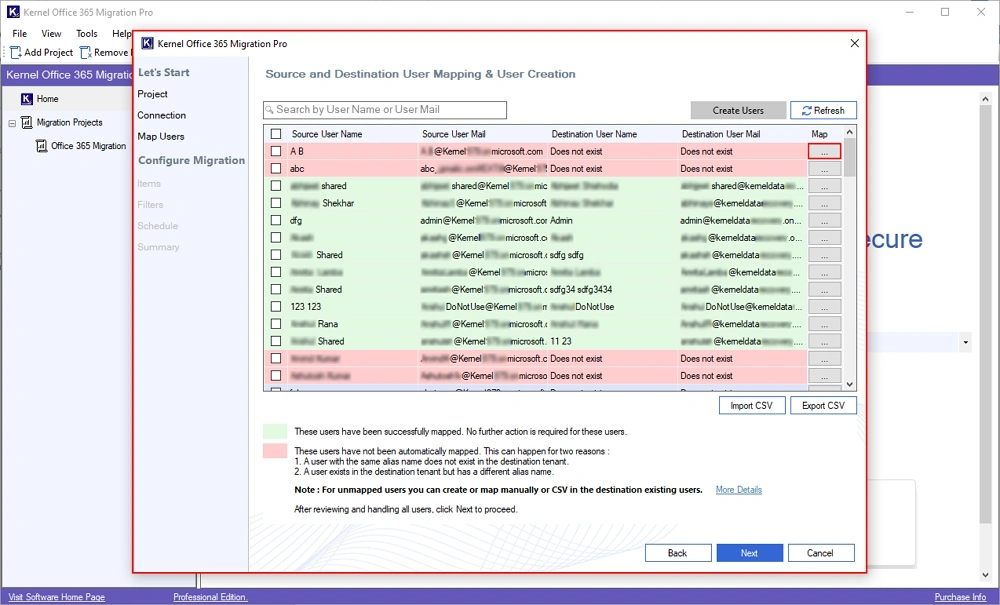
User mapping: mapped users in green, unmapped in red, with CSV import and export. This window, like the others here, is from the Pro edition.
Features
Mailbox types beyond the basic inbox
Kernel Office 365 Migration handles primary mailboxes, in-place archives, shared mailboxes, Microsoft 365 group mailboxes and public folders, in the entry edition as well as above it.
Automatic and CSV user mapping
Kernel Office 365 Migration fetches users from the connected tenants, pairs those it can, and flags those it can't, so an administrator can fix them or load a prepared CSV.
Selective and incremental runs
Kernel Office 365 Migration filters by date, item type and folder, and can exclude empty or deleted folders. Its "Skip previously migrated items" option lets you re-run a job and move only what's new, which is how you pick up after an interruption.
Exchange and hybrid sources
Kernel Office 365 Migration also migrates from on-premises and hybrid Exchange, which KernelApps lists back to Exchange 2000, and from hosted Exchange.
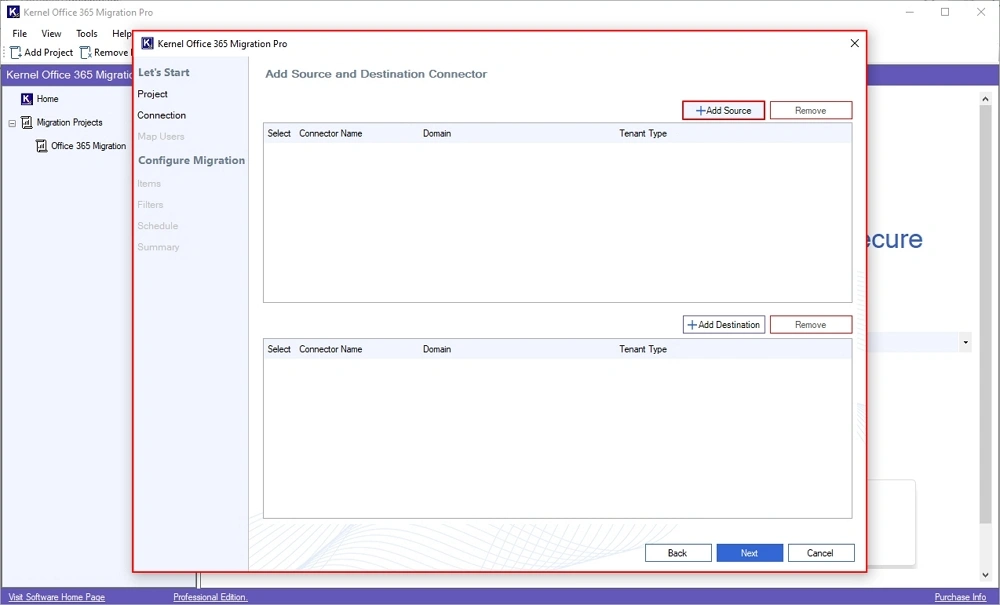
Adding the source and destination connectors for a project.
Modern authentication and reports
Kernel Office 365 Migration connects with OAuth 2.0 and supports MFA, and KernelApps says it doesn't store mailbox data or credentials. A migration report in CSV shows what moved and what failed.
Benefits
- You pay by mailbox count, not per user per month. For a defined project, the cost is known up front.
- Pilots are cheap. The 10-item trial shows whether the connection, permissions and mapping work.
- Re-runs don't duplicate. A delta pass catches mail that arrived during the cut-over.
Real-World Uses
- A merger: folding an acquired company's tenant into yours.
- A divestiture: carving one business unit out into a new tenant.
- A rebrand: moving users to a tenant on a new domain.
- Leaving on-premises Exchange for Microsoft 365.
Who It's For, and Who Should Skip It
Buy it if you're running a mailbox migration of tens to a few hundred users and want a fixed price. Skip the entry edition if you also need OneDrive, SharePoint or Teams: those are in Pro and in the Complete plan. A single mailbox doesn't justify this: export it to PST instead. Very large tenants should ask for a custom quote, since prices above 500 mailboxes aren't published.
Usage Guide
- Install the demo on a Windows PC with at least 8 GB RAM and 100 GB free.
- Create a project and give the job a name.
- Add the source and destination tenants and sign in as an administrator.
- Let it fetch users, then fix anything marked unmapped.
- Choose mailboxes and folders, and apply filters.
- Start the job, watch progress and save the CSV report.
- Run it again with "Skip previously migrated items" just before the cut-over.
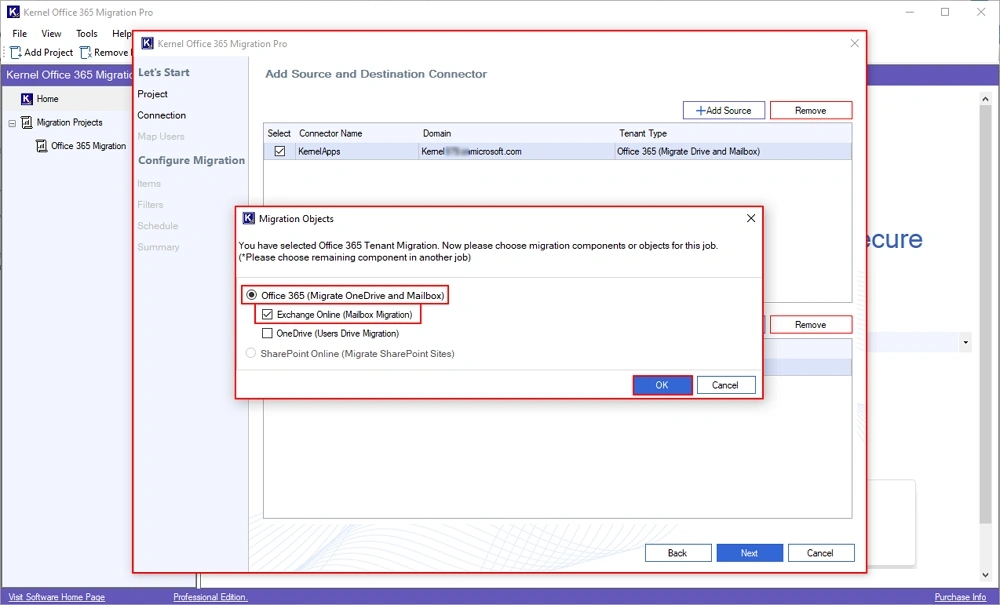
Choosing what a job will migrate. OneDrive and SharePoint options appear in the Pro edition.
Before you buy
- Count mailboxes, then years. Each step up raises both: 100 mailboxes for 1 year at $249, 250 for 2 years at $499, 500 for 3 years at $799.
- Pick the right edition. The entry plan is mail only. OneDrive starts at Pro, and Teams, SharePoint and Planner are in the Complete plan.
- Plan for the hardware. KernelApps asks for 8 GB RAM, 16 GB recommended, and 100 GB of free disk.
Where it falls short
- Prices scale quickly past mail. Pro starts at $499 and the Complete plan at $2,399.
- It's a one-PC tool. Everything runs through the Windows machine you install it on, so that PC has to stay up for the whole job.
- Independent reviews are rare. We found no independent review of this edition on G2 or TrustRadius, where listings exist but have few or no ratings.
- Microsoft's service limits still apply. Throttling on the tenant side can slow large jobs whichever tool you use.
What Users Say
The strongest praise is on the vendor's own site. Some of it is specific, but it's hand-picked.
Customers quoted on the vendor's page
KernelApps shows 4.9 out of 5 from 493 reviews collected on its own site, with 95% rated Excellent.
"While Microsoft had made it all but impossible to do tenant to tenant migrations (companies never merge or split, right) then Kernel tools really made it with Teams 1:1 chat and Microsoft Planner migration where other migration tools that our migration partner company was using by default totally failed. Also support from Vikram was superb and much appreciated." - Martin Sandberg, Estonia
"I've used their products for around 5 years now, once you figure out which one you need for your use case you won't be disappointed. I use both Office 365 Backup and Office 365 migration, it's reliable and "just works"." - Tom Cuthbertson, United Kingdom
"Great support, actually called me and showed me how their product worked, great price, much cost effective than the other o365 migration tools." - Joe Sheldon, United States
"We needed a Microsoft 365 migration tool to move emails from our old tenant to a new one. The Kernel Office 365 migration tool made my migration simple and easy." - Brian R. Nelson
Kernel Data Recovery on Trustpilot
Kernel Data Recovery's Trustpilot page shows 4.9 out of 5 from 166 reviews, read through a page summarizer. Those reviews rate the company rather than this product, and about 2% of them are one-star.
Excerpts about migration work: "Overall migration accuracy is good." - Ashok Kumar, August 21, 2026. "During email migration tasks, the software maintained data integrity" - Vasu Giri, May 19, 2026.
The pattern: buyers keep coming back to the support team and the price against competitors. Tom Cuthbertson's aside is worth noting: KernelApps' range is confusing until you work out which product you need.
Comparisons
Kernel Office 365 Migration vs Microsoft's cross-tenant mailbox migration
Microsoft offers its own cross-tenant mailbox migration for administrators comfortable with PowerShell and the setup it requires. Kernel's tool puts mapping, filters and reporting in one window and charges a flat price by mailbox count. Choose by how much scripting your team wants to do.
Standard vs Pro vs Complete
The standard edition moves mail: mailboxes, archives, shared mailboxes, groups and public folders. Pro adds OneDrive, users and group management, permission migration and scheduling. The Complete plan adds SharePoint, Teams and 1:1 chats, and Microsoft Planner.
Editions and Pricing
| Plan | Price | Covers | Validity |
|---|
| Kernel Office 365 Migration (this listing) | $249 on the order page | Up to 100 mailboxes | 1 year |
| Kernel Office 365 Migration | $499 | Up to 250 mailboxes | 2 years |
| Kernel Office 365 Migration | $799 | Up to 500 mailboxes | 3 years |
| Pro | From $499 | 100 mailboxes + 50 OneDrive | 1 year |
| Complete Tenant-to-Tenant | From $2,399 | 100 mailboxes, 100 OneDrive, 10 SharePoint sites, 10 Teams, 10 user chats | 1 year |
FAQs
Can I migrate only some users with Kernel Office 365 Migration?
Yes. Kernel Office 365 Migration lets you pick specific users from the admin account, so a 150-user tenant can move in stages or in part.
What happens if a Kernel Office 365 Migration job is interrupted?
You re-run it. Kernel Office 365 Migration's delta option skips what's already been moved, so mail isn't duplicated.
Does Kernel Office 365 Migration work with MFA accounts?
Yes. KernelApps says Kernel Office 365 Migration connects through modern authentication with OAuth 2.0 and supports MFA.
Can I run a pilot with Kernel Office 365 Migration?
Yes. KernelApps recommends a pilot on a small batch of users to check mapping and permissions, and the trial handles 10 items per folder for that purpose.
Does a Kernel Office 365 Migration license expire?
Yes. KernelApps lists a validity of 1, 2 or 3 years depending on the mailbox tier. The order page itself doesn't set up an automatic renewal.
Does Kernel Office 365 Migration run as a cloud service?
No. Kernel Office 365 Migration is a Windows program, installed on a PC or server you control, and connects to Microsoft 365 from there.
System Requirements
- Windows 11, 10, 8.1, 8, Windows Server 2025, 2022, 2019, 2016, 2012 and 2008 R2
- Intel Pentium 4 class processor or higher
- 8 GB RAM (16 GB recommended) and 100 GB of free disk space
- An administrator account on the source and destination tenants
Conclusion
Kernel Office 365 Migration is worth $249 for a contained mail-only migration of up to 100 mailboxes. The reason to buy is a flat price and a wizard that handles archives, shared mailboxes and public folders in the entry edition. The reason not to is a project that also needs OneDrive, SharePoint or Teams, where the price climbs fast. Run the 10-item trial against your real tenants first.
Download Free TrialBuy Now