DataNumen Backup: Plain File and Folder Backup with Full, Incremental and Differential Modes
DataNumen Backup is a $49.95 Windows program that copies the files and folders you choose into a backup folder, using full, incremental or differential backups, and restores any saved version later. It's for people and small offices who want a small, no-frills backup tool for their documents rather than a whole-disk imaging suite.
You keep client files in three folders and a few loose spreadsheets on the desktop. You want them copied to an external drive every evening, with older versions kept, without learning a complex backup product. That's the job DataNumen Backup is built for, and very little else.
Quick facts
- Version: 1.7, released November 10, 2020
- Developer: DataNumen, Inc.
- Platform: Windows, 32-bit program
- Backs up: files and folders (not whole disks or system images)
- Methods: full, incremental and differential
- Price: $49.95 for one user, a one-time payment with no auto-renewal on the order page
- Trial: free demo version
- Guarantee: 30 days
- Language: English
- What we checked: installer file version 1.70 (7.78 MB, digitally signed by DataNumen, Inc.) downloaded from the vendor, with a June 5, 2022 file date; the $49.95 order page price, against a $59.95 list price. We didn't run a backup or restore ourselves, and the demo's limits aren't published. Checked on November 8, 2026.
Before you buy
- Compare it with what Windows already has. Windows' File History backs up your folders to another drive automatically and keeps older versions, for free. DataNumen Backup is worth paying for only if you want its profile-based approach or its choice of backup methods.
- Files only. It doesn't make a system image, so it can't bring back Windows and your programs after a disk failure. DataNumen Disk Image ($49.95) is the vendor's tool for that.
- No built-in schedule is listed. The program runs a profile when you click Start Backup; DataNumen doesn't list a scheduler among its features.
- Not updated since 2020, and the help file still contains pages from one of DataNumen's repair tools.
- Test the demo first. DataNumen doesn't say what the demo leaves out, so make a small test backup and restore before you buy.
- A refund needs a reason. Refunds run for 30 days, but you have to explain why in detail.
Download Free Trial Buy Now
Overview
DataNumen Backup has a single main window: a list of backup profiles, buttons to create, change and remove them, and two big buttons, Start Backup and Start Restore. A progress bar shows the elapsed and estimated remaining time. Everything else happens in two dialogs, one to define a profile and one to choose what to restore.
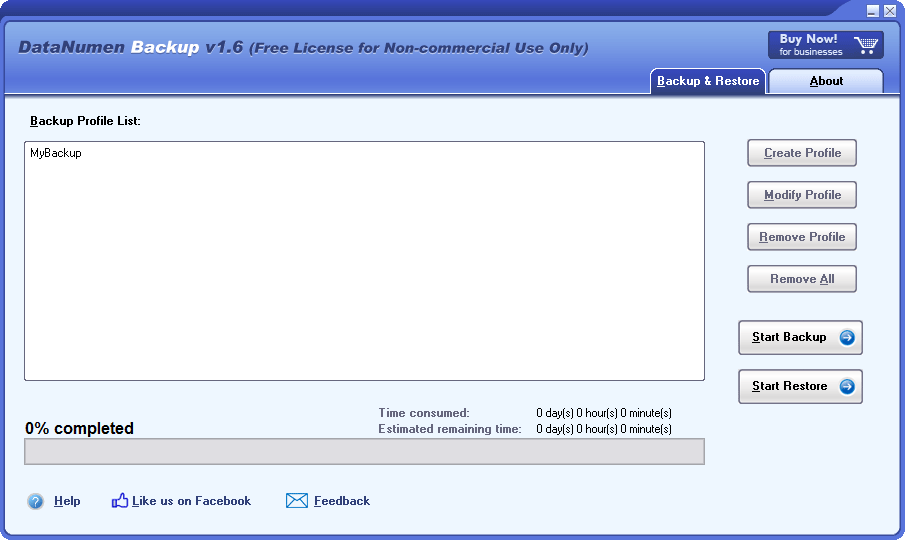
The main window, shown here in version 1.6 (then labeled "Free License for Non-commercial Use Only"): the profile list, the profile buttons, Start Backup and Start Restore.
Features
Backup profiles with several sources
DataNumen Backup stores each backup job as a named profile. A profile can include several folders and single files at once, so "Work documents" can cover a projects folder, an invoices folder and one database file on the desktop, all copied to the same backup directory.
Full, incremental or differential backups
DataNumen Backup lets you choose the method per profile. A full backup copies everything each time. An incremental backup copies only what changed since the last backup of any kind, the fastest and smallest. A differential backup copies what changed since the last full backup, so a restore needs only the full backup plus the latest differential.
Compression and a free-space margin
DataNumen Backup's profile dialog also sets a compression level and an "Extra Free Space" figure in GB, the room to leave free on the backup drive.
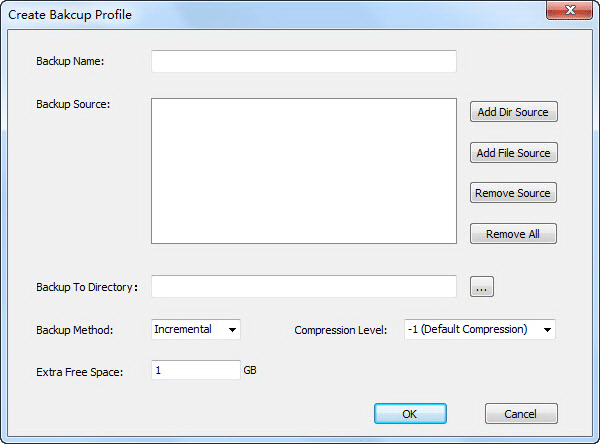
The profile dialog (from version 1.5): backup name, folder and file sources, target directory, backup method, compression level and extra free space.
Restore any saved version
DataNumen Backup lists every backup run of a profile by date and time. You pick the version you want and restore it either to a folder of your choice or straight back to the original folders, which helps when a file was overwritten with a bad edit two days ago.
Benefits
- Little to learn. One window, one dialog per profile: someone who has never set up a backup can do it in a few minutes.
- Your choice of method. Incremental saves time and space; differential makes restores simpler.
- Old versions on hand. Picking a dated version gets back yesterday's file, not just the last copy.
- Light. 8 MB on disk and 16 MB of memory at minimum, so it suits old PCs too.
Real-World Uses
- A freelancer's client folders. One profile copies the projects and invoices folders to an external drive with incremental backups at the end of the day.
- A small office PC. A differential profile backs up the shared documents folder, so a restore needs just two backup sets.
- Before a risky change. Run a full backup of a folder before reorganizing it, and restore that version if it goes wrong.
Who It's For, and Who Should Skip It
It suits Windows users who want a small, separate program for backing up chosen folders and who like to start backups themselves.
Skip it if you need a full system backup to recover from a dead disk (use a disk imaging tool such as DataNumen Disk Image), if you want backups to run on a schedule or to the cloud without thinking about them, or if Windows' free File History already does what you need. Businesses that need versioned, scheduled and monitored backups are better served by a maintained backup suite.
Usage Guide
- Download the demo and install it.
- Click Create Profile, give the backup a name, and add folders with Add Dir Source and single files with Add File Source.
- Choose the backup directory, ideally on another drive, and pick the backup method and compression level.
- Select the profile and click Start Backup.
- To restore, select the profile, click Start Restore, choose a dated version, and restore it to a folder or to the original locations.
Where it falls short
- Basic for the price. No system images, no cloud targets, no encryption and no scheduler are listed, features many free backup tools offer.
- An old release. Version 1.7 dates from November 2020.
- Thin documentation. The help file's FAQ and "repair" pages describe a file repair tool, not this program.
- No independent reviews. See below.
What Users Say
We found no independent review of DataNumen Backup on G2, Capterra or Trustpilot, or in any tech magazine.
DataNumen's own figures
The product page shows 4.90 out of 5 from 1,657 votes. DataNumen collects these votes itself and shows almost the same figure on every product page, including its file repair tools, so it says little about this backup program.
Without outside reviews, a test backup and restore with the demo on a copy of your folders is the only real check.
Comparisons
DataNumen Backup vs. Windows File History
File History is free, built into Windows, backs up your user folders to another drive on a timer and keeps older versions. DataNumen Backup lets you back up any folders and single files you pick and choose full, incremental or differential mode, but you start each run yourself.
DataNumen Backup vs. DataNumen Disk Image
Both cost $49.95. DataNumen Backup copies chosen files and folders and keeps dated versions. DataNumen Disk Image copies a whole disk or drive byte by byte, which is what you need to restore a complete system or to clone a disk.
Editions and Pricing
There's one edition. The order page shows a weekly special price for every quantity, and $49.95 is what one license cost at checkout:
| User licenses | List price each (US$) | Special price each (US$) |
|---|
| 1 | 59.95 | 49.95 |
| 2 - 9 | 49.95 | 39.95 |
| 10 - 24 | 39.95 | 29.95 |
| 25 - 49 | 29.95 | 24.95 |
| 50 - 99 | 24.95 | 16.95 |
| 100 - 199 | 16.95 | 11.95 |
| 200 - 499 | 11.95 | 9.95 |
| 500+ | 9.95 | 6.95 |
FAQs
Can DataNumen Backup back up my whole Windows system?
No. DataNumen Backup copies files and folders. To back up or clone a whole disk, including Windows and your programs, you need a disk imaging tool such as DataNumen Disk Image.
Should I choose incremental or differential backups in DataNumen Backup?
Choose incremental in DataNumen Backup if backup speed and space matter most, since each run copies only what changed since the last run. Choose differential if you want simpler restores: you only need the last full backup and the latest differential.
Can DataNumen Backup restore files to a different folder?
Yes. DataNumen Backup restores a chosen version either to a directory you pick or back to the original backup folders.
Is DataNumen Backup a subscription?
No. DataNumen Backup is a one-time purchase. Free upgrades and support last one month, then DataNumen sells an Annual Support and Maintenance Plan.
Can one DataNumen Backup license be used on several PCs?
No. A DataNumen Backup single-user license covers one computer. Multi-user licenses cost less per PC, down to $6.95 each at 500 users.
System Requirements
- Windows
- Intel or equivalent processor, x86 or x64
- 16 MB of memory minimum, 1 GB recommended
- 8 MB of disk space
Conclusion
Hard to recommend at $49.95 for most people. The reason to buy is simplicity: a tiny program that backs up exactly the folders you pick, with your choice of full, incremental or differential backups and any dated version to restore. The main reason not to is that Windows' free File History covers the same ground automatically, and DataNumen Backup has no listed scheduler, cloud or system image support and no update since 2020. Try the demo with a test folder, and buy it only if its manual, profile-based way of working is exactly what you want.
Download Free Trial Buy Now